


Resource and capability portfolio matrix powerpoint shapes




Try Before you Buy Download Free Sample Product
 Impress Your
 Audience
 100%
100% Editable
 Save Hours
 of Time


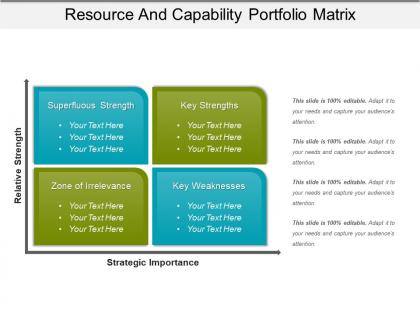
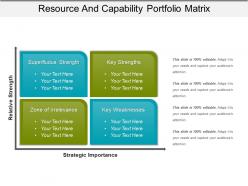
Enhance your profit prospects with our resource and capability portfolio matrix PPT slide. This resource analysis PPT layout helps you plan your strategic tools so that to gain a competitive edge over your competitors in the market. It also helps in planning the structure as well as analyzing your business competencies for their effective use. Describe the significance of resource and capability management with this PPT diagram slide for the business to attain the long term business targets. It helps in effective utilization of your business available resources. Analyzing the resource and capabilities of your business model ensures that your business will able to sustain effectively in the future. This resource and capability matrix PPT layout diagram also allows your management to take control of your business growth by developing the result oriented and long term business strategies. Thus, ensure the continuous profit and revenue for your establishment with our resource and capabilities analysis PowerPoint image design. Click on the download tab now. Bring about accord with our Resource And Capability Portfolio Matrix Powerpoint Shapes. Convince folks to extend a hand of friendship.
People who downloaded this PowerPoint presentation also viewed the following :
Resource and capability portfolio matrix powerpoint shapes with all 5 slides:
Decide on your actions with our Resource And Capability Portfolio Matrix Powerpoint Shapes. Choose the course you desire to follow.


FAQs for Resource and capability portfolio
So basically you make this grid that shows what resources you actually have vs what you need for your goals. List out your key stuff first, then rate how well each one supports your objectives. Honestly, most people skip this step and wonder why their strategy falls apart later. It'll show you where you're missing skills, what you're not using enough, and where to spend money. The whole point is being real about your limits before you dive in - otherwise you're just setting yourself up to fail. Sounds boring but it actually saves you from a lot of headaches.
Make a simple grid with your resources (people, tech, budget) on one side and your main business processes on the other. Rate each combo 1-5 for how well it's working right now. I know it sounds boring, but you'll be shocked at what gaps show up. Don't sugarcoat anything - be brutal about what actually sucks vs what's genuinely strong. Get input from other teams too since they'll catch stuff you can't see from your level. The whole thing takes like an hour but gives you this crystal clear picture of where to put money next. Way better than guessing.
Okay so definitely start with skills and experience levels - that's your foundation right there. Then add availability and what roles people can actually do. Current workload is clutch too because you don't want to overload someone who's already swamped. Tech skills matter if you're doing anything technical obviously. Location and time zones can save you so much headache later, trust me on that one. I'd honestly just start basic though - skills and when people are free. Short sentences work better anyway. You can always pile on more details once you figure out what actually helps versus what just makes everything messy.
Dude, these matrices are actually pretty sweet for figuring out who should work on what. Basically you map out everyone's skills and see the gaps right away. No more guessing who's good at what or accidentally burning out your best people. I used to just wing it honestly, but now I can see exactly where we need training or new hires. Super helpful when you've got like three projects running at once. Just list your team's abilities next to what your upcoming projects need. The mismatches jump out immediately and you'll stop making those "seemed like a good idea" assignments.
So a Resource Capability Matrix is basically your team's skill gap detector. You map out everyone's current abilities against what your projects actually need. Pretty genius, honestly - the gaps just jump out at you visually. Like you might discover your whole dev team is missing cloud skills, or half your designers need UX training. I use mine during planning sessions to catch training needs early. Way better than scrambling mid-project when you realize nobody knows how to do something critical. The visual format makes patterns super obvious too.
So basically you map out what skills your team actually has vs what you need for your goals. Super helpful for spotting those "oh crap" moments where you're missing something critical. Plus you might discover you've got like three people doing the same thing (awkward but it happens). The whole point is getting real about whether your current setup can handle what the bosses want. Forces some honest conversations about hiring, training, or moving people around. Just start with your main objectives and figure out what capabilities each one needs - honestly the visual alone is pretty eye-opening.
Honestly, the worst thing you can do is go overboard with detail right from the start - you'll burn out before you even get it done. Most places also just let people rate themselves, which is pretty useless since everyone's either way too modest or thinks they're a rockstar. Don't treat it like homework you can finish once and forget about either. People grow, switch roles, learn new stuff. And for the love of god, actually spell out what "intermediate" or "advanced" means! I've seen matrices where those terms are completely meaningless. Keep it focused on what really matters first, get input from multiple people to verify skills, and plan to update it regularly.
Honestly, ditch the spreadsheets - they're such a pain to keep updated. Get tools that automatically sync with your HR system instead. They'll pull in certifications, training records, all that stuff without you having to manually enter everything. Real-time dashboards are pretty cool too, you can spot skill gaps instantly across your whole team. Some platforms even use AI to suggest who should work on what based on everyone's current abilities. Way less time updating, more time actually making decisions with the data. Smartsheet's decent, or look into workforce planning software that plays nice with whatever systems you're already using.
Microsoft's got this capability matrix thing that maps out their engineers' tech skills - makes staffing projects way less of a headache. IBM does something similar but for their consulting teams, matching industry knowledge with technical stuff for clients. Buffer (love their transparency btw) uses a simpler version for tracking marketing skills. Thing is, they all started basic and just built on what worked. Don't overthink it at first - just map out what your team can actually do and you'll spot the gaps pretty quick. The complex stuff can come later once you figure out what matters.
Honestly? Monthly updates work best if you can manage it. People are constantly learning new stuff, getting promoted, or jumping ship for better gigs. Project needs change fast too - what made sense 3 months ago is probably way off now. Do quick monthly check-ins for any big changes, then every quarter sit down and really look at skill gaps and capacity planning. Oh and definitely set a calendar reminder because I guarantee you'll forget otherwise! Quarterly is the bare minimum though - any less and you're basically flying blind.
So you need both physical stuff and the harder-to-see assets. Equipment, buildings, tech, money, people - that's the obvious tangible pile. But honestly? The intangible stuff usually matters way more. Brand reputation, patents, company culture, how skilled your team is, customer loyalty, your processes. Even who you know in the industry counts. I'd start by just dumping everything valuable your company has into a list, then sort it later. The tricky part is measuring things like culture or relationships - but those often drive more value than the physical assets everyone focuses on first.
So basically, you map out what skills your team has now versus what you'll need after the change happens. Super helpful for spotting gaps before they bite you in the ass. I've seen too many projects crash because nobody realized until halfway through that their best Excel person was retiring next month. Start with your end goals - what capabilities do you actually need? Then check your current people against that list. You'll see pretty quick who needs training, who could lead the charge, and where you might have to bring in outside help.
Heat maps are honestly your best bet here - the color coding makes skill gaps super obvious. Interactive dashboards work well too since people can filter by whatever they actually care about. Skill radar charts are decent for comparing individuals, though they can get messy with bigger teams. Even just color-coding a regular spreadsheet beats plain text every time. The trick is knowing your audience - execs want the big picture view while PMs need all the nitty-gritty details. I'd probably start with a simple heat map and see how people respond.
So basically, a Resource Capability Matrix shows you what skills your people actually have vs. what you need for upcoming stuff. Pretty handy for spotting gaps fast. You'll see who's ready to move up and where your training money should go. Plus it reveals which team members are probably bored out of their minds and need fresh challenges - honestly, those are often your best performers getting restless. The whole thing gives you this overview so you can decide if you should hire someone new or just train up who you've got. I'd start by matching current skills against whatever your business goals are for the next 6-12 months.
Honestly, start simple with just utilization rates and how long it takes to fill roles - that second one will drive you crazy but it's super telling. Skill gap percentages are useful too, especially if you're tracking whether people actually close those gaps through training. Project success rates matter when they're tied to having the right skills on the team. Oh, and definitely watch retention for your top performers because losing them is brutal. I'd maybe add forecast accuracy later - like how well you predict future needs vs reality. But seriously, pick 2-3 max or you'll just end up with spreadsheets you never look at.
-
I discovered this website through a google search, the services matched my needs perfectly and the pricing was very reasonable. I was thrilled with the product and the customer service. I will definitely use their slides again for my presentations and recommend them to other colleagues.
-
It saves your time and decrease your efforts in half.