

Risk assessment methodology powerpoint templates





Try Before you Buy Download Free Sample Product
 Impress Your
 Audience
 100%
100% Editable
 Save Hours
 of Time


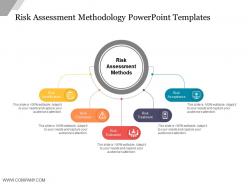
Define the various risk techniques with our risk assessment methodology PPT templates. Use this risk control PPT image to portray the various types of organizational risks and their impact over your business over a period of time. It will also act as a risk management tool which can be used to manage as well control all the future uncertainties related to the business. Use this risk analysis PPT slide diagram as an essential guiding tool to analysis the various methods of controlling as well as evaluating your company risks. Also, use this risk management matrix PowerPoint template to describe the methods of risk assessments like qualitative and qualitative methods which may help in measuring your business risks. You can likewise use this organizational risk PPT chart to build some influential business strategies which will helps in taking some effective business decisions. Therefore, tap on the download link and start exploring more with this PPT diagram. Ensure a joyful exchange with our Risk Assessment Methodology Powerpoint Templates. Folks will be happy to interact.
People who downloaded this PowerPoint presentation also viewed the following :
Risk assessment methodology powerpoint templates with all 5 slides:
Bring factors causing friction to end with our Risk Assessment Methodology Powerpoint Templates. Identify elements contributing to inefficiency.

FAQs for Risk assessment
So for risk assessment, you need five main things: identifying threats, analyzing vulnerabilities, assessing impact, evaluating likelihood, and prioritizing risks. First, list everything that could go wrong. Then find your weak spots that bad actors might exploit. Here's where most people mess up - they just slap "high/medium/low" labels on impact without doing the math. You've got to quantify the actual business damage in dollars or downtime. After that, figure out how probable each scenario really is. Finally, rank everything so you know what fires to put out first. Oh, and document your criteria upfront so you're not all over the place with consistency.
Honestly, the best approach is mixing both methods so they back each other up. Start with your hard numbers - past losses, probability data, all that concrete stuff. But then add qualitative insights to catch what the data misses, like new threats or stakeholder worries. What really works is when you let each method question the other. Say your numbers show low risk but experts are raising red flags? Time to investigate. Oh, and don't treat them as separate things - create a back-and-forth between quantitative and qualitative. That's where you'll find the real insights.
Dude, stakeholder engagement can totally make or break your whole risk assessment. Different people spot different problems - finance sees budget issues, ops catches workflow stuff, users find the practical headaches you'd never think of. Plus people actually follow through when they helped create the plan, which is honestly just human nature. Map out who's affected by each risk first, then drag them into workshops or interviews. They'll validate what you found and help figure out what to tackle first. Oh and don't skip the end users - they always have the most surprising insights.
Don't just do risk assessments once a year - that's basically useless now. Weekly or monthly check-ins work way better, depending on your field. I'd focus on environmental monitoring and getting feedback from stakeholders (ugh, I hate that word but you know what I mean). Throw everything into a simple impact vs probability grid. High-impact, high-probability stuff gets priority. The trick is making it part of your normal routine instead of scrambling when shit hits the fan. Yeah, it's more work upfront, but you'll actually stay ahead of problems for once.
Monte Carlo tools like @RISK or Crystal Ball are seriously worth checking out - they're amazing for uncertainty modeling. ServiceNow and MetricStream help centralize everything and cut down on manual work (trust me on this one). If your team's into coding, R and Python have solid risk libraries. Honestly though, don't overlook basic Excel models with sensitivity analysis. They can actually make a huge difference in accuracy. I'd probably start with whatever matches your budget and current setup, then expand from there once you see what's working.
Honestly, regulators pretty much control your entire risk assessment approach. You can't just wing it with whatever method sounds good - you've got to start with their requirements first. Pharma deals with insane FDA documentation standards. Finance has Basel III breathing down their necks. Manufacturing? ISO standards and OSHA rules everywhere. It's kind of a pain but makes sense I guess. Each industry has totally different compliance nightmares to navigate. Bottom line - figure out what your regulators demand, then build your whole process around those must-haves. Everything else is secondary.
Honestly, most people rush it and go with their gut instead of actual data - big mistake. Scope creep kills these things too. I've watched teams try analyzing everything simultaneously and just freeze up completely. Don't forget to loop in stakeholders or you'll miss obvious stuff. Treating it like a one-time thing instead of ongoing? Recipe for disaster. Personal bias screws up your scoring every time, so watch for that. Keep your approach consistent throughout (sounds boring but whatever, it works). Document your assumptions because I guarantee you'll forget your reasoning six months later when everything's changed.
Historical data is honestly your best friend here - it'll show you what actually goes wrong versus what you're worried might go wrong. Pull the last 2-3 years of incidents and near-misses, then map them against your current risk categories. Compare your old predictions to what really happened. Most people skip this part (which is crazy to me), but it's how you build that feedback loop where each assessment gets better. Yeah, it takes time upfront, but you'll spot the real patterns instead of just guessing. Your models will thank you later.
Document exactly what could go wrong and how it'd hurt the business - none of that "high security risk" nonsense that means nothing. Your methodology matters too, plus likelihood/impact ratings with actual evidence backing them up. I've honestly seen assessments that read like horoscopes! Oh, and write down your assumptions because you'll forget them. Make it clear who owns each risk. Trust me, when someone asks "wait, how'd we get this number?" months later, you'll be glad you documented everything properly instead of scrambling to remember.
Build monitoring right into your risk process from day one. Quarterly reviews work for most industries - assign someone to own each risk area or it'll just sit there collecting dust. Track your key indicators so you can catch problems before they blow up. Here's what really matters though: get people comfortable reporting issues without getting their heads chopped off. I mean, nobody wants to be the messenger who gets shot, right? Capture what you learn from incidents and feed it back into your assessments. Schedule that first review cycle now and actually stick to it.
Dude, visual storytelling is everything. Charts, infographics, those red/yellow/green traffic lights - way better than drowning people in technical garbage. I bombed a presentation once with probability matrices and literally watched everyone's eyes glaze over. Skip the jargon completely. Tell them what risks actually mean for their day-to-day stuff or their budget. Use analogies they'll get. Oh, and always give them clear next steps with names attached. They need to leave knowing "how freaked out should I be?" and "what's our move?" Simple as that.
Dude, the data processing power alone is insane - these systems can crunch historical incidents, market trends, all that stuff way faster than any team. What's really cool is how they catch patterns you'd totally miss doing it manually. Real-time monitoring beats those old quarterly check-ins too, since risk scores actually update as things change. The predictive stuff has gotten genuinely impressive lately. Though honestly, I'd probably test it on just one risk area first. Don't go crazy right out the gate, you know?
Start with figuring out who'd actually want to attack you - nation-states, ransomware crews, maybe disgruntled employees. Map out all your digital stuff and data first. Then hunt for weak spots in your tech, processes, and people (honestly, people are usually the biggest vulnerability). Third-party vendors are tricky since they're basically part of your network now. The annoying thing is threats change constantly, so you can't just do this once. Focus on your most critical assets first - the stuff that'd really screw you over if it got hit.
Honestly, culture is everything when it comes to risk assessment. People need to feel safe calling out problems without getting their heads chopped off. When there's trust and open communication, you actually get real data about what's going wrong. But in toxic environments? Forget it. Everyone just tells leadership what they want to hear, which is completely useless. I've watched this torpedo entire programs - it's painful to see. Leadership sets the tone here, and if they're creating fear instead of psychological safety, your risk assessments become fiction. Fix the culture first, then worry about the fancy frameworks.
So basically, you run your risk strategies through different "what-if" scenarios - like a cyberattack hits or the market tanks. I always think of it as stress-testing your defenses before you actually need them. Model how your current controls would handle a supply chain mess or whatever disaster fits your business. You'll probably find gaps you didn't see coming. The trick is mixing realistic problems with those nightmare scenarios that keep you up at night. Start mild, then go full catastrophe mode. That way when things inevitably go sideways, you're not scrambling to figure out what actually works.
-
Easy to edit slides with easy to understand instructions.
-
Awesome use of colors and designs in product templates.