


Security information event management dashboard improve security vulnerability management




Try Before you Buy Download Free Sample Product
 Impress Your
 Audience
 100%
100% Editable
 Save Hours
 of Time


This slide covers the SIEM dashboard which focuses on server status, log sources, total logs, last log, collectors, log sources etc.
People who downloaded this PowerPoint presentation also viewed the following :
Content of this Powerpoint Presentation
Cyberattacks are more frequent nowadays and the warnings often go unnoticed. This is why now more than ever, your organization needs a strong security system. Security Information Event Management or SIEM is thus the need of the hour. It’ll help find security issues and fix them fast.
SIEM provides businesses with information about what's going on in their networks, so they can quickly respond to the potential threats while still following the rules set by regulators. Over the last ten years, this technology has improved to include artificial intelligence, thus making it better and faster to implement detection of any security-related threats.
SlideTeam acknowledges the importance of the risk-based approach of SIEM in managing and resolving threats related to security vulnerabilities. A strong security management plan requires an SIEM dashboard, which analyzes and correlates data to display system activity. Our SIEM dashboard helps organizations in detecting suspicious behavior, identifying risks, investigating, mitigating cybersecurity risks, meeting regulatory compliance, and upgrading security.
What sets apart our SIEM dashboard PPT Layouts are the professional designers behind these. Business experts who have expertise in the specific hacking risks that businesses face are the ones who have crafted these ready-to-use SIEM Dashboard PPT Templates.
In addition, we keep our information up to date with the most recent security trends and best practices. This also means that our clients are able to easily update our presentation templates to fit their needs. Here is one example of a Security information event management dashboard to improve security vulnerability management.
Template 1: Security Information Event Management Dashboard
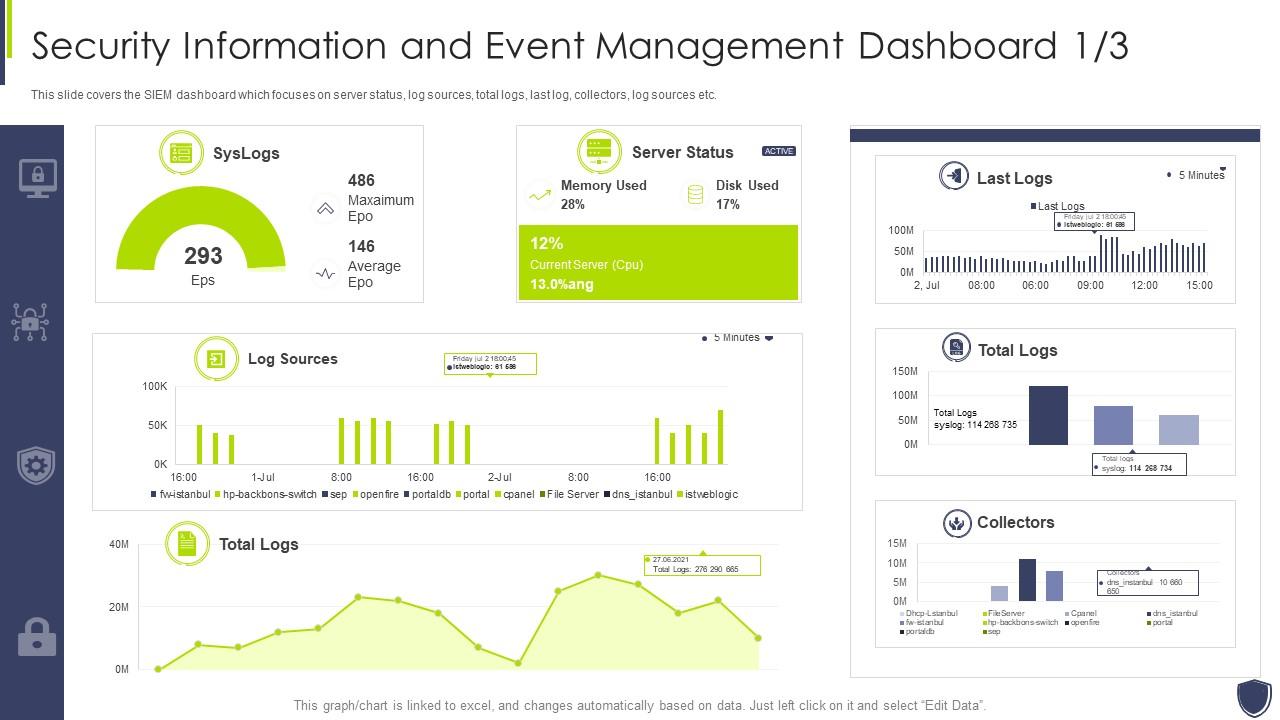
This PPT Slide provides an overview of the SIEM dashboard, highlighting key information such as server status, log sources, total logs, last log, collectors, and more. With this PPT Deck, you can keep an eye on the state of your servers in real time, achieving smooth system operation. You can look into the sources of your logs to find information from all over your network. The total logs are carefully added up, giving you a full picture of your protection situation. With the last login details, you can identify and neutralize potential risks in less time. Thus, our PowerPoint Presentation is a key to improved security vulnerability management.
Conclusion
Our pre-designed PPT Theme for the SIEM dashboard is one of the best and safest choices if you are looking to improvise the management of security vulnerabilities. The main goal is to identify potential security issues and fix them before they escalate. Its extensive and up-to-date security monitoring and automation tools are made available to enterprises via frequent updates that reflect the newest security trends and best practices.
Organizations looking to boost their security information management can trust this SIEM dashboard PPT Deck from SlideTeam. Our PPT Slides offer an all-inclusive plan that will strengthen your security measures. Use our informative and catchy templates to adopt excellence in security, identify risks, and respond faster.
What’s More?
Have a look at new horizons in security management with our built-in dashboard snapshot. Get access with a click here.
Security information event management dashboard improve security vulnerability management with all 7 slides:
Use our Security Information Event Management Dashboard Improve Security Vulnerability Management to effectively help you save your valuable time. They are readymade to fit into any presentation structure.






FAQs for Security information event management dashboard improve
So SIEM tools do three key things - they pull in logs from all your network devices, analyze that data to find weird patterns, and fire off alerts when something's suspicious. It's like having a security guard who never sleeps, honestly. The cool part is how they connect seemingly random events - maybe a failed login plus strange traffic from that same IP address. That correlation stuff is where they really shine because most people would totally miss those connections. Oh, and when you're shopping around for one, definitely check how well it plays with your current setup and whether you can tweak the alert rules.
So SIEM is basically like having a security guard who never takes a coffee break and can watch everything at once. Traditional stuff like firewalls just blocks known bad things - pretty reactive. But SIEM? It learns what normal traffic looks like in your network, then freaks out when something weird happens. Way more proactive approach. You'll actually catch insider threats and those sneaky advanced attacks that would totally slip past regular antivirus. Honestly, it's probably the closest thing to having a real analyst monitoring 24/7 without paying someone's salary.
Pretty much anything that logs stuff can feed into your SIEM. Firewalls, routers, antivirus, IDS systems - all fair game. Servers and databases work too. Cloud services, endpoints, even email systems and door access controls if you want to get fancy. The real pain? Getting your SIEM to actually understand all those different log formats. That's where most people get stuck, honestly. My advice is to start with whatever's most critical for security - don't try to connect everything at once or you'll go crazy. Build it out piece by piece and you'll have way fewer headaches.
So ML basically teaches your SIEM what normal traffic looks like, then freaks out when something's off. Way better than those rigid rule-based systems we used to deal with. It'll catch weird login patterns, suspicious data flows, that kind of stuff. The false positive thing is huge too - saves you from drowning in useless alerts. Takes a while to train properly though. Once it learns your network's personality, you'll spot actual threats way faster. Honestly beats manually writing detection rules for every possible scenario.
Ugh, SIEM stuff is a pain honestly. Data management hits you first - you'll drown in logs that eat up storage like crazy. Finding good analysts? Good luck with that, they're pricey and jump ship constantly. Then there's the integration nightmare when all your security tools hate each other. False positives will drive you insane too. I swear some SIEMs are basically alert spam machines if you don't tune them right. My advice? Figure out your actual use cases first instead of just dumping everything in there. And seriously invest time upfront getting the tuning right or you'll regret it later.
So basically, SIEM pulls all your security logs together automatically - which you'd need to track for compliance anyway. Auditors eat this stuff up because it shows who touched what data and when sketchy things happened. The cool part? You can set up dashboards that map right to whatever framework you're dealing with - SOX, HIPAA, PCI DSS, whatever. Just configure the rules to catch events your specific regulation cares about first. Then schedule those reports so your compliance folks stay happy. Honestly beats scrambling around collecting logs manually when audit season hits.
Honestly, I'd focus on four main things to see if your SIEM is actually working. MTTD and MTTR are huge - basically how fast you spot threats and deal with them. False positive rates matter too because chasing fake alerts all day is soul-crushing. Also track your alert coverage and how well it correlates stuff together. Oh, and don't forget incident escalation rates plus how productive your analysts are being. The goal? Less noise, more real threats caught. Set some baselines first, then check monthly trends. That'll tell you if all your tuning work is worth it or if you're just spinning your wheels.
So basically, hook your threat intel feeds straight into the SIEM - it'll auto-enrich alerts with context about sketchy IPs, domains, hashes, all that stuff. Way better than getting some vague "suspicious connection" nonsense. You'll actually see if it's linked to an APT group or whatever. The correlation rules are honestly clutch for connecting dots between random events. Build some dashboards to track what's hitting your industry specifically. Oh and definitely tune your detection rules with fresh IOCs. I'd start with just one or two solid feeds though - don't go crazy right away.
So UBA is basically like having a detective watching your users 24/7. It learns normal patterns - when people log in, what they access, usual network stuff. Then when someone goes rogue (or gets compromised), it spots the weird behavior that regular SIEM alerts would totally miss. Like if Dave from accounting suddenly downloads a ton of files at 2am or starts poking around servers he's never touched. Honestly, most places don't realize how much sneaky stuff flies under the radar without it. You really should push for UBA integration if you don't have it yet.
Real-time alerts are honestly what separates useful SIEMs from fancy log collectors. You catch threats while they're actively happening instead of finding out weeks later during some audit. Pretty huge difference when you think about it. The alerts let you jump on incidents while attackers are still poking around your network - you can actually stop them from stealing data or spreading to other systems. Just don't go crazy with the sensitivity settings or you'll drown in false alarms and miss the actual bad stuff.
SIEMs basically adapt by letting you customize rules and compliance stuff for your specific industry. Like healthcare ones focus on HIPAA and protecting patient data. Financial services? They're all about fraud detection and PCI compliance. Manufacturing is interesting - they actually monitor those industrial control systems for threats. Retail setups watch POS systems and payment security. You'll want to work with your vendor to set up the detection rules and dashboards that match whatever regulations you deal with. Each industry has different attack patterns they worry about, so the whole system gets configured around that.
Honestly, AI/ML integration is where everything's headed right now - the behavioral analytics can catch stuff you'd never spot manually. Cloud-native platforms are everywhere since most companies are already moving that direction anyway. SOAR functionality is getting built right into SIEM tools now, which is pretty convenient. Real-time streaming beats the old batch processing hands down. Oh, and XDR is basically merging with SIEM capabilities these days. User behavior analytics is another big one. I'd definitely check what your current vendor's adding to their stack before you go shopping around.
Honestly, moving to the cloud makes a massive difference for SIEM. No more worrying about running out of storage space or processing power - you can just spin up resources when you need them. Super handy during those crazy high-traffic periods. Then scale back down when it's quiet again. Your hardware refresh headaches? Gone. Plus you get data centers everywhere, which helps with latency if your team's spread out. I mean, my buddy's company saved a ton just on not having to buy new servers every few years. Just watch your network bandwidth though - that's where you'll hit bottlenecks if you're not careful.
SIEM licensing alone runs $10-50K yearly based on your data volume. Then you'll need staff who actually know what they're doing - either hire or train your current team. Implementation costs? Yeah, expect that to basically double your budget. Nobody warns you about that part upfront. ROI comes from faster incident response and lower breach costs, though honestly the compliance stuff is harder to put a number on. Most places break even around 18-24 months if they don't cheap out on staffing. Here's the thing - if you undersize it from the start, you're just setting money on fire. Get realistic about your log volumes first.
So your SIEM turns into command central for incident response - that's where you'll triage alerts and track everything. It gives your IR team the detection data and timeline info they need when shit hits the fan. The cool part is it works backwards too - your incident playbooks help tune the SIEM to cut down false positives. Most SIEMs have case management built in, but honestly? Lots of teams still export to dedicated platforms like Phantom for the heavy lifting. Oh, and make sure your logging actually covers what your forensics people need - learned that one the hard way.
-
Out of the box and creative design.
-
Top Quality presentations that are easily editable.