

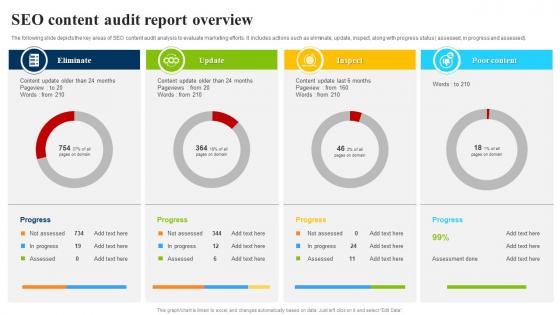
SEO Content Audit Report Overview




Try Before you Buy Download Free Sample Product
 Impress Your
 Audience
 100%
100% Editable
 Save Hours
 of Time


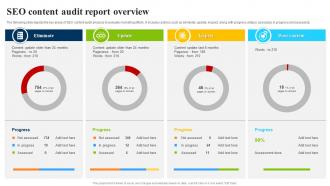
The following slide depicts the key areas of SEO content audit analysis to evaluate marketing efforts. It includes actions such as eliminate, update, inspect, along with progress status assessed, in progress and assessed.
People who downloaded this PowerPoint presentation also viewed the following :
SEO Content Audit Report Overview with all 7 slides:
Use our SEO Content Audit Report Overview to effectively help you save your valuable time. They are readymade to fit into any presentation structure.





FAQs for SEO Content
Honestly, I'd start with the obvious stuff - organic traffic, keyword rankings, and click-through rates. Page speed matters a ton too because people bounce if your site takes forever to load. Check your backlink profile and see how your domain authority's trending over the past year or so. But here's the thing - don't get obsessed with traffic numbers if they're not actually converting. I've seen too many people celebrate vanity metrics while their sales stay flat. Pull 6-12 months of data first, then tackle whatever's hurting your money pages before you worry about the rest.
Grab Ahrefs or SEMrush and pull your full backlink profile first. You'll see all the domains linking to you plus their authority scores. There's always some sketchy stuff hiding in there, so hunt down those spammy links that could be tanking your rankings. Check your anchor text too - does it look natural or way too optimized? I usually export everything to a spreadsheet because it's easier to spot weird patterns that way. Also look at how your referring domains have grown over time and figure out which sources are actually worth keeping. Then you can prioritize which toxic links to disavow first.
Screaming Frog is your best bet - honestly nothing beats it for crawling sites and catching broken links, duplicate content, all that stuff. Google Search Console is a no-brainer since it shows what Google actually sees. I'd throw in SEMrush or Ahrefs too for their audit tools. They're better at spotting page speed and mobile issues that Screaming Frog sometimes misses (though don't tell anyone I said that lol). Start with Screaming Frog, then check your findings against GSC data. Those three will probably catch like 90% of your technical headaches.
Yeah, site speed definitely affects your rankings - Google actually uses it to decide where you show up in search results. Slow sites also annoy users, which hurts your engagement numbers. Check your pages with Google PageSpeed Insights and GTmetrix for load times and fixes. Both tools are pretty solid. Don't forget mobile testing since Google cares way more about mobile now. Your Core Web Vitals in Search Console matter too - honestly, they're becoming a bigger deal lately. Start with the major problems like image sizes and server speed. You'll go crazy if you obsess over tiny details first.
Start with your title tags and meta descriptions - gotta make them unique with your keywords. Check if your headers are structured right (H1, H2s, etc.). Clean up those URLs too - nobody wants those garbled auto-generated messes. Internal links matter more than people think, so map those out. Don't skip image alt text either. Oh, and page speed is huge now since Google's obsessed with user experience. Mobile responsiveness too, obviously. Honestly, just make a checklist and go page by page - way easier than trying to remember everything.
So grab Screaming Frog or SEMrush and crawl your site - they'll catch duplicate content fast. Google Search Console is good too for spotting duplicate titles and descriptions. E-commerce sites are honestly the worst culprits here. You'll find product pages, pagination stuff, and those annoying URL parameters creating tons of duplicate versions. Fix the high-traffic pages first since they matter most. Use canonical tags to point to your main version, 301 redirects for actual duplicates, or just add unique content to make similar pages different. The traffic-heavy ones should be your priority anyway.
Mobile stuff is seriously critical for SEO now. Google looks at your mobile version first when deciding rankings - crazy how that flipped, right? Test your site on actual phones to see if text is readable without zooming and buttons aren't tiny. Fast loading matters too. I've watched perfectly good desktop sites completely bomb in search results because their mobile experience was garbage. Run Google's Mobile-Friendly Test during your audit. Check Core Web Vitals for mobile performance. Honestly, fix mobile problems before anything else - they'll kill your rankings faster than most other issues.
Check your Google Search Console for click-through rates - that'll tell you if your titles and meta descriptions are actually working. Low CTRs? Your tags probably aren't compelling enough. Also make sure they're not getting cut off (keep titles under 60 characters, descriptions under 160). I'm obsessive about this stuff, but it really does make a difference! Each page needs unique tags with your keywords worked in naturally. Oh, and definitely prioritize your highest-traffic pages first - way better use of time than fixing random pages no one visits.
Page speed is honestly where I'd start - it's massive for both user experience and Google rankings. Most people are on mobile now, so make sure your site doesn't look terrible on phones. After that, work on your navigation and internal linking structure. If you've got site search, that needs to work well too. Alt text and proper headings are becoming more important lately - Google's getting pickier about accessibility stuff. Oh, and Core Web Vitals directly mess with your search performance, so definitely track those. Just run it through Google PageSpeed Insights first to see where you stand.
So first thing - check your title tags and meta descriptions. Make sure they're actually compelling and have your keywords (but don't go crazy with keyword stuffing). Your headers need to make sense too - like H1, H2s should flow logically. Duplicate content is a huge problem honestly, way more sites have this issue than you'd expect. Internal linking matters a lot. Oh and your content actually has to match what people are searching for, which sounds obvious but... yeah. Run Screaming Frog on everything - it'll catch the technical stuff you'd miss otherwise.
So first thing - check your organic sessions and conversion rates in GA. CTR from search results is probably the most underrated metric tbh, everyone ignores it but it tells you everything. Pull up which pages are actually getting traffic vs the ones you thought would crush it (always surprising). Session duration and bounce rate matter too, obviously. Oh and definitely break it down by mobile vs desktop because people act completely different on each. Geographic stuff can be weird too depending on your audience. I'd do like a 3-month comparison to catch any big shifts or random drops.
Honestly, competitor analysis is where you'll find all the stuff your regular SEO audit totally misses. You get tunnel vision looking at your own site, you know? But then you peek at what competitors are doing and suddenly you're like "oh shit, they're ranking for THAT keyword and I never even thought about it." Look at their backlinks, content strategies, whatever technical stuff they're doing different. I swear my best ideas come from snooping on competitors lol. Just pick like 3-5 sites that rank well for your main keywords and see what they're doing that you aren't.
Dude, local SEO can totally mess up your audit if you're not careful. Check their Google Business Profile first - is it even optimized? Then dive into NAP consistency across directories because that gets chaotic with multiple locations. Local keywords matter too, obviously. Schema markup for locations is huge but half these sites don't bother with it. Are they showing up in local pack results? Probably not if they're ignoring location-specific landing pages (which honestly drives me crazy). Oh, and definitely compare their local search visibility against competitors in the same area - that'll tell you everything you need to know.
So basically, information architecture is just how you organize all your content on your site. Search engines crawl through following links and figuring out how pages relate to each other. Messy structure = confused crawlers = bad rankings. I always think of it like organizing a really big bookstore - you need logical sections and clear paths between them. Start with clean URL hierarchies and descriptive navigation. Keep important pages within 3 clicks of your homepage (this one's huge). Also check your internal linking - you'd be surprised how many sites have related content that doesn't actually link to each other. It's honestly one of the easier SEO wins if you take time to map it out properly.
Honestly, the worst thing you can do is rush through everything and miss the big picture stuff. Running automated tools feels productive but they can't tell you jack about what users actually want. I see people fixating on broken links while their whole site structure is a mess - classic mistake. Skip competitor research and you're basically flying blind since everyone's fighting for the same rankings. Also don't just tackle easy fixes first because they make you feel accomplished. Focus on what'll actually move the needle, even if it's harder work upfront.
-
SlideTeam offers so many variations of designs and topics. It’s unbelievable! Easy to create such stunning presentations now.
-
Amazing product with appealing content and design.