

Software development best practice tools jira dashboard for software teams progress




Try Before you Buy Download Free Sample Product
 Impress Your
 Audience
 100%
100% Editable
 Save Hours
 of Time


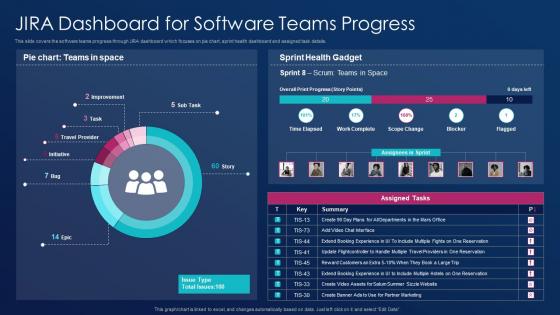
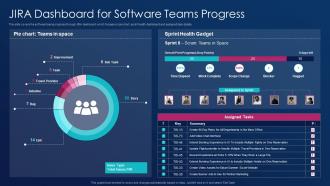
This slide covers the software teams progress through JIRA dashboard which focuses on pie chart, sprint health dashboard and assigned task details.
People who downloaded this PowerPoint presentation also viewed the following :
Software development best practice tools jira dashboard for software teams progress with all 7 slides:
Use our Software Development Best Practice Tools Jira Dashboard For Software Teams Progress to effectively help you save your valuable time. They are readymade to fit into any presentation structure.





FAQs for Software development best practice tools jira dashboard for
For Jira dashboards, start with sprint progress gadgets and burndown charts - those are your bread and butter. Issue statistics help catch bottlenecks early. Don't forget an assigned-to-me filter for your own stuff. That created-vs-resolved chart is honestly clutch though. Shows you if you're actually getting ahead or just spinning your wheels (we've all been there). Your role matters too. PM? Focus on team metrics. Developer? Personal queue and blockers are key. I'd say start basic and only add widgets you'll actually check daily - otherwise it just becomes visual noise.
So custom filters are basically your best friend for cleaning up all that dashboard chaos. You can hide the stuff you don't care about and only show what matters - like high-priority bugs or tickets for your team. Super helpful when you're drowning in data. The cool part? Save them once and use them everywhere on your dashboard instead of recreating the same thing repeatedly. Honestly wish I'd figured this out sooner. Just start with whatever workflow you use most - your dashboard will look way less overwhelming immediately.
So widgets are basically your way to set up a custom dashboard that shows all the stuff you actually care about. Real-time data like sprint progress, issue counts, team workload - all right there without clicking around forever. Honestly they're kind of addictive once you get the hang of it! Everything updates automatically so you're not looking at stale info. I'd start simple with like 2-3 widgets first - maybe your assigned issues up top, team stuff below. You can always add more later once you figure out what you're actually checking every day. Oh and you can make different dashboards for different projects too which is clutch.
Honestly, custom dashboards are a game changer for sprint planning. Start with Jira's default agile dashboard and tweak it from there. Throw in velocity charts so you can see how your team's been performing historically. Burndown charts from past sprints help too. I spend way too much time in these during planning week, but they're actually useful. Add backlog gadgets to visualize story points and issue stats to catch patterns in bugs or story complexity. Pro tip: make different dashboard views for different meetings. One for backlog grooming, another for sprint kickoffs. Focus on metrics that'll actually help your team decide stuff, not just pretty charts.
Track burndown charts and velocity first - those are your bread and butter. Story points completed vs planned shows if you're being realistic about capacity. Honestly, I'm kind of obsessed with monitoring blocked tickets because nothing's worse than work just sitting there doing nothing. Cycle time and issue resolution rates are solid too. Don't forget backlog health and defect rates if quality's been sketchy lately. Keep your dashboard to like 5-7 metrics tops or you'll drown in data. Add new ones based on whatever's actually causing your team headaches.
So there's a few ways to tackle this. REST APIs and webhooks work great if you don't mind getting your hands dirty with some code. Most BI tools already have Jira connectors though - Tableau, Power BI, that whole crew. Way easier than building from scratch, honestly. Zapier's another solid option for pushing data around without much technical hassle. The API route gives you the most control but you'll need dev resources. Oh, and definitely check your BI tool's marketplace first - there's probably something already built that'll save you tons of time.
Honestly, less is way more here. Stick to maybe 4-6 widgets that your team actually checks - sprint progress, blocked stuff, deadlines. I went overboard once and built this crazy detailed dashboard that literally nobody touched lol. Group similar things together so it makes sense when you glance at it. Consistent filters help too, otherwise the data's all over the place. Good titles and color coding save people time scanning through everything. But here's the thing - just ask your team what numbers they actually care about first. You'll probably be surprised what matters to them vs what you think matters.
Dude, role-based access control is seriously the best thing you can do for your Jira dashboard. People only see what actually matters to their job - developers get their tickets, managers see the big picture stuff, stakeholders just get their slice. No more drowning everyone in random projects they don't care about. Honestly, it's wild how much more people actually use the dashboard when it's not total chaos. Plus sensitive info stays locked down without you having to think about it. Just set your permissions first, then build those role-specific filters. Trust me on this one.
Honestly, charts make all the difference for Jira dashboards. Pie charts show issue breakdowns nicely, and burndown charts help track sprint stuff. Bar charts work great for seeing who's swamped with work too. Color-coding saves you so much time - green for done, red for overdue, you get it. Those "Issues Statistics" gadgets are clutch for quick snapshots. Tables aren't bad but they get messy real quick if you're not careful. Mix it up with different visual types instead of drowning in text. Pick 2-3 important metrics first, then add more later.
Add Control Charts and Cumulative Flow Diagrams - they're lifesavers for spotting bottlenecks. Filter your issues by status and keep an eye on columns where stuff just sits forever. Resolution Time Reports help too, especially for finding those workflow steps that always drag (seriously, why does code review take three weeks?). Break your dashboard into sections for different teams so you can spot patterns faster. Oh, and actually check these regularly. There's no point setting up fancy tracking if you're just gonna ignore it when things pile up.
Ugh, the worst thing people do is jam every single metric onto one dashboard. Makes it totally useless! Start with maybe 3-4 gadgets that your team actually looks at daily - not just random stuff because you can. Also, those generic filters are the devil - they pull in tickets nobody cares about. Size your gadgets right so text doesn't get chopped off (learned this the hard way). Don't forget permissions too, otherwise wrong people see everything. You can always add more later once you figure out what's actually helping vs just looking fancy.
Honestly, Jira dashboards are a game changer for cutting down on all those "what's the status?" messages cluttering up Slack. Set up gadgets showing sprint progress and blockers so everyone knows what's happening without you having to explain it constantly. The best part? Share it with stakeholders and they'll stop pestering you for updates every few hours - they can just check themselves. I always create a team dashboard with key metrics and drop the link in our main channel. Takes like 10 minutes to set up but saves hours of back-and-forth later.
Honestly, automation is a game-changer for keeping your Jira dashboard actually useful. Set up workflows to handle the boring stuff - status updates, task assignments based on criteria, deadline alerts. Your dashboard stays current instead of showing last week's mess (which happens way too often). No more manual updates eating up your day. The real-time data means you can actually trust what you're seeing. I'd start with automating those repetitive status changes first - seriously, that alone will save you so much hassle and make everything way more reliable.
Check it monthly at minimum, but honestly depends on your team's pace. Fast-moving projects? Maybe every couple weeks. I've watched so many dashboards turn into digital junkyards - widgets tracking stuff nobody cares about anymore. Quick test: does this actually help you decide things? If not, time to clean house. Team changes, sprint priorities shift, or you're just ignoring half the panels? That's your signal. Oh, and set a calendar reminder or you'll totally forget. Trust me on that one.
So basically, personal dashboards are just for you - nobody else can see them. Team ones can be shared with your group or made public. I think of my personal dashboard as like my private workspace where I dump all the stuff I need to track. Team dashboards are where everyone sees the same metrics and project updates. Honestly, I probably spend way too much time tweaking my personal one when I should be working lol. For team dashboards, they're clutch during standups since everyone's looking at the same sprint progress. My advice? Start with a personal one first to figure out how the gadgets work, then make team ones later.
-
Great experience, I would definitely use your services further.
-
Content of slide is easy to understand and edit.