


Software development best practice tools jira dashboard for agile software teams work status




Try Before you Buy Download Free Sample Product
 Impress Your
 Audience
 100%
100% Editable
 Save Hours
 of Time


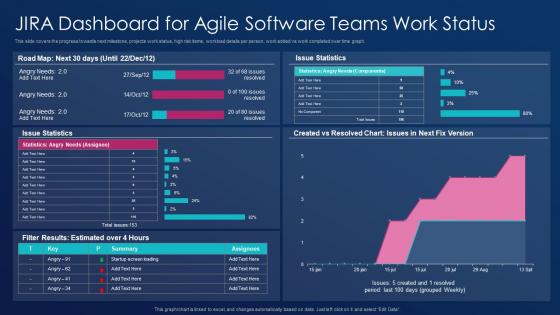
This slide covers the progress towards next milestone, projects work status, high risk items, workload details per person, work added vs work completed over time graph.
People who downloaded this PowerPoint presentation also viewed the following :
Software development best practice tools jira dashboard for agile software teams work status with all 7 slides:
Use our Software Development Best Practice Tools Jira Dashboard For Agile Software Teams Work Status to effectively help you save your valuable time. They are readymade to fit into any presentation structure.





FAQs for Software development best practice tools jira dashboard for agile software
Honestly, the workflows you can set up are pretty solid - totally customizable and the real-time dashboards actually make sense. Sprint planning doesn't suck like it does in other tools. You'll be able to track stuff from start to finish, set up transitions that happen automatically, and the visual reports are clear enough that even non-tech people get it. Kanban and Scrum boards take a minute to figure out but they're intuitive after that. Oh, and it plays nice with Confluence, Slack, GitHub - saves you from tab hell. I'd say start basic with their templates first. You can get fancy with customization once everyone's used to it.
So basically, break your user stories down into smaller tasks and estimate story points - that's the bread and butter stuff. Jira's backlog prioritization is clutch for figuring out what actually needs to happen next sprint. Saves you from those endless "but this is more important" debates, trust me. Set up swim lanes on your sprint board and watch those burndown charts like a hawk to catch problems early. The reporting will show you what your team can realistically handle each sprint. Oh, and create a workflow that fits how you guys actually work, not some fancy process you found online. Way more effective.
Ok so there's three types of Jira and it's kinda confusing tbh. Software is the one dev teams use - sprints, bug tracking, all that agile stuff. Service Management is basically a fancy help desk for IT tickets. Work Management is for regular business teams like marketing or HR who need to track projects but aren't coding anything. I honestly think they could've named these better! But here's how I pick: are you building software, running a help desk, or just managing normal business projects? That'll tell you which one you need.
So Jira's custom workflows are pretty clutch - they let you build out your team's actual process instead of cramming everyone into their boring default setup. You can add stages like "Code Review" or make QA sign off on bugs before they're marked done. Takes some setup time but honestly? Worth it. No more confusion about who does what or stuff getting lost. My advice though - don't overthink it at first. Just grab your team, map out how you currently work (literally draw it if you have to), then build the workflow around that. Start basic and add complexity later.
So Jira's got some pretty decent reporting stuff built in. Burndown charts are clutch for sprint tracking - shows if you're gonna hit your goals or crash and burn. Velocity charts tell you how much work your team actually cranks out (spoiler: probably less than you think). There's also cumulative flow diagrams that'll spot workflow bottlenecks, plus control charts for cycle times. Honestly? Start with burndown and velocity first. They're super straightforward and you'll immediately see where your team stands. Velocity is my personal favorite since it keeps sprint planning realistic instead of wildly optimistic.
Honestly, Jira's marketplace has a crazy amount of integrations that'll save you so much time. I'd start with Slack - getting notifications there instead of constantly refreshing Jira is life-changing. GitHub connects seamlessly for code stuff, plus you can hook up Confluence for docs. CI/CD tools, testing frameworks like Selenium, time tracking apps - pretty much everything links up. My advice? Map out what tools you're already using daily (I made this mistake and added random integrations I never touched). Then tackle the ones causing the most annoying app-switching first. The difference is honestly night and day once you get a few key ones running.
Honestly, good Jira hygiene saves so much headache later. Write titles that actually explain what needs doing - none of that vague "bug" nonsense. Fill out the fields properly because trust me, you'll be digging through old tickets trying to remember context. Break big tasks down so stuff doesn't just sit there forever in limbo. Keep your story points realistic if you're doing sprints. Update statuses regularly - your PM will love you for it. Oh, and set up decent filters early on. I learned that one the hard way when our backlog became a complete disaster to navigate.
Yeah, Jira's actually pretty decent for agile stuff. They've got ready-made Scrum and Kanban templates that work well out of the box. With Scrum you get sprints, backlogs, burndown charts - all that good stuff. Kanban's there if you want continuous flow instead. Honestly, their sprint planning is solid. I'm in there every week dragging stories around between columns. The velocity tracking works, and somehow the reports don't confuse our stakeholders (miracle, right?). Best thing though - you can tweak the workflows to fit how your team actually operates. Don't feel stuck with their defaults. Start there and adjust as you go.
Look, Jira's got pretty solid security once you set it up right. Permission schemes are your first line of defense - they control who sees, edits, or deletes stuff. You can lock down whole projects to specific teams, which honestly saves so much headache later. For really sensitive stuff like HR issues, there's issue-level security that hides tickets from certain people. Don't forget two-factor auth - it's a pain but worth it. Everything runs on HTTPS and logs who did what, so you've got a trail. I'd start with the permission schemes though, that's where most problems happen.
Yeah, Jira's actually pretty flexible - you can customize fields, workflows, issue types, all that stuff. Marketing teams might track totally different things than your dev team, which is nice. Workflows can match however you guys actually work instead of some cookie-cutter process. The permissions are solid too. Honestly though, I've seen teams go nuts with customization and make it way too complicated. Start basic. Map out what you're doing now first, then tweak Jira to fit that. Way easier than trying to force everyone into their default setup, trust me.
Honestly, Jira's been a game-changer for our remote team. Everything lives in one spot so you're not constantly wondering what people are working on. The comment threads on tickets? So much better than endless email chains - I actually look forward to checking updates now. You can see who's swamped and who's got bandwidth across different time zones, which is clutch. Set up your workflows first (boring but necessary), then just make sure everyone actually updates their ticket status. We had one guy who never did this and it drove us all nuts. Short version: it cuts down on those "hey, quick question" Slack messages that aren't really quick.
Honestly, the biggest game-changer is getting ruthless with prioritization - drag your most critical stuff to the top using Jira's ranking feature. Break everything into clear epics and user stories first though. The estimation tools are decent once you figure them out, and definitely set up labels/components so you can actually find things later. I'd groom your backlog regularly too (delete old irrelevant tickets - trust me on this one). Sprint planning gets so much easier when you're not digging through hundreds of outdated stories. Oh, and use roadmap view for stakeholder updates - saves tons of explanation time.
Honestly, the learning curve is brutal at first - Jira feels like information overload compared to something clean like Trello. Your team's gonna need serious time to figure out workflows and all those custom fields. Moving your data over is such a headache too, you'll probably lose formatting and have to rebuild stuff. Don't even get me started on the configuration options - there's literally too many choices which sounds great until you're staring at 50 different settings. People hate switching tools, so adoption takes forever. Oh, and start simple! Train like 2-3 people who actually care, then slowly add the fancy features once everyone stops complaining.
Dude, Jira automation is seriously worth learning. You can set up rules to handle all the boring stuff - moving tickets around, assigning issues, sending updates when things change. The setup is pretty straightforward: pick a trigger (like when someone logs a bug), add conditions (maybe only high priority ones), then choose what happens next (auto-assign to your team lead or whatever). I was skeptical at first but honestly? Game changer. You'll stop doing the same mind-numbing clicks all day and actually get to work on real problems. Just start with one simple rule and don't go crazy with it right away.
Atlassian University has free courses that are actually decent - way better than most corporate training stuff. Their beginner course covers all the basics without being boring. The documentation is pretty thorough too, plus their community forums have real users sharing helpful tips. Honestly though, what works best is making your own training materials with screenshots from your actual Jira setup. Every company's instance looks different, so generic training only goes so far. I'd start with Atlassian's courses first, then do some hands-on sessions using your specific workflows.
-
Presentation Design is very nice, good work with the content as well.
-
Good research work and creative work done on every template.