

Software Development Project Plan Powerpoint Presentation Slides





Try Before you Buy Download Free Sample Product
 Impress Your
Audience
 100%
Editable
 Save Hours
of Time


Check out our professionally designed presentation on the Software Development Project Plan that helps project managers and developers visualize all the plans for one or more software programs. This PPT presentation covers Software Development Resource Planning, resource requirement timeline, Task allocation according to Resources, and tools required by the project resources. It also includes software requirements types such as functional and non-functional requirements and domain requirements. Here we also cover detailed design specifications such as Software Design Levels Process Activities Comprising Software Detailed Design, Detailed Design Core Components, Detailed Design Implementation Model, and Detailed Design Software Architecture. It also covers data migration stages, including preparation, using developing tools, trial data migration, validation by customer and testing, Data Migration Approaches, and data mitigation process. This PowerPoint presentation covers project documentation, product documentation, system documentation, user documentation, and process documentation structure. In this presentation, we include software development project employees training programs, criteria for training, and training schedule. At last, it describes Successful Production System Implementation strategies and the project closedown process. Get access to this powerful template now.
People who downloaded this PowerPoint presentation also viewed the following :
Content of this Powerpoint Presentation
Slide 1: This slide introduces Software Development Project Plan. State Your Company Name and begin.
Slide 2: This slide presents Table of Content for the presentation.
Slide 3: This slide highlights title for topics that are to be covered next in the template.
Slide 4: This slide covers software project documentation process.
Slide 5: This slide shows requirements for the software development project.
Slide 6: This slide presents one page user case including target release, document status, document owner, etc.
Slide 7: This slide displays software design touch points including phases such as initiate, discovery, delivery, etc.
Slide 8: This slide represents software development architecture framework.
Slide 9: This slide highlights title for topics that are to be covered next in the template.
Slide 10: This slide showcases Software Development Resource Planning.
Slide 11: This slide covers resource requirement roadmap timeline for software project development.
Slide 12: This slide shows roles and responsibilities along with tasks allocated according to resources.
Slide 13: This slide presents resource requirement inputs tools such as project charter, project management plan, project documents, etc.
Slide 14: This slide highlights title for topics that are to be covered next in the template.
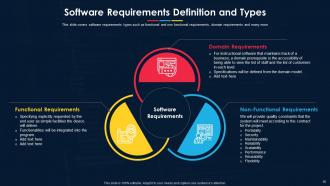
Slide 15: This slide covers software requirements types such as functional and non functional requirements.
Slide 16: This slide covers software requirements specifications including features like client specifications, system customers, managers, etc.
Slide 17: This slide represents software requirement validation process that can be checked against some conditions.
Slide 18: This slide showcases requirement elicitation process.
Slide 19: This slide covers requirements definition including functional and non-functional requirements.
Slide 20: This slide highlights title for topics that are to be covered next in the template.
Slide 21: This slide displays software design levels such as architectural design, high- level design, and detailed design.
Slide 22: This slide shows Process Activities Comprising Software Detailed Design.
Slide 23: This slide covers architecture deliverables and repository, artifacts and building blocks, re-usable building blocks, etc.
Slide 24: This slide presents elements items, system requirements, software detailed design and unit construction.
Slide 25: This slide covers detailed design software architecture including client devices and client application.
Slide 26: This slide highlights title for topics that are to be covered next in the template.
Slide 27: This slide displays detailed design system configuration including the specification of computer from its hardware components.
Slide 28: This slide showcases system configuration implementation workflow diagram.
Slide 29: This slide shows configuration framework for software including version control, continuous integration, deployer, etc.
Slide 30: This slide highlights title for topics that are to be covered next in the template.
Slide 31: This slide covers software acquisition and installation process.
Slide 32: This slide shows application development process including formalized list, customer requirements, design application interface, etc.
Slide 33: This slide displays application development framework including high level full stack framework, code generators aggregators, etc.
Slide 34: This slide represents agile application development methodology including requirements, integrate tests, review, etc.
Slide 35: This slide highlights title for topics that are to be covered next in the template.
Slide 36: This slide showcases data migration stages including time span such as preparation, using developing tools, trial data migration, etc.
Slide 37: This slide covers data migration analysis and discovery, extract, cleanse, validate, etc.
Slide 38: This slide shows information customer content, including existing data sources, new data sources, existing content meta tags, etc.
Slide 39: This is another slide continuing Data Migration Process.
Slide 40: This slide highlights title for topics that are to be covered next in the template.
Slide 41: This slide presents project documentation, product documentation, system documentation, etc.
Slide 42: This slide displays software system quality documentation including quality manual, procedures, work instructions, etc.
Slide 43: This slide highlights title for topics that are to be covered next in the template.
Slide 44: This slide covers software testing checkpoints, such as start-up procedure, query procedure, file mounting procedure, etc.
Slide 45: This slide represents software testing methodologies such as functional testing's including unit, integration, system, etc.
Slide 46: This slide showcases strategies for software testing such as time fixing, passing the buck, manual testing exploratory, etc.
Slide 47: This slide covers factors that effect software testing such as risks, objectives, skills, etc.
Slide 48: This slide highlights title for topics that are to be covered next in the template.
Slide 49: This slide shows on the job training program including mentoring field operations customer facilities, material, project development, etc.
Slide 50: This slide covers software development training criteria such as lagging practices, intermediate improvement and leading practices etc.
Slide 51: This slide covers software development training schedule including task, priority level, employee name, etc.
Slide 52: This is another slide continuing Training Program Schedule.
Slide 53: This slide displays Successful Production System Implementation.
Slide 54: This slide highlights title for topics that are to be covered next in the template.
Slide 55: This slide covers software project close down process starting from handover software to user.
Slide 56: This slide covers software evaluation dashboard including spring details.
Slide 57: This slide covers project evaluation dashboard including planning, design , development and testing.
Slide 58: This slide displays Icons for Software Development Project Plan.
Slide 59: This slide is titled as Additional Slides for moving forward.
Slide 60: This is Our Mission slide with related imagery and text.
Slide 61: This is Our Team slide with names and designation.
Slide 62: This is About Us slide to show company specifications etc.
Slide 63: This slide provides Clustered Column chart with two products comparison.
Slide 64: This slide provides 30 60 90 Days Plan with text boxes.
Slide 65: This is Our Target slide. State your targets here.
Slide 66: This slide contains Puzzle with related icons and text.
Slide 67: This is a Timeline slide. Show data related to time intervals here.
Slide 68: This is a Financial slide. Show your finance related stuff here.
Slide 69: This slide depicts Venn diagram with text boxes.
Slide 70: This is a Thank You slide with address, contact numbers and email address.
Software Development Project Plan Powerpoint Presentation Slides with all 75 slides:
Use our Software Development Project Plan Powerpoint Presentation Slides to effectively help you save your valuable time. They are readymade to fit into any presentation structure.






FAQs for Software Development Project Plan
You'll want to nail down your scope first - what you're actually building vs what you're not. Saves tons of drama later, trust me. Break your timeline into chunks with realistic milestones, and honestly, add buffer time because stuff always takes longer than you think. Resource allocation means figuring out who's doing what and when. Risk management sounds fancy but it's just thinking through what could go wrong early on. Oh, and don't skip the communication plan - stakeholders need updates or they get weird about things. Templates are your friend for the first few projects so you don't forget the testing phases and other critical stuff.
Honestly, don't wait until stuff goes wrong to think about risks - build it into your planning upfront. During the initial phases, flag the obvious stuff: scope creep, tech dependencies, that one developer who always takes vacation at crunch time (we all know the type). Build buffer time and mitigation tasks right into your sprints. Keep a simple risk tracker that you actually look at weekly with the team. I can't stress this enough - make it a living doc, not some forgotten spreadsheet. Pick your top 3-5 risks this week and assign someone to own each one.
Honestly, just grab whatever project management tool your team will actually stick with - Jira, Asana, Linear, they're all pretty much the same thing anyway. Scrum or Kanban work great for the framework stuff. Daily standups are clutch for keeping everyone on the same page, and burndown charts let you see if you're totally screwed or on track. Start basic though - sprint tracking and story points are enough. I've seen teams go way overboard with complicated setups that nobody ends up using. You can always add more bells and whistles later once people get into the groove.
Honestly, start by talking to stakeholders about what they actually need - not just what they think they want. There's always a difference there. Document everything you're building AND what you're not building (this part saves your ass later). Make a scope doc with clear acceptance criteria and deadlines. Before touching any code, get signatures from everyone involved. Sounds formal but it's worth it. Schedule regular check-ins because scope creep is inevitable. People will always want "just one more thing." Setting boundaries upfront means fewer headaches down the road.
Dude, communication plans literally save projects from going off the rails. Map out who needs what info and when - sounds boring but it's a lifesaver. I've watched so many teams build the wrong thing because nobody clarified the requirements upfront. Set up clear channels for updates and scope changes too. The worst part is when issues blow up because there's no escalation process. Trust me, spending time on this early beats dealing with angry stakeholders later. Oh, and don't forget to actually stick to whatever system you create - half my coworkers set these up then ignore them completely.
Start by breaking everything into tiny, specific chunks - you can't estimate "build user authentication" but you can totally nail "create login form." Honestly, just make your best guess then tack on like 25-50% extra time because stuff always goes sideways. I learned this the hard way lol. Check who's got the right skills early and see if they're actually free. Use old project data if you have it. The whole trick is being realistic instead of that optimistic nonsense we all fall into. Track your actual hours so you'll get better at this over time.
Ugh, scope creep is the WORST. Get your change control locked down right away - document everything before saying yes to anything. Last project I managed, "just a small tweak" became three extra months of hell. Your stakeholders need to get that adding stuff means cutting other stuff, period. Otherwise you'll never ship. Keep a change log where everyone can see it and make them put requests in writing. No exceptions, even if the CEO asks nicely. Weekly check-ins help catch this stuff before it spirals completely out of control.
Honestly, just go back to your original goals - did you solve the problem, stay on budget, hit your timeline? Track the obvious stuff like user adoption and performance metrics. Stakeholder happiness matters way more than people admit since they control your next project. I'd also look at technical debt because a project that's impossible to maintain later? That's not really a win. ROI targets are key if you set them upfront. Oh, and definitely schedule a review meeting like 3-6 months after launch - gives you actual data to work with instead of just guessing.
Honestly? Your team setup totally changes how fast you can ship stuff. Cross-functional teams are amazing - way shorter feedback loops, less passing things around between departments. But if you're stuck with the whole hierarchical thing with separate teams for everything... yeah, it'll take longer. More meetings, more coordination headaches. Though I guess sometimes all that process does catch bugs we'd miss otherwise. Also depends on team size - bigger means you can work on multiple things at once, smaller means doing one thing at a time. Just figure out how your people actually collaborate (not what the org chart says) and plan around that reality.
So here's what I'd do - take your big project and chop it into shorter chunks with check-ins every 2-3 weeks instead of waiting until the end. Your main timeline stays the same, but now you're getting feedback way more often. Clients actually love this because they feel more involved (and less anxious honestly). Figure out which parts of your project are the sketchiest first - that's where you want to try the iterative stuff. You'll still hit your major milestones, just with more wiggle room to pivot when things inevitably get weird.
Honestly, start simple with like 3-4 metrics max or you'll drown in data. Track your velocity and burn-down rates for delivery stuff. Quality-wise, look at defect rates and code coverage - technical debt too if you're not already drowning in it. Customer satisfaction is probably the most telling metric though, since what's the point if users hate what you built? Oh, and don't sleep on team health metrics. Sprint goal achievement, retro action items - that kind of thing. Stressed teams ship garbage, so it's worth watching. You can always add more metrics later once you figure out what actually moves the needle for your project.
Honestly? Set up regular check-ins from the start - like weekly demos where people can actually see what you've built, not just boring status updates. Make it stupid easy for them to give feedback too. Slack channels work great, or whatever project tool you're using. Pick someone to own the communication piece because otherwise stuff will definitely slip through. Map out early who needs to weigh in on what decisions. Trust me, figuring that out upfront saves so much drama later. The whole thing falls apart if stakeholders feel left out of the loop.
MoSCoW is clutch for this - sort everything into Must have, Should have, Could have, Won't have. After that, I always look at value vs effort because honestly, why waste time on low-impact stuff? Dependencies matter tons since you can't start some tasks until others wrap up. The Eisenhower matrix works great too, though that's more for daily planning than big picture stuff. Oh, and always flag your critical path items first - those plus any blockers that'll mess up your teammates should jump straight to the top.
Honestly, start thinking about team stuff from the very beginning - don't wait until things get messy. Set up regular check-ins and figure out who's doing what early. Different working styles are gonna clash (especially with remote people), so build in extra time for those random "wait, can we talk about this?" moments. Clear communication channels are huge. I've watched so many projects blow up because everyone thought they were aligned but totally weren't. Oh, and create space where people actually feel okay saying "hey, this is broken" before it becomes a disaster.
Okay so you're gonna want a project charter first - that's your scope and big picture stuff. Requirements doc and technical specs come next. Honestly, the timeline with clear milestones is probably the most critical thing because I've watched so many projects just... drift without deadlines. Risk assessment and resource plans are obvious ones. Communication strategy too - who talks to who about what. Oh and don't forget architecture diagrams and testing plans. One thing though - put everything somewhere everyone can actually access it, not buried in some folder nobody checks.
-
Informative design.
-
Great product with effective design. Helped a lot in our corporate presentations. Easy to edit and stunning visuals.