


Software Development Life Cycle IT Powerpoint Presentation Slides




Try Before you Buy Download Free Sample Product
 Impress Your
 Audience
 100%
100% Editable
 Save Hours
 of Time


In this Software Development Life Cycle PowerPoint presentation, we have covered an overview of the service provider company by including core values and strengths. This PowerPoint presentation is of significant assistance in learning about the SDLC Models service provider company, introduction to the Software Development Life Cycle, its need, working, and different models. In addition, Software Development Process PPT shows applications of SDLC models in other sectors, the need for software development lifecycle, its working by covering its various phases such as requirement gathering, design, development, deployment, and maintenance. Moreover, this Software Development Life Cycle presentation represents the different SDLC models, including Waterfall, Rapid Application Development RAD, Spiral, V-model, Incremental, Agile, Iterative, and Big Bang model, by covering their design, phases, applications, and advantages and disadvantages. Further, the Software Development Process template caters to the role of security in SDLC models by including its overview, importance, benefits, and working. Lastly, the SDLC deck comprises a pricing list for all services for SDLC models, a 30-60-90 days plan, a roadmap, a performance tracking dashboard, and the post-implementation impact of SDLC Models. Download it now.
People who downloaded this PowerPoint presentation also viewed the following :
Content of this Powerpoint Presentation
Slide 1: This slide introduces Software Development Life Cycle IT. State Your Company Name and begin.
Slide 2: This is an Agenda slide. State your agendas here.
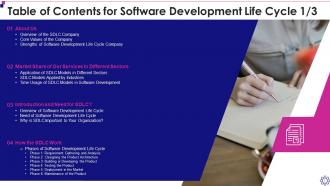
Slide 3: This slide presents Table of Content for the presentation.
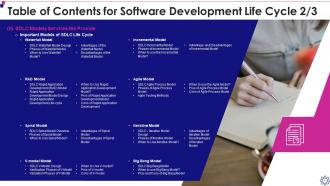
Slide 4: This is another slide continuing Table of Content for the presentation.
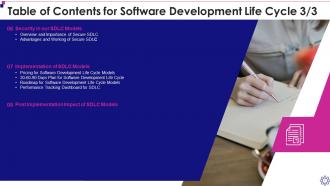
Slide 5: This is another slide continuing Table of Content for the presentation.
Slide 6: This slide highlights title for topics that are to be covered next in the template.
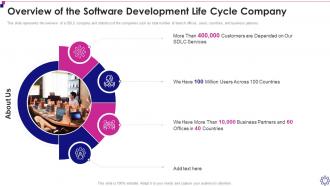
Slide 7: This slide shows Overview of the Software Development Life Cycle Company.
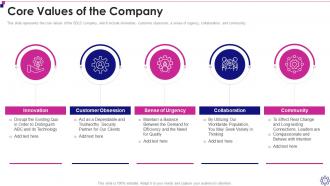
Slide 8: This slide represents the core values of the SDLC company.
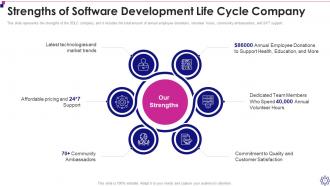
Slide 9: This slide displays Strengths of Software Development Life Cycle Company.
Slide 10: This slide highlights title for topics that are to be covered next in the template.
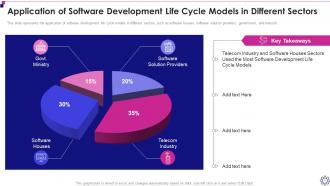
Slide 11: This slide showcases Application of Software Development Life Cycle Models in Different Sectors.
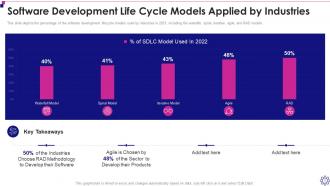
Slide 12: This slide shows Software Development Life Cycle Models Applied by Industries.
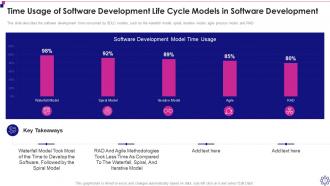
Slide 13: This slide presents Time Usage of Software Development Life Cycle Models in Software Development.
Slide 14: This slide highlights title for topics that are to be covered next in the template.
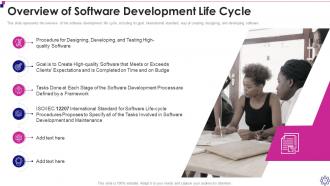
Slide 15: This slide displays Overview of Software Development Life Cycle.
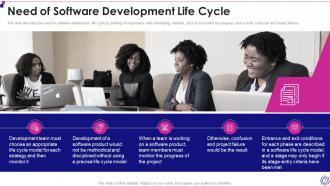
Slide 16: This slide describes the need for software development life cycle.
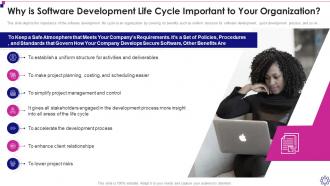
Slide 17: This slide depicts the importance of the software development life cycle to an organization.
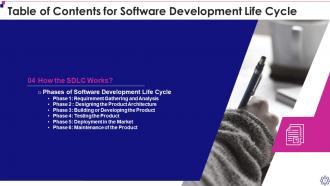
Slide 18: This slide highlights title for topics that are to be covered next in the template.
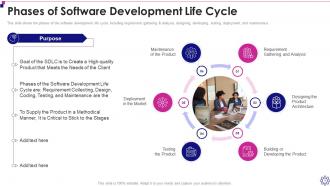
Slide 19: This slide represents Phases of Software Development Life Cycle.
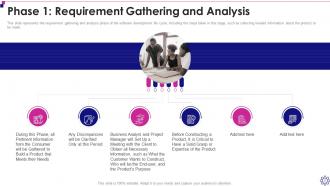
Slide 20: This slide showcases requirement gathering and analysis phase of the software development life cycle.
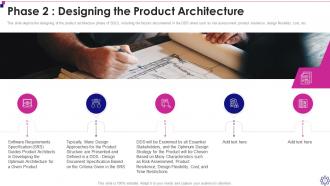
Slide 21: This slide depicts the designing of the product architecture phase of SDLC.
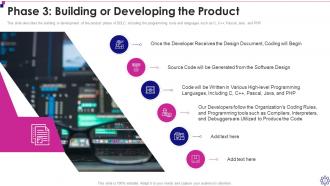
Slide 22: This slide describes the building or development of the product phase of SDLC.
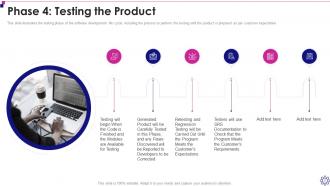
Slide 23: This slide illustrates the testing phase of the software development life cycle.
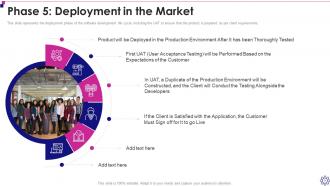
Slide 24: This slide represents the deployment phase of the software development life cycle.
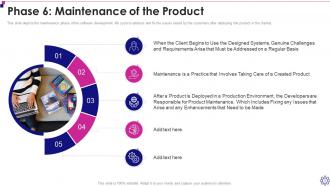
Slide 25: This slide depicts the maintenance phase of the software development life cycle.
Slide 26: This slide highlights title for topics that are to be covered next in the template.
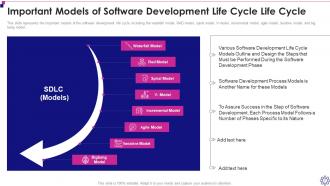
Slide 27: This slide showcases Important Models of Software Development Life Cycle Life Cycle.
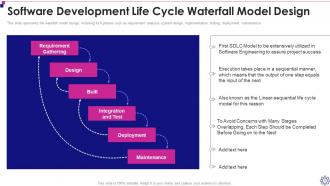
Slide 28: This slide shows Software Development Life Cycle Waterfall Model Design.
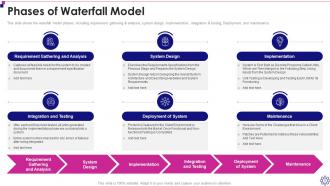
Slide 29: This slide presents waterfall model phases, including requirement gathering & analysis, system design, implementation, etc.
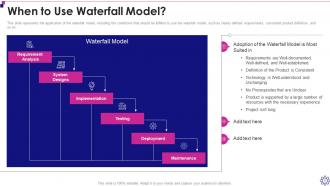
Slide 30: This slide represents the application of the waterfall model, including the conditions that should be fulfilled to use the waterfall model.
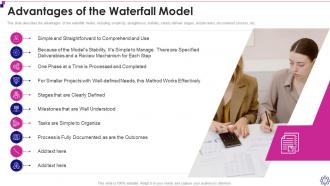
Slide 31: This slide describes the advantages of the waterfall model, including simplicity, straightness, stability, clearly defined stages, etc.
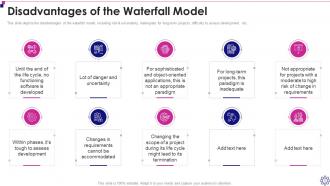
Slide 32: This slide depicts the disadvantages of the waterfall model, including risk & uncertainty, inadequate for long-term, etc.
Slide 33: This slide highlights title for topics that are to be covered next in the template.
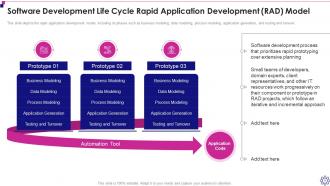
Slide 34: This slide showcases Software Development Life Cycle Rapid Application Development (RAD) Model.
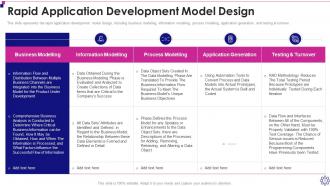
Slide 35: This slide shows Rapid Application Development Model Design.
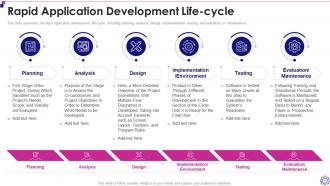
Slide 36: This slide presents Rapid Application Development Life-cycle.
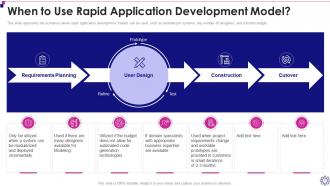
Slide 37: This slide represents the scenarios where rapid application development models can be used.
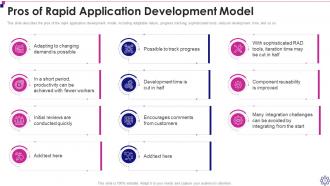
Slide 38: This slide showcases Pros of Rapid Application Development Model.
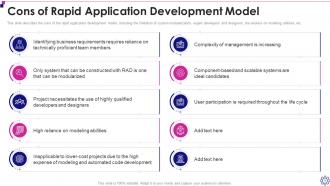
Slide 39: This slide shows Cons of Rapid Application Development Model.
Slide 40: This slide highlights title for topics that are to be covered next in the template.
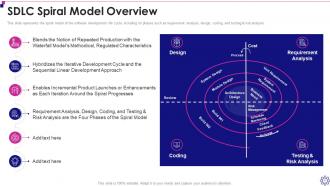
Slide 41: This slide represents the spiral model of the software development life cycle.
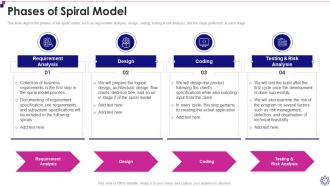
Slide 42: This slide depicts the phases of the spiral model, such as requirement analysis, design, coding, testing & risk analysis, etc.
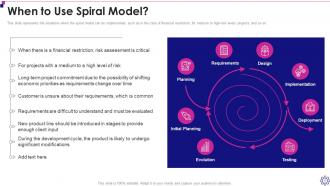
Slide 43: This slide represents the situations when the spiral model can be implemented.
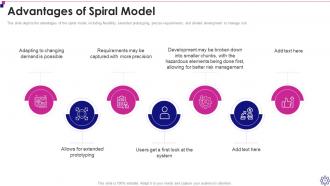
Slide 44: This slide depicts the advantages of the spiral model, including flexibility, extended prototyping, precise requirements, etc.
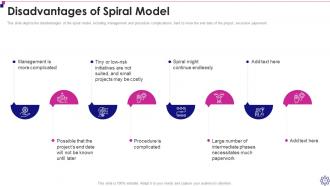
Slide 45: This slide represents disadvantages of the spiral model, including management and procedure complications, hard to know the end date, etc.
Slide 46: This slide highlights title for topics that are to be covered next in the template.
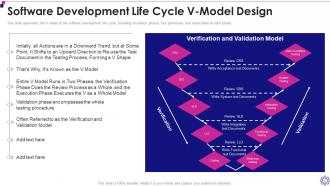
Slide 47: This slide showcases Software Development Life Cycle V-Model Design.
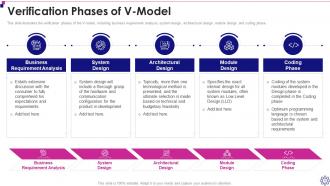
Slide 48: This slide illustrates the verification phases of the V-model, including business requirement analysis, system design, etc.
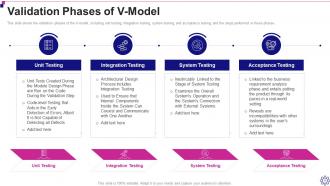
Slide 49: This slide shows the validation phases of the V-model, including unit testing, integration testing, system testing, etc.
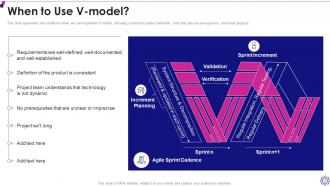
Slide 50: This slide represents the conditions when we can implement V-model, including consistent product definition, clear and precise prerequisites, etc.
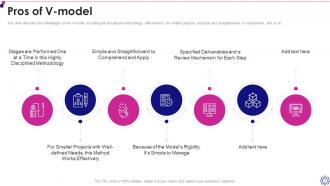
Slide 51: This slide describes the advantages of the V-model, including the disciplined methodology, effectiveness for smaller projects, etc.
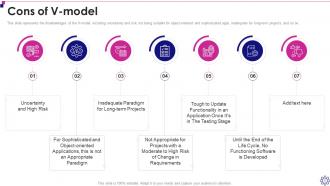
Slide 52: This slide represents the disadvantages of the V-model, including uncertainty and risk.
Slide 53: This slide highlights title for topics that are to be covered next in the template.
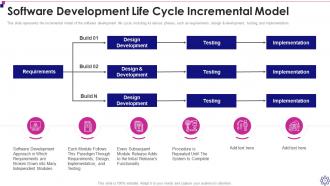
Slide 54: This slide showcases Software Development Life Cycle Incremental Model.
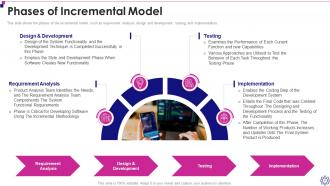
Slide 55: This slide shows the phases of the incremental model, such as requirement analysis, design and development, etc.
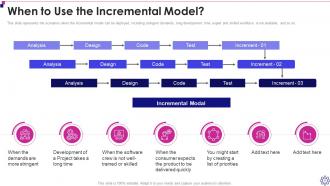
Slide 56: This slide represents the scenarios when the incremental model can be deployed.
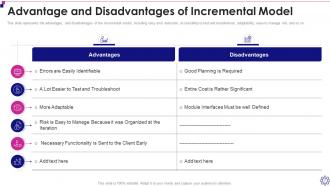
Slide 57: This slide showcases Advantage and Disadvantages of Incremental Model.
Slide 58: This slide highlights title for topics that are to be covered next in the template.
Slide 59: This slide shows Software Development Life Cycle Agile Process Model.
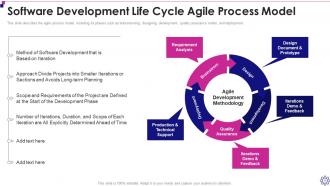
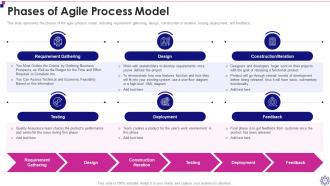
Slide 60: This slide represents the phases of the agile process model, including requirement gathering, design, etc.
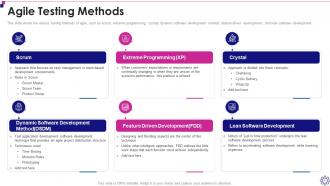
Slide 61: This slide shows the various testing methods of agile, such as scrum, extreme programming, crystal, etc.
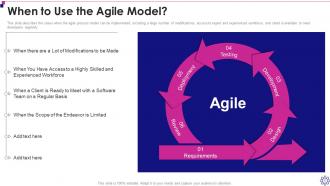
Slide 62: This slide describes the cases when the agile process model can be implemented.
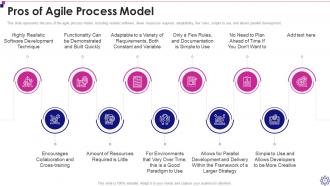
Slide 63: This slide represents the pros of the agile process model, including realistic software, fewer resources required, etc.
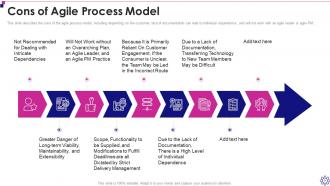
Slide 64: This slide describes the cons of the agile process model.
Slide 65: This slide highlights title for topics that are to be covered next in the template.
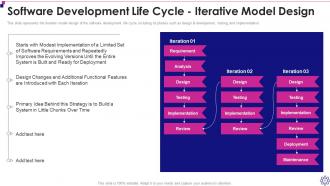
Slide 66: This slide represents the iterative model design of the software development life cycle.
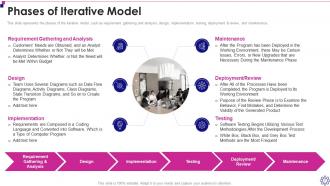
Slide 67: This slide represents the phases of the iterative model, such as requirement gathering and analysis, design, implementation, etc.
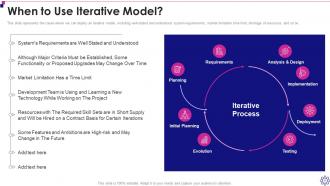
Slide 68: This slide displays cases where we can deploy an iterative model.
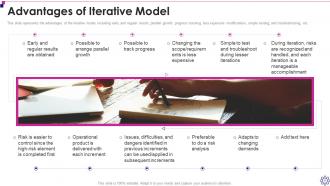
Slide 69: This slide represents Advantages of Iterative Model.
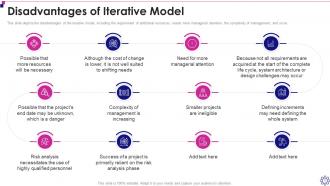
Slide 70: This slide depicts the disadvantages of the iterative model.
Slide 71: This slide highlights title for topics that are to be covered next in the template.
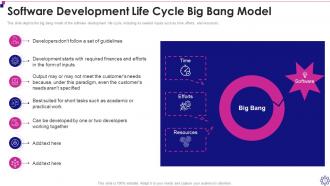
Slide 72: This slide shows Software Development Life Cycle Big Bang Model.
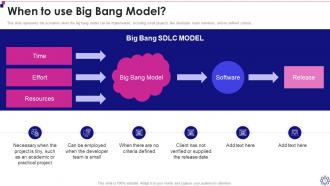
Slide 73: This slide represents the scenarios when the big bang model can be implemented.
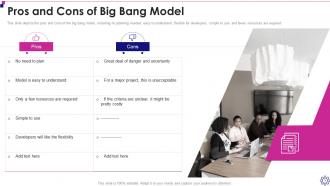
Slide 74: This slide depicts the pros and cons of the big bang model.
Slide 75: This slide highlights title for topics that are to be covered next in the template.
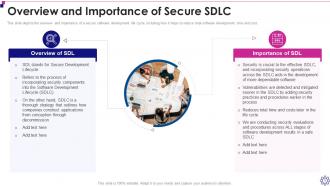
Slide 76: This slide depicts the overview and importance of a secure software development life cycle.
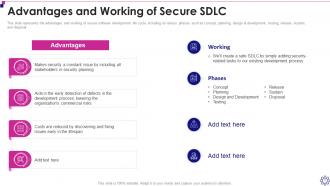
Slide 77: This slide showcases Advantages and Working of Secure SDLC.
Slide 78: This slide highlights title for topics that are to be covered next in the template.
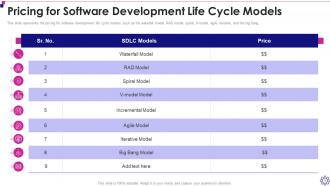
Slide 79: This slide shows Pricing for Software Development Life Cycle Models.
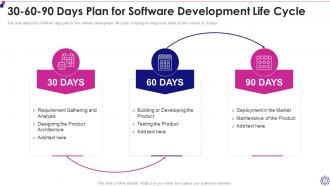
Slide 80: This slide presents 30-60-90 Days Plan for Software Development Life Cycle.
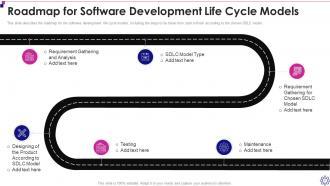
Slide 81: This slide displays Roadmap for Software Development Life Cycle Models.
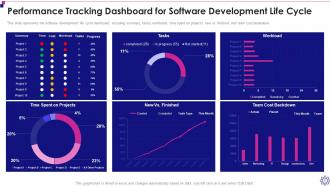
Slide 82: This slide represents Performance Tracking Dashboard for Software Development Life Cycle.
Slide 83: This slide highlights title for topics that are to be covered next in the template.
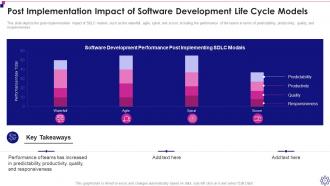
Slide 84: This slide showcases Post Implementation Impact of Software Development Life Cycle Models.
Slide 85: This slide displays Icons for Software Development Life Cycle (IT).
Slide 86: This slide is titled as Additional Slides for moving forward.
Slide 87: This is About Us slide to show company specifications etc.
Slide 88: This is a Financial slide. Show your finance related stuff here.
Slide 89: This is Our Mission slide with related imagery and text.
Slide 90: This is a Timeline slide. Show data related to time intervals here.
Slide 91: This slide presents Weekly Timeline with Task Name.
Slide 92: This slide depicts Venn diagram with text boxes.
Slide 93: This slide shows Post It Notes. Post your important notes here.
Slide 94: This slide showcases Magnifying Glass to highlight information, specifications etc
Slide 95: This is a Thank You slide with address, contact numbers and email address.
Software Development Life Cycle IT Powerpoint Presentation Slides with all 100 slides:
Use our Software Development Life Cycle IT Powerpoint Presentation Slides to effectively help you save your valuable time. They are readymade to fit into any presentation structure.





FAQs for Software Development Life Cycle IT
So basically you've got planning, analysis, design, implementation, testing, deployment, and maintenance. First you figure out requirements - like what are we even building here? Then design the whole thing out. Implementation is the fun part where you actually code everything. Testing comes next (and seriously, don't skip this step - learned that the hard way). After that you deploy and keep maintaining it forever basically. Different teams might shuffle these around, but those are your core phases. Oh, and figure out where you are in the process so you know what you should be working on next!
So basically, Agile chops everything into short bursts with tons of feedback. Waterfall? You're stuck following this super rigid sequence - finish one phase, then move on. Honestly, Waterfall requirements almost always fall apart once real users get involved (learned that the hard way). With Agile you can actually pivot when you figure out what people want. Instead of waiting forever for some final product, you get working stuff delivered bit by bit. If there's any chance your requirements might shift - and let's be real, they probably will - go with Agile.
So the V-Model's main thing is you plan testing right from the start, which catches bugs early when they're cheaper to fix. Documentation is solid too - everything traces back nicely. But man, it's super rigid. Change one requirement and you're basically redoing work on both sides of that V shape. Gets pricey quick. Also, stakeholders don't see actual working software until way late, so no early feedback. Honestly though, if your requirements are locked down and won't change much, it's actually pretty decent. Otherwise you'll probably want something more flexible.
Honestly, it's all about matching your process to what you're actually dealing with. Small projects? You can totally combine requirements with design, skip the heavy docs, and just iterate quickly. But once things get big and complex, you need those formal checkpoints or everything turns into a mess - trust me on this one. Bigger projects require way more upfront planning, while smaller ones can stay flexible and pivot easily. The phases don't really change, just how formal you get with them. Start by figuring out your team size and scope, then dial your process up or down from there.
Think of documentation as your project's brain dump - it saves all the important stuff so you don't forget later. You'll write down scope and requirements during planning. Design phase means wireframes, architecture docs, technical specs. Code comments and API docs happen during development (seriously, document your APIs or everyone will hate you). Testing creates test cases and bug reports. After deployment, you need user manuals and troubleshooting guides. I learned this the hard way - without good docs, you'll spend half your time six months later trying to remember why you made certain choices.
So CI/CD is basically like setting up an assembly line for your code. When you commit changes, it automatically runs tests and pushes everything through different environments without you babysitting the whole process. No more manual handoffs between dev and ops - honestly, it's a game changer. You'll catch bugs way earlier and avoid those annoying "works on my machine" situations. Plus deployments happen way faster. I'd start simple though, maybe just automate your test runs first? Even that small step will save you hours and make releases so much more reliable. Trust me on this one.
Stakeholder interviews are your best friend - get everyone talking upfront. User stories help too, though honestly most people skip this part and regret it later. I'd throw in some prototyping so people can actually see what you're building instead of just imagining it. Document analysis is boring but useful for understanding current systems. Oh, and watching users work with existing processes? Super eye-opening. You'll catch stuff you never would've thought to ask about. Don't rely on just one method though - mix it up for better results.
Honestly, just get QA involved from day one instead of treating it like an afterthought. Have them sit in on requirements reviews and sprint planning - they'll catch stuff way earlier. Set up your CI pipelines to run tests automatically (saves so much headache). Code reviews and unit testing should happen during development, not after. Yeah, it feels like extra work at first, but you'll thank yourself later when you're not scrambling to fix bugs right before release. The whole team needs to own quality, not just dump everything on QA at the end. Makes everyone's life easier.
Honestly, start with your project's constraints - budget, timeline, team size. Fixed requirements that won't change? Waterfall's probably your friend. But if stakeholders will keep tweaking things or you're not 100% sure what you're building, go Agile. Team experience matters a ton too. I've watched so many teams just pick whatever they've used before (guilty of this myself lol), but sometimes you gotta step outside your comfort zone. Don't force your project into the wrong box just because it feels familiar, you know?
Honestly, project management tools are a lifesaver for tracking where everything is in your development cycle. You can finally see who's doing what and catch problems early before they mess up your whole timeline. Most of them play nice with whatever dev tools you're already using too. The best part? Stakeholders can actually watch progress happen instead of constantly bugging you about deadlines - though let's be real, some will still do that anyway. Requirements tracking becomes way less painful, and you won't lose track of features anymore. I'd start with Jira or Asana, they're pretty straightforward.
Oh man, scope creep will destroy you every time - I learned that the hard way on my last big project. Don't skip requirements gathering either, even when everyone's breathing down your neck to start coding. Testing needs to happen constantly, not just at the end when you're already behind schedule. The thing that really gets me is when teams don't loop in stakeholders early enough. Communication breakdowns between devs and business folks? Total project killer. My advice: nail down those requirements first, be ruthless about scope changes, and honestly just over-communicate with everyone involved.
Dude, user feedback is like your sanity check for every SDLC cycle. Collect it during testing, after you deploy stuff, even when you're just figuring out requirements. Then actually use those insights for your next sprint - don't just file them away somewhere! Honestly can't tell you how many times this has saved my butt from building something completely wrong. Oh and build those feedback loops right into your process from the start. Regular user reviews, beta tests, demo sessions - whatever works. You'll catch issues way earlier instead of having that awkward "um, this isn't what we meant" conversation later.
Dude, don't just slap security on at the end - that's asking for trouble. Start with threat modeling when you're gathering requirements, then build in secure coding practices during development. Code reviews are your friend here. Run security testing alongside your regular testing - static analysis, dynamic scans, dependency checks, all that jazz. I mean, penetration testing before you deploy is pretty much non-negotiable these days. Yeah, it feels like extra work upfront, but trust me, it's way less painful than dealing with a breach later. Oh, and make sure everyone on the team owns security, not just the security folks.
So DevOps basically threw the old waterfall method out the window - no more tossing code over the fence and hoping ops figures it out. Now dev and ops teams actually work together throughout the whole process. You get continuous integration, automated testing, way faster deployments. The feedback loops are so much tighter, which honestly makes debugging less of a nightmare. Plus infrastructure as code is a game changer once you get used to it. My advice? Start automating your testing and deployment stuff now. Trust me, you'll thank yourself later when you're not scrambling to fix production issues at 2am.
Honestly, just pick 2-3 metrics per phase or you'll drown in spreadsheets. Requirements? Track how complete they are and how often they change. Design reviews and documented decisions matter there. For dev work, code quality and defect density are solid - though velocity gets gamed so much it's almost useless sometimes. Testing's all about detection rates and coverage, plus those bugs that slip through. Deployment success and rollback rates tell you if you're actually shipping well. Start with whatever's breaking your team's brain right now and measure that first.
-
Top Quality presentations that are easily editable.
-
Designs have enough space to add content.