

Software Development Methodologies Powerpoint Presentation Slides




Try Before you Buy Download Free Sample Product
 Impress Your
 Audience
 100%
100% Editable
 Save Hours
 of Time


This PowerPoint presentation briefly explains the problems an organization faces with the Waterfall model and implements Agile Methodology in software development projects. In this Software Development Methodologies PowerPoint Presentation, we have covered the importance of agile methodology, an overview of agile methodology, Agile Software Development, and Agile Manifesto. In addition, this Agile Scrum Methodology PPT contains the various Agile Methodologies Frameworks such as Scrum, Extreme Programming, Kanban, Lean, Crystal, DSDM, and ASD. Also, the Agile Development Methodology PPT presentation includes the training and budget for Agile adoption, the Agile Implementation section that contains Agile best practices, roles, responsibilities, RACI Matrix, the implementation process, and matrices for effective use of Agile. Furthermore, this Software Development Methodologies template caters to a comparison between the Agile and Waterfall model, methods to expand the Agile impact, 30-60-90 days plan, a roadmap, and a dashboard for Agile team management. Lastly, this Agile Methodology deck includes the post-implementation impact of Agile Methodology on business. Get access to this powerful template now.
People who downloaded this PowerPoint presentation also viewed the following :
Content of this Powerpoint Presentation
Slide 1: This slide introduces Software Development Methodologies. State your company name and begin.
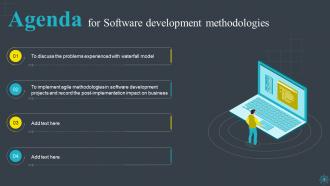
Slide 2: This slide states Agenda of the presentation.
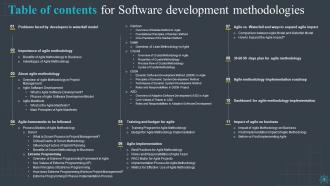
Slide 3: This slide presents Table of Content for the presentation.
Slide 4: This slide highlights title for topics that are to be covered next in the template.
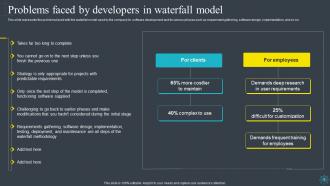
Slide 5: This slide displays Problems Faced by Developers in Waterfall Model.
Slide 6: This slide highlights title for topics that are to be covered next in the template.
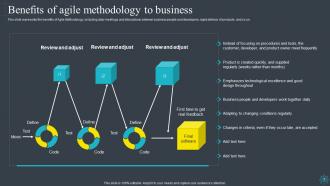
Slide 7: This slide displays Benefits of Agile Methodology to Business.
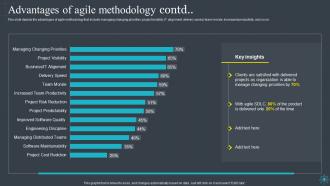
Slide 8: This slide depicts the advantages of agile methodology that include managing changing priorities, project visibility, etc.
Slide 9: This slide highlights title for topics that are to be covered next in the template.
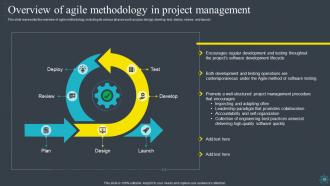
Slide 10: This slide represents Overview of Agile Methodology in Project Management.
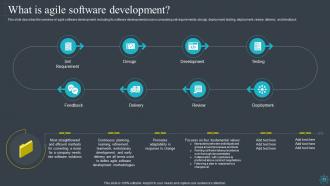
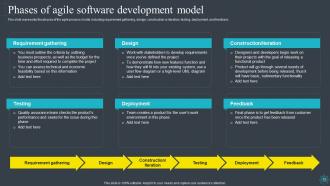
Slide 11: This slide describes the overview of agile software development.
Slide 12: This slide showcases Phases of Agile Software Development Model.
Slide 13: This slide highlights title for topics that are to be covered next in the template.
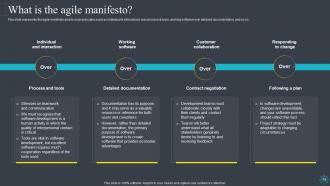
Slide 14: This slide represents the agile manifesto and its main principles such as individual & interactions.
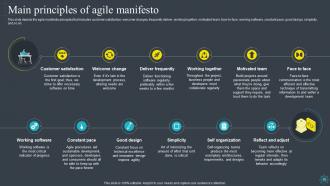
Slide 15: This slide depicts the agile manifesto principles that includes customer satisfaction, welcome changes, frequently deliver, etc.
Slide 16: This slide highlights title for topics that are to be covered next in the template.
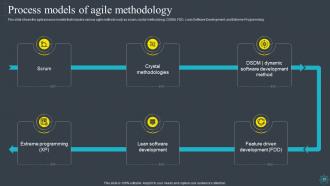
Slide 17: This slide shows the agile process models that includes various agile methods such as scrum, crystal methodology, DSDM, etc.
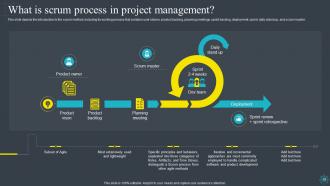
Slide 18: This slide depicts the introduction to the scrum method, including its working process.
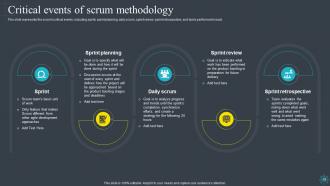
Slide 19: This slide represents Critical Events of Scrum Methodology.
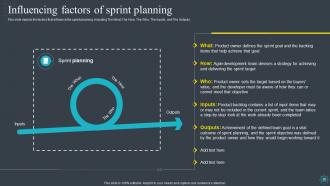
Slide 20: This slide showcases the factors that influence the sprint planning.
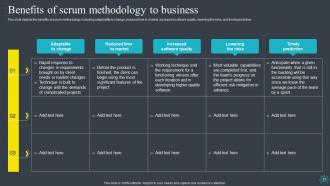
Slide 21: This slide shows Benefits of Scrum Methodology to Business.
Slide 22: This slide highlights title for topics that are to be covered next in the template.
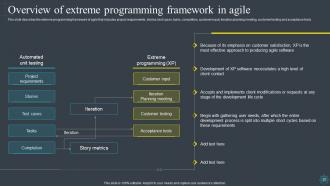
Slide 23: This slide presents Overview of Extreme Programming Framework in Agile.
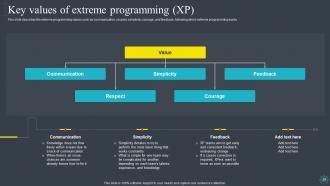
Slide 24: This slide describes the extreme programming values such as communication, respect, simplicity, etc.
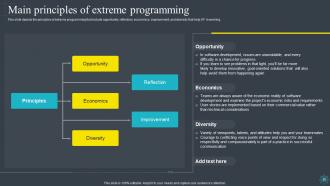
Slide 25: This slide depicts the principles of extreme programming that include opportunity, reflection, economics, etc.
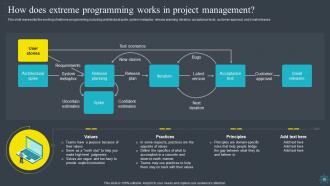
Slide 26: This slide represents the working of extreme programming, including architectural spike, system metaphor, etc.
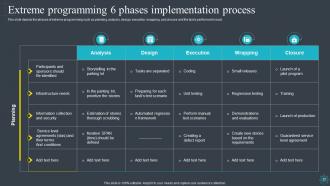
Slide 27: This slide showcases Extreme Programming 6 Phases Implementation Process.
Slide 28: This slide highlights title for topics that are to be covered next in the template.
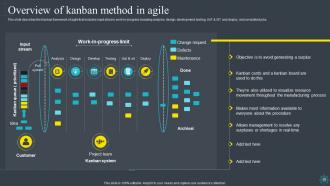
Slide 29: This slide describes the Kanban framework of agile that includes input stream.
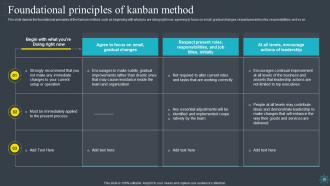
Slide 30: This slide depicts the foundational principles of the Kanban method.
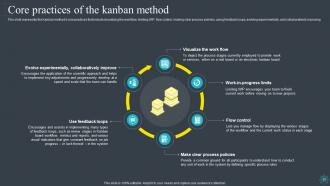
Slide 31: This slide showcases Core Practices of the Kanban Method.
Slide 32: This slide highlights title for topics that are to be covered next in the template.
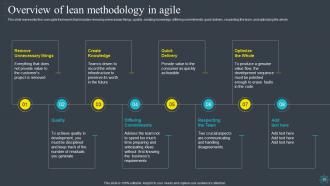
Slide 33: This slide represents the Lean agile framework that includes removing unnecessary things.
Slide 34: This slide highlights title for topics that are to be covered next in the template.
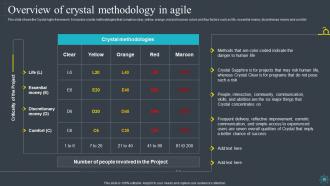
Slide 35: This slide presents Overview of Crystal Methodology in Agile.
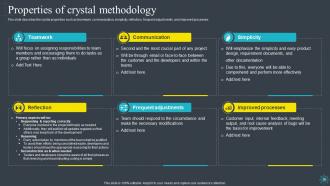
Slide 36: This slide describes the crystal properties such as teamwork, communication, simplicity, etc.
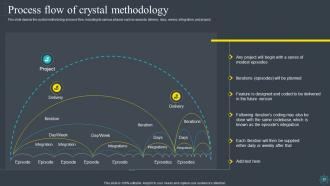
Slide 37: This slide depicts the crystal methodology process flow, including its various phases such as episode, delivery, days, etc.
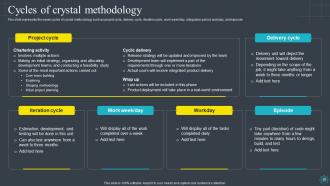
Slide 38: This slide represents the seven cycles of crystal methodology such as project cycle, delivery cycle, iteration cycle, etc.
Slide 39: This slide highlights title for topics that are to be covered next in the template.
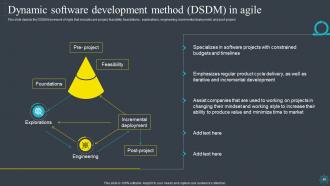
Slide 40: This slide showcases Dynamic Software Development Method (DSDM) in Agile.
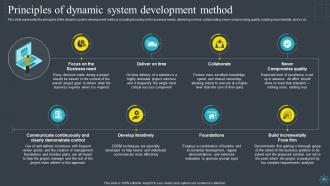
Slide 41: This slide shows Principles of Dynamic System Development Method.
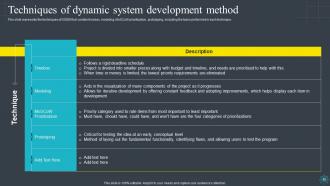
Slide 42: This slide shows Techniques of Dynamic System Development Method.
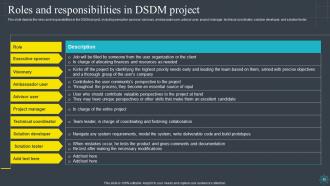
Slide 43: This slide presents Roles and Responsibilities in DSDM Project.
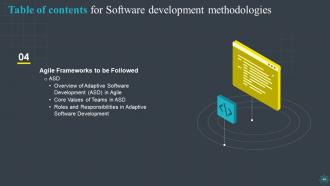
Slide 44: This slide highlights title for topics that are to be covered next in the template.
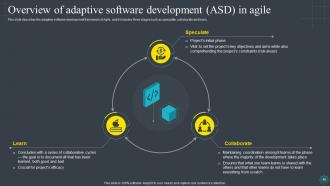
Slide 45: This slide displays Overview of Adaptive Software Development (ASD) in Agile.
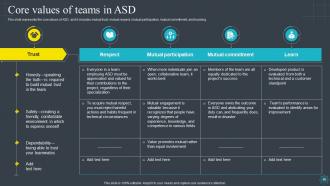
Slide 46: This slide represents the core values of ASD, and it includes mutual trust, mutual respect, mutual participation, etc.
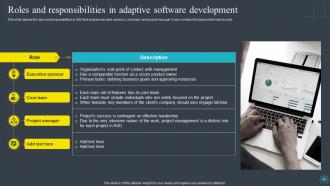
Slide 47: This slide showcases Roles and Responsibilities in Adaptive Software Development.
Slide 48: This slide highlights title for topics that are to be covered next in the template.
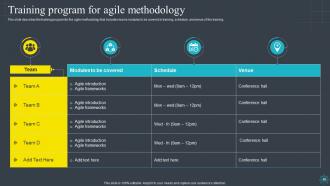
Slide 49: This slide describes the training program for the agile methodology that includes teams modules to be covered.
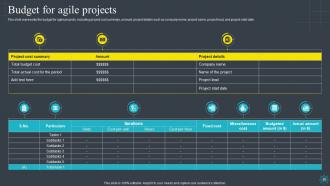
Slide 50: This slide represents the budget for agile projects, including project cost summary, amount, and project details.
Slide 51: This slide highlights title for topics that are to be covered next in the template.
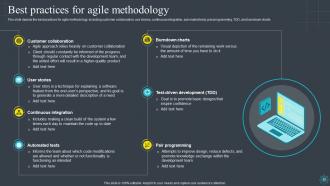
Slide 52: This slide showcases Agile approach relies heavily on customer collaboration.
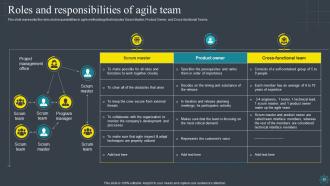
Slide 53: This slide represents the roles and responsibilities in agile methodology.
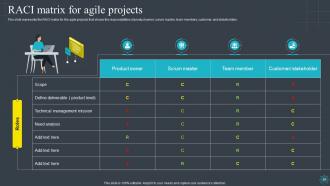
Slide 54: This slide presents RACI matrix for the agile projects that shows the responsibilities of product owner.
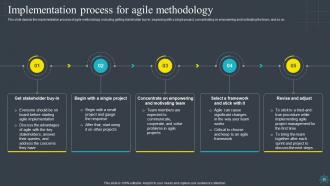
Slide 55: This slide displays Implementation Process for Agile Methodology.
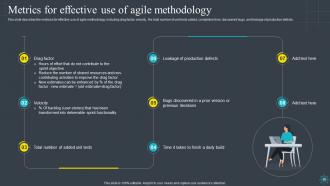
Slide 56: This slide represents Metrics for Effective Use of Agile Methodology.
Slide 57: This slide highlights title for topics that are to be covered next in the template.
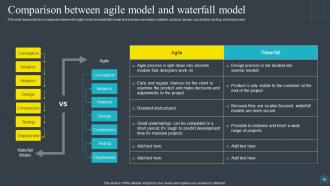
Slide 58: This slide shows Comparison between Agile Model and Waterfall Model.
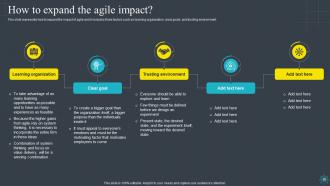
Slide 59: This slide represents how to expand the impact of agile and it includes three factors such as learning organization, clear goals, and trusting environment.
Slide 60: This slide highlights title for topics that are to be covered next in the template.
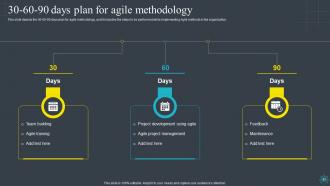
Slide 61: This slide showcases 30-60-90 Days Plan for Agile Methodology.
Slide 62: This slide highlights title for topics that are to be covered next in the template.
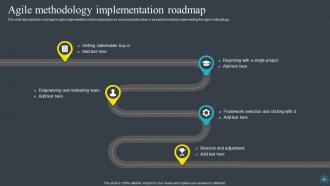
Slide 63: This slide displays Agile Methodology Implementation Roadmap.
Slide 64: This slide highlights title for topics that are to be covered next in the template.
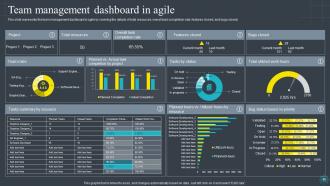
Slide 65: This slide represents the team management dashboard in agile by covering the details of total resources.
Slide 66: This slide highlights title for topics that are to be covered next in the template.
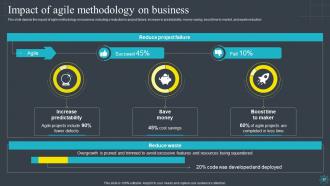
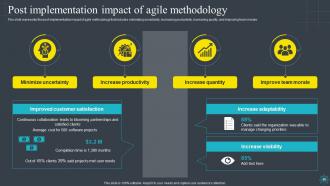
Slide 67: This slide depicts the impact of agile methodology on business.
Slide 68: This slide showcases Post Implementation Impact of Agile Methodology.
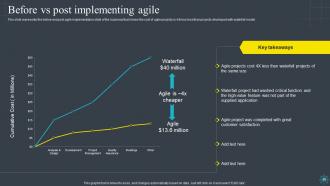
Slide 69: This slide represents the before and post agile implementation state of the business.
Slide 70: This slide contains all the icons used in this presentation.
Slide 71: This slide is titled as Additional Slides for moving forward.
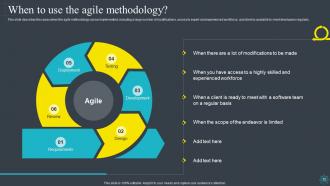
Slide 72: This slide describes the cases when the agile methodology can be implemented.
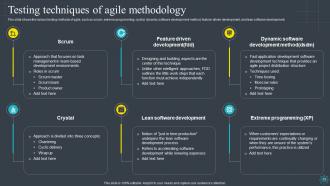
Slide 73: This slide shows the various testing methods of agile, such as scrum, extreme programming, crystal, etc.
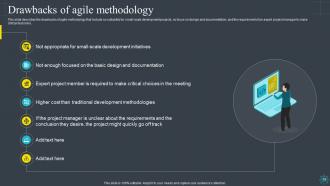
Slide 74: This slide describes the drawbacks of agile methodology.
Slide 75: This slide shows Post It Notes. Post your important notes here.
Slide 76: This is a Timeline slide. Show data related to time intervals here.
Slide 77: This slide depicts Venn diagram with text boxes.
Slide 78: This slide showcases Magnifying Glass to highlight information, specifications etc
Slide 79: This is Our Goal slide. State your firm's goals here.
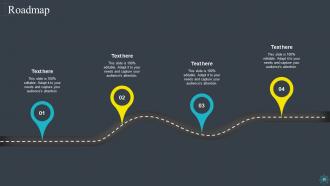
Slide 80: This slide presents Roadmap with additional textboxes.
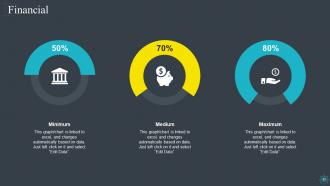
Slide 81: This is a Financial slide. Show your finance related stuff here.
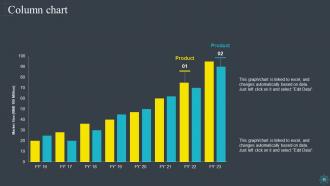
Slide 82: This slide displays Column chart with two products comparison.
Slide 83: This slide contains Puzzle with related icons and text.
Slide 84: This is a Thank You slide with address, contact numbers and email address.
Software Development Methodologies Powerpoint Presentation Slides with all 89 slides:
Use our Software Development Methodologies Powerpoint Presentation Slides to effectively help you save your valuable time. They are readymade to fit into any presentation structure.





FAQs for Software Development Methodologies
Flexibility is the big one here. Agile does these short sprints so you can pivot when things change - and trust me, things always change. Waterfall's more like following a recipe step by step. You plan everything upfront, then just... execute. Can't really go back once you're moving forward. If your requirements are crystal clear and won't shift? Waterfall's fine. But most projects aren't like that. Agile handles uncertainty way better since you're constantly getting feedback and adjusting. The downside is you'll need stakeholders who actually want to stay involved throughout. Some people prefer the "tell me when it's done" approach, honestly.
Look, DevOps is just tearing down that stupid wall between dev and ops teams. You stop doing those nightmare releases where you chuck code over and pray it works. Everyone collaborates from the start on deployments and monitoring stuff. Automate everything you can - CI/CD, testing, whatever. Ship tiny changes constantly instead of those massive updates that always broke something. The feedback gets so much faster when both teams are watching production together. Honestly, just pick one thing your team does manually all the time and automate that first.
Honestly, Spiral works best for those massive, messy projects where you don't really know what you're building yet. High-risk stuff too - like if screwing up means someone's getting fired or losing millions. The whole iterative thing with constant risk checking? Super helpful when stakes are high. Perfect for mission-critical systems where failure isn't an option. Your stakeholders will love seeing prototypes every few weeks instead of waiting months for results. Oh, and you'll definitely need people who actually know how to do proper risk analysis - can't just wing that part. Not gonna lie though, it's probably overkill for simpler projects.
Dude, you can actually see where work gets stuck before it becomes a total nightmare - that visibility alone is worth it. Instead of waiting around for sprint deadlines, you're constantly shipping stuff. Way more flexible too since you can shift priorities without breaking everything. Honestly, I think it beats Scrum for most teams. Just grab a board and set up three columns: "To Do," "In Progress," and "Done." Then - and this part's key - add limits to how much can sit in progress at once. Otherwise you'll end up with the same chaos as before, just... organized chaos.
User stories are lifesavers for keeping everyone on the same page. The "As a [user], I want [goal] so that [benefit]" format makes requirements crystal clear instead of leaving room for confusion. They break work into manageable pieces that fit nicely into sprints - usually a few days each. Scope creep becomes way less of a nightmare when you stick to them. Oh, and definitely write them with your product owner, not in isolation. Getting alignment on acceptance criteria upfront saves you from those awkward "wait, this isn't what we wanted" conversations later. Trust me on that one.
Dude, prototyping changed everything for me. You build quick mockups first instead of coding for months in the dark. Get feedback super early, then iterate based on what people actually want. Way better than the old school approach where you'd realize you built garbage after wasting tons of time. Your first attempt will probably be rough anyway - that's normal! Low-fi prototypes make requirements so much clearer. Honestly saved my butt on multiple projects when I thought I knew what users needed but was totally wrong.
You gotta track the obvious stuff first - velocity, cycle time, defect rates. But honestly? The soft metrics matter just as much. I've watched teams crush their sprint goals while everyone secretly hated their lives. Check team satisfaction and burnout regularly. Customer happiness is huge too - are you building what people actually want? Set up retrospectives where everyone can be real about what's working and what sucks. Oh, and don't get obsessed with the numbers if your team is falling apart. Balance is everything.
Honestly, remote Agile is tough. You can't just walk over and ask quick questions anymore - everything becomes this formal thing. Daily standups get weird on video calls. Time zones are the worst part though, good luck getting everyone together for sprint planning. The whole vibe changes when you're not physically together, and team chemistry definitely takes a hit. Plus you miss all those random hallway conversations where problems actually get solved. My take? Get decent video tools (don't cheap out), set up some actual communication rules, and do informal coffee chats regularly. That last part sounds cheesy but it works.
Honestly, Scrum and Kanban are perfect for CI/CD since they're all about quick iterations and pushing stuff out regularly. Works great with your automated pipelines. DevOps fits right in too - you're already tearing down those annoying walls between dev and ops anyway. Lean development's another solid choice because it cuts out the fluff and focuses on getting value to users fast. Waterfall though? Complete opposite direction. If your team's never done this before, I'd probably go with Scrum first. The whole sprint thing just naturally gets people thinking about integrating code more often, which is exactly what makes CI/CD work so well.
So Agile is basically the overall philosophy - you know, working in short cycles, talking to customers, being flexible with changes. Scrum is just one way to actually do Agile stuff. With Scrum you get real structure: sprint planning meetings, daily check-ins, someone called a Product Owner who decides what to build. Most teams I know just say "Agile" when they really mean Scrum, which is kinda confusing at first. Start with Scrum if you're new to this. Way easier to learn concrete practices than trying to figure out some abstract mindset thing.
Honestly, it comes down to how messy your project's gonna get. Small teams with stuff that'll probably change? Go agile. Fixed requirements and bigger groups work better with waterfall. Your client matters too - some want constant check-ins (which gets old fast, trust me), others just want updates at milestones. Team experience is huge though. Don't throw junior devs into something they can't handle yet. Oh, and if you're in healthcare or finance, regulatory stuff might force your hand anyway. But really? Just figure out how uncertain everything is right now. That usually makes the choice pretty obvious.
So V-Model is basically Waterfall but smarter about testing. Instead of crossing your fingers and testing everything at the end, you plan tests for each development phase as you go. Requirements phase? You're already thinking about acceptance tests. Design phase? Integration tests get mapped out. It's way better than the "build first, pray later" approach most teams end up with. Catching bugs early saves you so much headache (and money). Look, if you're stuck doing sequential development anyway, V-Model at least gives you that testing structure without turning your whole process upside down. Makes the inevitable bug hunt less painful.
So basically, start by cutting out all the BS that wastes time - pointless meetings, docs no one reads, features users ignore. Map out your workflow to spot where things get stuck. Build stuff only when you actually need it, not way ahead of schedule. Oh and let your team grab tasks when they're ready instead of dumping work on them - works way better honestly. It's kinda like decluttering but for your entire process. Focus on how long things take and tighten up those feedback loops. Maybe just try one small thing this sprint and see what happens?
Honestly, tech advancements pretty much dictate how we end up working. Cloud computing made DevOps and continuous deployment actually possible - before that it was just a pipe dream. Now AI tools are pushing us toward predictive planning and way more automated testing. Better collaboration platforms completely transformed remote work too (thank god, especially after 2020). Even small tech improvements can totally reshape methodologies. My advice? Keep an eye on what's coming next because that's usually where work processes are headed. It's like tech creates the playground, then we figure out new games to play on it.
Yeah totally doable! So basically you'd want to bake cloud stuff right into your planning phase - think containerization and cloud-native patterns from day one. Testing gets trickier since you're now dealing with scalability and deployment scenarios. Documentation becomes way more critical (trust me on this one) because distributed systems are just... messy. Even if you're doing waterfall or whatever structured approach, throw in some DevOps practices like CI/CD pipelines. Infrastructure as code is pretty clutch too. The main thing is don't treat cloud deployment like some random step at the end - make it part of your core process.
-
Eye-catching PPT designs, outstanding team, and best customer service. I’m a super satisfied customer here!
-
Editable, diversified, compatible with MS PPT and Google Slides, and on top of that finest graphics!! I mean in the words of the famous Ross Geller, “What more do you want!”