

Software Test Plan Powerpoint Ppt Template Bundles





Try Before you Buy Download Free Sample Product
 Impress Your
Audience
 100%
Editable
 Save Hours
of Time


Introducing our comprehensive and user-friendly PowerPoint PPT presentation on Software Test Plan. This informative presentation is tailored for IT professionals and covers all aspects of creating a well-structured software test plan document. It provides valuable insights into the importance of test planning, key components of a test plan, and best practices for effective test management. Our PPT includes visually appealing slides that highlight the significance of automation tools in streamlining the testing process, ensuring efficiency and accuracy. Whether you are a beginner or an experienced professional, this presentation will equip you with the knowledge and tools to create a robust software test plan that ensures high-quality software delivery.
People who downloaded this PowerPoint presentation also viewed the following :
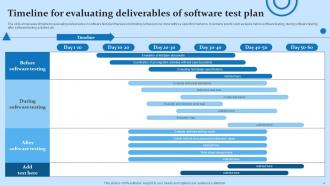
Software Test Plan Powerpoint Ppt Template Bundles with all 17 slides:
Use our Software Test Plan Powerpoint Ppt Template Bundles to effectively help you save your valuable time. They are readymade to fit into any presentation structure.







FAQs for Software Test Plan Powerpoint
So you'll need test objectives and scope first - basically what you're testing and why. Timeline with milestones, resource needs, and your pass/fail criteria are essential. Risk assessment is huge too (honestly, most projects crash because people skip this part). Test environment setup and data requirements should be in there. Entry/exit criteria define when testing actually starts and stops - super critical. Oh, and get stakeholder buy-in before you start anything. Trust me, getting everyone aligned upfront prevents so many issues down the road.
Okay so basically you want to spell out exactly what you're testing AND what you're not - that second part always catches people off guard. Your objectives need concrete success criteria, like "login works on Chrome, Firefox, Safari" or "system doesn't crash with 1000 users." I learned the hard way that vague objectives just lead to scope creep later. Make sure your scope actually fits your timeline and resources (obvious but people ignore this constantly). Document everything clearly so stakeholders can't pull that "oh I thought we were including X" nonsense later. How will you know when you're actually done testing?
So basically, risk assessment is like figuring out which parts of your software would absolutely wreck everything if they broke. You make a list of your biggest nightmares - payment processing failing, user data getting corrupted, that sort of thing. Then you throw most of your testing resources at those scary areas first. The boring stuff that nobody really uses? Just run some quick smoke tests and call it good. I mean, you can't test every single thing with the same intensity unless your team has magical time-bending powers. Start with what keeps you up at night and work your way down from there.
So here's the thing - you've gotta trace every single test case back to an actual business requirement. That's your lifeline when people start questioning stuff. Go through those requirements docs with a fine-tooth comb, then map your test scenarios directly to what matters. I'm obsessed with keeping a traceability matrix because trust me, stakeholders will definitely ask "why are we even testing this?" Pull your BAs and product owners into planning sessions too. They'll spot when you're going down some technical rabbit hole that users couldn't care less about. Your test plan should sound like it came from someone who gets what the business actually wants to accomplish.
Start with unit testing, integration testing, and user acceptance testing - that's your foundation right there. System and regression testing matter too, especially if you're pushing updates constantly. Oh, and performance testing! Seriously, can't tell you how many times I've seen apps crash because nobody bothered testing under real load conditions. It's wild how often that gets skipped. Don't try to do everything at once though. Pick what actually matches your risks first, then expand from there. Those three core ones will get you pretty far to start.
So first thing - figure out your test scope and what you're actually dealing with. What kind of testing do you need? Functional, performance, security stuff? Match your tools to that, but honestly don't overthink it. Simple tools often work better than the flashy ones everyone's hyping up. Think about your team's skills too, plus timeline and budget (ugh, always comes down to money). You'll need to sort out environments and test data - that's usually where things get messy. Here's what I'd do: map out all your testing activities first, then see where you're missing tools or people. Way easier than starting with random tools and hoping they fit.
Look, test case design is what turns your testing plan from a vague idea into something you can actually execute. Without proper test cases, you're basically just winging it. Map them directly to your requirements so you don't miss critical stuff. Good ones cover all the functionality, weird edge cases, and real user scenarios. Plus they're repeatable - super helpful when someone else needs to run the same tests. I've definitely been on projects where sloppy test cases let obvious bugs slip right through to production. Not fun explaining that to stakeholders.
Start by mapping out each environment - dev, staging, UAT, prod-like, whatever you've got. For each one, write down the config differences, data sets, and who can access what. Trust me, I've watched projects crash because people thought staging was identical to prod (spoiler: it's not even close). Define which tests run where and include your setup/teardown steps. Oh, and don't forget to document any weird dependencies or limitations that'll mess with your timeline. Honestly, most teams treat this stuff like an afterthought, but you should plan it like actual infrastructure from day one.
So you want to know if your testing's actually doing anything useful? Check your test coverage first - what percentage of code you're hitting. Defect detection rates matter too, plus how many bugs escape to production (trust me, those midnight calls from angry users suck). Track pass/fail rates and whether you're hitting deadlines or always scrambling. I'd also watch defect density by module - helps you find the sketchy parts of your codebase early. Just throw these numbers on a dashboard and review weekly with the team. Nothing fancy needed.
Look for the repetitive, tedious test cases first - those are goldmines for automation. Map out your strategy in the test plan and pick your tools early. Honestly, don't try automating everything right away though. That's where people mess up. Regression tests, smoke tests, and API stuff should be your starting point since they pay off quick. Oh, and factor in time for actually building and babysitting those scripts later. I learned that one the hard way! Bottom line: weave automation into your whole testing approach from day one instead of tacking it on later.
Ugh, the worst part is how your detailed test plans become useless overnight when requirements change after each sprint. Super annoying tbh. User stories don't give you nearly enough detail compared to traditional specs, so you're always guessing. And you're literally writing tests while devs are still building the feature - talk about awkward timing. I'd say keep everything lightweight and modular instead of those massive step-by-step docs. Focus more on the big picture testing strategy. Oh, and definitely work closer with your dev team - they actually become your best friends for figuring out what needs testing.
Get your stakeholders in the room early - like, before you've even finished drafting anything. Round up developers, product managers, business folks, end users, ops teams. Run actual workshops where they can hash out requirements and priorities together. Don't just email them a document to review (trust me, that's where feedback goes to die). Each group brings different perspectives on risks and what "done" looks like. Make the sessions collaborative so they're actually shaping the strategy, not just rubber-stamping yours. Oh, and give everyone clear deadlines for their input - otherwise you'll be chasing people forever.
Definitely put your test plan in version control and review it every sprint - saves so much headache later. Write modular test cases since requirements always change (learned this the hard way). Don't go crazy documenting everything upfront because honestly, half will be different by next week anyway. Quick feedback sessions with stakeholders help you catch scope creep early. Set up automated alerts when requirements get updated. Oh, and treat it like a living document, not something carved in stone. Build buffer time into your timeline because changes are inevitable, and keep your test data flexible too.
So the SDLC totally changes how you handle test planning. Waterfall means you do everything upfront once requirements are set - kind of old school but it works. Agile's the opposite though, you're updating your test plan every sprint since things keep changing. Honestly, I think agile makes more sense these days. Your test activities just need to match whatever development approach your team uses. If you're doing sprints, your test plan can't be some static document gathering dust. You'll be scrambling to catch up otherwise. Just sync your planning rhythm with how the devs actually work.
Scope and acceptance criteria are where most people mess up - "test the login feature" is useless, right? You need specifics. Get your test environment and data requirements sorted early or you'll hate yourself later. Timelines should actually be realistic (I learned this the hard way). Don't overcomplicate with random details that'll just confuse everyone. Never assume your team knows your testing approach - they probably don't. Oh, and loop stakeholders in while you're drafting. Trust me, it's way better than rewriting the whole thing afterward.
-
“As you have innovative ideas and they are all customizable, this saves a huge chunk of your time to prepare well-read presentations.”
-
Nice and innovative design.