

Technical Support Workflow Powerpoint Ppt Template Bundles





Try Before you Buy Download Free Sample Product
 Impress Your
 Audience
 100%
100% Editable
 Save Hours
 of Time


Our Technical Support Workflow Powerpoint Ppt Template Bundles are topically designed to provide an attractive backdrop to any subject. Use them to look like a presentation pro.
People who downloaded this PowerPoint presentation also viewed the following :
Technical Support Workflow Powerpoint Ppt Template Bundles with all 22 slides:
Use our Technical Support Workflow Powerpoint Ppt Template Bundles to effectively help you save your valuable time. They are readymade to fit into any presentation structure.








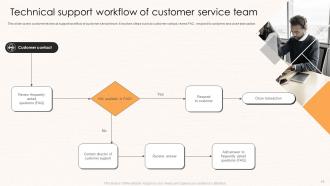







FAQs for Technical Support Workflow Powerpoint
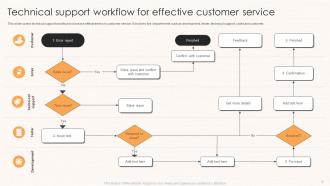
So you've got ticket intake first - log everything that comes in. Next is triage where you figure out what's actually on fire versus what can wait. Investigation comes after that - reproduce the bug, dig through logs, maybe bug someone smarter if you're stuck. Then fix it and test the hell out of it. Follow up with the user afterward because sometimes they'll say it's "fixed" when it totally isn't. Oh, and write down what you did! Future you will thank past you when this exact same weird issue shows up in six months.
So basically, ticketing systems dump all your support stuff in one spot so you don't lose track of anything. I love that you can see which issues keep popping up - makes it way easier to fix the root cause instead of just putting out fires constantly. Your team can actually work together on the tricky problems too, instead of that annoying back-and-forth email mess. Auto-assignment based on who knows what is a game changer for saving time. My advice? Set up your categories and response time rules first, then make sure everyone tags things consistently.
So I'd focus on four main things: how fast you respond to tickets initially, total time to actually solve problems, customer satisfaction scores, and whether you fix things on the first try. Most teams get obsessed with being super quick but honestly? Quality matters more than speed - learned that the hard way. Track your ticket volumes and escalation rates too since those help you catch patterns before they blow up. Pick maybe 2-3 metrics that match your biggest headaches right now. You can always add more later once you've got those dialed in.
So automation takes care of all the boring repetitive tasks, which frees you up for the tricky stuff that actually matters. I'd start with basic ticket routing using keywords - that alone saves tons of time. Auto-responses work great for FAQ-type questions too. Chatbots can handle simple troubleshooting, though honestly some customers still prefer talking to humans right away. Your response times get way better since people hear back instantly. Set up escalation rules so urgent tickets don't get buried. Just begin with categorizing tickets first - don't try to automate everything at once or you'll go crazy.
Honestly, just nail these basics and you'll be golden. Quick acknowledgment first - even "got it, checking now" works. Skip all the tech jargon because people are already frustrated. Give them realistic timelines and actually hit them (or update when things go sideways). Templates are fine for common stuff but tweak them so you don't sound robotic. Oh, and this matters - always circle back to confirm it's actually fixed from their end, not just what your system says. Being proactive with updates beats everything else though. People just want to know you didn't forget about them.
Look for patterns in what customers keep complaining about - that's where your workflow is probably broken. Their feedback shows you exactly where people get stuck or frustrated. Sometimes customers explain issues way clearer than our internal docs anyway! Check which escalation paths aren't smooth and where your team needs more training. Resolution surveys are gold for this stuff. I'd review feedback weekly instead of waiting. Short bursts work better than trying to analyze everything at once. Focus on recurring themes rather than one-off complaints, and you'll spot what tools or automations to prioritize next.
So every industry kinda does their own thing based on what their customers actually need. Healthcare has to be HIPAA-compliant and available 24/7 - makes sense when people's lives are involved. Finance companies are all about security and having clear escalation for fraud stuff. SaaS businesses lean heavy into self-service because their users usually know their way around tech anyway. Manufacturing is totally different though - they're usually sending actual people with tools to fix broken equipment, so they integrate with field service systems. Honestly, the trick is just figuring out how urgent your customers' problems really are and how they prefer to communicate. Don't just steal another industry's playbook.
Honestly, start with a decent ticketing system - Zendesk's pretty solid but Freshdesk works too if you're on a budget. Knowledge base is a lifesaver, seriously. Otherwise you'll be answering "how do I reset my password" until you lose your mind. For remote troubleshooting, TeamViewer does the trick. Oh, and grab some monitoring tools so you can fix stuff before customers even notice it's broken. Internal chat platform helps too - Slack or whatever. That covers the basics. You can always add more specialized stuff later when things get crazy busy.
So first thing - get your knowledge base hooked up directly in the ticketing system. That way your agents don't have to flip between tabs constantly (which honestly drives everyone nuts). Most platforms let you set up auto-suggestions when certain keywords pop up in tickets, plus you can embed KB links straight into your response templates. The real game-changer though? Let customers search your help docs before they even submit tickets. And here's what I'd focus on first - find out which articles your team uses most and polish those up. Then just build out from there based on whatever keeps coming up in tickets. Oh, and seriously keep that documentation updated or it'll backfire on you.
Honestly, hands-on training beats everything else. Get your new people shadowing the vets and role-playing those nightmare customer calls we all dread. Product training is huge too - can't fix what you don't actually understand, right? Cross-training with other departments helps tons because then support gets why certain issues are such a big deal elsewhere. Oh, and regular feedback sessions plus escalation practice really builds confidence. Skip the generic customer service fluff though. Figure out where your specific team struggles first, then build training around those gaps.
So basically you're ranking tickets by urgency, which totally controls how your day goes. System outages? Those shoot straight to the top and wreck whatever you had planned. Lower priority stuff just has to wait - that's how it works. You'll be shuffling things around constantly (kinda like Tetris honestly), but at least you're keeping the important business stuff running. Set clear criteria upfront so you're not overthinking every decision. Oh, and try checking your queue first thing in the morning, then maybe block out some time for the smaller tasks when you can.
Honestly, the worst part is when users can't explain what's broken and you're just guessing blindly. "It works on my machine" will make you want to scream. Communication is messy, you can't see their setup, and everything becomes this annoying guessing game. But here's what actually works - get really strict about your process upfront. Make them fill out detailed ticket forms before you even look at it. Set up screen sharing right away, don't wait. Create those step-by-step checklists so you're not reinventing the wheel every time. Trust me, forcing people to document stuff first saves you hours of back-and-forth later.
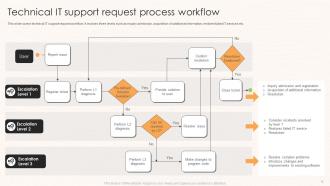
Honestly, start by auditing where your escalations are breaking down right now - that'll show you the real problem spots. Documentation is huge though. Each tier needs to actually write down what they tried and what the customer's dealing with before passing it up. I swear, half the time tickets just bounce around because nobody knows what already happened! Get some kind of template going so the handoffs are consistent. Oh, and don't just dump everything into one general queue - let your tier 1 people escalate directly to the right specialists based on what type of issue it is. Way more efficient.
Look, data analytics basically shows you where your support is falling apart and what's actually working. Track stuff like how long tickets take to resolve, escalation patterns, and which issues keep popping up - those repeat ones are gold mines honestly. You'll spot bottlenecks pretty quick, see where your team's knowledge gaps are, and figure out what workflows suck. Don't get hung up on daily ups and downs though. Focus on trends over weeks or months instead. Oh, and start simple - pick maybe 2-3 metrics that actually matter to your team and just track those consistently. More data isn't always better.
Set up a shared knowledge base with flowcharts for your most common problems - like decision trees that walk everyone through the same steps. Start with your top 5 issues, honestly that's plenty to begin with. Document what actually works and let the team update it as they go. The trick is being consistent on initial steps but not so rigid that people can't think outside the box when weird stuff comes up. I've watched teams crash and burn when they over-engineer this. Regular reviews help you figure out what's actually useful versus what looks good on paper. Don't try to solve everything at once.
-
Such amazing slides with easy editable options. A perfect time-saver.
-
Professionally designed slides with color coordinated themes and icons. Perfect for enhancing the style of the presentations.