

Test Automation Process Powerpoint Ppt Template Bundles





Try Before you Buy Download Free Sample Product
 Impress Your
 Audience
 100%
100% Editable
 Save Hours
 of Time


Our Test Automation Process Powerpoint Ppt Template Bundles are topically designed to provide an attractive backdrop to any subject. Use them to look like a presentation pro.
People who downloaded this PowerPoint presentation also viewed the following :
Test Automation Process Powerpoint Ppt Template Bundles with all 17 slides:
Use our Test Automation Process Powerpoint Ppt Template Bundles to effectively help you save your valuable time. They are readymade to fit into any presentation structure.






FAQs for Test Automation Process Powerpoint
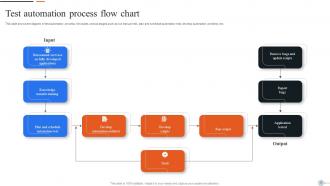
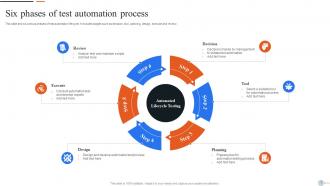
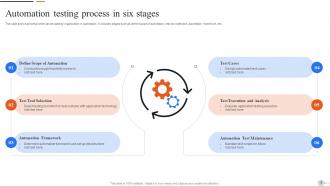
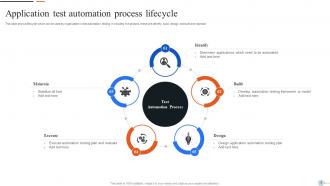
Okay so basically you've got five main phases to think about. Planning comes first - figure out what you actually want to automate and your overall strategy. Then design your test cases and framework. Implementation is next, which honestly takes forever because you're writing all the actual scripts. After that you run the tests and look at results. Oh and maintenance is huge - your tests will break constantly as the app changes, so budget time for that. I'd definitely start with just one small pilot project first though. Test out your whole approach before you go crazy and try to automate everything at once.
So you're basically comparing what automation costs you vs. what it saves. Add up your setup costs - tools, training, building scripts - plus whatever maintenance you'll need. Then look at how much you're saving on manual testing hours, faster releases, catching fewer bugs in production. Most teams break even around 6-12 months, which honestly isn't bad. Oh, and don't forget the stuff that's harder to measure - better test coverage, your team not wanting to quit from doing the same boring tests over and over. Start tracking everything from day one though, because you'll need those numbers when your boss asks if it was worth it.
Focus on the repetitive stuff first - regression tests, smoke tests, API calls. That boring grunt work that eats up time every release. Unit tests are no-brainers too. Don't bother with new features that keep changing though, you'll just be fixing broken scripts constantly (learned that the hard way). Start with your most critical user flows since that's where you'll see the biggest payoff. Honestly, automate anything you're sick of clicking through manually. Save the experimental stuff for later when it's actually stable.
So the big names are Selenium, Cypress, and Playwright - though Playwright's kinda the new hotness everyone's talking about. TestComplete and Katalon get used a ton in corporate settings too. Selenium's still king because it's ancient and works with literally everything. Cypress makes developers happy with its debugging tools. Playwright crushes cross-browser stuff. Honestly depends what your team already knows - if they're JavaScript people, I'd probably go Cypress or Playwright. Way better dev experience than wrestling with Selenium configs all day.
Go for the repetitive stuff first - regression tests you're running all the time are perfect candidates. I'd avoid anything that changes constantly (learned that one the hard way with UI tests that broke literally every sprint). Critical user journeys are solid bets too. Skip exploratory testing though - way too much human judgment involved. Edge cases that barely happen? Not worth it. Start with smoke tests and your core functionality, then build out from there. You want clear pass/fail scenarios, not the messy gray areas. Once you've got those dialed in, expanding gets way easier.
Honestly, don't get stuck overthinking which tool to use - Selenium, Cypress, whatever. Just grab one and go with it, you'll waste weeks comparing features otherwise. The real pain is how much setup time you need upfront, plus your first tests are gonna be super flaky. Which sucks but it's normal! Teams always think they'll see ROI way faster than reality. Oh and test maintenance is like... a whole thing nobody warns you about. Start with maybe 3-5 rock-solid test cases that cover your most critical stuff. Build some wins first before going crazy with coverage.
Start with clean code habits right away - descriptive names, separate test data from logic, all that good stuff. Page Object Model is seriously worth learning for UI tests, trust me on this one. Don't hardcode everything (I've been there, it's messy). Comment the weird scenarios so you remember what you were thinking. Oh, and treat test code like real code - refactor regularly, do code reviews with your team. I learned this the hard way debugging broken tests at midnight. You'll save yourself so much headache later.
Honestly, CI/CD is what makes test automation actually useful instead of just sitting there looking pretty. Your pipeline kicks off tests automatically when you push code - no more forgetting to run them later. Unit tests run first, then integration stuff, maybe some quick smoke tests after deployment. It catches bugs early when fixing them doesn't make you want to cry. Plus only code that passes gets deployed, which has literally saved my ass so many times. The feedback is instant too, so you're not sitting around wondering if everything's broken. Trust me, once you get it working smoothly you'll wonder how you lived without it.
Track your test coverage percentage and how much time you're saving vs manual testing - those are the big ones. Defect detection rate matters too. Honestly, maintenance overhead is probably the most telling metric though. If you're constantly fixing flaky tests instead of building new stuff, that's a red flag. Also watch execution time and whether your team actually runs the tests regularly. The sweet spot is when your manual testers can ditch the boring regression stuff and do more exploratory work instead. Oh, and start simple with time saved and coverage first - you can always add fancier metrics later once you've got the basics down.
Write test cases that actually make sense - one thing per test, with names that tell you what broke. I learned this the hard way after spending hours debugging "test1" garbage. Keep them independent so they don't mess with each other when running. You want unit tests for your core logic, integration for workflows, but go easy on UI tests since they're flaky. The trick is picking the right level for what you're testing. Run them regularly too, otherwise what's the point? And actually fix failures instead of just ignoring them like we all do sometimes.
Don't just keep rerunning those failing tests and crossing your fingers. You gotta figure out what's actually breaking them first. Most of the time it's timing stuff - ditch those hard sleeps and add proper waits instead. Also check your selectors aren't garbage and your test data is stable. Honestly, I've watched teams ignore flaky tests for months and it just destroys everyone's trust in the suite. Keep a list somewhere (spreadsheet works) so you can track which ones are the worst. Hit the frequent flakers first - that's where you'll see the biggest win for your test stability.
Dude, test data management can make or break your automation - learned this the hard way. Your tests are only good as the data feeding them. Bad data = flaky tests and you'll waste hours chasing fake bugs. Set up clean, standardized datasets that hit your edge cases. Also make sure you're wiping data between runs properly. Honestly, data generation tools are pretty clutch for realistic scenarios too. Put effort into your test data strategy early on. Otherwise your whole suite becomes unreliable and nobody trusts it anymore.
Dude, just go with whatever your team already knows best. Seriously - I've seen projects fail because someone picked a "cool" language nobody could maintain later. If you're all Java people, use Java for your tests too. Makes code reviews way smoother. Python's awesome if you're starting fresh (the syntax won't make your eyes bleed), and JavaScript makes sense for heavy web testing. Though honestly? C
-
Great product, helpful indeed!
-
“Excellent service from the customer support team when I wanted a slide that was a bit different from those on their standard menu. Super helpful.”