

Typical project phases powerpoint template






Try Before you Buy Download Free Sample Product
 Impress Your
 Audience
 100%
100% Editable
 Save Hours
 of Time


Generate enthusiasm with your intelligent ideas through our Typical Project Phases Powerpoint Template. Be able to interact with the crowd.
People who downloaded this PowerPoint presentation also viewed the following :
Content of this Powerpoint Presentation
Managing a project is challenging irrespective of its scope and scale. From planning the little things to coping with the rapidly changing demands of customers to delivering products on time, there are a lot of things that can go wrong, quickly. If you are not an expert at handling projects, then embarking on a fresh new project can make you feel like you are at the bottom of the mountain and the summit is too far to reach. However, breaking down a project into phases is a good option and can also be used as a structured way of navigating challenging projects.
Building a project foundation and understanding the phases of a project or a project lifecycle is crucial for its success. A project lifecycle refers to five distinct and crucial phases through which a project goes from initiation to successful closing.
Typical project phases help break a project down into more manageable steps, enabling project managers to anticipate next steps easily. This, in turn, helps professionals ensure the project's success. You can use our meticulously designed slides to generate enthusiasm for your audience.
Click here to access the best templates on “Five Phases of Project Management Life Cycle” to complete your projects successfully.
Typical Project Phases PowerPoint Templates
Our ‘Typical Project Phases’ PPT Templates are helpful in comprehending the core phases to assist project managers in completing projects. This slide exhibits information on the five crucial phases to captivate your audience. The 100% editable PowerPoint Layout with an innovative design enables you to interact with the crowd with confidence.
With SlideTeam's professional slide deck, handling your project phases with opportunity analysis becomes much easier. Click here to explore the best PPT layouts to make any challenging task a cakewalk.
Let’s go through some of the top-quality Project Phases
PPT Slides to include in your presentation.
Template 1: Typical Project Phases PPT Template
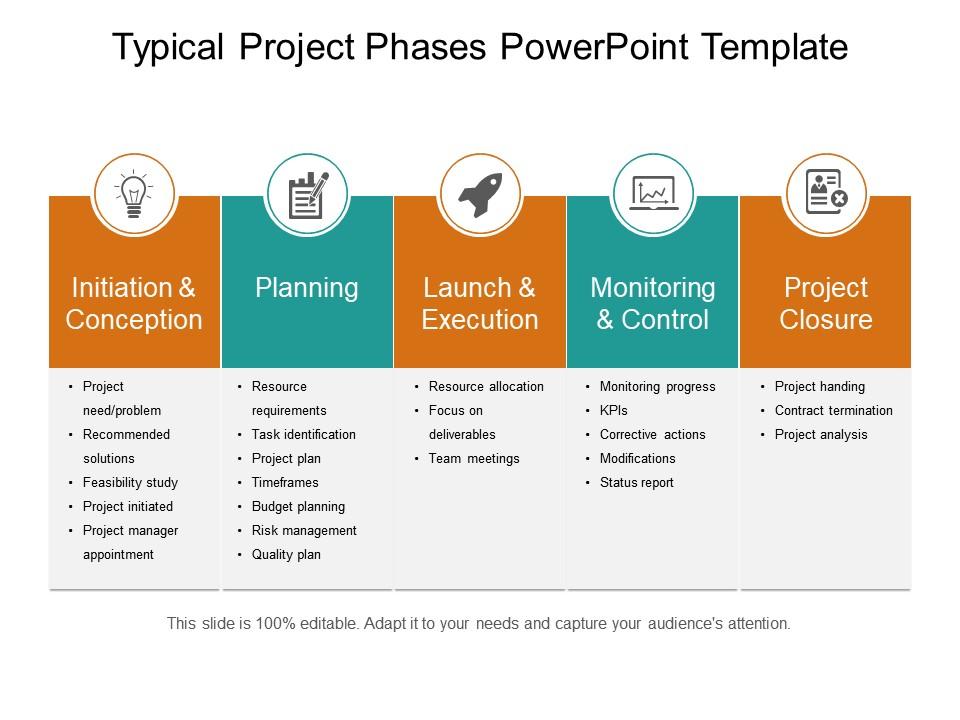
The five-stage project phase is a structured framework or a roadmap that guides you toward the successful completion of a project. At first, stakeholders start the project and then plan it. Next, the project team launches and executes the project and then monitors and controls its performance. Finally, when the project concludes, it must be closed out. Introducing our enticing five-stage project phase PPT Preset that encompasses five key phases, each highlighting needs as the project continues. It is an outstanding, versatile tool, perfect for corporate professionals. The intuitive design of this PPT Slide enables you to map out the journey using icons, relevant information, and phase infographics. Get it today and simplify complex concepts with clear text and colorful graphics to convince your audience.
Handle your Project at Ease with our Smartsheet
A Project Phase Template acts as a project management tool that streamlines the processes and provides visibility and context for your projects. It helps to track, plan, and manage the project phases with the utmost efficiency, ensuring successful completion. It is essential to have a significant project phase template before you embark on any new project. Unlock your power of visual storytelling and enthrall your audience in minutes with our Project Phases presentation templates.
Also, tracking phases of a project with allocated and spent time is an effective way of managing them. Find the Best Tracking Project Phases Templates here.
Typical project phases powerpoint template with all 5 slides:
Generate awe with our Typical Project Phases Powerpoint Template. The audience will be completely astounded.


FAQs for Typical project
So there's five main phases you gotta think about - initiation, planning, execution, monitoring, and closing. First you define what you're actually trying to do and why. Then comes planning where you map out timelines and resources (this part's boring but super important). Execution is where shit gets real - honestly where most projects either crush it or completely implode. You're constantly checking progress during this whole thing and tweaking stuff. Finally you wrap everything up and do a little post-mortem. Oh and don't rush planning even though it's tempting - trust me, it'll save your sanity later.
Honestly, good communication stops like 90% of project disasters. I learned this the hard way lol. Regular updates mean everyone knows their role and deadlines - no more "wait, wasn't John doing that?" confusion. You'll spot issues while they're still small problems, not massive fires. Stakeholders won't freak out because they actually know what's happening. Quick decisions happen when people have context. Trust me, just start with weekly status emails. Makes everything so much smoother. Sounds basic but it's weirdly the thing most teams skip.
Okay so for project stuff, definitely grab Asana, Monday.com, or Trello - I've been through like all of them lol. Slack's basically required now for team chat, or Teams if you're in that ecosystem. Time tracking is huge if you bill clients - Toggl works great. Google Workspace handles all your docs and sharing needs pretty smoothly. Honestly though? The biggest thing is picking one from each category and not switching every time something shiny pops up. I learned that the hard way after reorganizing our entire workflow like three times last year.
So project scope is just mapping out what you're actually gonna deliver - like the specific stuff you're on the hook for and what's NOT your problem. Super important because it keeps everyone on the same page about expectations. Plus you can estimate time and resources way better when you know exactly what you're building. Honestly, the best part? When someone comes asking for "just a tiny change" (and they always do), you've got something in writing to point at. Document everything and make sure stakeholders sign off before you start - trust me on this one. Scope creep will absolutely wreck your timeline if you're not careful.
Honestly, you've gotta get ahead of this stuff before it crashes your project. Sit down with your team and brainstorm every possible disaster - I know it sounds dramatic, but trust me on this one. Once you have your list, figure out which risks are most likely and which would hurt the most. Build actual plans for the scary ones and make someone responsible for each. Don't forget to pad your timeline and budget too. Oh, and here's where most people mess up - actually look at this risk stuff throughout the project, not just once at the beginning.
Figure out your critical path first - what actually affects your deadline if it gets delayed. MoSCoW method works great: Must have, Should have, Could have, Won't have. I'm obsessed with priority matrices too (urgent vs important). Dependencies will mess you up though - sometimes you need those boring low-priority tasks done before the sexy high-priority stuff can even start. Things change constantly, so review weekly. Oh and definitely get your team involved in these conversations. They'll catch dependencies and problems you'd never see sitting in your PM bubble.
Dude, stakeholder engagement makes or breaks projects - I can't stress this enough. Get them involved early and they'll actually help you instead of fighting you every step. You catch problems before they blow up, everyone knows what's happening, and suddenly you have allies instead of enemies. Honestly, I've watched perfectly good projects die because someone important felt ignored. Map out your top 5 stakeholders first. Then just... talk to them regularly? Don't spam them with updates, but keep them in the loop. Oh, and pro tip - figure out who actually has influence vs who just thinks they do.
Honestly, start with making people feel safe to mess up - that's huge. I'd do regular check-ins about how they're actually feeling, not just work stuff. Everyone needs to know what they're working toward, so get crystal clear on goals. Oh and celebrate the little wins! People eat that up. Don't micromanage - let them own their work. Some folks are Slack people, others need actual face time, so figure that out. Tomorrow just ask each person what gets them fired up, then work with that. Trust me, it makes a difference.
Honestly, just focus on the big three: are you on time, on budget, and delivering what you promised? Quality stuff matters too - defect rates and how happy stakeholders are will save your ass later. Oh and check if your team's burning out or sitting around doing nothing. But here's the thing - don't go crazy tracking like 15 different things. Pick maybe 3-5 max because otherwise you'll drown in data and won't actually use any of it. Start simple with these basics, then tweak based on what actually helps you make calls.
Honestly, you've gotta get your change control sorted first. Document everything that comes in, then figure out what it'll do to your timeline and budget before saying yes to anything. Trust me on this one - winging it is a disaster waiting to happen. Get stakeholder sign-off every time, no exceptions. Once something's approved, tell your team right away and update your docs. The trick is catching this stuff early instead of always putting out fires. Maybe set up some regular check-ins? Oh, and make a simple change request form today - future you will thank me later when you're not drowning in chaos.
Map out what skills each task actually needs first, then check who's got bandwidth. Don't stick your best coder on docs when they're drowning in features already - I've watched projects implode from that exact mistake. Resource management tools help you spot conflicts early, which honestly saves so much drama later. Build buffer time into everything because stuff always takes longer than you think. Oh and actually talk to your team about their real capacity, not just what looks good on the schedule. People won't always speak up when they're overloaded.
Honestly, catch conflicts before they blow up - that's half the battle right there. Listen to everyone without picking sides, but steer the talk back to project stuff instead of personal drama. I swear, I've watched good teams completely implode because someone thought ignoring problems would make them disappear. Sometimes you need those awkward one-on-one conversations too. The whole thing is about staying neutral while getting people focused on what actually needs to get done. Oh, and create space where people can speak up without feeling like they'll get thrown under the bus.
Look, without some kind of structure everyone's just making stuff up as they go. Total chaos. Pick Agile if your requirements keep changing and you need to pivot quickly. Waterfall's solid when you know exactly what you want from day one. The main thing is that your whole team understands the process - like when reviews happen, who makes calls, all that stuff. Honestly doesn't matter which one you choose as long as you stick with something. Trust me, you'll be way less stressed when crunch time hits and everyone actually knows what they're doing.
Honestly, do it right after each phase wraps up - your memory gets fuzzy fast. I always forgot the good stuff when I waited until the end. Make a basic template: what worked, what sucked, what to do differently. Store it somewhere your team actually looks at, not buried in some random drive folder. When starting new projects, pull up lessons from similar ones with your team. Keep it scannable with bullet points instead of huge blocks of text. Oh and make sure it's searchable - you'll be digging through these way more than you think. Trust me on this one.
Ugh, the biggest pain is definitely communication breakdowns and time zones screwing everything up. Plus you can't just tap someone on the shoulder when they're slacking off. Building actual relationships is weird too - like, small talk on Zoom hits different, you know? I'd say over-communicate through Slack, email, whatever works. Set deadlines with extra buffer time because stuff always takes longer remotely. Tools like Asana help you actually see what's happening. Schedule regular check-ins so people don't feel isolated. Oh, and write everything down - assumptions will bite you in the ass when everyone's scattered. Start by figuring out where your team's communication is currently falling apart.
-
Awesome use of colors and designs in product templates.
-
Great designs, Easily Editable.