


Various Types Of Data Integrity Risks




Try Before you Buy Download Free Sample Product
 Impress Your
 Audience
 100%
100% Editable
 Save Hours
 of Time


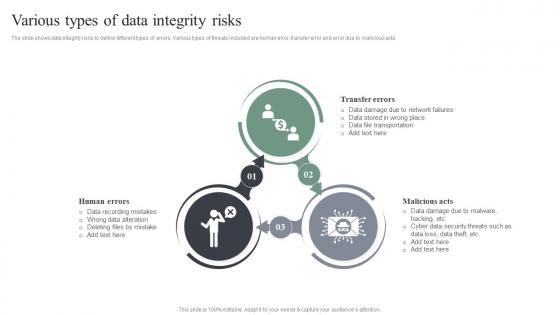
The slide shows data integrity risks to define different types of errors. Various types of threats included are human error, transfer error and error due to malicious acts.
People who downloaded this PowerPoint presentation also viewed the following :
Various Types Of Data Integrity Risks with all 6 slides:
Use our Various Types Of Data Integrity Risks to effectively help you save your valuable time. They are readymade to fit into any presentation structure.





FAQs for Various Types Of
Honestly, most data disasters come from people just screwing up - wrong deletions, bad info entry, botched migrations. We've all been there. Hardware crashes and software bugs are pretty common too. Obviously hackers and ransomware are real threats, but I'd worry more about your coworkers accidentally nuking something important first. Poor access controls just make everything ten times worse since random people can modify stuff they shouldn't touch. Two things that'll save your butt: regular backups and decent user permissions. Sounds boring but those cover like 90% of the nightmare scenarios you'll actually face.
Multi-layer validation is your best bet - hit it at input, database level, and with regular checks. Most corruption happens right at entry, so catch that stuff early with basic validation like data types, ranges, email formats, phone numbers. Run automated scripts to spot weird patterns and duplicates. Oh, and checksums are clutch for any data moving between systems. The trick is baking this into everything from the start - your forms, APIs, batch jobs, whatever. I've seen too many teams try to bolt validation on later and it's always a mess. Build it in day one and you'll thank yourself later.
Honestly, user access control is your best bet for keeping data safe from the wrong hands. You don't want everyone having keys to every room, you know? Set up different permission levels based on what people actually need for their jobs - some folks only need to read stuff, others need full editing rights. Authentication and role-based access are huge here. I'd start by checking who has access to what right now because I bet there's some outdated permissions floating around. Regular reviews help catch when someone switched departments but still has their old access. Prevents both honest mistakes and sketchy behavior.
Oh man, migrations are such a headache! You'll mainly see problems from data corruption, mapping screwups, and incomplete transfers. Sometimes entire records just vanish. Other times fields get mapped to totally wrong places, or your data gets chopped off because the new system has smaller field limits. Network hiccups are the worst though - they leave you with half-finished datasets that look fine at first glance. Most teams rush through validation (guilty as charged), so bad data sneaks through. Run checksums on everything, spot-check samples as you go, and keep solid logs. Trust me, you'll thank yourself later when something inevitably breaks.
Set up daily automated checks first - validation rules, duplicate detection, that kind of stuff. Monthly deep dives are clutch for catching weird inconsistencies between systems. Dashboards help a ton so everyone can actually see what's happening with data quality without bugging you constantly. Document everything you find (I know, boring but necessary) and track patterns over time. Oh, and definitely start with your most critical business data instead of trying to monitor everything at once. You'll just overwhelm yourself otherwise. Build it up gradually as you get the hang of it.
Yeah, cyberattacks can totally mess up your data. Hackers might tweak your files, slip in malicious code, or hit you with ransomware that corrupts everything. The really sneaky ones make tiny changes you won't catch – like altering financial records by small amounts over months. They'll also wipe audit trails so you can't tell what got compromised. Honestly, it's pretty terrifying how sophisticated some of these attacks are getting. Your best bet? Keep solid backups, set up monitoring for weird data changes, and run regular integrity checks. Better safe than sorry with this stuff.
Start with database triggers and constraints - they're already built into whatever you're using. Great Expectations and Datafold are solid for monitoring weird changes. ETL tools like dbt have validation baked in which is nice. Checksums work great for catching corruption when you're moving stuff around. Honestly, I'd probably go constraints first since you don't need to install anything new. Then add monitoring tools later when things get more complex. Oh, and Talend's decent too if you need something more heavy-duty for transforms.
Start with real examples that'll actually scare them - like when customer data gets scrambled or financial numbers go haywire. Nobody cares about theory, but show them what happens when things break? That gets attention. Do quick lunch sessions so people don't feel like you're stealing their whole day. Cover the tech basics (backups, validation) but honestly the human stuff matters more - double-checking work, speaking up when something looks off. Oh, and make it specific to what they actually do. Generic training is basically useless.
Dude, data integrity issues in regulated industries will absolutely destroy you. The FDA and SEC don't play around - you're looking at massive fines, criminal charges for executives, maybe even jail time. Remember Theranos? Yeah, that level of screwed. You'll lose operating licenses, face constant audits, and deal with both civil and criminal liability. Shareholders will sue you for everything too. Honestly, the regulatory pile-on is brutal once they smell blood. Your only real defense is having solid audit trails and controls already set up before things go sideways, because proving you had proper safeguards might be what saves you.
Think of backups as your data insurance policy - you'll want copies stored in different spots, not just one place. Test them monthly because discovering broken backups during an actual emergency is the worst feeling ever. Point-in-time recovery is clutch since you can roll back to before everything got messed up. Honestly, I've watched so many people learn this lesson the hard way. Multiple copies are non-negotiable, and if you can't actually restore from your backup, it's basically useless. Regular testing sounds boring but it's what separates the prepared from the panicked.
Oh man, the Knight Capital thing still blows my mind - they lost $440 million in 45 minutes because their trading software freaked out from bad data. Wild stuff. The UK had that COVID disaster too where Excel literally hit its row limit and dropped 16,000 positive cases. Facebook's big 2021 outage? Yeah, partly data configuration issues. It's crazy how these aren't just small glitches - they turn into massive failures that wreck everything at once. Operations, money, reputation, the works. Always double-check your critical data stuff!
Okay so storage type makes a huge difference here. Databases are actually pretty solid - they've got ACID properties and checksums built right in. Cloud storage? Usually has redundancy and error correction, plus honestly those companies probably handle this stuff way better than we would anyway. File systems though... that's where things get dicey. Hardware fails, files corrupt, it's a mess. I learned this the hard way last year when I lost like three days of work. My advice? Use checksums and validate your data regularly no matter what you're storing on. Every system has weak spots, so you gotta cover your bases.
Dude, data integrity issues will absolutely wreck your customer trust - like, seriously damage your reputation. Once people find out their info got corrupted or lost, they're done with you. I've watched companies lose like 30-40% of customers after big incidents (honestly it's painful to see). Bad reviews and social media drama follow fast. Word spreads even faster. You really want solid data validation and regular backups set up now. Way better than scrambling to fix things later when everyone's already mad at you.
Machine learning algorithms are great at spotting weird patterns and outliers that you'd totally miss just looking at spreadsheets. You can set up automated monitoring that flags data corruption or sketchy changes right when they happen. Natural language processing cleans up messy text data too - honestly saves so much time. The real win is catching problems before they screw up your reports downstream. I set up workflows like this at my last job and it was night and day difference. Real-time validation beats manual checking every time.
Focus on error rates first - that's your bread and butter. How fast are you catching issues? What percentage gets flagged automatically vs someone stumbling across it later? False positives will drive everyone nuts, so definitely track those. I usually go with data quality scores, completeness rates, and validation rule triggers. Recovery time matters too when stuff does slip through the cracks. Set up some dashboards so you're not just putting out fires all day. Honestly, pick like 3-4 metrics that actually move the needle for your business instead of tracking everything under the sun.
-
“You have the structure in place that are easy to explore new opportunities.I will be recommending your services to other people.”
-
Easy to use and customize templates. Helped me give a last minute presentation.