


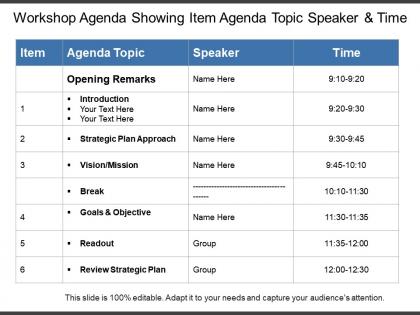
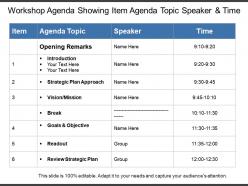
Workshop agenda showing item agenda topic speaker and time




Try Before you Buy Download Free Sample Product
 Impress Your
 Audience
 100%
100% Editable
 Save Hours
 of Time


Carve out a name for yourself. Slice through with our Workshop Agenda Showing Item Agenda Topic Speaker And Time.
People who downloaded this PowerPoint presentation also viewed the following :
Workshop agenda showing item agenda topic speaker and time with all 5 slides:
Convince folks that they will benefit by consulting you with our Workshop Agenda Showing Item Agenda Topic Speaker And Time. Encourage them to check back.


FAQs for Workshop agenda showing item agenda topic
Start with intros and set expectations upfront. Then break your main content into realistic chunks - seriously, double whatever time you think you need because discussions always run over. Build in breaks every hour and a half or people will zone out completely. Map out what materials each section needs and who's running what if you have multiple facilitators. Don't forget Q&A time! The worst thing is ending with everyone looking confused about what happens next, so finish with clear action steps. Oh, and keep the agenda visible so you can actually stick to it when things inevitably go sideways.
Honestly, just mix things up every 15-20 minutes or people will zone out completely. I learned this the hard way! Throw in discussions, quick polls, maybe some group work - anything that isn't just you talking at them. Cap sessions at 90 minutes before breaks because nobody's attention span lasts longer than that. Oh, and definitely start with something engaging, not boring logistics stuff. Make sure there's always time for questions and wrap each section with something actionable. People need to feel like they're getting somewhere, not just sitting through another endless presentation. Trust me, treat them like actual participants and you'll be golden.
Honestly, time blocks are what save workshops from becoming total disasters. Always add buffer time because discussions will run long and someone's laptop won't connect to the projector - guaranteed. Work backwards from when you need to wrap up, then cut like 20% of what you planned to cover. Participants stay way more focused when they can see the structure coming. I learned this the hard way after trying to cram everything in and watching people's eyes glaze over. Better to nail fewer topics than rush through everything like you're speed dating.
Honestly, I always put the big stuff first when everyone's still sharp - usually right at the start. Meetings drag on way longer than planned (trust me on this one), so get your must-haves covered early. After that, try sequencing things so they flow into each other naturally. Mid-morning hits that sweet spot for tough decisions when people aren't brain-dead yet. Save the fun brainstorming stuff for post-lunch when energy crashes anyway. Oh, and definitely pad some extra time between your priorities. Nothing worse than rushing through something important because Bob went on another tangent about his weekend.
Oh man, definitely build in buffer time - I can't tell you how many meetings I've seen crash and burn because someone thought a "quick discussion" would take 10 minutes. Get a visible timer going and maybe ask someone else to be the timekeeper so you're not constantly playing time police. That gets awkward fast. Set up a "parking lot" for random ideas that pop up but aren't really on-topic. Here's the thing though - you've gotta be pretty ruthless about sticking to your main goals. Don't feel bad about cutting things short or scheduling follow-ups for leftover stuff.
Honestly, templates are a lifesaver for workshop agendas. People can actually scan them quickly instead of staring at boring bullet points. I always use color coding for different activities - total game changer. Clean layouts with time blocks and icons help everyone stay oriented throughout the day. Break times and transitions become super obvious. You'll look way more polished without doing extra work. I've been in too many workshops where everyone's lost by lunch because the agenda was just dense text. Oh, and those little activity icons? They're weirdly helpful for visual people.
Honestly? Three to five days ahead is perfect timing for sending your agenda. People won't ignore it, but they also won't forget by the time your workshop rolls around. I used to send these way too early and learned my lesson after countless "wait, what's happening again?" looks. Make sure you include what they'll learn, how long each part takes, and anything they need to prep or bring. Don't bury it in the calendar invite - nobody checks those properly. Just email it separately. Oh, and definitely send a quick reminder the day before with the basics: time, location, materials. Trust me on this one.
Go through all that feedback properly - don't just glance at the star ratings. Look for the stuff that keeps coming up. Like if everyone's complaining about timing, you need shorter chunks or more breaks. People are brutally honest about what felt useful vs total waste of time (which is actually helpful). Check if your flow worked - did everyone crash after lunch? Some activities probably killed it while others were duds. Oh and definitely see which topics hit vs missed. Use all that to shuffle things around and ditch whatever didn't land. The patterns will jump out once you really dig into the comments.
Build your agenda in layers - start with basics everyone needs to know. Then split into breakout sessions by skill level. Advanced people won't zone out, beginners won't panic. I swear, workshops that try pleasing everyone just end up being mediocre for all! After the opening, let people pick their own tracks based on what they need. Survey folks beforehand so you know what you're dealing with. Oh, and make sure the groups come back together to share what they learned - otherwise the beginners miss out on cool insights from the advanced sessions.
Break things up every 15-20 minutes or people will literally zone out on you. I made this mistake once - did a 45-minute straight lecture and could see souls leaving bodies lol. Mix it up: start with pair discussions or quick polls, then hit your main content, wrap with hands-on stuff. Short bursts work way better. Just make sure the activities actually connect to what you're teaching, not random fluff to kill time. Oh and always have a backup ready because workshops are unpredictable. Plan your transitions too - that's where things get awkward if you don't think ahead.
Ugh, learned this one the hard way - people's cameras just started disappearing one by one during my first virtual workshop! Keep sessions short, like 45-90 minutes max. Online attention spans are brutal compared to in-person stuff. Send all materials beforehand so nobody's frantically downloading mid-session (trust me on this). Start with interactive stuff right away when everyone's still awake. Always have backup tech ready because something will break. Oh, and build in extra time between activities - screen sharing and breakout rooms take forever to set up compared to just moving around a room.
Put your objectives right at the top - like, super obvious so nobody's confused about what you're trying to do. I'd go with 2-3 specific goals using words like "decide" or "create." Bullet points work way better than paragraphs, trust me. Then connect each agenda item back to those goals throughout. Honestly, this is the only thing that stops meetings from turning into random chat sessions. Oh, and circle back to the objectives at the end to make sure you actually accomplished something instead of just talking for an hour.
Oh man, the worst thing you can do is pack way too much stuff in without any breathing room. Everything takes forever - like seriously, double whatever time you think you need. Also don't do back-to-back intense sessions or people's brains just completely shut off. Make sure each part has an actual purpose too, not just random "let's discuss this" time that leads nowhere. Quick side note - if you're using any tech, test it first because Murphy's Law is real. I always build in like 20% extra time minimum.
Honestly, the best thing I've learned is to just read the room and roll with it. Build buffer time into everything upfront - you'll need it. When people are really into a discussion, let it keep going and cut the next thing short. But if something's bombing? Bail fast. I once watched 20 people completely check out during this endless brainstorm that went on forever - never again. Make your agenda visible and just tell people when you're switching things up. Have backup activities ready that you can easily swap or skip. Oh, and whatever your main learning goals are? Don't touch those - everything else is fair game.
Honestly, I'd go straight to Canva - they have tons of agenda templates and you don't need any design experience. Takes like 10 minutes max to make something that looks professional. Google Docs works fine too if you're in a rush, just grab one of their templates and throw in some colors or icons. Notion's cool if you want participants to access it digitally (though sometimes people find that overwhelming). PowerPoint sounds random for an agenda but it's actually super flexible for layouts. I've seen people do some really creative stuff with it. Start with Canva though - you'll thank me later.
-
Great designs, really helpful.
-
Nice and innovative design.