


Meeting workshop agenda powerpoint guide





Try Before you Buy Download Free Sample Product
 Impress Your
 Audience
 100%
100% Editable
 Save Hours
 of Time


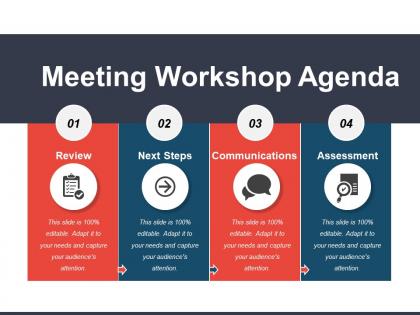
Pick our meeting workshop agenda PowerPoint template and keep track of your important business meetings, duties, deadlines and responsibilities. The meeting workshop agenda PPT slideshow has been crafted with using a four staged process with icons. Use this agenda Presentation visual in business, planning and process related presentations. The adoption of the agenda is a customary practice followed by many organizations, so you can use our PPT shape and customize it such that it suits your business strategies and goals. When you want to showcase your future thoughts and objectives for achieving your business goals, our four staged business agenda Presentation slide can be very helpful. The most helpful feature of this PowerPoint theme is that there is enough space to enter your own information which is matching your business theme or goals. So, quickly download this agenda PPT graphic and start using this in your business meetings. Well begun is half done it's said. Choosing our Meeting Workshop Agenda Powerpoint Guide is an excellent example.
People who downloaded this PowerPoint presentation also viewed the following :
Meeting workshop agenda powerpoint guide with all 5 slides:
Condemn bigotry with our Meeting Workshop Agenda Powerpoint Guide. Enlighten folks about baseless intolerance.
FAQs for Meeting workshop
Okay so you definitely need time blocks and breaks - learned that one the hard way when I did a 3-hour thing with no breaks and everyone just zoned out completely. Work backwards from what you want people to actually take away, then build your flow: intros, main stuff, action items. Oh and buffer time! Discussions always run over. I'd throw in interactive bits throughout so people don't just sit there. List materials upfront too - saves you from scrambling later. Honestly the best agendas I've seen assign someone to own each section so it's not all on you.
Hit them with your best stuff right in the first 15 minutes - seriously, this makes or breaks everything. I watched an entire room mentally check out by hour two once, and it was painful. Mix high-energy activities with quieter moments throughout the day. Keep each segment under 30 minutes max, and throw in breakouts or quick polls every 45 minutes or so. People's brains just can't handle straight lecture mode anymore. Longer breaks are clutch too - everyone needs to actually recharge, not just grab coffee and scroll their phones. End each section with something concrete they can take away. Oh, and map out when YOU typically have energy dips during the day, then plan around that.
Oh man, timing is everything with workshops! Put your heavy-hitter content right at the start when people are actually awake and caffeinated. After about an hour, brains start turning to mush - it's just how we're wired. Drop in some interactive stuff or group discussions after you've dumped a lot of info on them. Honestly, I always save the fluff topics for late afternoon because that's when everyone's mentally checked out scrolling Instagram anyway. Don't be that person who drones on for three straight hours. Read the room and give people natural breaks to reset their attention spans.
Honestly, go for like 70% interactive stuff, 30% you actually talking. Break any lecture bits into 10-15 minute chunks max, then immediately jump into hands-on work or discussions. I made this mistake once - did a 45-minute presentation block and people were literally falling asleep! Think of your content as just the setup for interaction, not the main show. Each time you share something, have them use it right away or talk about it in small groups. People remember way more when they're actively doing something with the info instead of just sitting there listening to you drone on.
Honestly, tiered agendas are a lifesaver for this. Start with the basics everyone needs to know, then split into tracks by experience level. Pair beginners with your experts during hands-on stuff - the knowledge transfer just happens naturally and it's way less awkward than formal presentations. Throw in some optional deep-dive sessions too. Advanced people can geek out while others catch up on fundamentals. Oh, and label everything clearly so people know what's required vs. bonus content. Nobody wants to sit through stuff that's way over their head or boring them to tears.
Honestly, visual templates are a game changer. People actually look at them instead of ignoring walls of text. You can use colors and icons to show what's happening when - breaks, presentations, group work, whatever. The hierarchy thing really works too - participants instantly get the flow instead of hunting through paragraphs. I've seen people pull up the visual agenda on their phones during sessions, which never happens with boring text versions. Canva's got decent free templates if you want to try it. Even PowerPoint works if you're not feeling fancy.
Oh man, definitely don't overstuff your agenda - I always think I can fit way more than actually works. People zone out hard if you go longer than 90 minutes without breaks. Seriously, build in 15-minute breaks or everyone gets cranky. Also? Leave buffer time because discussions ALWAYS run over, without fail. The worst thing though is when you don't nail down what each session's actually supposed to accomplish - then it's just random chatter. I usually plan like 25% less content than my brain thinks I need. Trust me on that one.
Okay so basically, dig into your old workshop feedback first - that stuff is gold. Check the participant surveys (people are weirdly honest on those), facilitator notes, random comments, all of it. Look for timing issues especially - did things drag or feel rushed? Which activities got people talking vs. the ones that totally bombed? Honestly, you'll probably see some clear patterns emerge pretty quickly. Then just restructure around what you find: keep the activities that worked, scrap or fix the disasters, and definitely build in some buffer time. I learned that one the hard way!
Dude, your brain basically turns to mush after 90 minutes max - I've seen it happen in real time during workshops. People just glaze over completely. Half-day sessions need at least one 15-minute break. Full days? You'll want lunch plus two shorter ones. Here's what actually works: put breaks right after your heaviest content or before switching topics. Oh, and definitely write "BREAK" on the agenda - sounds dumb but people literally look for it. Trust me on this one, I bombed a 3-hour session once because I thought I was being efficient. Nobody retained anything.
So basically, you gotta think about who's gonna be in the room first. Executives? They want the big picture stuff and results. But if you've got people who actually do the work day-to-day, they need the nitty-gritty details and hands-on stuff. Experience level matters too - newbies need more explanation time and simpler language. Experts can handle complex concepts way faster. Oh, and definitely survey people beforehand about their biggest pain points. Then build your whole agenda around fixing those specific issues. Trust me, it makes such a difference when people feel like you're actually addressing their real problems.
Survey people beforehand about what's bugging them most - that'll give you actual data to work with. Dot voting is clutch during the session. Give everyone sticky dots to slap on their top picks. I always go back to the MoSCoW thing too (Must have, Should have, Could have, Won't have). Impact vs effort matrix rocks for this stuff. Plot topics by value versus time needed. Hit your must-haves first obviously, then squeeze in whatever high-impact items fit. Oh, and don't overthink it - you can't cover everything anyway.
Honestly, Google Docs or Notion work great for this - they update live so when things inevitably change last minute, everyone sees it instantly. I'd email the agenda beforehand with edit permissions so people can throw in their own questions. During the workshop, just project it while people follow along on phones or laptops. The cool part? Same document becomes your notes and action items afterward. Oh, and definitely get everyone's permissions sorted ahead of time - learned that one the hard way. Pick one tool and stick with it though. Switching between platforms mid-workshop is just chaos waiting to happen.
Honestly, double your buffer time - tech always breaks when you least expect it. Keep segments super short, like 20-30 minutes tops because staring at screens is brutal. If you're doing hybrid, make sure remote people don't feel like second-class citizens (been there, it sucks). Oh and definitely cut your content by like 25% compared to what you'd do in person. People process stuff slower on video calls. Have someone else ready who knows the platform in case you freeze up or your wifi dies. Different time zones? That's a whole other headache to plan around.
Okay so here's what I do - for every agenda item, write down the actual outcome you want. Not just "talk about marketing" but like "pick our top 3 marketing priorities for next quarter." I literally ask myself what someone should be able to DO after we meet. Share this stuff with people ahead of time too so they don't show up totally unprepared (happens way more than it should). Game changer honestly. Your agenda stops being this random list of topics and actually becomes something that gets you from point A to point B.
Honestly, your questions and engagement totally change how workshops play out. When people start asking stuff or getting into discussions, facilitators will pivot on the spot to focus on what's actually landing with everyone. The best parts usually happen when someone veers off the planned topics anyway - that's when you figure out what your team really needs to work on. Don't hold back if something's confusing or you want to go deeper. I've seen agendas get completely flipped because participants spoke up about what mattered to them. The whole thing should work for you, not against you.
-
Awesome presentation, really professional and easy to edit.
-
Use of icon with content is very relateable, informative and appealing.