

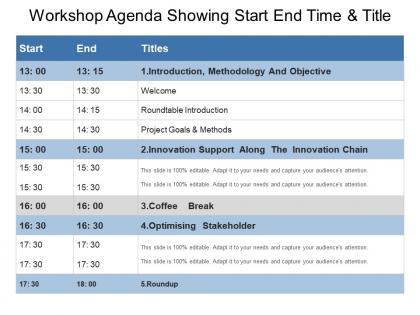
Workshop agenda showing start end time and title




Try Before you Buy Download Free Sample Product
 Impress Your
 Audience
 100%
100% Editable
 Save Hours
 of Time


Ensure folks comprehend the intent of the judgement with our Workshop Agenda Showing Start End Time And Title. Drive home the implications of each clause.
People who downloaded this PowerPoint presentation also viewed the following :
Workshop agenda showing start end time and title with all 5 slides:
Our Workshop Agenda Showing Start End Time And Title are forward looking. Your eyes will be focused ahead.

FAQs for Workshop agenda showing start end
Okay so for your workshop template - definitely get the obvious stuff in there first: times, session names, who's running what. Breaks are crucial because hangry participants are the worst. I'd throw in learning goals for each part and what materials people need to bring. Location details too, obviously. One thing I always do is add a "parking lot" section for random questions that pop up - trust me on this one. Build in extra time because nothing ever goes according to plan. Oh, and send it out the day before so people can actually prepare instead of showing up totally clueless.
Honestly, visual workshop agendas are game-changers. People scan them way faster than boring text blocks. I'd throw in some color-coding and icons – maybe a little chat bubble for discussions, presentation icon for talks, that kind of thing. Most people learn visually anyway, so it actually sticks better. Canva's pretty solid for this, or just use PowerPoint if you're lazy like me. Show your session lengths, breaks, all that good stuff at a glance. Trust me, participants will thank you when they can mentally prep for what's coming next instead of being surprised by random activities.
Hey! So I swear by the 60-20-20 thing - 60% actual content, 20% interactive stuff, 20% breaks. Put your biggest points upfront when everyone's still awake (learned that one the hard way after a brutal post-lunch session). Discussions ALWAYS go long, so build in extra time between sections. Nobody can focus for more than 45 minutes straight without their brain turning to mush. Break every 90 minutes minimum - trust me on this. Oh, and send the agenda beforehand so people aren't sitting there wondering what's happening next.
Honestly, the 70/30 split works really well - most of your time should be interactive stuff, not lecturing at people. I always try to mix content into activities instead of doing those painful lecture-then-activity chunks. Makes it feel more like a real conversation where you're bouncing ideas around (though yeah, you're still running the show). Never go longer than 15 minutes without throwing in discussion or polls or something quick. Gets people actually thinking instead of just sitting there. Oh, and always kick off with an activity - gets the energy going right from the start, then you can weave in whatever content they need as you go.
Dude, you've gotta get participant input or your workshop will flop hard. Send out a quick survey beforehand asking what they want to learn and what's bugging them at work. I've watched so many facilitators crash and burn because they just winged it! Check in during the session too - if people look lost or want to go deeper on something, ditch your plan. Flexibility is everything. Oh, and don't forget to grab feedback afterward for next time. Seriously though, that pre-workshop survey is your lifeline.
Honestly, start with whatever's driving you crazy first - that's what worked for me. Trello or Asana are great for tracking who's presenting what and when stuff's due. I'm obsessed with Mentimeter because it kills all those endless email chains about what people actually want to cover. Google Docs is perfect for the collaborative stuff - everyone can jump in and suggest changes. Your calendar tools will automatically ping people when you update things, which is clutch. Oh, and Kahoot makes the actual sessions way more engaging than just talking at people for hours. Don't overcomplicate it though - pick one thing first.
Mix up your activities so you're hitting different learning styles - some people need visuals like slides, others learn better with hands-on stuff or group discussions. I always throw in something totally random that gets people moving around because honestly? Sitting all day sucks. Switch between quiet individual work and high-energy group sessions. Oh, and make sure the same important concepts show up in multiple formats throughout the day. That way if someone misses it the first time as a lecture, maybe they'll get it during the breakout activity. Keeps everyone engaged instead of zoning out.
Honestly, the best trick is weaving networking right into your schedule instead of hoping it just happens. Throw in 15-20 minute coffee breaks between sessions. Small breakout groups work great too - people solve problems together and actually talk. I've watched workshops where they literally just switched up lunch seating and boom, instant connections. Put some collaborative stuff right after your content blocks so everyone's buzzing about what they learned. Oh, and Q&A panels beat boring presentations every time. Mix up the formats and be deliberate about it - that's really what makes the difference.
Honestly? People always try to squeeze way too much in. I've seen it happen a million times - you end up rushing through everything and nobody's happy. Don't do back-to-back stuff without breaks either. Your brain needs time to actually process what just happened, you know? Plus there's always some random delay that throws everything off. Be super clear about timing for each part. Here's what I always do: plan everything out, then literally cut 20% of your content and use that extra time for transitions. Sounds counterintuitive but it works way better than cramming.
Honestly, pre-workshop surveys are a game changer. Ask people about their challenges, skill levels, what they want to get out of it. Then build your agenda around their actual answers instead of some cookie-cutter template. I've watched so many trainings flop because they taught basics to people who already knew that stuff - painful to sit through! The responses help you figure out what to prioritize and how advanced to make things. You'll spot patterns in what everyone's struggling with too. Oh and send it like two weeks ahead so you actually have time to redesign everything based on what they tell you.
Okay so first thing - ditch those vague session titles that tell you nothing. You want clear time blocks with actual descriptions of what's happening and who's presenting. Room numbers are clutch too. Oh, and tell people what to bring beforehand so they're not scrambling. Buffer time between sessions is your friend - trust me on this one. People need bathroom breaks and won't admit it. Send the agenda out early, use fonts people can actually read, and if you're doing meals, ask about dietary stuff. Basically just be specific enough that attendees can picture their whole day instead of wondering what they signed up for.
Your agenda is basically what makes or breaks the whole thing. Pack too much in? People zone out. I found this out the hard way during this brutal 3-hour workshop where everyone looked dead by the end. Mix up discussions with activities and actual breaks - that's what keeps people awake. Map it to attention spans, not just what YOU want to cover. Short bursts work better than long lectures. Build in those natural energy shifts throughout the day. Honestly, variety is everything when you're trying to keep a room engaged.
Email the agenda 3-5 days ahead with a subject like "Workshop Agenda - [Date]." Include times, breaks, and prep stuff they need. I always add a quick line about what they'll actually get out of it - honestly, people need that motivation upfront. Post it in Slack too so it's easy to find later. Here's what saves your butt: ask them to confirm they read it and mention any scheduling conflicts early. Trust me, you don't want to start with confused faces asking what you're even doing there. Short sentences work better than long ones anyway.
Honestly, just build in way more buffer time than you think you need - I usually tack on like 15-20% extra because good discussions never stay on schedule. Set up some segments as "flexible blocks" you can stretch or shrink. Have backup activities ready to throw in if the vibe shifts. Oh, and definitely get someone else to watch the clock for you so you're not constantly checking the time while trying to facilitate. People actually love it when you're transparent about adjusting things on the fly - just keep your agenda visible and tell them what's happening. Trust me, it beats awkwardly cutting off great conversations.
Track success with feedback scores on content and engagement - did people actually stay awake? Check if you hit your agenda items without going over time (guilty of this myself). Follow up with quick knowledge checks to see what stuck. The best indicator though? Whether participants actually use what they learned back at work. Behavior changes are harder to spot but way more meaningful than just good ratings. Oh, and ask if they'd recommend it to colleagues - that honest recommendation thing usually tells the real story about whether your workshop was worth it.
-
Wonderful templates design to use in business meetings.
-
I discovered this website through a google search, the services matched my needs perfectly and the pricing was very reasonable. I was thrilled with the product and the customer service. I will definitely use their slides again for my presentations and recommend them to other colleagues.