

Time management template powerpoint templates




Try Before you Buy Download Free Sample Product
 Impress Your
 Audience
 100%
100% Editable
 Save Hours
 of Time


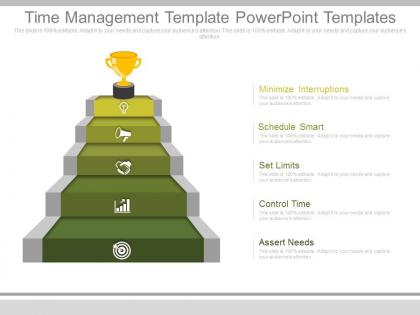
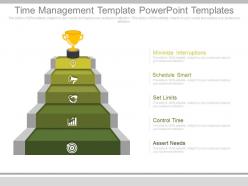
Looking to build and improve adequacy, effectiveness or efficiency of your business by presenting the procedure of arranging and practicing cognizant control over the measure of time spent on particular exercises to the employees and partners via a PowerPoint presentation. We can help you in achieving your business goals and targets. Browse readymade time management template designed by team of experts. With the help our PPT templates, your time administration may be helped by a scope of aptitudes, apparatuses, and strategies used to oversee time while finishing particular assignments, tasks, and objectives conforming to a due date. This time management presentation template includes six stages process are minimize interruptions, schedule smart, set limits, control time, and assert needs. In future, if you are planning to convey your idea on other related topics like workforce management and modeling, time perception, work activity management and project management, you can make the use of these PPT slide designs. Stop wasting time and download our time management template PowerPoint template slides.Wake up your audience.Time Management Template Powerpoint Templates add a design shock aimed to keep them focused on your ideas.
People who downloaded this PowerPoint presentation also viewed the following :
Time management template powerpoint templates with all 7 slides:
Drive home the basics with our Time Management Template Powerpoint Templates. They excel in the fundamentals.
FAQs for Time management
Key features include priority matrices, daily/weekly scheduling blocks, goal-setting sections, task categorization systems, and progress tracking mechanisms. These elements streamline productivity by enabling clear priority identification, efficient time allocation, and consistent progress monitoring, with many professionals finding that structured templates ultimately deliver enhanced focus, reduced overwhelm, and measurable improvements in personal efficiency.
A time block template helps prioritize daily tasks by providing visual scheduling structure, dedicated focus periods, realistic time allocation, and built-in buffer zones for unexpected interruptions. Through systematic blocking, professionals can tackle high-priority work during peak energy hours, minimize task-switching inefficiencies, and maintain better work-life boundaries, ultimately delivering enhanced productivity and reduced stress across demanding schedules.
Color coding and visual elements enhance time management templates by improving task categorization, priority identification, pattern recognition, and overall usability through intuitive design systems. These visual strategies enable users to quickly distinguish between project types, deadlines, and responsibilities while reducing cognitive load, with many professionals finding that well-designed templates significantly streamline workflow organization and boost productivity across complex scheduling demands.
Businesses can customize time management templates by incorporating shared calendars, collaborative task boards, milestone tracking systems, and real-time progress indicators tailored to their workflow patterns. Through strategic template modifications, teams in sectors like consulting, marketing, and project management streamline communication, reduce scheduling conflicts, and enhance accountability, ultimately delivering improved coordination and faster project completion across departments.
Digital time management templates offer enhanced flexibility, real-time collaboration, automated scheduling, cross-device synchronization, and integrated analytics capabilities that paper planners cannot match. These digital solutions streamline workflow management by enabling instant updates, seamless team coordination, and data-driven insights, with many organizations finding that digital templates ultimately deliver improved productivity and strategic resource allocation across departments.
Gantt charts enhance time management templates by providing visual project timelines, task dependencies, resource allocation tracking, and milestone identification. Through these comprehensive scheduling tools, project managers streamline workflow coordination, identify potential bottlenecks, and maintain team accountability, with many organizations finding that visual timeline management significantly improves project delivery rates and stakeholder communication.
Best practices for designing student time management templates include creating clear visual hierarchies, incorporating flexible scheduling blocks, building in buffer time for unexpected tasks, and balancing academic priorities with personal activities. These templates work most effectively when they feature color-coding systems, weekly and daily views, and goal-tracking sections, with many students finding that customizable formats enhance their productivity and reduce academic stress.
Time management templates cater to different working styles by offering visual formats like Kanban boards for visual learners, detailed schedules for structured planners, and flexible frameworks for adaptive workers. These customizable approaches enable professionals across industries, from creative agencies to financial services, to align productivity systems with their natural workflows, ultimately enhancing efficiency and reducing stress.
Weekly planner templates improve focus and reduce procrastination by providing structured time blocks, clear priority hierarchies, visual progress tracking, and accountability mechanisms. Through systematic task organization and deadline visibility, professionals streamline their workflow while minimizing decision fatigue, with many finding that dedicated planning sessions ultimately deliver enhanced productivity and reduced overwhelm in increasingly demanding work environments.
Integrating time tracking features into time management templates delivers enhanced productivity monitoring, accurate project costing, improved resource allocation, better deadline management, and data-driven insights for future planning. These integrated systems enable organizations to identify time drains, optimize workflows, and boost operational efficiency, with many businesses finding that real-time tracking ultimately enhances both individual performance and strategic decision-making capabilities.
A quarterly planning template helps individuals achieve long-term goals by breaking ambitious objectives into manageable 90-day milestones, establishing clear priorities, and creating structured accountability systems. Through strategic quarterly reviews, professionals can track progress more effectively, adjust strategies based on real results, and maintain consistent momentum, with many finding that this systematic approach delivers measurable advancement toward major career and personal objectives.
Healthcare, manufacturing, consulting, legal services, and project management industries benefit significantly from tailored time management templates because they face unique scheduling complexities, compliance requirements, and resource allocation challenges. These specialized templates streamline workflow coordination, enhance operational efficiency, and ensure regulatory adherence, with many organizations finding that industry-specific approaches deliver faster project completion and improved client satisfaction.
Accountability can be incorporated through progress tracking sections, milestone checkpoints, shared responsibility assignments, and regular review schedules within templates. These structured accountability measures enable teams to monitor commitments, identify bottlenecks early, and maintain momentum on priorities, with many organizations finding that transparent progress visibility ultimately delivers improved project completion rates and stronger team performance.
Common mistakes include over-scheduling without buffer time, choosing overly complex templates that create administrative burden, failing to customize templates for specific workflows, and rigidly adhering to schedules without flexibility for priorities. Many organizations find that successful template implementation requires regular review and adjustment, with teams initially focusing on simple frameworks before scaling to more sophisticated time-tracking systems that enhance productivity.
Time management templates enhance workflow efficiency by standardizing task prioritization, eliminating decision fatigue, and creating consistent organizational systems across teams. These structured frameworks streamline project coordination, reduce time spent on planning activities, and enable better resource allocation, with many organizations finding that standardized templates accelerate project delivery while maintaining quality control.
-
Top Quality presentations that are easily editable.
-
Awesome presentation, really professional and easy to edit.