

Zero Trust Architecture ZTA Powerpoint Presentation Slides




Try Before you Buy Download Free Sample Product
 Impress Your
 Audience
 100%
100% Editable
 Save Hours
 of Time


Grab our Zero Trust Architecture ZTA PowerPoint presentation. This comprehensive PPT Bundle concisely overviews the zero trust network, highlighting its main pillars, features, and functionalities. The ZTNA PowerPoint Presentation explores why businesses adopt ZTNA and demonstrates how it can enhance security and operational efficiency. Additionally, the Zero Trust Model PPT delves into the architecture of ZTNA, encompassing user and architectural workflows. The Zero Trust Architecture ZTA PPT presentation offers valuable insights into unique ZTNA software solutions and essential considerations for selecting them. Moreover, the presentations Software-defined Perimeter SDP template addresses the implementation challenges of ZTNA and provides solutions. It also presents a detailed comparison of ZTNA with other technologies. Furthermore, the Zero Trust Network Access deck includes a training program and an estimated budget plan for ZTNA implementation. Lastly, the Identity-Defined Networking IDN PowerPoint Presentation showcases practical use cases of ZTNA technology and presents a compelling case study. This fully editable and customizable template is compatible with Google Slides, ensuring convenience and flexibility for users.
People who downloaded this PowerPoint presentation also viewed the following :
Content of this Powerpoint Presentation
Slide 1: This slide introduces Zero Trust Architecture (ZTA). State your company name and begin.
Slide 2: This is an Agenda slide. State your agendas here.
Slide 3: This slide displays Table of contents for ZTNA.
Slide 4: This slide continues Table of contents for ZTNA.
Slide 5: This slide outlines the limitations of virtual private network-based remote access services.
Slide 6: This slide represents the overview of traditional perimeter-based network security.
Slide 7: This slide depicts another Table of contents for ZTNA.
Slide 8: This slide presents the overview of zero trust network access.
Slide 9: This slide illustrates the key principles of zero trust network access model.
Slide 10: This slide outlines the top features that a modern ZTNA model should include.
Slide 11: This slide highlights the critical pillars of the zero network trust access model.
Slide 12: This slide describes the various types of zero-trust network access models.
Slide 13: This slide represents the overview of zero-trust solution categories.
Slide 14: This slide shows the working of zero trust network access.
Slide 15: This slide outlines the working of the zero trust network access model.
Slide 16: This slide represents the comparison between zero trust network access versions 1.0 and 2.0.
Slide 17: This slide highlights title of contents further.
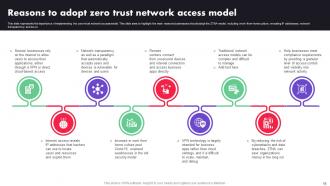
Slide 18: This slide presents the importance of implementing the zero-trust network access model.
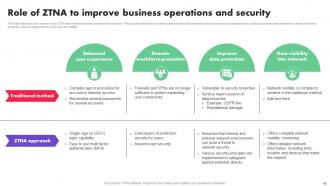
Slide 19: This slide contains the ways in which ZTNA improves the business operations and security.
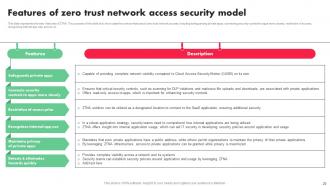
Slide 20: This slide presents the main features of ZTNA.
Slide 21: This slide represents the benefits of zero trust network access.
Slide 22: This slide shows another table of contents.
Slide 23: This slide gives an overview of zero trust network access architecture.
Slide 24: This slide describes the core logical components of the zero-trust network architecture model.
Slide 25: This slide gives an overview of external elements of zero trust network architecture.
Slide 26: This slide outlines the checklist to develop a zero-trust network access architecture.
Slide 27: This slide again exhibits Table of contents for ZTNA.
Slide 28: This slide describes the overview of zero trust network access user flow.
Slide 29: This slide outlines the workflow of zero trust network access architecture.
Slide 30: This slide gives an overview of the working features of zero trust network access architecture.
Slide 31: This slide shows Table of contents for ZTNA further.
Slide 32: This slide describes the main models of ZTNA architecture.
Slide 33: This slide shows the overview of the endpoint-initiated zero trust network topology model of ZTNA deployment.
Slide 34: This slide provides an overview of service initiated zero-trust network topology model.
Slide 35: This slide highlights title of contents for presentation.
Slide 36: This slide describes the overview of the client-based approach of zero trust network access architecture.
Slide 37: This slide gives an overview of the pro-browser-based approach of zero trust network access architecture.
Slide 38: This slide illustrates the overview of the self-hosted deployment approach of ZTNA architecture.
Slide 39: This slide outlines the overview of the as-a-service implementation approach of ZTNA architecture.
Slide 40: This slide represents the various deployment approaches for zero-trust network access architecture.
Slide 41: This slide presents Table of contents to be discussed further.
Slide 42: This slide depicts the top software solution for zero-trust network access.
Slide 43: This slide highlights the main criteria while choosing the right zero trust solution.
Slide 44: This slide represents the techniques used in the zero-trust network access model.
Slide 45: This slide contains titles for the topics to be discussed further.
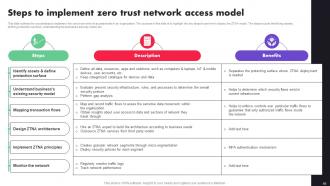
Slide 46: This slide outlines the crucial steps to implement the zero trust network access model in an organization.
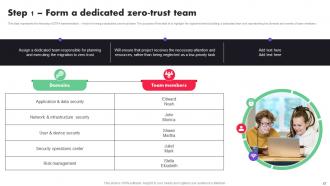
Slide 47: This slide represents the first step of ZTNA implementation, which is forming a dedicated zero-trust team.
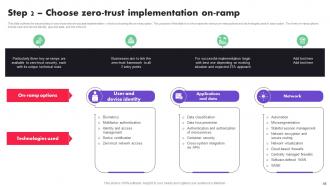
Slide 48: This slide outlines the second step of zero trust network access implementation, which is choosing the on-ramp option.
Slide 49: This slide outlines the first on-ramp option of zero trust network access implementation, which is user and device identity.
Slide 50: This slide describes the second on-ramp option, which is the applications and data of ZTNA implementation.
Slide 51: This slide outlines the third on-ramp option for ZTNA deployment, which is the network.
Slide 52: This slide outlines the third step of ZTNA deployment, which is assessing the environment.
Slide 53: This slide represents the fourth and fifth steps of ZTNA deployment, which is reviewing available technology and launching primary zero trust projects.
Slide 54: This slide outlines the sixth and seventh steps for ZTNA implementation, which are defining operational changes and implementing, rinsing and repeating the process. The purpose of this slide is to showcase the following steps in zero trust model deployment.
Slide 55: This slide depicts Table of contents which is to be discussed further.
Slide 56: This slide outlines the main challenges of ZTNA implementation.
Slide 57: This slide talks about the various solutions to overcome the ZTNA deployment challenges.
Slide 58: This slide shows Title for the topics to be discussed further.
Slide 59: This slide represents the comparison between the zero trust security model, software-defined perimeter, and virtual private network.
Slide 60: This slide compares the two security models.
Slide 61: This slide outlines the comparison between zero trust network access and software-defined perimeter.
Slide 62: This slide describes the difference between zero trust network access and a virtual private network.
Slide 63: This slide presents the comparative analysis between traditional security models and ZTNA.
Slide 64: This slide represents the comparison between zero-trust network access and zero-trust architecture.
Slide 65: This slide depicts Table of contents for ZTNA
Slide 66: This slide outlines the training program for implementing the zero-trust network access model in the organization.
Slide 67: This slide represents the cost of implementing ZTNA in the organization.
Slide 68: This slide continues Table of contents for ZTNA.
Slide 69: This slide showcases the timeline for implementing the ZTNA security model.
Slide 70: This slide shows Table of contents-Roadmap to implement zero trust network access model.
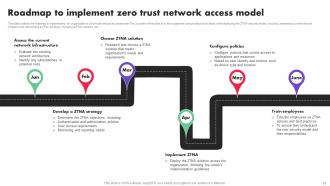
Slide 71: This slide outlines the roadmap to implementing an organization's zero-trust network access model.
Slide 72: This slide highlights Title of contents-Zero trust network access performance tracking dashboard.
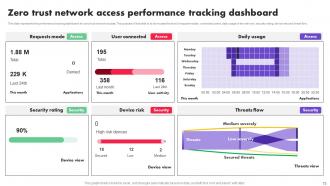
Slide 73: This slide represents the performance tracking dashboard for zero trust network access.
Slide 74: This slide showcases Table of contents for ZTNA further.
Slide 75: This slide renders the problems with the legacy virtual private network security model and how ZTNA can overcome those challenges.
Slide 76: This slide continues Table of contents for ZTNA.
Slide 77: This slide outlines multiple use cases of zero-trust network access systems.
Slide 78: This slide represents the case study for implementing the ZTNA security model into a food and beverage organization.
Slide 79: This slide renders another Table of contents for ZTNA.
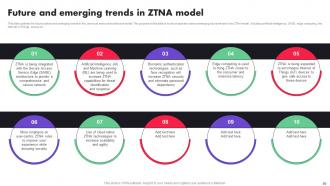
Slide 80: This slide outlines the future outlook and emerging trends in the zero trust network architecture model.
Slide 81: This slide shows all the icons included in the presentation.
Slide 82: This slide is titled as Additional Slides for moving forward.
Slide 83: This slide outlines the overview and working of the micro-segmentation concept of cybersecurity.
Slide 84: This slide represents the comparison between the two primary approaches to implementing zero-trust network access.
Slide 85: This slide provides an overview of zero trust exchange and its benefits.
Slide 86: This slide presents Roadmap with additional textboxes.
Slide 87: This slide describes Top tenets of zero trust network access model.
Slide 88: This is Our Target slide. State your targets here.
Slide 89: This is a Quotes slide to convey message, beliefs etc.
Slide 90: This slide exhibits Comparison between Social media users.
Slide 91: This slide shows Post It Notes. Post your important notes here.
Slide 92: This slide provides 30 60 90 Days Plan with text boxes.
Slide 93: This slide showcases Magnifying Glass to highlight information, specifications etc
Slide 94: This is a Financial slide. Show your finance related stuff here.
Slide 95: This is a Thank You slide with address, contact numbers and email address.
Zero Trust Architecture ZTA Powerpoint Presentation Slides with all 95 slides:
Use our Zero Trust Architecture ZTA Powerpoint Presentation Slides to effectively help you save your valuable time. They are readymade to fit into any presentation structure.
-

Zero Trust Architecture ZTA
-
Agenda for Zero Trust Architecture ZTA
-
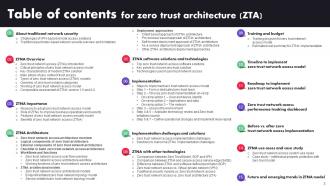
Table of contents for zero trust architecture ZTA
-
Zero Trust Architecture ZTA
-
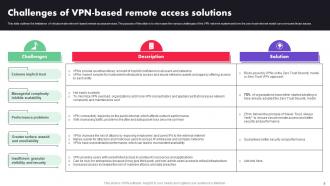
Challenges of VPN based remote access solutions
-
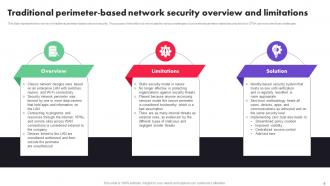
Traditional perimeter based network security overview and limitations
-
Zero trust architecture ZTA
-
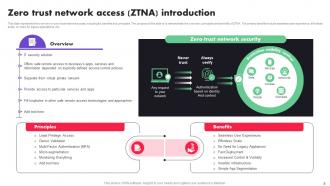
Zero trust network access ZTNA introduction
-
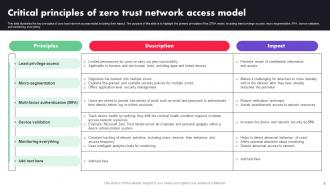
Critical principles of zero trust network access model
-
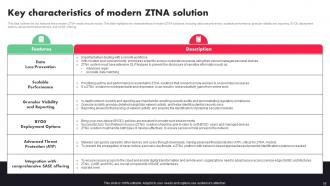
Key characteristics of modern ZTNA solution
-
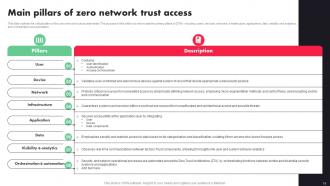
Main pillars of zero network trust access
-
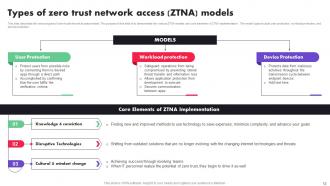
Types of zero trust network access ZTNA models
-
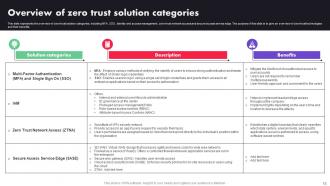
Overview of zero trust solution categories
-
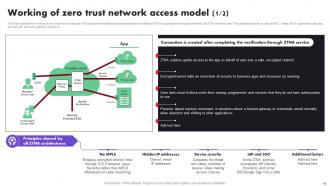
Working of zero trust network access model 1 2
-
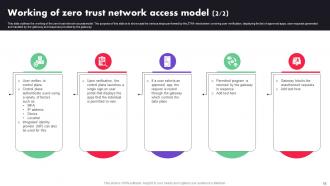
Working of zero trust network access model 2 2
-
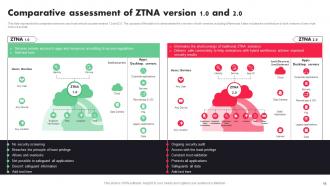
Comparative assessment of ZTNA version 1 0 and 2 0
-
Zero trust architecture ZTA
-
Reasons to adopt zero trust network access model
-
Role of ZTNA to improve business operations and security
-
Features of zero trust network access security model
-
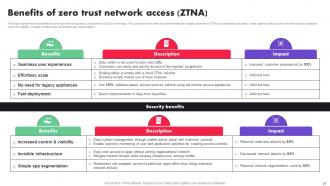
Benefits of zero trust network access ZTNA
-
Zero Trust Architecture ZTA
-
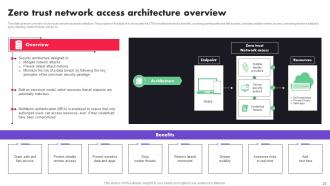
Zero trust network access architecture overview
-
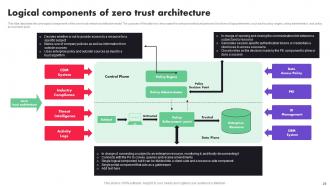
Logical components of zero trust architecture
-
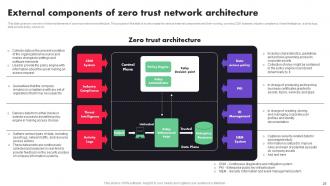
External components of zero trust network architecture
-
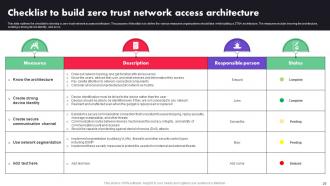
Checklist to build zero trust network access architecture
-
Zero Trust Architecture ZTA
-
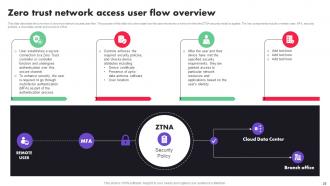
Zero trust network access user flow overview
-
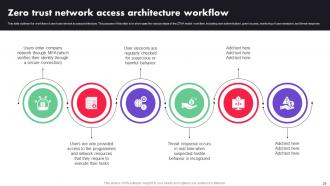
Zero trust network access architecture workflow
-
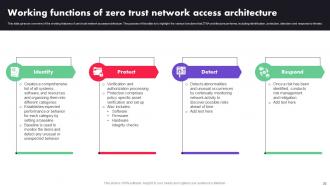
Working functions of zero trust network access architecture
-
Zero Trust Architecture ZTA
-
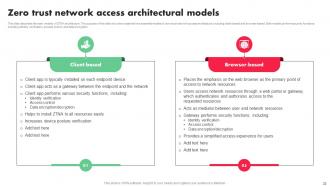
Zero trust network access architectural models
-
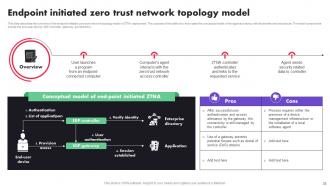
Endpoint initiated zero trust network topology model
-
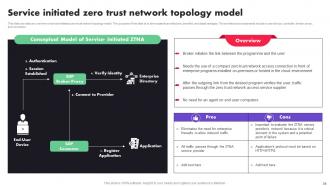
Service initiated zero trust network topology model
-
Zero Trust Architecture ZTA
-
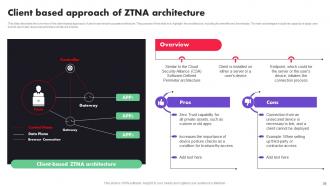
Client based approach of ZTNA architecture
-
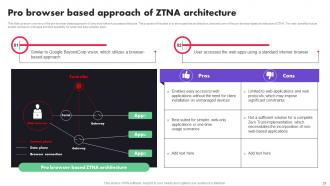
Pro browser based approach of ZTNA architecture
-
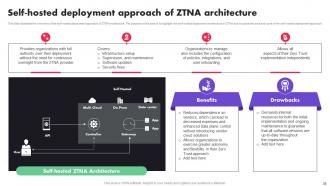
Self hosted deployment approach of ZTNA architecture
-
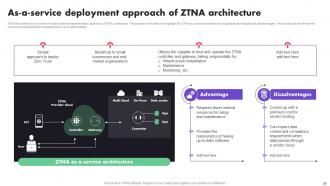
As a service deployment approach of ZTNA architecture
-
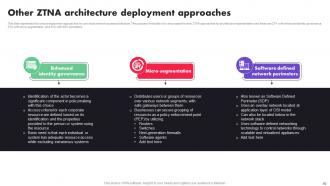
Other ZTNA architecture deployment approaches
-
Zero Trust Architecture ZTA
-
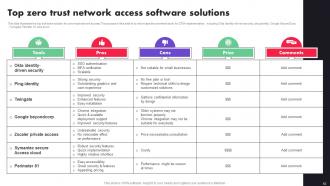
Top zero trust network access software solutions
-
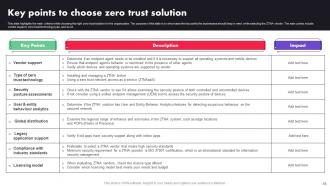
Key points to choose zero trust solution
-
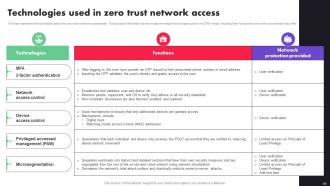
Technologies used in zero trust network access
-
Zero Trust Architecture ZTA
-
Steps to implement zero trust network access model
-
Step 1 Form a dedicated zero trust team
-
Step 2 Choose zero trust implementation on ramp
-
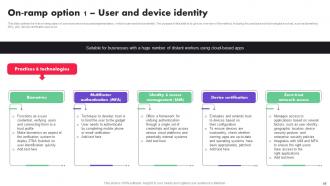
On ramp option 1 User and device identity
-
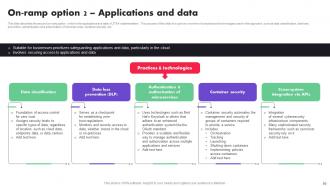
On ramp option 2 Applications and data
-
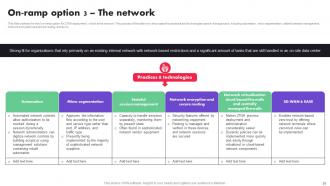
On ramp option 3 The network
-
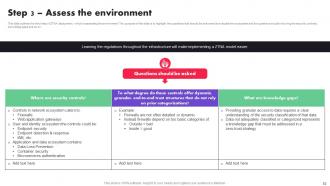
Step 3 Assess the environment
-
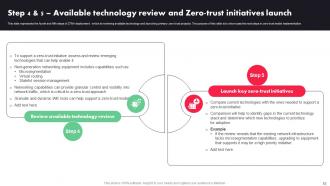
Step 4 5 Available technology review and Zero trust initiatives launch
-
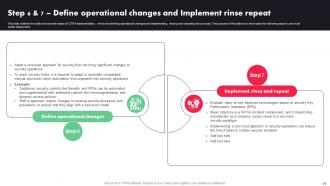
Step 6 7 Define operational changes and Implement rinse repeat
-
Zero Trust Architecture ZTA
-
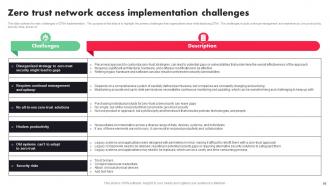
Zero trust network access implementation challenges
-
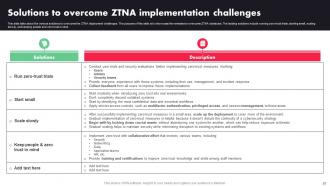
Solutions to overcome ZTNA implementation challenges
-
Zero Trust Architecture ZTA
-
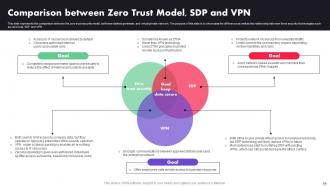
Comparison between Zero Trust Model SDP and VPN
-
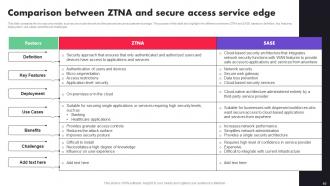
Comparison between ZTNA and secure access service edge
-
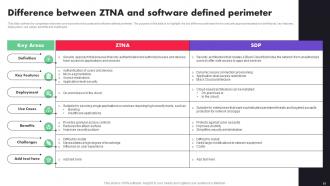
Difference between ZTNA and software defined perimeter
-
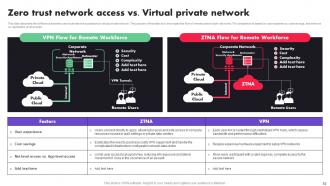
Zero trust network access vs Virtual private network
-
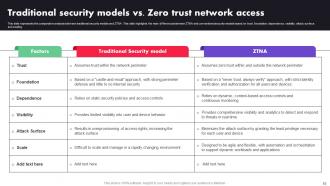
Traditional security models vs Zero trust network access
-
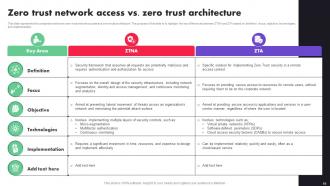
Zero trust network access vs zero trust architecture
-

Zero Trust Architecture ZTA
-
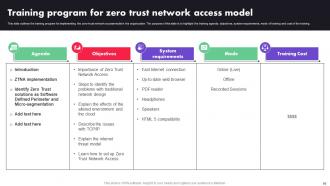
Training program for zero trust network access model
-
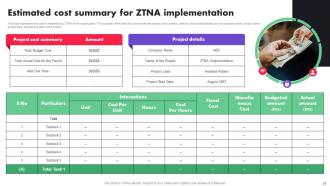
Estimated cost summary for ZTNA implementation
-
Zero trust architecture ZTA
-
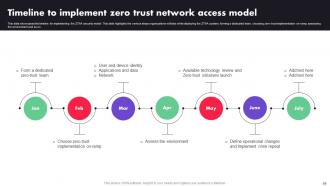
Timeline to implement zero trust network access model
-
Zero Trust Architecture ZTA
-
Roadmap to implement zero trust network access model
-
Zero trust architecture ZTA
-
Zero trust network access performance tracking dashboard
-
Zero trust architecture ZTA
-
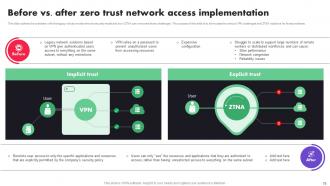
Before vs after zero trust network access implementation
-
Table of contents Zero trust architecture ZTA
-
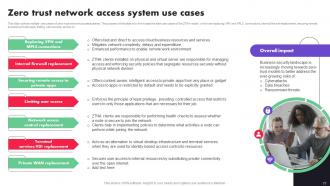
Zero trust network access system use cases
-

Case study intellectual property protection with zero trust model
-
Zero trust architecture ZTA
-
Future and emerging trends in ZTNA model
-
Icons slide for zero trust architecture ZTA
-
Additional slides
-
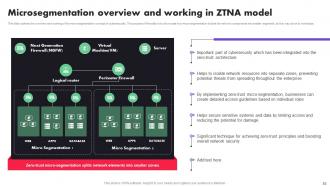
Microsegmentation overview and working in ZTNA model
-
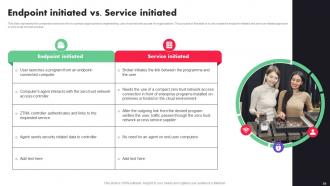
Endpoint initiated vs Service initiated
-
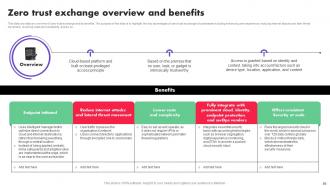
Zero trust exchange overview and benefits
-
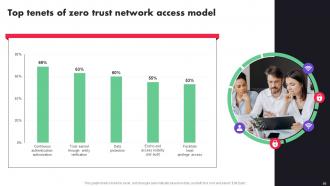
Top tenets of zero trust network access model
-

Thanks for watching
-

-

-

-

-

-

-

-

FAQs for Zero Trust Architecture ZTA
So Zero Trust is basically being paranoid about everything - but like, productively paranoid. You never automatically trust any user or device, whether they're inside your network or not. Everyone gets verified first. Then you only give people the bare minimum access they need for their actual job. Oh and here's the fun part - you assume someone's already hacked you, so you're constantly watching everything. Honestly, it sounds exhausting but it works. Start by figuring out what you've got and who actually needs to touch what.
So basically, old school security is like having a bouncer at the front door - once you're in the club, you can go anywhere. Zero Trust? Complete opposite. Everyone gets checked at every room, even if you're already inside. Picture airport security but for every single door in the building. Yeah, it's annoying at first. But way safer since it verifies your identity, device, location - all that stuff - before letting you access anything. I'd start with figuring out what data actually matters to you, then slap multi-factor auth on everything important.
So Zero Trust really comes down to never trusting anyone by default - even your own employees. You're checking identity constantly before letting people access stuff. MFA everywhere is your best first move, honestly. Also gotta verify devices and watch for weird user behavior patterns. It's annoying but way more secure than the old "you're inside our network so you're fine" approach. My company just rolled this out last month and people complained initially, but they're getting used to it. Every request gets treated like it could be malicious.
Start by figuring out what assets and data flows you actually have - sounds boring but you need that baseline first. Break everything into really specific security zones instead of those huge network chunks everyone does. We're talking individual apps, databases, specific user groups. Most people use software-defined networking or next-gen firewalls for this stuff. Honestly, setting it up is kind of a pain initially. But then you get super strict access between each zone - least-privilege style. Someone breaks into one area? They're stuck there instead of bouncing around your whole network. I'd definitely start small with your most critical stuff and build out from there.
Honestly, start with identity management - that's where everyone who gets this right begins. You're gonna need multi-factor auth, single sign-on, the whole IAM setup basically. Network segmentation comes next so you can create those tiny security zones. EDR tools are clutch for watching every device that connects. Data encryption everywhere, no exceptions there. Oh and get some orchestration platform because trying to manage all this stuff manually? Yeah, that'll make you lose your mind pretty quick. The tech stack sounds overwhelming but if you tackle identity first, the rest falls into place way easier.
So Zero Trust is pretty paranoid - it treats everyone like a potential threat, even your own team. Nobody gets automatic access just because they're "inside" the company network anymore. With remote work, this actually makes sense though. Your employees are logging in from random coffee shops and sketchy home wifi, right? The system constantly checks their identity, device security, and if they're acting weird before letting them touch sensitive stuff. Way different from the old days when being on the office network meant you were trusted. Start with multi-factor authentication and basic device rules - honestly those two things alone will save your butt.
So Zero Trust basically assumes everyone's sketchy - even your own employees. Nobody gets automatic access just because they work there. Users have to keep proving they're legit, and they only get the bare minimum access for their job. Sounds paranoid? That's the whole idea. The system watches everyone constantly and can cut off access instantly if things look weird. Even if someone goes bad or gets hacked, the damage stays limited. First step though - audit who actually needs what access. You'll probably find people have way more permissions than they should (I always do).
Honestly, legacy systems are gonna be your biggest headache - they weren't designed for this stuff. Getting teams on board is rough too since everyone thinks you're just making their jobs harder. Most networks assume people are trustworthy once they're inside, so ripping that apart gets expensive fast. Users will absolutely hate the extra login steps, fair warning. You'll spend forever just figuring out what assets you even have, then writing policies for everything. Training your security folks on new tools takes time too. I'd definitely start with a small pilot on something non-critical first.
Yeah, totally works with NIST, ISO 27001, all that stuff. Think of Zero Trust as more of an add-on than starting from scratch. You take your current security setup and just layer in the "trust nobody" approach. Makes everything way tighter honestly - no more assuming your internal network is automatically safe. Map out what controls you already have, then spot where you need better identity checks or network segmentation. I'd bet money you're already closer than you realize. The whole "never trust, always verify" thing just gives your existing frameworks actual teeth. Pretty straightforward once you dig into it.
So threat intel basically makes your Zero Trust way smarter - instead of just "can this user log in?" you're asking stuff like "does this match attack patterns we've seen?" The analytics side is honestly the game changer though. It catches weird stuff that normal rules miss, like someone accessing databases at 3am with valid creds but totally sus timing. You end up with way more context-aware decisions instead of basic authentication checks. Oh, and start by plugging threat feeds into whatever security tools you already have - easiest win for better detection.
Yeah, Zero Trust does add friction - no way around it. Users get hit with more authentication steps, device checks, the whole nine yards. It's basically a security vs convenience trade-off. The accessibility stuff gets messy if your multi-factor auth doesn't work with screen readers and whatnot. But honestly? Smart SSO and risk-based authentication help a ton. Make the security invisible most of the time. Only bug users when something actually looks suspicious - like Bob from accounting suddenly logging in from Belarus at 3am. Focus on that approach and people won't hate you as much.
Honestly, Zero Trust is a compliance officer's best friend. You get crazy detailed logs of every access attempt, plus continuous verification of users and devices. No more guessing games about who touched what data and when. The granular controls are perfect for stuff like HIPAA or PCI DSS - you can actually prove only authorized people accessed sensitive info. I'd start by looking at your current compliance gaps first, then see how Zero Trust controls map to them. You'll probably be surprised how many boxes it checks automatically. Least-privilege access becomes way easier to enforce too.
Honestly, start by figuring out what you actually have - map your users, devices, all that data stuff first. Don't even think about controls yet. Then go nuts with least privilege access and verify literally everything, even internal connections. MFA everywhere, no exceptions (I can't believe some companies still skip this). Continuous monitoring beats perimeter defenses every time since attacks come from weird places now. Your team's gonna hate the workflow changes at first, so train them early. Oh and definitely roll it out piece by piece - I've seen too many places try to flip everything at once and completely wreck their systems.
Zero Trust speeds up incident response big time because you're already monitoring everything granularly. When something goes wrong, you don't have to scramble around trying to figure out what got hit. The micro-segmentation lets you isolate threats fast, and you can see exactly where they've moved. All those access requests you're already logging? That becomes your forensics goldmine - like having cameras everywhere but for network traffic. I'd say run through your next incident drill using those Zero Trust logs and you'll see what I mean. The difference is pretty dramatic.
Honestly, Zero Trust would be impossible to manage without automation - imagine your security team manually checking every single login request all day. Automation handles the heavy lifting: continuous monitoring, policy enforcement, real-time risk checks. When something sketchy happens, it automatically cuts access or flags threats without human intervention. You'll want to spend serious time configuring those automation rules upfront though. Once it's running, the system makes thousands of micro-decisions daily about who gets into what. Dynamic policy updates happen instantly. It's pretty wild how fast these systems can adapt compared to traditional security setups.
-
The designs are very attractive and easy to edit. Looking forward to downloading more of your PowerPoint Presentations.
-
SlideTeam, Please don’t stop sharing discount coupons! I love your occasional discounts and tend to buy your products around that corner.