


Zero Trust Network Architecture Flowchart




Try Before you Buy Download Free Sample Product
 Impress Your
 Audience
 100%
100% Editable
 Save Hours
 of Time


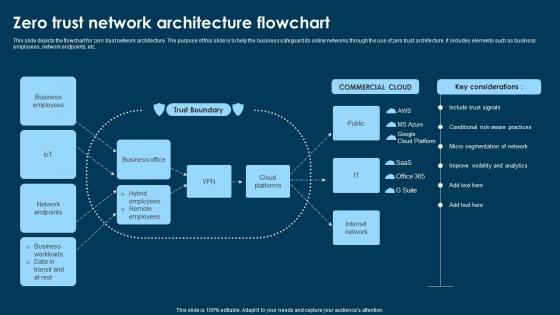
This slide depicts the flowchart for zero trust network architecture. The purpose of this slide is to help the business safeguard its online networks through the use of zero trust architecture. It includes elements such as business employees, network endpoints, etc.
People who downloaded this PowerPoint presentation also viewed the following :
Zero Trust Network Architecture Flowchart with all 9 slides:
Use our Zero Trust Network Architecture Flowchart to effectively help you save your valuable time. They are readymade to fit into any presentation structure.








FAQs for Zero Trust
So Zero Trust is basically "don't trust anyone, verify everything" - you treat every user and device like they could be compromised until they prove they're legit. Doesn't matter if someone's sitting right in your office, they still gotta verify. The old approach of trusting stuff just because it's on your internal network was pretty naive tbh. Give people only the bare minimum access they need for their job - nothing extra. Oh and here's what you should actually do first: figure out what access your team really needs vs all the random permissions they've probably accumulated over time. It's usually eye-opening.
So traditional security is basically like having a fortress - once you're in, you can access pretty much everything. Zero Trust throws that whole concept out the window. It assumes your network is already compromised, honestly. Every single user and device gets checked constantly before touching any data. Instead of just guarding the front door, you've got checkpoints everywhere. Your current setup probably trusts internal traffic way too much (most do). Start with your crown jewel assets and make people authenticate again to reach those. It's "never trust, always verify" but applied to literally everything.
So Zero Trust is all about proving who you are before you can touch anything. No more "oh you're on our network, you must be fine" - now it's MFA, certificates, biometrics, the whole deal. Picture showing your ID every single time you walk into a different room (super annoying, I know). The tricky part? This verification keeps happening constantly, not just when you first log in. Honestly, the biggest challenge is finding identity tools that won't make your users want to throw their laptops out the window.
First thing - audit what you've got. Map your users, devices, data flows, all that stuff. Multi-factor auth should be your next move, then work on network segmentation to build those secure zones. It's honestly like trying to renovate while you're still living there, which sucks but that's reality for most companies. I'd focus on your most critical assets first, then slowly expand outward. Don't try flipping everything at once - that's a recipe for disaster. Just pick one pilot project and see if it actually works before going crazy with it.
Start with MFA and IAM - they'll give you the biggest bang for your buck security-wise. You're also gonna need network segmentation tools to create isolated zones, plus endpoint detection software that monitors all your devices. Fair warning though, the constant monitoring feels like overkill at first but you adapt. CASBs are a must if you're doing any cloud stuff (which, let's be real, who isn't these days?). Network segmentation comes next. Honestly just focus on getting multi-factor authentication locked down first - everything else can wait.
So Zero Trust basically assumes everyone's sketchy - even your own employees. Wild concept, right? Instead of giving people free rein once they're inside your network, it checks every single person and device constantly. Yeah, it's super paranoid but honestly works great. When someone's account gets hacked or an employee decides to cause trouble, they can only mess with stuff they're specifically allowed to access. You'll want to start by figuring out your most important data first, then lock it down tight. Only give access to people who actually need it.
Look, Zero Trust is honestly a game-changer for compliance stuff. You're verifying everyone constantly instead of just trusting people once they're in your network - makes GDPR and HIPAA way less stressful. The audit trails happen automatically, which is nice because those compliance reviews used to be such a pain. You'll catch data breaches right away instead of finding out weeks later when it's already a disaster. My advice? Start with your most sensitive data first and build the controls around that. The granular access control thing really does make everything smoother once you get it set up.
Don't try doing everything at once - that's where most people mess up. Your users will hate you if security suddenly gets way more restrictive without warning them first. I've seen teams get totally distracted by flashy vendor demos and buy a bunch of tools before they even know what their network looks like. Focus on processes and training, not just the tech stuff. Cultural change is harder than you think it'll be. Start with one small use case to prove it works. Get your stakeholders on board early, and honestly, make sure you can actually see what you're trying to protect first.
So micro-segmentation is basically how Zero Trust actually works in the real world. You break your network into tiny pieces instead of having these huge zones where everything can talk to each other. Picture individual locked rooms vs one massive warehouse - way harder for attackers to move around if they get in. Each segment needs its own authentication, which honestly is a pain to set up but totally worth it. Short sentences work better here. Even if someone breaks in, they're stuck in that one segment. Start by figuring out what your critical stuff is and what actually needs to communicate. You'll thank yourself later.
Zero Trust really depends on continuous monitoring - that's what makes the "never trust, always verify" approach actually work. You can't just check someone's credentials once and forget about it. The system has to constantly watch user behavior, device health, network activity, and how people access stuff. It's like having a security guard who doesn't fall asleep on the job (honestly, most traditional security feels like that sleepy guard). Without real-time visibility, threats can just hop around your network unnoticed. I'd start with your most critical assets and get monitoring set up there first.
So Zero Trust is this approach where you don't trust anyone by default - even your own employees. Every single person and device gets verified each time they want access to something. Think of it like carding everyone at every door instead of just the entrance (yeah, super annoying but honestly necessary these days). Remote work makes this even more critical since people are logging in from random coffee shops and potentially sketchy home networks. If someone's connection gets hacked, your company data is still safe. Start with multi-factor authentication and make sure you're verifying devices too.
Start with something like Okta or Azure AD for managing who gets access to what. For network stuff, Palo Alto Prisma or Zscaler are pretty solid choices - they'll handle your traffic monitoring and segmentation. CrowdStrike's great for endpoint protection if you can swing the budget. Oh, and you'll definitely need a SIEM like Splunk to actually see what's happening across everything. Honestly though? Pick one vendor's whole suite instead of mixing five different tools. Trust me on this one - I've seen too many teams spend months just trying to get everything to talk to each other properly.
Yeah, you'll get more login prompts for sure - especially when jumping between networks or hitting sensitive stuff. But honestly? Most people get used to it super fast. The annoying part is usually the SSO and MFA setup at first. Once that's smooth though, it kinda just runs in the background. I'd say get your password manager sorted and download whatever authenticator app they're using right away. That'll save you headaches later. Takes maybe a week to feel normal, then you barely think about the extra steps. Way better than dealing with a breach, trust me.
Yeah, the upfront costs are no joke - new security tools, identity systems, maybe some big infrastructure overhauls. Training eats up budget too. Honestly, the time your team spends implementing is probably gonna be your biggest hidden expense. Most places hit ROI in 2-3 years though, thanks to fewer breaches and better compliance. Don't try to do it all at once - that's just asking for trouble. Start with your most critical stuff first, then expand out. Way easier on the wallet and you can actually show some wins early.
Track security stuff like incident rates and detection speed - that's the obvious part. But honestly, don't ignore user experience or people will hate you. Monitor login times and helpdesk complaints because nobody wants security that's a nightmare to use. Policy compliance rates are huge too. Before you roll anything out, get your baseline numbers first (learned this the hard way). Then check monthly how you're doing with access changes when people switch roles. Build a dashboard so you can actually see what's happening instead of guessing.
-
Well-designed and informative templates. Absolutely brilliant!
-
Nice and innovative design.