

Zero Trust Architecture Powerpoint Ppt Template Bundles




Try Before you Buy Download Free Sample Product
 Impress Your
 Audience
 100%
100% Editable
 Save Hours
 of Time


Introducing our cutting edge presentation on Zero Trust Architecture the ultimate solution for modern security challenges. In an age where cyber threats are rampant, this PPT delves deep into the realms of Security, Authentication, Access Control, Network Segmentation, and Identity and Access Management IAM. Learn how our comprehensive approach to cybersecurity ensures that no one, whether inside or outside your organization, is automatically trusted. Discover the power of robust authentication methods and fine grained access control. Explore the benefits of network segmentation and the pivotal role of IAM in safeguarding your data. Elevate your security posture and stay one step ahead in the ever evolving world of digital threats with this informative presentation. Your organizations safety is our priority.
People who downloaded this PowerPoint presentation also viewed the following :
Zero Trust Architecture Powerpoint Ppt Template Bundles with all 25 slides:
Use our Zero Trust Architecture Powerpoint Ppt Template Bundles to effectively help you save your valuable time. They are readymade to fit into any presentation structure.












FAQs for Zero Trust Architecture Powerpoint
Look, Zero Trust is basically "don't trust anyone, ever" - you verify every single person and device trying to access stuff, no exceptions. Traditional security was like having a fortress wall where everything inside was supposedly safe (spoiler: it wasn't). This approach treats your whole network like it's crawling with bad actors. Map out your crown jewel assets first, then lock those down with strict controls. You're constantly watching who's doing what and giving people the bare minimum access they actually need. It's way more paranoid but honestly? That's the world we live in now.
So Zero Trust is this security approach where you don't automatically trust anything - even stuff that's supposedly "inside" your network. Every user and device gets verified each time they want access, whether they're at Starbucks or using some cloud app. Think of it like checking IDs at every single door, not just the front one (okay that's kinda cheesy but whatever). It's honestly perfect for all this remote work madness we're dealing with. Even if someone's laptop gets hacked or they're on terrible WiFi, you're still covered since nothing gets automatic trust. Start with multi-factor authentication everywhere - that's the low-hanging fruit.
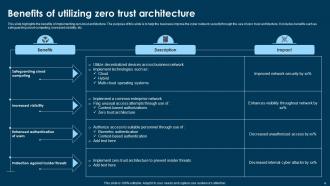
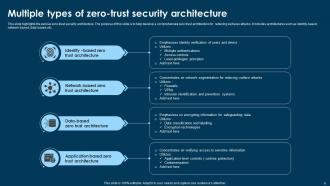
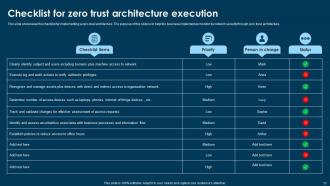
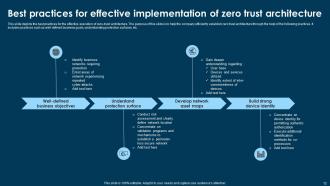
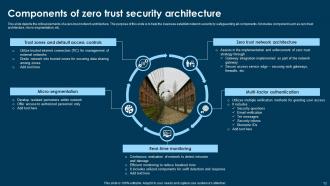
So you'll need a few key things to get Zero Trust rolling. IAM is huge - honestly the biggest piece since it verifies every single user and device. Network segmentation creates those security boundaries you need. Endpoint security monitors devices, and data classification helps you figure out what actually matters (sounds boring but it's not). Continuous monitoring tools are essential too, plus policy enforcement scattered throughout your network. Oh, and don't try to do everything at once - start with your most sensitive stuff first and build from there.
Honestly, IAM is what makes Zero Trust actually work. Your system needs to constantly verify who people are and what they can access - not just at login, but all the time. Location, device, how they're behaving, all that stuff matters. It's like having a security guard who's always paying attention (which is exhausting to think about, but necessary). You'll want solid multi-factor authentication and give people only the access they absolutely need. Start by looking at what you've got now. Then figure out where you can add smarter, more specific controls that actually respond to what's happening.
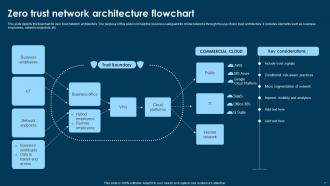
So micro-segmentation is like having a bouncer for every room in your network instead of just the front door. It creates these tiny security zones around each app and workload. When hackers break in (and they will), they can't just run wild through everything - they hit walls everywhere they turn. Perfect for Zero Trust since you're already expecting the worst anyway. Picture fire doors that slam shut automatically... actually, that's probably a better analogy than the bouncer thing. Each zone has its own checkpoints, so you're constantly verifying access. I'd start by mapping out your most critical stuff first and segment those.
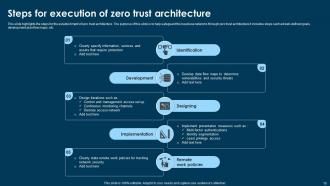
First thing - do a full inventory of your security tools, network setup, and data flows. You can't fix what you don't know exists. Honestly, most companies find a bunch of shadow IT they had no clue about. Next, check your identity management maturity since that's your Zero Trust foundation. Can you actually enforce least-privilege access? Will your systems handle continuous verification? Also look at your team's skills and budget for this transition - it's not cheap. The trick is being super honest about your gaps instead of pretending you're ready when you're not.
So you'll definitely need IAM as your starting point - Okta or Azure AD work great for controlling access. Microsegmentation firewalls help you slice up your network into smaller chunks. SIEM platforms are pretty much mandatory since you're assuming everything's already sketched out. EDR tools too, honestly can't skip those anymore. The trick is getting them all to play nice together, which is where most people mess up. I'd personally start with whatever IAM solution fits your budget and work outward from there. Integration's where the real work happens.
So Zero Trust is basically paranoid security - nobody gets trusted by default, not even your own people. Every single person and device has to prove they belong there before accessing anything. Sounds exhausting, right? But here's the thing - if someone on your team goes rogue or gets their credentials stolen, the system still blocks them from stuff they shouldn't see. You control exactly who accesses what data and when. Honestly, it's pretty smart given how many breaches start from the inside. I'd start with your most sensitive files first.
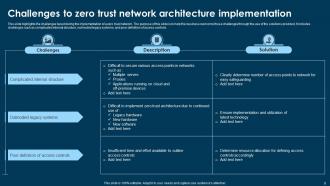
Honestly, the worst part is dealing with ancient systems that hate Zero Trust architecture. Your employees will complain about extra login steps too - can't blame them really. Mapping out every single data flow? Total nightmare. And good luck convincing the C-suite to spend money upfront, even when you show them the long-term savings. Here's what actually works: pilot program with your crown jewel assets first. Don't try to fix everything at once - that's how projects die. Get executives on board early with solid ROI numbers. Training is huge though. People need to understand why security got more annoying, or they'll find workarounds.
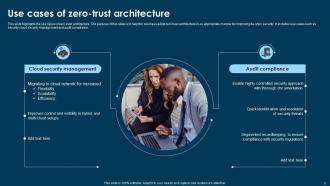
Honestly, Zero Trust is kind of perfect for compliance stuff. You're already doing most of what GDPR and HIPAA want - encryption, access logs, limiting who can see what. The constant verification thing gives you solid audit trails, so you can actually prove who touched which data. Data segmentation makes minimization way less painful too. What I love about it is compliance stops being this separate headache and just becomes part of how your security works. My advice? Map what you've got against your requirements first - I bet you're closer than you think. Oh, and the logging is honestly better than most dedicated compliance tools I've seen.
Dude, security incident reduction is your main metric - watch that like a hawk. Authentication success rates matter too, along with how long it takes legit users to actually get access. I'd also track failed login attempts and policy violations. Oh, and definitely monitor detection/response times for threats. The data gets nuts pretty fast though, so stick to those basics at first. Here's the thing - user experience is just as critical as the security stuff. People will revolt if they can't do their work smoothly. Monthly dashboards work well for tracking all this, then tweak as needed.
Honestly, treat vendors like you would any sketchy user - don't trust them by default. Multi-factor auth is a must, and only give them access to what they actually need for their job. I've watched companies get totally screwed because they let vendors run wild in their systems. Monitor what they're doing constantly and audit their permissions regularly. Get security proof from them and review it quarterly (at least). Oh, and segment their network access so if they get compromised, they can't just hop around your infrastructure. Document everything because you'll need that paper trail later.
Google completely dumped their VPN after getting breached - now they authenticate every single request no matter where you are. Netflix does the same thing, which is smart since they just assume someone's already inside their network. Microsoft rolled it out internally too (gotta eat your own dog food, right?). CISA and other government folks jumped on board as well. The trick is starting small though. Don't try to flip your whole company overnight - that's a recipe for chaos. Pick one app or maybe a small team first and see how it goes. Akamai did this really well. Once you prove it works, then you can expand from there.
So Zero Trust basically flips everything - you're not protecting the perimeter anymore, you're protecting identities and data instead. Nothing gets trusted automatically, even if it's already inside your network. Your SIEM tools have to get way more detailed now, and honestly? Endpoint protection isn't optional anywhere anymore. Network segmentation becomes huge too. The tricky part is making all these tools actually talk to each other for real-time risk checks and smart access controls. Yeah, it makes your security stack messier, but it's so much stronger. I'd start by figuring out which tools you have can actually verify stuff instead of just watching it happen.
AI threat detection is getting scary good these days. Your employees won't hate the new authentication methods as much - they're way more seamless now. Zero Trust is moving to the cloud, which honestly makes sense. Security tools are finally starting to play nice with each other instead of being isolated islands. Real-time verification is replacing that old "trust but verify" approach. Don't forget about IoT and remote work security - that stuff's everywhere now. You'll want to figure out how this impacts your budget and current setup sooner rather than later.
-
Love the template collection they have! I have prepared for my meetings much faster without worrying about designing a whole presentation from scratch.
-
Love the template collection they have! I have prepared for my meetings much faster without worrying about designing a whole presentation from scratch.