

Firewall Audit Powerpoint Ppt Template Bundles





Try Before you Buy Download Free Sample Product
 Impress Your
 Audience
 100%
100% Editable
 Save Hours
 of Time


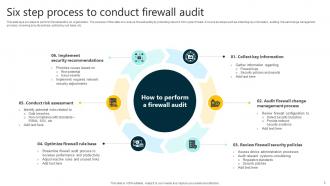
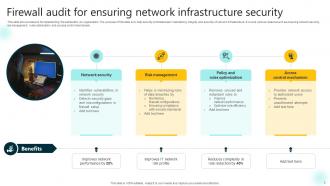
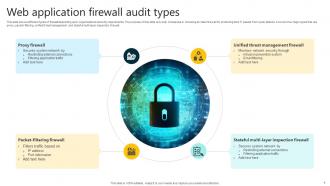
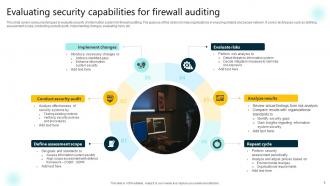
Firewall audit is systematic testing and evaluation of a network firewalls configuration rules and policies in order to safeguard computer networks against unauthorized access and data breaches. A firewall audits goal is to confirm that the firewall is effectively securing the network by identifying and addressing possible vulnerabilities, thus maintaining an effective security posture. In order for firewalls to respond to shifting threats and network requirements, they must be regularly assessed and upgraded.Use our Firewall Audit PowerPoint presentation to strengthen network defences. Navigate the areas of access control analysis, firewall configuration evaluation, and network security audit. Realise the crucial significance of safeguarding digital assets by performing an in-depth assessment of firewall system. Understand how to evaluate, enhance, and manage firewall settings to protect against online threats. This presentation provides the information and resources an organization need to strengthen its digital boundaries. Analyse the fundamental components of firewall security to make sure that businesss critical data is kept secure in the face of ever changing threats.
People who downloaded this PowerPoint presentation also viewed the following :
Firewall Audit Powerpoint Ppt Template Bundles with all 20 slides:
Use our Firewall Audit Powerpoint Ppt Template Bundles to effectively help you save your valuable time. They are readymade to fit into any presentation structure.











FAQs for Firewall Audit Powerpoint
Honestly, I'd tackle this in five chunks. Start with your rule sets - that's where most of the messy stuff lives. Look for old rules that don't make sense anymore or ones that are way too loose. Access control policies are next - do they actually match what your business needs right now? Oh, and check your logging setup because people forget about that constantly. Network segmentation is huge too - make sure different zones aren't talking when they shouldn't be. Last thing, just verify your firmware's current. The rule review will probably eat up most of your time anyway.
Look, you gotta dig into your logs first - check for dead rules and overly broad permissions that aren't doing anything useful. Traffic monitoring will show if you're accidentally blocking legit business stuff or letting sketchy things through. Run some pen tests too, see what holes exist. Most companies I've dealt with are running like 40% useless rules they forgot about years ago. Set up reviews every few months so your ruleset doesn't turn into a mess again. Those analysis tools are honestly lifesavers for spotting conflicts between rules.
Honestly, the biggest mess I see is those lazy "allow all" rules that nobody ever went back to fix. Tons of dead rules for services that got decommissioned years ago but are still sitting there. Oh, and duplicate rules everywhere - it's like people just kept adding instead of cleaning up. Admin access wide open from any IP is pretty bad too, should really lock that down to your management networks. Port ranges are usually way too broad when you could just specify the exact ones. Logging is often garbage which makes troubleshooting suck. I'd start by actually documenting what's running first, then compare.
Quarterly is the bare minimum, but monthly's way better if you can pull it off. High-risk industries? Definitely go monthly. Things move so damn fast in cybersecurity that quarterly might leave you exposed too long. How often you change configs matters too - more changes means more frequent checks. Oh, and some compliance stuff has its own timeline requirements you'll need to hit. I'd start with quarterly reviews of your rules, policies, and logs, then see how it goes. Also set up some automated alerts so you're not flying blind between audits.
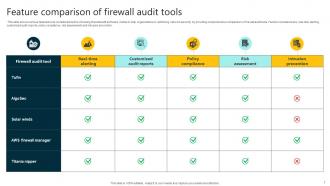
Honestly, I'd mix automated tools with some hands-on digging. Nmap or Nessus work great for mapping your network and spotting open ports. Then throw FireMon or Tufin at it to catch rule conflicts - those tools are pretty solid for that stuff. Manual log review is where you'll find the real dirt though. Logs don't lie about what's actually going down. Oh, and if you're stuck with compliance requirements, grab some scanning tools for that headache too. No single tool catches everything, so layer this approach. Start automated, then get your hands dirty with the manual stuff.
So basically, you gotta figure out which regulations apply to your company first - SOX, HIPAA, PCI-DSS, whatever. Each one has different rules for documenting firewall stuff and how often you need to audit. Some want quarterly reviews (ugh), others are yearly. You'll be tracking every single change, keeping detailed logs, and proving your firewall rules actually make sense for the business. Honestly, the paperwork is probably the worst part. Just map out your audit schedule based on whatever compliance standards you're stuck with, then build your process around those specific deadlines and requirements.
So traffic analysis is basically how you figure out if your firewall's actually working or just pretending to. Look at what's getting through and what's blocked - you'll spot weird patterns that scream "something's wrong here." I usually check both allowed and denied traffic because honestly, the denied stuff tells you just as much. Bottlenecks become super obvious when you dig into the logs. Set up reviews maybe weekly or monthly so you catch problems early. It's kind of like detective work but way more boring - just you, packets, and coffee.
Honestly, just make a simple risk matrix - plot everything by how likely it is vs how bad it could be. Critical stuff first: open ports to the internet, overly broad rules exposing sensitive systems. Medium risks are things like outdated documentation or those unused rules that somehow multiply like rabbits. Context matters a ton though - database access rules might be whatever for some companies but absolutely devastating if you're dealing with financial data. Build your timeline around this and knock out the high-impact, high-probability stuff immediately.
For your firewall audit, focus on the usual suspects: throughput, latency, CPU/memory usage, and packet drops. Connection counts matter too. Here's what most people miss - check which rules are actually getting hit. I've seen networks with hundreds of dead rules just sitting there taking up space. Monitor your blocked vs allowed traffic ratios and keep an eye on failed login attempts. Oh, and don't forget about logging performance because that'll bite you if it becomes a bottleneck. Set up some automated reports so you're not pulling this stuff manually every month.
So firewall auditing basically gives you a play-by-play of all the network traffic that got allowed or blocked. Think of it like security footage for your network. When shit hits the fan, you can trace exactly how attackers got in and what systems they compromised. Plus during recovery, you'll know which firewall rules were too loose and need fixing. The logs also help when you're dealing with management - you can actually prove you patched the security holes. One thing though - make sure you're backing up those audit logs regularly. Trust me, you don't want to lose that historical data right when you need it most.
Track every config change with timestamps and who did it - auditors eat that stuff up. Document what your rules actually do instead of cryptic IP lists, like "HR payroll access" or whatever. Version control everything like it's code because honestly, it basically is. Keep those approval records handy too. Before changing anything, grab snapshots of the before/after states. Set up automated backups while you're at it - saves your butt later. Oh and the "why" behind changes matters just as much as the "what." Can't stress this enough: if you can't explain what happened during crunch time, audit season becomes absolute hell.
Ugh, they all suck in different ways tbh. Cloud stuff is constantly changing - rules are always shifting around and you're dealing with both their native firewalls plus whatever virtual ones you threw in there. On-prem is at least predictable but you'll be manually checking configs forever. Don't even get me started on hybrid setups though - different interfaces for everything and trying to keep policies consistent is a nightmare. Honestly just get some automated tools that work across platforms. Trust me, doing this by hand will make you want to switch careers.
Dude, firewall audits are clutch for seeing what's actually happening vs what you think is happening. You'll catch all those random rules someone added "just for testing" that are still there six months later lol. Plus you find ports hanging open for no reason and policies that don't make sense anymore. Honestly the worst part is discovering how bad your logging is - like how are you supposed to spot sketchy traffic if you can't even see it? I'd run these every quarter or so. Compare the results each time and you'll catch problems way before the bad guys do.
Start with CompTIA Security+ - that's your foundation. Then go for CISSP or CISA since you want the audit angle. Honestly, most firewall auditors I've met learned way more on the job than in any class, but you still need the creds. Get vendor-specific training too depending on what your company runs - Cisco ASA, Palo Alto, whatever. SANS courses cost a fortune but they're actually worth it. Oh, and don't skip compliance stuff like SOX or PCI-DSS training because that's what auditors really care about. See what your company will cover first though.
Ugh, virtualization makes firewall audits such a pain. You're basically auditing like 5 networks stacked on top of each other - virtual firewalls, hypervisor stuff, VMs talking to each other without ever hitting your physical network. Honestly the worst part is you can't see half of what's happening. Traditional monitoring tools miss all that VM-to-VM chatter. I'd start by mapping out your virtual segments first (sounds boring but trust me). Then work through each layer - virtual firewall logs, hypervisor policies, communication rules between VMs. Takes forever but you'll catch way more issues going layer by layer.
-
“I really like the convenient operation and professionalism I saw on the SlideTeam website. I want to express my regards and appreciation to the team.”
-
Informative and engaging! I really like the design and quality of the slides.