


Fire Alarm System Powerpoint Ppt Template Bundles




Try Before you Buy Download Free Sample Product
 Impress Your
 Audience
 100%
100% Editable
 Save Hours
 of Time


Our Fire Alarm System Powerpoint Ppt Template Bundles are topically designed to provide an attractive backdrop to any subject. Use them to look like a presentation pro.
People who downloaded this PowerPoint presentation also viewed the following :
Fire Alarm System Powerpoint Ppt Template Bundles with all 20 slides:
Use our Fire Alarm System Powerpoint Ppt Template Bundles to effectively help you save your valuable time. They are readymade to fit into any presentation structure.





FAQs for Fire Alarm System Powerpoint
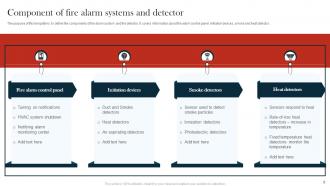
So you'll need smoke and heat detectors, plus those manual pull stations. The control panel is where everything connects - that's your main hub for processing signals and triggering responses. Horns and strobes handle notifications. Don't forget the wiring to tie it all together, obviously. If you're connected to a central monitoring station, there's extra equipment for that too. Some setups also interface with suppression systems, but honestly that depends on what you're working with. The control panel layout is key though - spend time learning yours because you'll be staring at it whenever something goes wrong.
So there's basically two ways fire alarms detect stuff. Smoke detectors either use light beams that get blocked by particles, or they have these ionization things where smoke messes with the electrical current. Heat ones are way simpler - they just go off when it gets too hot or heats up super fast. I swear the photoelectric ones in my apartment hate me cooking anything, but they work great for actual fires. You'll want both types around your place since some fires start with more heat than visible smoke.
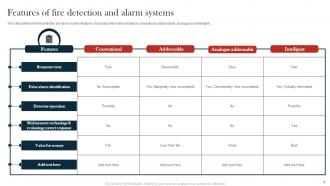
So there's basically three types you'll run into: conventional, addressable, and wireless. Conventional is the cheapest but only tells you which zone has a problem, not the specific device. Pretty annoying when you're trying to find the issue. Addressable costs more upfront but pinpoints exactly which detector went off - saves you tons of time. Wireless works great if you've got an older building where pulling new cables would be a pain in the ass. Honestly, I'd go addressable for most commercial stuff. The extra cost pays for itself when you're not wandering around looking for which smoke detector is beeping at 2am.
So your fire detectors and sprinklers are basically wired together. Smoke or heat triggers the detectors, which then automatically open the sprinkler valves in whatever zone needs it. Pretty cool system actually. The alarm panel gets feedback too - like if water starts flowing or someone messes with a valve. Both systems chat back and forth so you know what's happening in real time. Oh, and definitely test the whole setup every few months. You don't want to find out they're not talking to each other when there's actually a fire, you know?
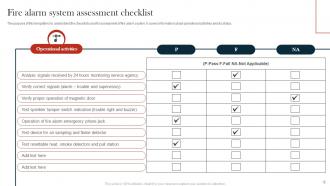
Test those buttons monthly - just hit 'em and make sure everything's working. Change backup batteries once a year, not when they decide to chirp at 3am (trust me on this one). Every few months, wipe dust off the smoke detectors because that stuff messes with how they work. Get a pro to check everything annually - wiring, the panel, making sure you're up to code. Oh, and document everything you do. Inspectors eat that up and it'll save your butt later when something comes up.
LED lights and smart detectors are your best bet - they automatically dial down power when nothing's happening. If you've got an old conventional system, upgrading to addressable will cut your energy use big time since the communication loops draw way less current. Honestly, the control panel upgrade might give you the biggest bang for your buck with those sleep modes. Wireless detectors work great too if you don't want to mess with running new cables (batteries last forever anyway). Start by checking how much power you're actually using now - you might be surprised where it's all going.
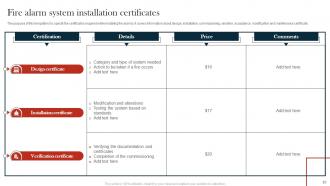
Residential vs commercial fire codes are totally different beasts. Your house just needs basic stuff - smoke detectors in bedrooms, hallways, pretty standard. Commercial though? That's where it gets crazy expensive and complicated. You're dealing with NFPA 72 standards, local fire codes, ADA requirements, sometimes weird industry rules too. The systems have zones and monitoring and honestly way more moving parts than they should. Oh and definitely call your fire marshal before doing anything - they'll know exactly what applies to your building. Trust me, it'll save you from redoing everything later when the inspector shows up.
Honestly, your fire alarm system is what saves everyone's ass when things go wrong. Without it detecting smoke or heat early, people won't know there's danger until it's too late. But here's the thing - it does way more than just make noise. The system also controls emergency lighting, unlocks doors automatically, and shuts down your HVAC so smoke doesn't spread everywhere. Pretty smart stuff. Just remember to test it monthly (yeah, I know it's annoying) and make sure everyone actually knows the evacuation plan when that thing starts blaring.
Test monthly - just hit the control panel, check a few detectors, make sure the alarms actually work. Then get a pro in once a year for the real deal. They'll go through every single component, check all the wiring, calibrate stuff, swap out batteries. Honestly, quarterly inspections are better if you're in a high-risk building, but most places can get away with annual. Oh, and keep records of everything! Fire inspectors are gonna want proof you've been doing this, and trust me, you don't want to scramble for paperwork during an audit.
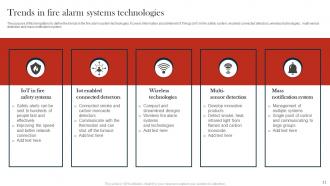
Dude, fire alarms have gotten crazy advanced lately. The new ones use AI to tell the difference between actual smoke and your burnt breakfast - no more false alarms every time you cook! Installation's way simpler now with wireless mesh systems. You can monitor everything from your phone too, which is honestly pretty cool. These systems even talk to your HVAC and security setup for better coordination. Oh, and they're like 90% more accurate than old school detectors. Honestly if you're upgrading, just get one with smartphone integration - that's where everything's headed anyway. The predictive maintenance stuff is neat too.
Dude, voice evacuation systems are so much better than regular fire alarms. People actually listen when they hear "Use the north stairwell" instead of just panicking at that awful beeping sound. You can update everyone in real-time too - like if one exit gets blocked, you just redirect them somewhere else. Way less chaos that way. I saw this in action at my old office building once and it was night and day compared to the usual stampede situation. If you're thinking about upgrading, voice systems are definitely worth the extra cost for crowd control.
Honestly, most people think fire alarms are just fancy smoke detectors, but they're way more complicated - like a whole network of different components. You can't just slap them up and ignore them either. They need constant testing and maintenance, which nobody wants to hear. Heat detectors work totally different from smoke ones, and beam detectors are their own thing too. People always assume louder = better, but that's not how coverage works at all. My advice? Find a good certified tech who actually knows what they're doing. Trust me, it'll save you headaches later.
So basically, your fire alarm connects to a 24/7 monitoring station that calls the fire department when it goes off. Pretty straightforward setup. Some of the newer systems actually connect straight to 911 dispatch, which I think is way better honestly. You just gotta make sure your monitoring contract isn't expired and they have your current phone number and any building codes. Oh, and test the connection monthly - learned this the hard way when my buddy's alarm went off and nobody got the signal because his system was basically talking to dead air.
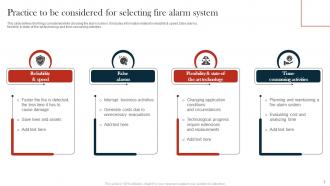
Start with building size and what type of occupancy you're dealing with - that's gonna drive everything else. Hospitals are totally different beasts than regular offices since people can't just walk out on their own. Map your detection zones first, then figure out notification coverage and how it'll work with sprinklers. Ambient noise is huge for sizing horns and strobes - learned that one the hard way. You'll be testing these things constantly so don't put devices where you can't reach them easily. I'd hit the critical areas first, then expand out so you don't end up with dead zones.
Honestly, most people don't think about this but your alarm choice makes a huge difference in how fast everyone gets out. You want something that cuts through background noise without being so jarring that people just freeze up. Different sounds can signal different emergencies too - pretty smart when you think about it. The frequency matters more than just cranking up the volume. But here's the thing - you really need to test whatever you pick with actual people in that space. I've seen systems that looked perfect on paper but totally failed because nobody could tell what the hell was going on when it went off.
-
They saved me a lot of time because they had exactly what I was looking for. Couldn’t be happier!
-
This design is not only aesthetically pleasing but it has many uses making the cost worthwhile. The graphics look stunning, and you can edit them as per your needs.