

IP Security Powerpoint Ppt Template Bundles




Try Before you Buy Download Free Sample Product
 Impress Your
 Audience
 100%
100% Editable
 Save Hours
 of Time


Enter the realm of fortified digital landscapes with our IP Security PPT, an illuminating guide to safeguarding networks and data. Delve into the core of network security, unraveling the importance of robust firewall protection to shield against external threats. Explore the intricate layers of data encryption, fortifying sensitive information against unauthorized access. This presentation illuminates the critical aspects of IP Security, empowering you to navigate the complexities of safeguarding digital assets. Equip your team with the knowledge to fortify networks, prevent data breaches, and ensure confidentiality through comprehensive encryption measures. Elevate your security posture and fortify your digital realm effectively with our insightful IP Security PPT.
People who downloaded this PowerPoint presentation also viewed the following :
IP Security Powerpoint Ppt Template Bundles with all 20 slides:
Use our IP Security Powerpoint Ppt Template Bundles to effectively help you save your valuable time. They are readymade to fit into any presentation structure.









FAQs for IP Security Powerpoint
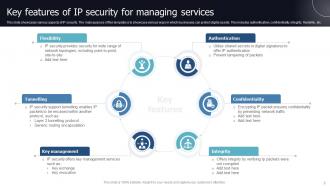
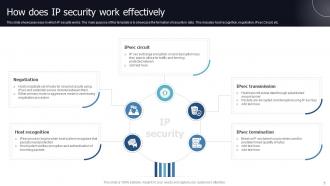
So IPsec basically does three things: checks if your data's really coming from the right source, makes sure nobody messed with it while traveling, and encrypts everything so randos can't read it. Kind of like mailing a sealed envelope with your signature instead of just a postcard, you know? Authentication, integrity, confidentiality - that's the trio. Pretty neat how it handles all that at once. Oh, and if you're doing VPN stuff, just double-check which IPsec mode you actually need. There's different ones for different setups.
So IPsec runs at Layer 3 while SSL/TLS is up at the application layer. What this means is IPsec can protect everything flowing between networks - apps don't even know it's happening. SSL/TLS though? Each application has to build it in separately, like how HTTPS works for browsers. You'd typically use IPsec for site-to-site VPNs or when you want to secure entire network connections. SSL/TLS is better for specific stuff like web traffic or API calls. They're really tackling different problems at different levels. For your situation - go IPsec if you want that set-it-and-forget-it network protection, SSL/TLS for application-specific security.
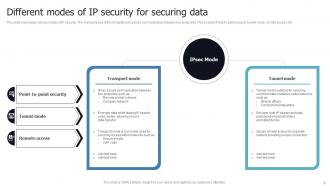
Okay so basically - transport mode just encrypts your data but keeps the original IP headers visible. Good for direct host-to-host stuff. Tunnel mode though? It encrypts everything and slaps new headers on top. Like putting your whole letter in a different envelope with fake addresses, if that makes sense. VPNs love tunnel mode because it hides where traffic's actually coming from. Pretty smart honestly. For your setup, you'll probably want tunnel mode if you're connecting remote sites through sketchy networks. Transport's more for when endpoints already trust each other.
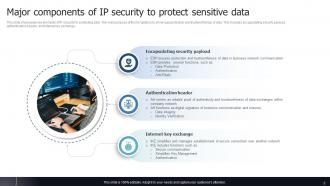
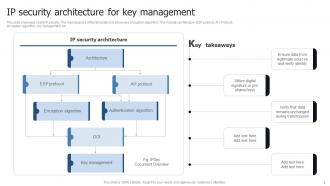
So IPsec has a few key pieces you should know about. Authentication Header (AH) handles authentication, while ESP does the encryption stuff. Security Associations (SA) basically define all the security settings between your endpoints - honestly this is where I'd start since most VPN setup headaches happen here. Then there's IKE for managing keys, though fair warning, troubleshooting IKE issues can be pretty annoying. Oh and the Security Policy Database decides which traffic actually gets protected. That's the gist of it really.
So IPsec basically uses two protocols to keep your stuff safe. ESP handles the encryption part - think of it like putting your data in a locked box. Then there's AH which does integrity checking through hashing, so you know nobody messed with it. Both can work in tunnel or transport mode depending on what you need. The neat thing is it runs at the network layer, so your apps don't even know it's there. Oh, and definitely go with AES encryption when you set it up - older algorithms are pretty much useless now. Just make sure you configure those security associations right or you'll have headaches later.
SAs are basically contracts between your devices that spell out exactly how to encrypt traffic. Each one has all the crypto specs - algorithms, keys, sequence numbers, you name it. Without them? IPsec just won't work, period. Picture it like this: your devices need step-by-step instructions for "encrypt this traffic flow with these settings." That's what SAs do. When IPsec breaks (and trust me, it will), checking if your SAs established correctly should be step one. If they're messed up, you're gonna be troubleshooting forever.
So IPsec works in two ways - tunnel mode and transport mode. Tunnel mode's what you want for site-to-site VPNs because it encrypts everything and slaps new headers on top. Transport mode? That's more for direct host connections. Here's the nice part: once you configure it, IPsec does all the authentication and encryption stuff automatically. Most enterprise gateways already have it built in, so you're basically just setting up policies, picking your encryption, and dealing with keys or certificates. Oh, and don't forget about security associations - they're like the rules that tell your tunnels how to behave. Honestly way less painful than it sounds.
Honestly, the complexity gets insane fast once you're dealing with thousands of tunnels. Key management will be your worst nightmare - distributing and rotating keys without breaking everything is brutal. Performance takes a hit too, especially with encryption at every hop. Troubleshooting becomes this awful guessing game of where packets are dying in your encrypted maze. I'd definitely go hub-and-spoke instead of full mesh to start. And seriously, get centralized management tools right away or you'll hate your life. Trust me on that one.
So basically IKE handles all the key stuff automatically - it's like having a background negotiator setting up your secure tunnel before any data moves. Pretty slick system actually. Both sides figure out which encryption to use, generate the keys, and IKE keeps refreshing them based on whatever timeouts you configure. You don't touch any of that manually, which is nice. Oh and heads up - if your IKE policies don't match on both endpoints, you'll spend forever debugging why connections keep dropping. Been there, not fun.
Yeah, IPsec will slow things down a bit - usually around 10-20% depending on what you're running. Software-based setups are the worst for this since your CPU has to handle all that encryption/decryption work. AES is pretty heavy if your hardware's not great. But honestly, most newer systems handle it fine unless you're doing something really performance-critical. Hardware IPsec is way better if you can swing it, or you could mess around with your tunnel configs. Just make sure you test throughput first - learned that one the hard way.
So basically IPv4 treats IPsec like an add-on you gotta configure separately - which is honestly kind of annoying. IPv6 originally had it built right in, way cleaner setup. But then they changed the rules and made it optional there too, go figure. Your IPv6 stuff will still have better security features out of the box though. Either way, you're gonna need to actually turn IPsec on and set it up properly if you want the real protection. It's not just magically secure because it's there.
Watch out for weak pre-shared keys and cert validation bypasses - those are huge. Key exchange is where attackers usually hit IPsec hardest. Replay attacks happen when sequence numbers get messed up, but honestly? Misconfigured policies cause way more problems than actual protocol attacks. Implementation bugs in crypto libraries will bite you too. Traffic analysis can still spot patterns even through IPsec tunnels. Use strong auth methods and keep everything updated. Oh, and audit your tunnel configs regularly - I've seen so many orgs skip that part.
So first thing - figure out which compliance framework you're dealing with. NIST if it's federal stuff, PCI DSS for payments, HIPAA for healthcare, whatever. Document everything: your encryption standards, how you handle keys, access controls. Auditors eat that up. Your cryptographic algorithms need to be the approved ones, and logging is huge for compliance reports. Oh and don't think of IPsec as this separate thing - it's just one piece of your whole security setup. You'll want to review your configs regularly since standards keep changing. Pain in the ass but necessary.
So for IPsec management, I'd probably go with strongSwan first - works great on Linux and it's free. Windows has built-in tools but they're kind of a pain honestly. If you're running Cisco gear, ASDM is solid. pfSense has this nice web interface that's way easier than command line stuff (which I usually prefer but whatever). Actually, pfSense might be your best starting point if you don't want to mess around with terminal commands. Just make sure you test everything like crazy before you actually deploy it - learned that one the hard way.
So IPsec plays pretty nicely with cloud stuff - AWS and Azure both have VPN gateways that'll handle the IPsec tunnels for you. IoT's where it gets messy though. Most of those tiny sensors just can't handle IPsec's processing demands, which is honestly kind of a pain. You'll find it works better on IoT gateways that collect data from all the smaller devices. Cloud-to-cloud connections? Yeah, IPsec site-to-site VPNs are solid there. I'd say use it for your important connections and gateway points, but keep something lighter ready for the small IoT stuff.
-
Innovative and attractive designs.
-
The customer care of SlideTeam is very responsive. I was having a payment issue and they fixed it for me in no time.