


Physical Security Powerpoint PPT Template Bundles





Try Before you Buy Download Free Sample Product
 Impress Your
 Audience
 100%
100% Editable
 Save Hours
 of Time


Our Physical Security Powerpoint PPT Template Bundles are topically designed to provide an attractive backdrop to any subject. Use them to look like a presentation pro.
People who downloaded this PowerPoint presentation also viewed the following :
Content of this Powerpoint Presentation
Slide 1: This slide introduces Physical Security. State your company name and begin.
Slide 2: This slide shows Common physical security threats faced by organization.
Slide 3: This slide presents Physical security system protection measures.
Slide 4: This slide displays Implementation steps of Physical security in company.
Slide 5: This slide represents Examples of physical security problems faced by company.
Slide 6: This slide showcases Physical security audit and assessment checklist.
Slide 7: This slide shows Physical security best practices to ensure safety.
Slide 8: This slide presents Physical security systems to enhance data safety.
Slide 9: This slide displays Physical security information management drivers.
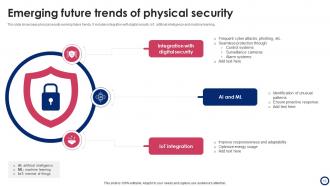
Slide 10: This slide represents Emerging future trends of physical security.
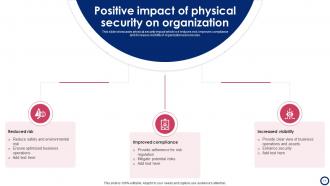
Slide 11: This slide showcases Positive impact of physical security on organization.
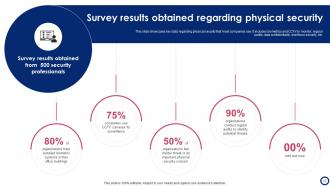
Slide 12: This slide shows Survey results obtained regarding physical security.
Slide 13: This slide presents Physical security information management across various industries.
Slide 14: This slide displays Physical security control methods and its functions.
Slide 15: This slide represents Physical security process flow chart.
Slide 16: This slide showcases Physical security system dashboard to track potential threat.
Slide 17: This slide shows Business physical security system icon.
Slide 18: This slide presents Physical security icon to restrict unauthorized success.
Slide 19: This slide displays Physical security icon with circular arrow.
Slide 20: This is a Thank You slide with address, contact numbers and email address.
Physical Security Powerpoint PPT Template Bundles with all 28 slides:
Use our Physical Security Powerpoint PPT Template Bundles to effectively help you save your valuable time. They are readymade to fit into any presentation structure.















FAQs for Physical Security Powerpoint
So you need four main things: perimeter stuff like fences and gates, access controls (keycards, biometrics, visitor check-ins), cameras and monitoring, plus actual security people or at least solid response plans. Don't sleep on environmental controls either - good lighting and alarms make a huge difference. Seriously, half the sketchy stuff happens in dark corners. Layer everything so you're not screwed if one system goes down. Oh, and do a walkthrough first to spot your weak points. No point in fancy tech if someone can just walk through your back door.
Start by walking through your entire place - I'm talking *everywhere*, not just the front door. Loading docks, side exits, all of it. Document the sketchy lighting, blind spots in cameras, weird vulnerable areas you never thought about. Your security guys and regular employees are goldmines for this stuff since they notice things you don't. Make a list ranking threats by how likely they are and how bad they'd be. Here's the thing - you gotta be brutally honest about what sucks instead of pretending everything's fine. Do this every few months, and definitely after any changes to the building.
Yeah, surveillance is like having extra eyes everywhere you can't be. Criminals usually back off when they see cameras, plus you'll have actual proof if anything happens. The new stuff is wild - motion sensors, night vision, AI that spots weird behavior automatically. Though honestly, placement matters way more than fancy features. Hit your entry points and blind spots first, maybe areas with expensive equipment. Just don't go overboard and make your employees feel like they're in prison or something. Figure out your weakest spots and start there.
Honestly, multi-layer authentication is your best bet - keycards plus biometrics or PINs. Way harder for someone to slip through. Automated monitoring catches weird stuff like 3 AM badge-ins or people hitting multiple doors super fast. Oh, and quarterly access reviews are a total pain but you gotta do them. Remove ex-employees immediately though, that's non-negotiable. My buddy's company got burned on that once. Connect everything to your cameras and alarms so you can actually see what's happening. Short version: make it annoying enough that most people won't even try.
Start with access control - key cards or codes for sensitive areas, and update permissions when people quit. Lock valuable stuff in cabinets or safes, especially laptops and any confidential documents. I actually had someone walk off with equipment during a crazy busy day, so learned that lesson the hard way! Security cameras in common areas and exits help too. The whole point is creating layers - if they get past one thing, there's still more blocking them. Oh, and do a walkthrough first to figure out what actually needs the most protection.
Look, training your employees is huge for physical security. Most people don't realize they're walking security risks, but flip that around and they become your eyes and ears everywhere. Teach them basics like not letting strangers tailgate through doors, actually using their badges properly, and spotting when someone's trying to social engineer them. Honestly, half the battle is just getting people to pay attention to weird behavior and report it. Your cameras can't be everywhere, you know? Start with simple awareness stuff about your biggest threats - but make it actually relate to what they do daily or they'll zone out.
Honestly, your building layout is like 90% of your security right there. Walk around and spot where sketchy people could hide - then design that stuff out. Good lighting and open sightlines beat expensive cameras any day. I always tell people to think about traffic flow too. You want to naturally funnel people where you can see them, not create these weird maze areas. Landscaping matters more than you'd think - bushes can either block views or help guide people. Even something as basic as where you put the dumpsters affects security. It's all about making trouble harder before it starts.
Honestly, you've got to stop treating physical and cyber security like they're totally separate things. Start with access controls that actually talk to each other - keycard plus multi-factor auth for sensitive areas. Put your security cameras on isolated networks (we got burned on this one). Your visitor management needs to play nice with IT policies too. Here's the thing though - someone has to own both sides or stuff falls through the cracks. Do a risk assessment mapping all your entry points, physical and digital. Trust me, you'll find way more gaps than you expect. Having one person who sees the whole picture makes a huge difference.
Honestly, it's all about finding that sweet spot between keeping things secure and not being creepy about it. Check your local privacy laws first - GDPR stuff can bite you if you're not careful. Your cameras and access controls shouldn't unfairly target certain groups or make things harder for people with disabilities. Document why you're doing each security measure, because you'll probably need to explain it later. The whole "reasonable security" thing can spiral into Big Brother territory pretty fast if you don't watch it. Get a lawyer to look over anything that involves monitoring people - trust me on this one.
Honestly, AI and IoT are game-changers for physical security. Your cameras can now spot sketchy behavior instead of just recording hours of useless footage. Pretty cool stuff. IoT sensors track everything - door access, temperature changes, you name it - across your whole building in real-time. But here's the catch: more connected devices means way more security vulnerabilities. It's like opening extra doors for hackers. My advice? Figure out what connected gear you've got first, then lock it down properly. The monitoring boost is worth it, but don't ignore the cyber risks that come with it.
Honestly, tailgating is huge - people just hold doors without thinking. Then there's stuff like that random side exit by the loading dock that nobody monitors. Visitor management is usually a mess too. I see this all the time: passwords stuck on monitors, people leaving workstations unlocked when they grab coffee. Oh, and dumpster diving is still totally a thing (why don't more places just shred everything?). Network equipment sitting there accessible is another major blind spot. Walk around your office and think like you're trying to break in - you'll spot the weak points pretty quick.
Dude, first thing - get everyone out and lock down the area. Seriously, don't let anyone else wander in there. Grab your phone and document everything with photos before you touch anything. Check your access logs ASAP and change any passwords that might've been compromised. The whole situation's gonna feel like complete chaos, but try to stay systematic about it. Call the cops if you need to, plus whoever else should know. This is exactly why having that incident response plan matters - you don't want to be figuring this stuff out on the fly. Oh, and schedule a debrief within the week to patch up whatever went wrong.
So the big thing right now is AI analytics - cameras that actually spot weird behavior instead of just recording everything. Cloud systems are taking over too, which makes sense since you can manage everything remotely. Mobile access is probably the biggest shift though - everyone wants to ditch keycards for their phones. IoT sensors are everywhere now (kind of crazy how much data they pull). Most platforms integrate access control with video and visitor stuff in one dashboard. Honestly, I'd start by checking what you already have before buying new gear. Sometimes you can just upgrade parts of your existing setup.
Make security part of regular conversations instead of just that annual training everyone zones out during. Leadership needs to actually follow the rules - like, if your CEO badges in properly instead of sneaking behind someone, people notice that stuff. Those boring monthly emails? Total waste. Try quick reminders in team meetings or maybe some kind of challenge where people can win something small. I've seen companies spotlight employees who catch sketchy emails, which works pretty well. The biggest thing is making sure people aren't scared to report weird stuff they notice. Nobody wants to feel like they'll get blamed for speaking up.
Focus on your riskiest spots first - that's where you'll see the biggest impact for your money. Maybe do it in phases so you're not hitting up the boss for everything at once, you know? Bundled deals from vendors usually beat buying stuff separately. ROI calculations sound boring but they actually work when you need to convince leadership. Oh, and don't skip the training budget - I've seen companies blow thousands on equipment that just sits there because nobody knows how to use it. Document your incidents before and after so you can prove it's working.
-
The designs are very attractive and easy to edit. Looking forward to downloading more of your PowerPoint Presentations.
-
Such amazing slides with easy editable options. A perfect time-saver.