

E Commerce Security Powerpoint Ppt Template Bundles





Try Before you Buy Download Free Sample Product
 Impress Your
 Audience
 100%
100% Editable
 Save Hours
 of Time


Our E Commerce Security Powerpoint Ppt Template Bundles are topically designed to provide an attractive backdrop to any subject. Use them to look like a presentation pro.
People who downloaded this PowerPoint presentation also viewed the following :
Content of this Powerpoint Presentation
Slide 1: This slide introduces E-commerce Security. State your company name and begin.
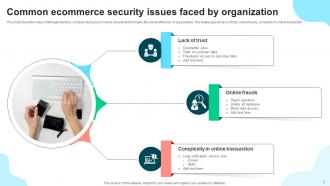
Slide 2: This slide shows Common ecommerce security issues faced by organization.
Slide 3: This slide presents 24/7 ecommerce website security measures.
Slide 4: This slide displays Ecommerce multi layer security measure.
Slide 5: This slide represents Types of threats faced during ecommerce security.
Slide 6: This slide showcases Common ecommerce security threats faced by organisation.
Slide 7: This slide shows Ecommerce security measure to protect web store form attacks.
Slide 8: This slide presents Ecommerce security measures to prevent from frauds.
Slide 9: This slide displays Ecommerce security tips to prevent from attacks.
Slide 10: This slide represents Best practices for ecommerce security measure.
Slide 11: This slide showcases Post implementation measures to enhance ecommerce security.
Slide 12: This slide shows Comparative analysis of ecommerce security tools.
Slide 13: This slide presents Step by step process of e-commerce security.
Slide 14: This slide displays Comparison matrix of ecommerce security software.
Slide 15: This slide represents Losses due to ecommerce payment security frauds.
Slide 16: This slide showcases Software solutions for security of ecommerce transactions.
Slide 17: This slide shows Ecommerce security icon for safer online transactions.
Slide 18: This slide presents Ecommerce security icon for preventing webstore.
Slide 19: This slide displays Icon for ecommerce security during online shopping.
Slide 20: This is a Thank You slide with address, contact numbers and email address.
E Commerce Security Powerpoint Ppt Template Bundles with all 28 slides:
Use our E Commerce Security Powerpoint Ppt Template Bundles to effectively help you save your valuable time. They are readymade to fit into any presentation structure.











FAQs for E Commerce Security Powerpoint
Dude, payment fraud is probably your biggest headache - that plus data breaches and DDoS attacks that'll crash your whole site. Hackers are obsessed with SQL injection and cross-site scripting, especially if your forms are trash. Account takeovers happen constantly with stolen passwords. Malware during checkout is nasty too, hits your customers directly. If you're running a marketplace, fake reviews and sketchy sellers are a whole other mess (learned that one the hard way). Everything's getting scarier each year honestly. Start with security audits and get multi-factor authentication running yesterday.
SSL and PCI DSS compliance are absolute musts - no way around those. Tokenize your payment data so you're not actually storing card numbers anywhere. Trust me, just use Stripe or PayPal instead of building from scratch. They've already solved all the headache stuff. Set up two-factor auth for admin access and stay on top of software updates. Oh, and never store sensitive payment info directly on your servers - that's asking for trouble. Let the payment pros handle the security nightmares while you focus on actually running your business.
Okay so encryption is like having a bodyguard for your online store data. It scrambles stuff like credit card numbers so even if hackers grab it, they can't actually read anything. You know that little padlock icon in your browser? That's SSL/TLS doing its thing while data moves around. Then there's encryption for stored info too - honestly, without it you're basically mailing everyone's payment details on postcards for the world to see. Pretty terrifying thought. Your payment processor should handle end-to-end encryption, and don't forget to keep those security certificates updated.
Honestly, get yourself a CDN like Cloudflare or AWS Shield first - they're lifesavers for soaking up those massive traffic hits before your servers even see them. Rate limiting's your next move; tell your firewall to start blocking IPs that spam too many requests per minute. Check if your hosting provider already has DDoS protection built in too (might save you some cash). Oh, and definitely have some kind of response plan ready. When attacks happen, everything moves crazy fast and you don't want to be scrambling around trying to figure out what to do while your site's down.
Okay so first off - 12+ characters minimum with the whole mix of uppercase, lowercase, numbers, symbols deal. But honestly? Passwords are kinda trash on their own these days, so multi-factor authentication is basically non-negotiable. For storage, use bcrypt or Argon2 to hash them properly - never store plain text (I've seen companies do this, it's horrifying). Account lockouts after failed attempts help too. Oh and those password strength meters during signup actually work pretty well for nudging users toward better choices. Password managers are seriously life-changing if you can get people to use them. The real trick is stacking these protections instead of just hoping one strong password will save you.
So PCI DSS has these 12 requirements but it's mostly about protecting card data and keeping your network locked down. Get firewalls up, encrypt everything, and never ever store those CVV codes - that's like rule
-
SlideTeam’s readymade presentations have landed my unique images with my bosses in the past and it continues to reward me.
-
Really like the color and design of the presentation.