

Security Operations Center Powerpoint Ppt Template Bundles




Try Before you Buy Download Free Sample Product
 Impress Your
 Audience
 100%
100% Editable
 Save Hours
 of Time


Our Security Operations Center Powerpoint Ppt Template Bundles are topically designed to provide an attractive backdrop to any subject. Use them to look like a presentation pro.
People who downloaded this PowerPoint presentation also viewed the following :
Content of this Powerpoint Presentation
Slide 1: The slide introdues Security Operations Center. State your ompany name and begin.
Slide 2: This slide provides a monthly timeline of steps to be implemented for integration of threat intelligence into security operation center.
Slide 3: The slide covers the various challenges faced by security operations center along with the solutions implemented to overcome them.
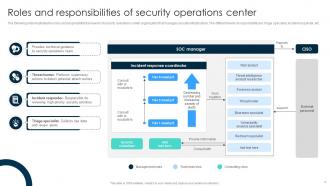
Slide 4: The slide illustrates the roles and responsibility framework of security operations center organization that manages security infrastructure.
Slide 5: The slide showcases the various tools that are used in functioning of security operations center for effective monitoring and prevention of threats.
Slide 6: The below slide highlights the threat intelligence types that offer a foundation for establishment of security operation center.
Slide 7: This slide exhibits the four stages involved in adaptive security architecture implementation in organization of SOCs.
Slide 8: The slide represents the technological trends of security operations center along with their impact on security.
Slide 9: The slide displays a general data protection regulation status of personal data breaches faced by company along with solution implemented and resolution.
Slide 10: This slide highlights the multiple banking and financial advantages of using security operation center as a service by maintaining the core IT operations.
Slide 11: The slide shows the various steps involved in the working of security operations center that helps to safeguard sensitive data from cyber-attacks.
Slide 12: This slide provides the multiple services provided by a company for security operations center that helps customers to opt for a service accordingly.
Slide 13: The slide represents the maturity model levels of security operations center that helps to identify and mitigate potential risk more effectively.
Slide 14: The slide highlights various risks associated with security operations that helps to analyze the severity level and resolutions status.
Slide 15: This slide shows a platform driven architecture for security operations that shows the insights related to security environments, platforms, and services.
Slide 16: The slide depicts a security incident framework that helps to identify, manage, and mitigate the security incidents.
Slide 17: The slide displays a technological integration architecture for security operation center that helps to understand the various technology.
Slide 18: The slide illustrates a risk assessment dashboard helps to understand the risk rating breakdown, action plan, top vulnerabilities, etc. of a business.
Slide 19: This slide represents the statistical data for worldwide security operations center market by geographical segmentation.
Slide 20: The slide renders Security operation surveillance center icon.
Slide 21: The slide displays Data security operations center icon.
Slide 22: The slide highlights Employee data security operations center icon.
Slide 23: This is a Thank You slide with address, contact numbers and email address.
Security Operations Center Powerpoint Ppt Template Bundles with all 31 slides:
Use our Security Operations Center Powerpoint Ppt Template Bundles to effectively help you save your valuable time. They are readymade to fit into any presentation structure.












FAQs for Security Operations Center Powerpoint
So SOCs are basically your cybersecurity war room - they watch your networks 24/7 looking for threats and weird activity. When something sketchy happens, they dig into it and handle the response. They're also hunting for threats before they become problems, which is honestly pretty cool. Managing all your security tools and alerts is another big part of what they do. Plus there's tons of documentation for compliance stuff (ugh). Bottom line: they're your front line defense, so you'll want to give them clean data and solid escalation processes to work with.
So basically SOCs mix automated tools with actual people to spot threats in real-time. Your SIEM pulls in logs from firewalls, endpoints, all that network stuff, then looks for weird patterns. Most alerts end up being false alarms though - kind of annoying but whatever. Analysts check the serious ones first using threat intel and playbooks. Real incidents get handed off to response teams who handle containment and cleanup. Having workflows ready beforehand is clutch because you don't want to be figuring things out mid-crisis.
For a solid SOC setup, grab a SIEM first - Splunk or QRadar are good bets for log stuff. Then add endpoint detection like CrowdStrike. The vendor space is honestly crazy right now, changes every month it feels like. Network monitoring tools are clutch too, plus vulnerability scanners and some incident response platform to keep workflows smooth. Oh and threat intel feeds - super important. Security awareness training's worth having too. My buddy just went through this whole process and said starting with one good SIEM then building out worked way better than trying to do everything at once.
So you want AI for your SOC? Start with something simple like email security or network monitoring - don't go crazy trying to do everything at once. Machine learning is actually pretty solid at finding weird patterns in all that log data, way better than humans scrolling through endless alerts honestly. Set it up to learn what normal looks like for your users and systems, then it'll flag the sketchy stuff. The false positive thing gets better over time as it learns. Plus it can help categorize threats automatically and even suggest what to do next. Pick one area, show it works, then expand. Way less painful that way.
So you'll want to focus on MTTD and MTTR first - basically how fast you spot threats and how quickly you respond. Those two alone will tell you a ton about your team's effectiveness. Alert-to-incident ratio is huge too because nobody wants to be buried under false alarms all day. Track your threat hunting success rates and tool coverage while you're at it. Oh, and don't sleep on the human side - analyst productivity like cases closed daily, plus training completion and retention rates. Honestly, keeping good people is half the battle in this field. Start simple with these metrics and expand your dashboard based on what actually moves the needle for your specific team.
Think of the SOC as your security nerve center - they're constantly talking to everyone. Network teams, infrastructure folks, app developers, you name it. Most of this happens through shared tickets and regular briefings, plus those fun 2am incident calls when stuff breaks. Compliance teams lean on them heavily for regulatory stuff, and they're always feeding vulnerability intel to IT for patch priorities. Honestly, the biggest thing is setting up who calls who before chaos hits. Trust me, you don't want to be playing phone tag during a breach.
Ugh, alert fatigue is brutal - you'll be drowning in thousands of daily alerts where 90% are garbage. Finding good analysts is a nightmare too. They need to think like hackers but those people cost serious money and jump ship constantly. Your tools probably don't play nice together either, which makes everything harder. Plus you're missing visibility in random network corners. The worst part? Management wants instant responses but proper investigations take time. Oh, and I almost forgot - start by cleaning up your detection rules first. Automate away the noise or you'll go insane.
Yeah so it really depends on what type of incident you're dealing with. Malware? Isolate everything first, then figure out what happened. Data breaches are honestly the worst - you've got these crazy tight legal deadlines for notifications and have to preserve all the forensic evidence. DDoS attacks are more straightforward, just filter traffic and get services back up. Insider threats though, that's where you need HR involved right away to revoke access. APTs get the full investigation treatment with threat hunting. The main thing is your containment approach changes completely - some incidents you announce immediately, others you stay quiet while you're still gathering intelligence.
Yeah, start by figuring out what normal looks like in your network first. Baseline all the regular traffic and user stuff, then tweak your thresholds from there. ML models are honestly pretty great for this - they learn what's actually sketchy vs just background noise. Set up proper asset tracking too, plus user behavior analytics. That way your system won't freak out when Bob does his weird 3am spreadsheet marathons again. The real trick is reviewing those alerts regularly and updating rules based on what keeps setting things off. Most false positives come from not knowing your own environment well enough.
So threat intel basically gives your SOC way more context about alerts - you're not just staring at random events anymore. You can match stuff against known IOCs and TTPs to figure out if it's actually serious or just background noise. Honestly, it's like having insider info on how attackers operate. Plus you get better at hunting because you know their patterns, and incident response speeds up since you can predict their next moves. Oh, and definitely start by getting a few feeds into your SIEM first - don't overcomplicate it initially.
Honestly, SOC sizing is tricky but here's what I've seen work. Most mid-size companies need around 3-5 analysts for 24/7 coverage, though that depends heavily on your automation setup. Look at your daily security events first - that'll give you a baseline. Compliance requirements matter too since some regs force specific response times. I'd definitely put one senior analyst per shift for escalations. Oh, and don't forget skill levels vary like crazy between people. My take? Start small with good automation and build up based on real incident volume. Way better than overestimating upfront and burning budget.
Dude, training is what makes or breaks a SOC team. Your analysts need to spot real threats in all that noise - and trust me, there's a LOT of noise. They've gotta know your specific setup inside and out, plus how to actually respond when shit hits the fan. Best tools in the world won't help if your team can't use them right or keeps missing obvious red flags. Threats change constantly too, so you can't just train once and call it done. Run regular sessions and those tabletop exercises where they walk through scenarios. Keeps everyone's head in the game.
Start with a solid SIEM - Splunk or QRadar work great for pulling in all your logs and making sense of the chaos. Machine learning is honestly where it gets exciting, catches weird patterns you'd totally miss otherwise. Set up correlation rules to cut through the noise and focus on actual threats. Oh, and threat intel feeds are clutch for adding context to your data. I'd map out your most critical sources first instead of trying to boil the ocean. The ML stuff can feel overwhelming at first, but it's worth pushing through that learning curve.
Honestly, get one dedicated channel going first - usually Slack works. Don't let people scatter across different chats or you'll lose your mind. Update everyone every 30 minutes even when nothing's happening, because radio silence just makes executives start panicking and calling around. I learned that one the hard way. Use simple status words like "investigating" or "fixing" so the business people can actually understand what's going on. Pick someone to handle all the talking - otherwise you'll have three people giving different updates. Oh, and write everything down with timestamps as you go. You'll thank yourself later during the postmortem.
MSSPs can be a game changer for SOC work, honestly. 24/7 coverage without dealing with night shift drama? Sign me up. Plus they've got access to those expensive security tools and threat intel that most teams can't swing budget-wise. The catch is you're giving up some control over how fast incidents get handled, and connecting their systems with yours can be messy. Oh, and don't become totally dependent on them - keep at least one person internally who knows what's going on. Just nail down those SLAs before you commit to anything.
-
The ease of modifying templates is just superb! Also, the vast collection offers plenty of options to choose from.
-
I am not the best at presentations but using SlideTeam’s PPT template made it easier for me. Thank you SlideTeam!