


Zero Trust Security Model Powerpoint Presentation Slides





Try Before you Buy Download Free Sample Product
 Impress Your
 Audience
 100%
100% Editable
 Save Hours
 of Time


This comprehensive PowerPoint presentation concisely overviews the zero trust network, highlighting its main pillars, features, and functionalities. Our Zero Trust Security Model PowerPoint Presentation explores why businesses adopt ZTNA and demonstrates how it can enhance security and operational efficiency. Additionally, the Zero Trust Model PPT delves into the architecture of ZTNA, encompassing user and architectural workflows. The Zero Trust Architecture ZTA PPT presentation offers valuable insights into unique ZTNA software solutions and essential considerations for selecting them. Moreover, the presentations Software-defined Perimeter SDP template addresses the implementation challenges of ZTNA and provides solutions. It also presents a detailed comparison of ZTNA with other technologies. Furthermore, the Zero Trust Network Access deck includes a training program and an estimated budget plan for ZTNA implementation. Lastly, the Identity-Defined Networking IDN PowerPoint Presentation showcases practical use cases of ZTNA technology and presents a compelling case study. This fully editable and customizable template is compatible with Google Slides, ensuring convenience and flexibility for users.
People who downloaded this PowerPoint presentation also viewed the following :
Content of this Powerpoint Presentation
Slide 1: This slide introduces Zero Trust Security Model.
Slide 2: This is an Agenda slide. State your agendas here.
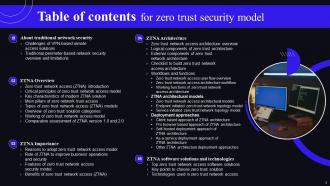
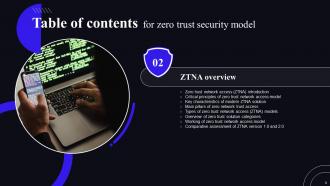
Slide 3: This slide displays Table of contents for ZTNA.
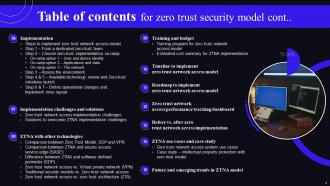
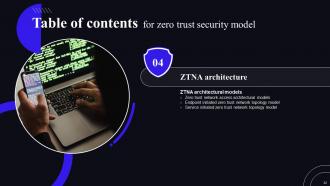
Slide 4: This slide continues Table of contents for ZTNA.
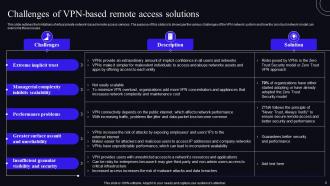
Slide 5: This slide outlines the limitations of virtual private network-based remote access services.
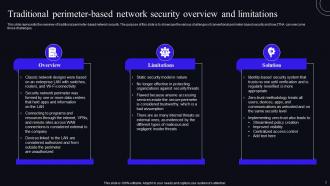
Slide 6: This slide represents the overview of traditional perimeter-based network security.
Slide 7: This slide depicts another Table of contents for ZTNA.
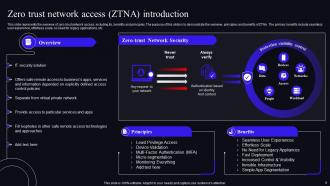
Slide 8: This slide presents the overview of zero trust network access.
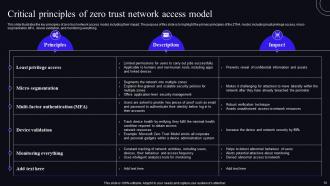
Slide 9: This slide illustrates the key principles of zero trust network access model.
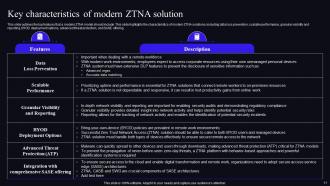
Slide 10: This slide outlines the top features that a modern ZTNA model should include.
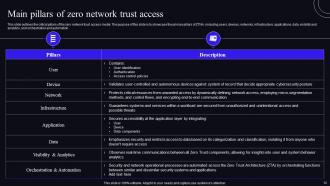
Slide 11: This slide highlights the critical pillars of the zero network trust access model.
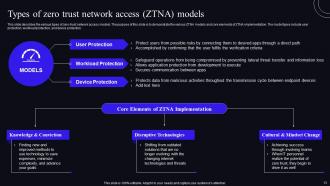
Slide 12: This slide describes the various types of zero-trust network access models.
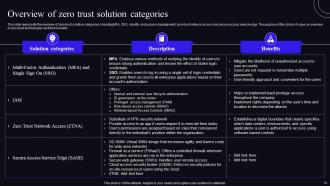
Slide 13: This slide represents the overview of zero-trust solution categories.
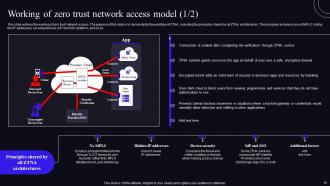
Slide 14: This slide shows the working of zero trust network access.
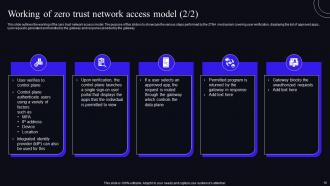
Slide 15: This slide outlines the working of the zero trust network access model.
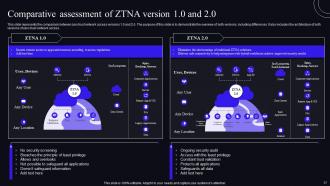
Slide 16: This slide represents the comparison between zero trust network access versions 1.0 and 2.0.
Slide 17: This slide highlights title of contents further.
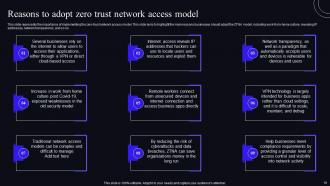
Slide 18: This slide presents the importance of implementing the zero-trust network access model.
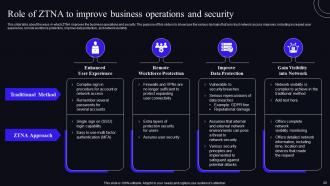
Slide 19: This slide contains the ways in which ZTNA improves the business operations and security.
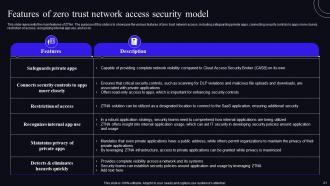
Slide 20: This slide presents the main features of ZTNA.
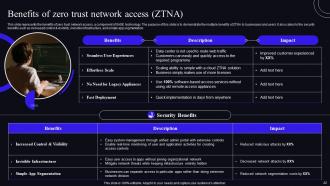
Slide 21: This slide represents the benefits of zero trust network access.
Slide 22: This slide shows another table of contents.
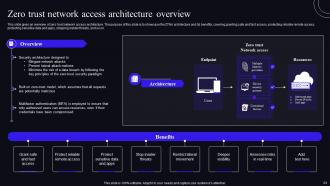
Slide 23: This slide gives an overview of zero trust network access architecture.
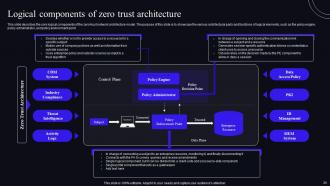
Slide 24: This slide describes the core logical components of the zero-trust network architecture model.
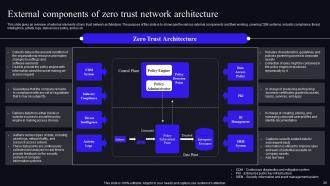
Slide 25: This slide gives an overview of external elements of zero trust network architecture.
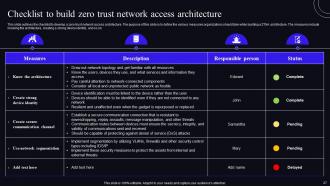
Slide 26: This slide outlines the checklist to develop a zero-trust network access architecture.
Slide 27: This slide again exhibits Table of contents for ZTNA.
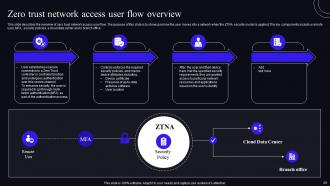
Slide 28: This slide describes the overview of zero trust network access user flow.
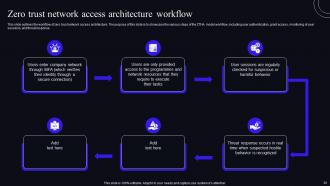
Slide 29: This slide outlines the workflow of zero trust network access architecture.
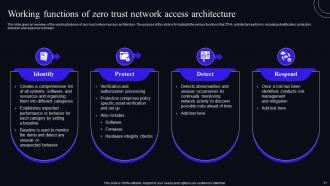
Slide 30: This slide gives an overview of the working features of zero trust network access architecture.
Slide 31: This slide shows Table of contents for ZTNA further.
Slide 32: This slide describes the main models of ZTNA architecture.
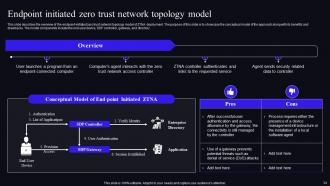
Slide 33: This slide shows the overview of the endpoint-initiated zero trust network topology model of ZTNA deployment.
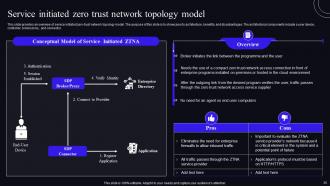
Slide 34: This slide provides an overview of service initiated zero-trust network topology model.
Slide 35: This slide highlights title of contents for presentation.
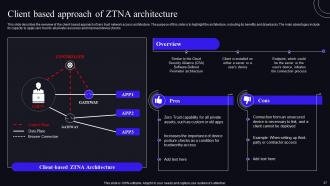
Slide 36: This slide describes the overview of the client-based approach of zero trust network access architecture.
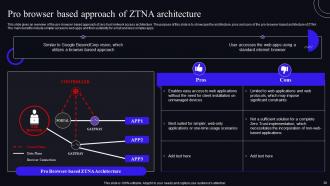
Slide 37: This slide gives an overview of the pro-browser-based approach of zero trust network access architecture.
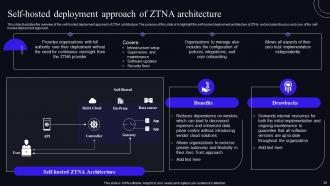
Slide 38: This slide illustrates the overview of the self-hosted deployment approach of ZTNA architecture.
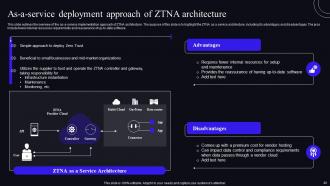
Slide 39: This slide outlines the overview of the as-a-service implementation approach of ZTNA architecture.
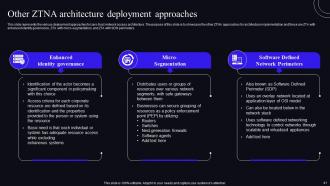
Slide 40: This slide represents the various deployment approaches for zero-trust network access architecture.
Slide 41: This slide presents Table of contents to be discussed further.
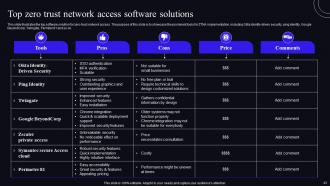
Slide 42: This slide depicts the top software solution for zero-trust network access.
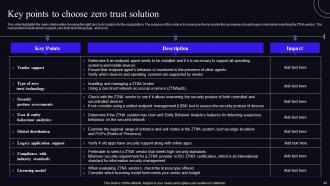
Slide 43: This slide highlights the main criteria while choosing the right zero trust solution.
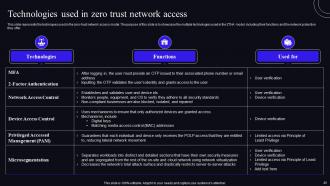
Slide 44: This slide represents the techniques used in the zero-trust network access model.
Slide 45: This slide contains titles for the topics to be discussed further.
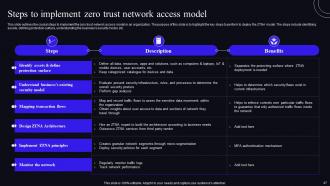
Slide 46: This slide outlines the crucial steps to implement the zero trust network access model in an organization.
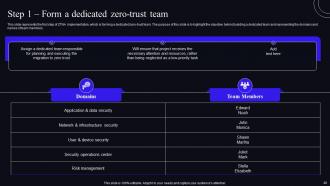
Slide 47: This slide represents the first step of ZTNA implementation, which is forming a dedicated zero-trust team.
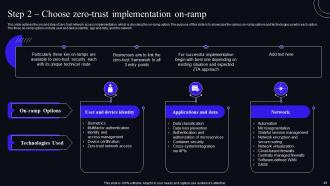
Slide 48: This slide outlines the second step of zero trust network access implementation, which is choosing the on-ramp option.
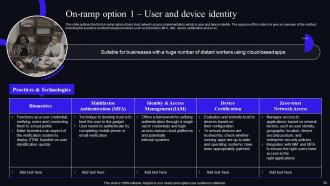
Slide 49: This slide outlines the first on-ramp option of zero trust network access implementation, which is user and device identity.
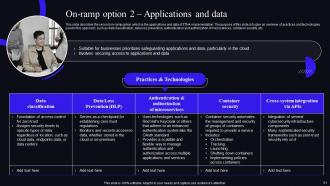
Slide 50: This slide describes the second on-ramp option, which is the applications and data of ZTNA implementation.
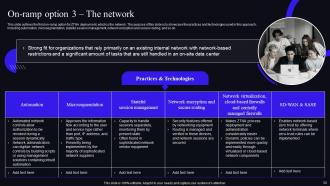
Slide 51: This slide outlines the third on-ramp option for ZTNA deployment, which is the network.
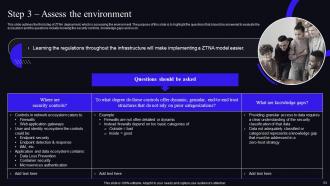
Slide 52: This slide outlines the third step of ZTNA deployment, which is assessing the environment.
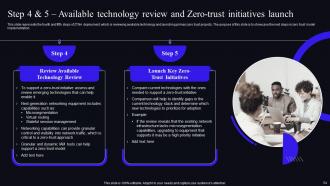
Slide 53: This slide represents the fourth and fifth steps of ZTNA deployment, which is reviewing available technology and launching primary zero trust projects.
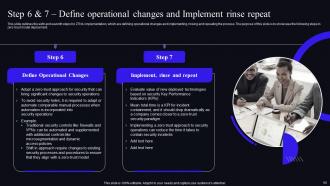
Slide 54: This slide outlines the sixth and seventh steps for ZTNA implementation, which are defining operational changes and implementing, rinsing and repeating the process. The purpose of this slide is to showcase the following steps in zero trust model deployment.
Slide 55: This slide depicts Table of contents which is to be discussed further.
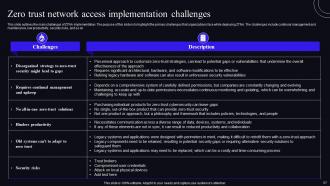
Slide 56: This slide outlines the main challenges of ZTNA implementation.
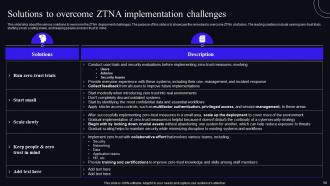
Slide 57: This slide talks about the various solutions to overcome the ZTNA deployment challenges.
Slide 58: This slide shows Title for the topics to be discussed further.
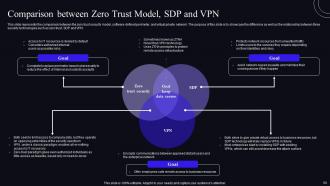
Slide 59: This slide represents the comparison between the zero trust security model, software-defined perimeter, and virtual private network.
Slide 60: This slide compares the two security models.
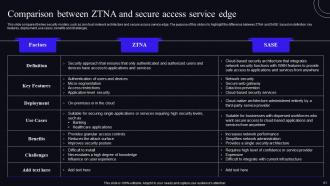
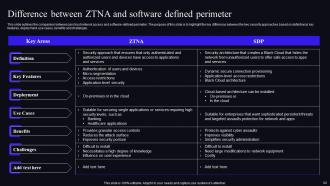
Slide 61: This slide outlines the comparison between zero trust network access and software-defined perimeter.
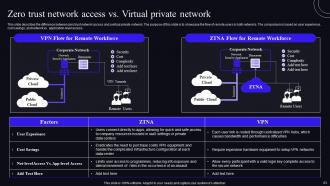
Slide 62: This slide describes the difference between zero trust network access and a virtual private network.
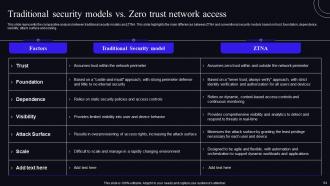
Slide 63: This slide presents the comparative analysis between traditional security models and ZTNA.
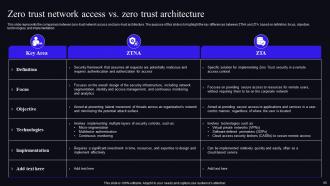
Slide 64: This slide represents the comparison between zero-trust network access and zero-trust architecture.
Slide 65: This slide depicts Table of contents for ZTNA
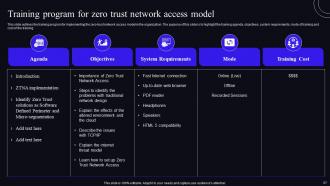
Slide 66: This slide outlines the training program for implementing the zero-trust network access model in the organization.
Slide 67: This slide represents the cost of implementing ZTNA in the organization.
Slide 68: This slide continues Table of contents for ZTNA.
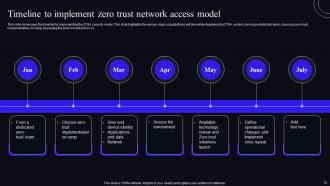
Slide 69: This slide showcases the timeline for implementing the ZTNA security model.
Slide 70: This slide shows Table of contents-Roadmap to implement zero trust network access model.
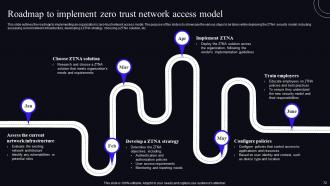
Slide 71: This slide outlines the roadmap to implementing an organization's zero-trust network access model.
Slide 72: This slide highlights Title of contents-Zero trust network access performance tracking dashboard.
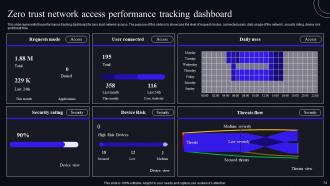
Slide 73: This slide represents the performance tracking dashboard for zero trust network access.
Slide 74: This slide showcases Table of contents for ZTNA further.
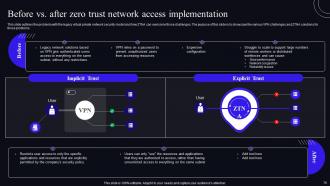
Slide 75: This slide renders the problems with the legacy virtual private network security model and how ZTNA can overcome those challenges.
Slide 76: This slide continues Table of contents for ZTNA.
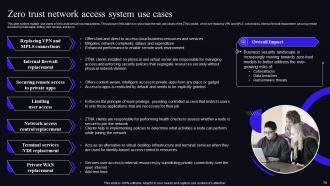
Slide 77: This slide outlines multiple use cases of zero-trust network access systems.
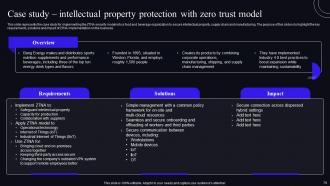
Slide 78: This slide represents the case study for implementing the ZTNA security model into a food and beverage organization.
Slide 79: This slide renders another Table of contents for ZTNA.
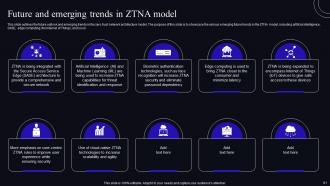
Slide 80: This slide outlines the future outlook and emerging trends in the zero trust network architecture model.
Slide 81: This slide shows all the icons included in the presentation.
Slide 82: This slide is titled as Additional Slides for moving forward.
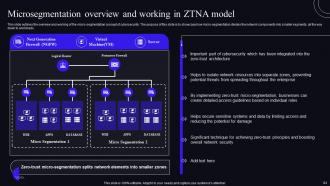
Slide 83: This slide outlines the overview and working of the micro-segmentation concept of cybersecurity.
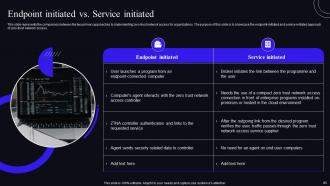
Slide 84: This slide represents the comparison between the two primary approaches to implementing zero-trust network access.
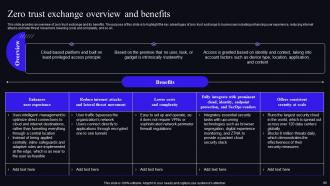
Slide 85: This slide provides an overview of zero trust exchange and its benefits.
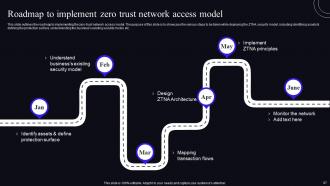
Slide 86: This slide presents Roadmap with additional textboxes.
Slide 87: This slide describes Top tenets of zero trust network access model.
Slide 88: This is Our Target slide. State your targets here.
Slide 89: This is a Quotes slide to convey message, beliefs etc.
Slide 90: This slide exhibits Comparison between Social media users.
Slide 91: This slide shows Post It Notes. Post your important notes here.
Slide 92: This slide provides 30 60 90 Days Plan with text boxes.
Slide 93: This slide showcases Magnifying Glass to highlight information, specifications etc
Slide 94: This is a Financial slide. Show your finance related stuff here.
Slide 95: This is a Thank You slide with address, contact numbers and email address.
Zero Trust Security Model Powerpoint Presentation Slides with all 94 slides:
Use our Zero Trust Security Model Powerpoint Presentation Slides to effectively help you save your valuable time. They are readymade to fit into any presentation structure.























FAQs for Zero Trust Security Model
So basically it's "never trust, always verify" - you don't automatically trust anything trying to access your systems, whether it's inside or outside your network. Pretty different from the old-school approach where everything behind the firewall was considered safe. People only get the bare minimum access they need for their job (least privilege), and you're constantly monitoring everything. Honestly, the traditional perimeter security feels so outdated now. Start by figuring out what your most critical data and systems are - that'll be your roadmap for setting up Zero Trust policies. It's way more work upfront but worth it.
So you know how old school security was like building a castle - tough walls but once you're inside, you can pretty much wander around freely? Zero Trust throws that whole concept out the window. Nothing gets trusted automatically, even if it's already on your network. Every request has to prove itself first. Users, devices, whatever - they all get checked before getting access to anything. Honestly, it's kind of paranoid but in a good way. When someone does break in or an employee goes rogue, they can't just hop around your systems causing chaos.
So basically Zero Trust is all about proving you're actually you before you get access to anything. No more assuming people are safe just because they're "inside" the network. Multi-factor authentication, checking devices, watching for weird behavior - the whole nine yards. Honestly feels a bit much sometimes, but I get why companies are going this route. Everyone's a potential threat until they prove otherwise. Your identity verification systems better be bulletproof though - they're doing all the work here. Without solid identity checks, the rest falls apart pretty quick.
Start by mapping out your data flows and access points - that's your foundation right there. Multi-factor authentication needs to go everywhere (and I mean *everywhere*). Network segmentation is huge too, so nothing can talk to everything else. Honestly, forget "trust but verify" - it's backwards now. Go with "verify then trust" for every single request. Focus on least-privilege access and watch user behavior constantly. Oh, and start small with your critical stuff first. Don't try flipping everything at once or you'll have chaos and angry users on your hands.
Honestly, start with identity stuff first - multi-factor auth, single sign-on, all that basic IAM foundation. Network segmentation tools let you slice everything into tiny zones. Endpoint detection shows you what's happening on every device (which can get overwhelming tbh). Privileged access management is huge since that's where hackers usually break in first. Cloud security platforms pull it all together and watch everything constantly. Don't try to do it all at once though - get your identity game tight, then add the other layers. My old boss tried to implement everything simultaneously and it was a nightmare.
So Zero Trust is super paranoid about everything - it assumes every user and device is sketchy until proven otherwise. Your data gets encrypted and locked down with constant authentication checks. Instead of just protecting the network edges, it wraps security around each piece of data individually. Honestly, it's kind of overkill but works great for cloud stuff. Even if hackers get in, they can't just waltz around grabbing files. You'll want to start with your most important data first though - don't try to do everything at once or you'll go crazy.
Honestly, legacy systems are gonna be your worst nightmare - they just weren't designed for this stuff. Retrofitting all that authentication is a total mess. Users will complain constantly about the extra steps too. I mean, who wants to enter another code every time they check email? Your IT team might get overwhelmed since you're basically starting over with security. Oh, and definitely start with small pilot programs first. Heavy user training upfront saves you from all the "this sucks" feedback later. Trust me on that one.
Basically you give people the bare minimum access they need for their job. That's it. No "just in case" permissions or broad network access anymore. Yeah, it's annoying to set up initially - like, really annoying. But you'll thank yourself later. Start by auditing what people currently have versus what they actually use (the gap is usually huge). Then slowly tighten things down. You're constantly checking and tweaking based on roles and risk. The trick is going small first instead of trying to overhaul everything at once.
So Zero Trust assumes everyone's trying to break in, which sounds paranoid but makes total sense with all the garbage WiFi we connect to. Your device gets checked constantly instead of just trusting your home network once. MFA kicks in everywhere, plus it monitors if your laptop's acting weird or got infected. The cool part? Even if hackers grab your stuff, they can't access everything since people only get what they actually need for work. Honestly, just start with MFA if you haven't - easiest thing that'll make the biggest difference right away.
Start by setting baselines - you can't measure improvement without knowing where you began. Then focus on detection/response times, failed logins, and privilege escalation attempts. Those numbers should all get better once Zero Trust kicks in. Honestly, the lateral movement metric is probably the most telling one. User behavior anomalies matter too, but they're trickier to interpret sometimes. The whole point is catching threats faster and containing damage when stuff goes sideways. Monthly check-ins with your security team work well for spotting trends. Don't overthink it initially though.
So basically, continuous monitoring is what makes Zero Trust actually work - you can't just check someone's credentials once and forget about it. Your system needs to constantly watch for weird behavior patterns and suspicious activity. It's like having a really good security guard who's actually paying attention, not just sitting there scrolling their phone. When something looks off, it automatically adjusts permissions or flags potential threats. Honestly, the hardest part is figuring out what "normal" looks like first, then you'll know when things go sideways.
Zero Trust basically does the compliance work for you - it's pretty cool actually. All that continuous monitoring and access tracking? That stuff auditors go crazy for is just built in. Instead of compliance being this awful separate project, it becomes automatic. You're already documenting everything anyway with the "never trust, verify" thing. Honestly, I'd start by just mapping what Zero Trust controls you have against your regs. You'll probably discover you're meeting way more requirements than you think. Makes the whole audit process less painful, which is saying something.
Yeah, Zero Trust is gonna be annoying at first - more login prompts, extra verification steps when people access sensitive stuff. Users will grumble about it initially but they get used to it pretty fast. Just don't roll it out everywhere at once or you'll have a revolt on your hands. Start with your most critical systems first. For accessibility, make sure you've got MFA options that work for everyone - some people can't use standard authenticators. The adaptive stuff helps too since it learns patterns and stops bugging users with constant prompts.
Yeah, you don't have to trash everything you've got. Most of your current stuff probably plays nice with Zero Trust already - firewalls, identity tools, endpoint protection can all work together through APIs and policy setups. Honestly, I've watched too many companies try to do everything at once and it's a nightmare. Way better to start small with identity verification and network segmentation. Map out your critical assets first, then roll out least-privilege access just for those. Once that's working smoothly, you can expand from there. Much less painful that way.
So AI's gonna make Zero Trust way smarter - think real-time behavior tracking and automatic threat responses. But quantum computing? That's honestly terrifying for current encryption. You'll need quantum-resistant algorithms soon. Cloud-native stuff means Zero Trust gets more distributed and API-heavy. IoT devices are exploding everywhere (my neighbor has like 50 smart things now) - each one needs verification. Edge computing pushes security closer to where data actually lives. I'd start checking out AI security tools and figure out what encryption you're currently using before it's too late.
-
I can say with full confidence that all your business, academic, or professional work requirements will be sufficed with SlideTeam. Their gallery is as rich as 2Million+!!
-
Professional and unique presentations.