

3d bullets for list diagram





Try Before you Buy Download Free Sample Product
 Impress Your
 Audience
 100%
100% Editable
 Save Hours
 of Time


Visuals are sure to create a lasting impression especially if they are done right. You get it right when you use our 3D Bullets For List Diagram.
People who downloaded this PowerPoint presentation also viewed the following :
Content of this Powerpoint Presentation
Description:
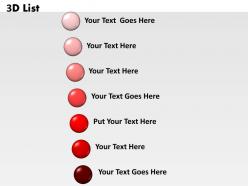
The image depicts a PowerPoint slide titled "3D List", featuring a vertical sequence of six 3D spheres, each a shade darker than the one above, ranging from light pink at the top to dark red at the bottom. Next to each sphere is a text placeholder that reads "Your Text Goes Here" or a variation of this, implying that the slide is designed to present a list of items, each point highlighted by a 3D sphere to draw attention.
Use Cases:
This type of slide is used in various industries:
1. Marketing:
Use: Presenting key campaign points.
Presenter: Marketing Coordinator.
Audience: Marketing Team.
2. Education:
Use: Listing learning objectives.
Presenter: Educator.
Audience: Students.
3. Corporate Training:
Use: Outlining training modules.
Presenter: Corporate Trainer.
Audience: Employees.
4. Event Planning:
Use: Itemizing event tasks.
Presenter: Event Manager.
Audience: Event Staff.
5. Project Management:
Use: Detailing project milestones.
Presenter: Project Manager.
Audience: Project Team.
6. Sales:
Use: Laying out sales strategies.
Presenter: Sales Executive.
Audience: Sales Representatives.
7. Health & Wellness:
Use: Enumerating health tips.
Presenter: Wellness Coach.
Audience: Clients, Patients.
3d bullets for list diagram with all 6 slides:
Bare the truth with our 3D Bullets For List Diagram. Your thoughts will dig up the facts.




FAQs for 3d bullets
3D list diagrams enhance presentations by improving visual engagement, making complex information more digestible, creating memorable hierarchical structures, and adding professional polish to content delivery. These visual tools streamline audience comprehension by transforming flat bullet points into dynamic displays, with many presenters finding that 3D elements significantly boost retention rates and maintain audience attention throughout longer presentations.
3D list diagrams enhance audience engagement by creating visual depth, improving information retention, and transforming static content into dynamic presentations that capture attention more effectively than flat text lists. These visual elements enable presenters to highlight key relationships, guide audience focus through layered information, and deliver more memorable experiences, with many organizations finding that 3D presentations significantly increase comprehension and participation rates.
**INPUT**: What software tools or platforms are best suited for creating 3D list diagrams? **OUTPUT**: Leading software for 3D list diagrams includes PowerPoint, Keynote, Canva, Adobe Illustrator, and specialized tools like Blender or SketchUp. These platforms streamline visual communication by offering templates, dimensional effects, and customizable elements, with many organizations finding that PowerPoint's built-in 3D capabilities deliver professional results while minimizing learning curves and costs. **Word count: 54 words**
**INPUT**: What are some design tips for effectively structuring 3D list diagrams? **OUTPUT**: Effective 3D list diagrams require clear hierarchy through consistent spacing, balanced visual weight distribution, strategic color coding for categories, and readable typography that maintains legibility across depth layers. These design principles streamline information processing by reducing cognitive load, enhancing visual flow, and creating intuitive navigation paths, with many organizations finding that well-structured 3D lists significantly improve audience comprehension and presentation impact. [Word count: 60 words]
Colors and shapes significantly enhance 3D list diagram clarity by creating visual hierarchy, improving information retention, and enabling quick data categorization through strategic color coding and distinctive geometric forms. Through thoughtful design choices, organizations streamline complex presentations, reduce cognitive load for audiences, and deliver more engaging stakeholder communications, with many finding that consistent color schemes and varied shapes ultimately boost comprehension rates.
Presenters should opt for 3D list diagrams when showcasing hierarchical relationships, emphasizing depth of information, or creating visual impact for executive presentations where engagement matters most. These diagrams work particularly well in strategy consulting, product launches, and board presentations, where the dimensional perspective enhances comprehension of layered concepts, ultimately delivering stronger audience retention and professional credibility.
Common mistakes include overcrowding slides with excessive text, using inconsistent colors or fonts, neglecting proper spacing between elements, choosing poor contrast ratios, and overcomplicating the visual hierarchy. These design pitfalls can confuse audiences and diminish message clarity, with many presenters finding that streamlined layouts, strategic white space, and cohesive formatting ultimately deliver stronger engagement and more effective communication outcomes.
3D list diagrams integrate seamlessly with other visual elements through strategic layering, consistent color schemes, complementary infographics, and coordinated animations that maintain visual hierarchy. These presentations enhance audience engagement by combining charts, images, and text blocks with dimensional lists, ultimately delivering cohesive storytelling and improved information retention across business communications.
Hierarchy in 3D list diagrams establishes clear information relationships through visual depth, size variations, and layered positioning, enabling audiences to instantly identify primary concepts, supporting details, and interconnected elements. This structured approach streamlines complex data presentation, enhances audience comprehension, and delivers more impactful business communications, with many organizations finding that hierarchical 3D visuals significantly improve stakeholder engagement and decision-making processes.
Animations enhance 3D list diagrams by guiding viewer attention through sequential reveals, emphasizing hierarchical relationships, and creating smooth transitions between complex data layers. These dynamic elements streamline information processing by highlighting key connections, reducing cognitive overload, and maintaining audience engagement, with many presenters finding that animated 3D diagrams deliver significantly improved comprehension and retention rates.
3D list diagram bullets enhance data visualization by adding depth, visual hierarchy, and dimensional perspective to complex information sets. These diagrams transform traditional flat lists into engaging visual experiences, with many organizations finding that the three-dimensional elements improve audience comprehension, retention rates, and presentation impact, ultimately delivering more persuasive business communications.
Presenters can customize 3D list diagrams by adjusting colors to match brand palettes, modifying fonts to align with corporate typography, resizing elements for optimal visual hierarchy, and incorporating company logos or icons. These customization options enable organizations to maintain consistent brand identity across presentations while enhancing visual appeal, with many businesses finding that branded 3D diagrams significantly improve audience engagement and reinforce professional credibility.
**INPUT**: What are some effective ways to explain complex information using 3D list diagrams? **OUTPUT**: Effective approaches include layered information hierarchies, visual depth for priority emphasis, color-coded categorization, progressive disclosure techniques, and spatial relationship mapping. These methods streamline complex data presentation by enhancing visual comprehension, reducing cognitive load, and creating intuitive navigation paths, with many organizations finding that 3D elements significantly improve audience engagement and information retention.
Audience preferences significantly influence 3D list diagram effectiveness by determining visual engagement levels, information processing speed, and comprehension rates. While tech-savvy audiences often appreciate sophisticated 3D elements for their modern appeal, traditional sectors like finance and healthcare may favor simpler designs, with many presenters finding that matching diagram complexity to audience expectations ultimately delivers better retention and clearer communication outcomes.
**INPUT**: What resources are available for learning more about designing 3D list diagrams? **OUTPUT**: Learning resources for 3D list diagram design include online design tutorials, professional presentation platforms, graphic design courses, template libraries, and specialized software training programs. These educational approaches enhance visual communication skills by teaching depth techniques, color theory, and layout principles, with many organizations finding that structured learning ultimately delivers more engaging presentations and improved audience retention across industries. **Word count: 58 words**
-
Amazing product with appealing content and design.
-
Awesome use of colors and designs in product templates.