

6 piece puzzle circular diagram arranged side by side
You must be logged in to download this presentation.




Try Before you Buy Download Free Sample Product
 Impress Your
 Audience
 100%
100% Editable
 Save Hours
 of Time


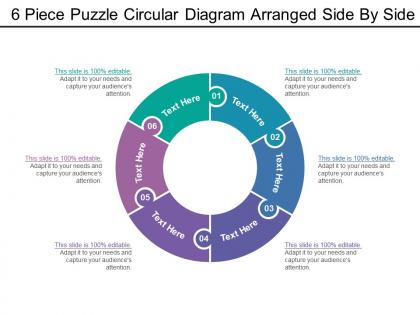
Excel as a business leader through our presentation design. Introducing our 6 piece puzzle circular diagram arranged side by side PowerPoint template. This is a six-stage process, we have adjoined 6 puzzle sections in a circular format to bind all the stages towards a complete solution. Explain your business agendas through this design. Make a mark in business meetings through our puzzle diagram. Circular formats make a uniform impression and deliver it easier for the viewer to understand the point. Text boxes visible here can be used for planning your schematic plans for the method. A sound design helps you to represent your ideas in a clearer way and helps you to reach closer to your desired objectives. Make your presentation memorable with our, 6 piece puzzle circular diagram arranged side by side PowerPoint template. Use this circular puzzle strategy design that gives you a major edge in this rapid competitive market. You may be a good business leader but that doesn?t make you a good presentation designer. That?s why you need to use 6 Piece Puzzle Circular Diagram Arranged Side By Side created by professionals only for people like you.
People who downloaded this PowerPoint presentation also viewed the following :
6 piece puzzle circular diagram arranged side by side with all 5 slides:
Dig away with our 6 Piece Puzzle Circular Diagram Arranged Side By Side. Your thoughts will bring up the truth.
FAQs for 6 piece puzzle circular diagram arranged
Honestly, circular puzzle diagrams are genius for showing how everything connects. Your audience instantly gets that if one piece goes missing, the whole thing falls apart. Way better than those soul-crushing bullet point slides we've all sat through! You can use them for business processes, project stuff, team dynamics - basically anything where the parts need each other to work. The circle thing also gives off this nice flow vibe, especially for processes that loop back on themselves. I'd totally try one next time you're explaining how different elements create something complete. They just look more interesting too.
Honestly, circular puzzle diagrams are perfect for this stuff. Your eye naturally follows the circle, which makes complicated info way easier to process. Way better than those boring bullet point lists everyone uses. There's something about puzzle pieces that just clicks with people - maybe because we all did puzzles as kids? Each piece can be a different part of your topic, and you show how they connect. I'd put your main point at the top and go clockwise from there. The whole circle thing makes everything feel complete and tied together, which is pretty cool.
Honestly, circular diagrams are perfect when you've got interconnected stuff that forms a complete picture. Like workflows where each step feeds into the next, or team structures where everyone has their own role but they all connect. I use them tons for breaking down complex ideas - way better than just listing everything out in boring bullet points (ugh). They're killer for strategic planning sessions too. You want data where each piece makes sense alone but also shows how it links to everything else. People can see the individual parts AND the whole thing at once, which is pretty neat.
Okay so circular diagrams are totally different from those regular flowcharts you're used to. Instead of going A to B to C in a straight line, everything loops back and connects to itself. Pretty cool actually. You can spot patterns that repeat, see how things influence each other at the same time, and track feedback loops way better. Regular diagrams? They're more like "start here, end there" which is fine but limiting. Use circular ones when you're dealing with messy systems that don't really have a clear beginning or ending point. They're honestly a game-changer for complex stuff.
Don't cram a novel into each section - nobody's gonna read a wall of text. Also keep your segments roughly the same size or it'll look weird and lopsided. I made the mistake once of using colors that were way too similar and you literally couldn't tell where one piece ended and another began, so learn from my fail lol. Font sizes should match across everything, and give your text some breathing room with white space. Step back when you're done - if you can't read the main points from across the room, you've overcomplicated it.
So color psychology is huge for these circular puzzles. Warm colors like red and orange naturally pull attention - perfect for your key pieces. Blues and greens work better as background elements. I swear, some people just throw every color at their diagram and it's a mess! You'll want to stick with one color family mostly, then maybe add one accent color for whatever's most important. The goal is guiding someone's eye around the circle smoothly. When you pick colors strategically, viewers actually get how the pieces connect instead of just staring at visual chaos.
Oh, those circular diagrams are actually pretty useful! I've seen teachers use them to show how subjects connect - math influences science, science influences art, that whole thing. Marketing people are obsessed with them for mapping customer journeys since buyers jump around unpredictably. They work well for business planning too when you need to show how departments depend on each other. Honestly beats the hell out of traditional flowcharts - they just feel more natural. People get the connections way faster than boring bullet points. You should try one next time you're explaining something complex.
Honestly, I'd go with Adobe Illustrator or Canva Pro. Illustrator's amazing for getting those puzzle pieces to line up perfectly - you can control every little detail. Canva's templates are actually pretty solid now and will save you so much time (I was skeptical at first but they've really stepped it up). If money's tight, Figma works great too. PowerPoint sounds weird but trust me, the shape tools are way better than you'd think. I'd start with a template then just swap in your colors and text. Way easier than building from scratch!
For your pie chart labels, definitely use fonts that are easy to read and keep them in the same spot relative to each segment. If there's room, stick them right inside each piece - otherwise use those little lines pointing from the outside. I always start at 12 o'clock and go clockwise, just feels more natural that way. Make sure your text is big enough that people don't have to squint. Oh, and if your segments are colored, pick contrasting text colors so they actually show up. Honestly though? Show it to someone else first - you'd be surprised how often labels that make perfect sense to you confuse everyone else.
Dude, storytelling is what makes your circular puzzle thing actually stick with people instead of just being another boring diagram. Walk them through each piece like you're telling a story - "so we hit this major roadblock here, then had our breakthrough with this piece" etc. Way better than randomly pointing at stuff! I'd go clockwise starting from one piece. The circular setup works perfectly because everything connects naturally, so your audience won't get lost. Honestly, most people zone out with static visuals anyway. But when you frame it as "here's what happened next..." they'll actually pay attention and remember it later.
Circular puzzle diagrams are actually pretty cool for mapping out complex systems. Each piece represents a different component, and since it's circular, it shows how everything connects in cycles instead of straight lines. Way more interesting than those standard flowcharts everyone uses (though honestly, sometimes flowcharts work fine too). Put related elements next to each other so you can see how one piece impacts the next. Really useful for customer journeys, product cycles, that kind of thing. Try sketching your process as a circle first - you'll catch connections you totally missed before.
Don't dump everything on screen at once - your audience will get lost. I like going clockwise from the top, but whatever direction feels right works. Just stay consistent. Use fade-ins or fly-ins with like half a second to a second between pieces. When pieces connect or interact with each other, throw in a quick glow or scale effect while you're talking about that section. Honestly, the main thing is keeping it smooth without going overboard on animations. Oh, and definitely test your timing beforehand! I've learned this the hard way. Keep a backup static version ready just in case.
Dude, get someone else to look at it! You'll be amazed what they catch that you totally missed. Circular diagrams are weird because people don't know where to jump in. Your coworkers will call out confusing arrows, wonky connections, or spots where you're basically forcing puzzle pieces together that don't fit. I always get at least two people to walk through mine and tell me what they see. Their "wait, what does this mean?" moments are gold - that's exactly where you need to fix stuff. They might even suggest better colors or layouts you never thought of. Trust me, fresh eyes are everything.
For circular puzzles, go with at least 8-10 inches diameter when printing. Digital? 1200x1200 pixels minimum. I made this mistake once - nobody could read the outer labels during my presentation, super awkward. Design at 150% of your final size so you've got room to shrink. Keep text 12pt or bigger even when scaled down. PowerPoint works fine for this stuff. Quick test - can you read it from the back of whatever room you'll be presenting in? If not, make it bigger. Trust me on this one.
Circles just make everything feel connected, you know? Your eye follows the curve and it creates this flow between all the parts instead of having a clear beginning and end. Linear stuff feels more like step-by-step instructions, but circles suggest everything's related and ongoing. Pretty smart psychology honestly - we see circular layouts as more whole and interconnected. People actually explore all sections instead of just focusing on where it "starts" (which doesn't really exist anyway). Use circles when you want to show collaboration or continuous processes rather than sequential steps.
-
best business ppt!
-
best business ppt!
-
Best way of representation of the topic.
-
Great quality product.
-
GOOD JOB
-
Its good
-
good