

Agile Change Management Request Process Flowchart




Try Before you Buy Download Free Sample Product
 Impress Your
 Audience
 100%
100% Editable
 Save Hours
 of Time


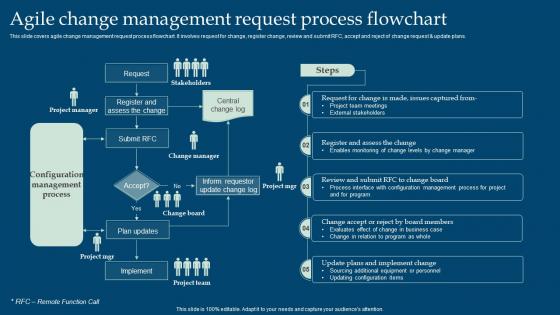
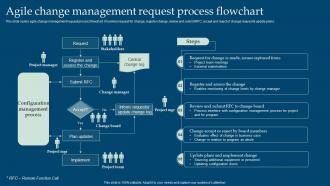
This slide covers agile change management request process flowchart. It involves request for change, register change, review and submit RFC, accept and reject of change request and update plans.
People who downloaded this PowerPoint presentation also viewed the following :
Agile Change Management Request Process Flowchart with all 6 slides:
Use our Agile Change Management Request Process Flowchart to effectively help you save your valuable time. They are readymade to fit into any presentation structure.





FAQs for Agile Change Management
So agile change management is basically treating change like you'd build any product - small experiments, constant feedback, quick pivots. Way better than those massive waterfall plans that never work anyway (seriously, who has time for that?). You break things into bite-sized pieces and let teams actually co-create solutions instead of forcing some top-down strategy. Fail fast, learn faster - that whole thing. The real difference? You're rolling with change instead of fighting it. Start with a pilot group and let momentum build naturally. It's way more flexible when priorities inevitably shift.
You definitely want to track both the quick wins and long-term stuff. Sprint completion rates, delivery times, team productivity - those give you the immediate data. But don't forget the human metrics too: engagement scores, how well people actually adopt new processes, general feedback vibes. Here's the thing though - cultural changes are slow to show up in numbers, which is honestly super frustrating when you're trying to prove value. Set up pulse surveys and retros to catch problems before they blow up. Oh, and this is crucial - get your baseline metrics locked down before you change anything. Trust me, leadership will definitely ask for ROI proof later.
Honestly, cross-functional teams are a game changer for handling change. Instead of departments working in their own bubbles, you get people from different areas collaborating right from the start. Decisions happen faster because everyone's already on the same page. No more "well, marketing does it this way" while IT rolls their eyes. When big changes come up, those relationships are already built - you're not starting from scratch trying to get everyone aligned. The trick is pulling key people from each department into regular meetings. Even if it's just a weekly check-in, that shared ownership makes such a difference. Trust me on this one.
Honestly, remote Agile change management is all about over-communicating - like, way more than feels normal. Keep doing video calls for standups and retros because people need to see faces when they're stressed about changes. Digital kanban boards are your best friend for keeping everyone on the same page with progress tracking. The hardest part? You can't just glance around and see who's struggling. So schedule those one-on-ones and maybe throw in some pulse surveys. Oh, and definitely audit where your change updates are going - I swear half the time important stuff just disappears into Slack chaos.
So I'd grab Jira or Trello for tracking changes - way better than spreadsheets, trust me. Slack keeps everyone talking during those crazy feedback rounds. Confluence is decent for docs that people actually update (shocking, I know). The thing is, you can pivot fast when clients flip-flop on requirements. Kanban boards help visualize what's happening without the email chaos. Honestly, Microsoft Teams works too if that's what your company already uses. Start simple though - pick one collaboration tool and add a basic board. Don't overthink it.
Ok so first thing - figure out who your key people are and what they actually get out of this. Because honestly, nobody gives a damn about "company-wide improvements" if it just creates more work for them. Get them involved in shaping decisions, not just hearing about them after the fact. Quick wins are your friend here - do regular demos so they can see real progress instead of sitting through another pointless status update. Oh, and keep feedback cycles short. When people feel like they're helping design the change rather than having it dumped on them, they'll actually want it to succeed.
Honestly, the hardest part is getting people to actually want to change - everyone's stuck in their comfort zone even when stuff clearly isn't working. Your team will probably hate the whole "iterate and adjust" thing since they're used to those step-by-step project plans. Start with small pilot projects to show quick wins. Leadership needs to be super vocal about why you're doing this, not just that you are. Train people on Agile basics and make it safe to mess up and try new things. Oh, and don't just announce changes - actually get stakeholders involved in planning them out. Makes a huge difference.
Honestly, agile change management is so much better than the old-school way of doing things. Instead of bosses just dropping changes on everyone, your team actually gets a say in what happens. People feel way less stressed because you're making small tweaks instead of these massive shake-ups that nobody asked for. Plus, morale goes up since everyone's getting regular feedback and can pivot when something isn't clicking. The whole thing just feels more collaborative - like you're all working together instead of being steamrolled. Next time you've got changes coming, bring your team in from the start and actually listen to what they say.
Honestly, change retrospectives are tricky because emotions run high. You'll want to make people feel safe to complain without getting thrown under the bus. I always timebox these discussions - otherwise they spiral into therapy sessions lol. Ask stuff like "what communication actually worked?" and "where did people push back the most?" Capture the hard data (adoption rates, delays) but also the messy human stuff - how's morale? Did stakeholders buy in? The key is ending with actual next steps, not just venting. Oh, and don't forget both process AND people impact matter here.
So agile change management is basically like having constant check-ins instead of waiting forever to see if something's actually working. You get feedback every few weeks rather than months later when it's too late to fix anything. Think of it like GPS rerouting when there's traffic - except for workplace changes, which sounds boring but honestly makes life way easier. The whole point is testing small tweaks, keeping what works, and dropping what doesn't. My advice? Start doing quick review cycles with your team and actually listen when people tell you stuff isn't working.
Honestly, you've gotta match how each person actually likes to get info. Some folks need those visual dashboards, others want to chat face-to-face. Your remote team? They're probably happiest with detailed Slack threads or quick videos they can watch later. I made this mistake once - sent the same email blast to everyone and like half the team missed key details. Super frustrating. Make sure people can actually respond and ask questions, especially cross-functional teams since changes hit them differently. Oh, and find your cheerleaders in each group first. They'll help spread the word way better than you can alone.
So basically, agile change management is like swapping your clunky cruise ship for a speedboat when stuff hits the fan. Your company can actually pivot fast when the market gets weird or customers flip what they want overnight. Instead of those painfully slow traditional processes, you're doing quick tests and getting feedback constantly. Break everything into bite-sized pieces so you can course-correct without blowing your budget. Honestly, the constant stakeholder input thing sounds annoying but it's what keeps you from going totally off-track. Way better than committing huge resources to something that might totally bomb.
Start with the smallest change that'll actually make a difference - don't try to fix everything at once. Pick your biggest pain point and test a mini version with just a few people first. I learned this the hard way after a massive workflow overhaul that nobody ended up using. Get real feedback on what's working, then slowly expand from there. Think of it like a pilot program instead of rolling it out company-wide. Honestly, most process changes fail because people go too big too fast. Measure the impact as you go and build on what's actually helping.
Honestly, agile leadership is kinda weird at first - you're basically giving up control to become more of a coach. Your teams start making the day-to-day calls while you focus on the big picture stuff. Sounds terrifying, right? But here's the thing: you set the vision and boundaries, then let people experiment within those limits. Small, frequent decisions replace those massive strategic plans we used to love. I'd start by figuring out what you can safely hand off versus what actually needs your input. The hardest part is trusting people won't screw it up!
Honestly, just treat your whole digital transformation like one big agile project. Break everything into 2-4 week sprints instead of those massive rollouts that never work anyway. Get your key people involved from the start - and I mean both tech folks AND the actual business users. That's huge because otherwise you end up building stuff nobody wants to use. Tech moves so fast that agile is basically perfect for this kind of thing. Focus on quick wins each cycle and get feedback constantly. Oh, and cross-functional teams are non-negotiable. Trust me on that one.
-
Use of different colors is good. It's simple and attractive.
-
The designs are very attractive and easy to edit. Looking forward to downloading more of your PowerPoint Presentations.