


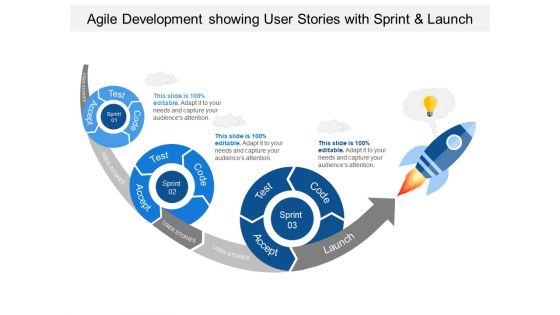
Agile development showing user stories with sprint and launch





Try Before you Buy Download Free Sample Product
 Impress Your
 Audience
 100%
100% Editable
 Save Hours
 of Time


Putting people first is a critical component of agile software development, and a user narrative places end users at the centre of the dialogue. Non-technical language is used in these stories to offer context for the development team and their work. The team understands why they are developing, what they are producing, and what value it produces after reading a user narrative. User stories are a critical component of every agile development. They contribute to the creation of a user-centered framework for everyday work, which fosters cooperation, innovation, and a better product overall. SlideTeam’s agile technology PowerPoint templates can help you get up to speed quickly on the basics of Agile development. Our templates provide in-depth information about user stories with sprint and launch through a step-by-step guide. You can also see how these concepts are put into practice by viewing our sample slides.
People who downloaded this PowerPoint presentation also viewed the following :
Agile development showing user stories with sprint and launch with all 5 slides:
Use our Agile Development Showing User Stories With Sprint And Launch to effectively help you save your valuable time. They are readymade to fit into any presentation structure.

FAQs for Agile development showing user stories with
Ok so user stories need three things: the **who** (user role), **what** (they want), and **why** (it matters). Format's usually "As a [user], I want [feature] so that [benefit]." Acceptance criteria are crucial - that's how you know it's actually done. Keep stories small enough for one sprint but valuable enough that people give a damn about them. Here's the thing though - half the magic happens in those conversations around the story, not just what's written down. Oh, and don't overthink the template too much at first. Try rewriting some of your current backlog items and see what happens!
Start with what brings the most value to users - their biggest headaches basically. I rank by ROI, how urgent it is, and effort needed. MoSCoW works well too (Must/Should/Could/Won't have). Dependencies are huge though - some stories have to happen first or your devs will be pissed. Don't forget technical debt that could mess up future work. Oh and definitely get your product owner involved in regular grooming sessions. Honestly, stakeholder alignment is half the battle here. Keep everything tied back to business goals and you're golden.
Stick with that "As a [user type], I want [goal] so that [benefit]" template - honestly, it works every time. Write like you're explaining stuff to your neighbor, not some tech conference. Skip the jargon completely. Acceptance criteria are huge though. Spell out what "done" actually means with real examples. Get your stakeholders involved early so they can poke holes in things before you build the wrong stuff. Oh, and read stories out loud during refinement meetings. Sounds weird but if people look lost, you know it's too complicated. I've seen teams waste weeks because nobody wanted to admit they didn't get the requirements.
So acceptance criteria are basically your way of turning a fuzzy user story into something devs can actually work with. They spell out exactly what needs to happen for the story to be "done" - like which buttons work, what gets validated, how the system acts in different situations. Without them, you're basically throwing requirements at the wall and seeing what sticks (learned that the hard way). QA loves them too since they know exactly what to test. Oh, and use that Given/When/Then format - makes everything cleaner. Aim for 3-5 criteria per story.
So the 3 C's are pretty straightforward once you get them. Card = the written story with just enough info to get started. Then comes Conversation - honestly the most important part but teams always rush through it. That's where you actually hash out what you're building and why. Confirmation is your acceptance criteria, basically the finish line so you don't keep adding random stuff forever. I always think of it like: card starts the discussion, conversation figures out the real details, confirmation stops scope creep. Just make sure you're actually doing all three parts instead of skipping straight to coding.
Skip the generic "as a user" stuff - that's lazy. Get specific about WHO you're writing for and what they actually get out of it. I've seen way too many teams just disguise technical tasks as user stories, which totally misses the point. Break them down small enough for one sprint. Always add clear acceptance criteria. Here's the thing - if you can't sit down with a real user and have them nod along when you explain the story, you're doing it wrong. Also, test this: can you explain why anyone should care? If not, back to the drawing board.
Think of personas as your reality check when writing user stories. Instead of building for some mythical "average user," you're designing for actual people with specific problems. Sarah from accounting has different needs than Mike the field tech, right? Your stories get way more focused when you can picture who's actually using the feature. Plus your team stays on the same page about priorities - which honestly saves so many pointless debates later. The acceptance criteria write themselves once you know your persona would never tolerate a slow loading screen or confusing navigation.
So basically, your user stories are gonna evolve constantly - that's just how it works. They start rough in the backlog, then during sprint planning you break them into actual tasks and add acceptance criteria. While your team's coding, you'll find weird edge cases or realize you missed something obvious (happens every time tbh). Sometimes stakeholders will jump in with clarifications that change everything. If a story gets too chunky, split it up. Don't stress about them being "perfect" from the start - they're meant to be living docs that you tweak as you learn more.
Honestly, I'd focus on completion rates and cycle time first - super telling metrics. How many stories are you actually finishing vs how long they're taking? Defect rates per story show quality issues early. Customer satisfaction scores are obvious but crucial. One thing I've noticed (maybe just me) - tracking how often you split stories mid-sprint reveals SO much about whether you're sizing them right upfront. Mid-sprint requirement changes are another good one to watch. Don't go crazy though. Pick maybe 2-3 that match your team's biggest headaches and review them during retros.
Honestly, just bake stakeholder feedback right into your refinement process instead of treating it like an extra step. After each sprint review, grab stakeholders for quick feedback sessions while they're looking at actual working software - that's when you get the good stuff, not from theoretical requirements. Drop their comments straight into your story notes or acceptance criteria so nothing vanishes into thin air. Maybe add "stakeholder validation" to your definition of done? Sounds a bit formal but it forces you to actually close the loop each time. The systematic approach really works - I learned this the hard way after too many "wait, that's not what we wanted" moments.
Skip the hours guessing game - go with story points or t-shirt sizing instead. Planning poker is clutch for this. Get everyone together to hash out each story's complexity and vote on it. Honestly, I way overthought this when I started out (probably still do sometimes lol). Split up anything that feels massive or unclear. Don't forget about testing and code reviews - they eat time too. Your team being consistent matters way more than nailing perfect estimates. Pick a few reference stories as your starting point, then just compare everything else back to those.
So basically epics are just big user stories that you'll need to chop up later. Like instead of "user can reset password," an epic would be the whole "user registration system." Way too big for one sprint, right? Themes sit above that - they're more like business goals grouping related epics together. "Improve user onboarding" or whatever. Honestly teams use these terms pretty randomly sometimes, which is annoying. But the main thing is epics help you organize your backlog without drowning in tiny stories. Break them down when you're ready to actually build something.
Dude, remote user stories need way more detail since you can't just walk over and ask "wait, what did you mean here?" I always throw in extra context and acceptance criteria now. Tools like Miro are actually pretty great for story mapping - sometimes better than standing around a whiteboard, honestly. Everyone should be able to comment on stories in real-time through whatever project tool you're using. Be super explicit about everything. Those random coffee conversations where you'd clarify stuff? Yeah, those don't exist anymore. Oh, and start using "definition of ready" checklists before sprint planning - saves so much headache later.
Honestly, just get your product owners and devs talking more. Regular story workshops are a game changer - developers can ask questions upfront instead of guessing later. I've watched too many teams just throw stories over the fence and hope for the best (spoiler: it never works). Your acceptance criteria need to be super clear. Use examples or mockups whenever you can. Let developers push back on stories that feel too big or weird - they catch problems early that'll bite you later. Oh, and set up quick check-ins during sprints. Way better than discovering everything's wrong at the sprint review.
User stories just flip your whole development approach around - you write everything from the customer's angle instead of diving into tech specs. The format is "As a [user type], I want [goal] so that [benefit]" and honestly, it's genius because it stops you from building pointless features. Like, try writing "As a user, I want better database indexing" without laughing. Can't do it! Every story forces your team to answer "what's the actual customer benefit here?" which is way harder than you'd think. Pull up your backlog right now and check if each item clearly explains why users would care.
-
The content is very helpful from business point of view.
-
Easily Understandable slides.
-
It saves your time and decrease your efforts in half.
-
Content of slide is easy to understand and edit.
-
Attractive design and informative presentation.