


Aging Report Powerpoint Ppt Template Bundles





Try Before you Buy Download Free Sample Product
 Impress Your
 Audience
 100%
100% Editable
 Save Hours
 of Time


Explore the dynamics of Accounts Receivable with our comprehensive Aging Report PowerPoint presentation. Dive into the essence of payment aging analysis, dissecting unpaid invoices across diverse breakdowns. Uncover the intricacies of financial insights, navigating through the detailed breakdown of outstanding payments and their aging status. This presentation illuminates the crucial role of an Aging Report, providing a comprehensive view of outstanding receivables, aging trends, and payment patterns. Empower your team with actionable insights derived from an in depth analysis, facilitating informed decision making and strategizing for improved cash flow management. Gain a strategic advantage in managing outstanding invoices and optimizing receivables with our detailed and insightful Aging Report presentation.
People who downloaded this PowerPoint presentation also viewed the following :
Aging Report Powerpoint Ppt Template Bundles with all 20 slides:
Use our Aging Report Powerpoint Ppt Template Bundles to effectively help you save your valuable time. They are readymade to fit into any presentation structure.

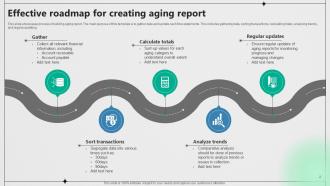

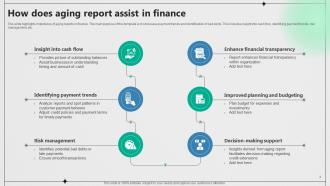
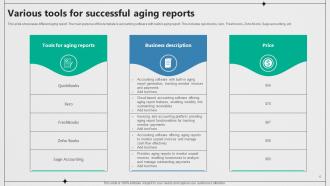
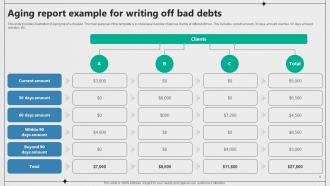









FAQs for Aging Report Powerpoint
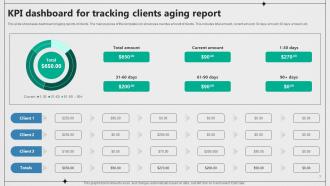
Look at your current balances first, then break down those aging buckets - 30, 60, 90+ days past due. Payment history patterns are huge too. Don't skip total outstanding per customer because honestly, that's where you'll spot your biggest risks. Average days to pay is super helpful if you're tracking it, plus any dispute amounts since those mess with your collection priorities. Oh, and segment by customer type or sales rep if that makes sense for your setup. Pull a basic report with this stuff and see what jumps out at you.
Think of your aging report as a preview of your bank account drama. It breaks down which invoices are late and how late they are. Some customers are serial late payers - honestly, you probably already know who they are. But the report gives you hard numbers to work with. Run it every week so you can chase down payments before things get ugly. You'll start seeing cash flow problems weeks ahead of time. That means you can either get aggressive with collections or line up a loan if needed. Don't be one of those people who prints it out and never looks at it again.
So basically, AR aging shows who owes YOU money - like which customers haven't paid their invoices yet. AP aging is the opposite - it's what you owe vendors and suppliers. Both break things down into the same time periods (30, 60, 90+ days). AR helps you figure out who to chase for payments first. AP helps you plan when to pay bills without getting hit with late fees. Honestly, our AP aging always looks way messier than I'd like to admit! But you'll probably find yourself checking AR more often since collecting money is such a pain. Use AR to prioritize your collection calls and AP to schedule payments.
Aging reports are honestly a game-changer for collections. Start with your oldest invoices - those are the most likely to go bad on you. Monthly reports will show you which customers are always late payers, so you can tighten their credit terms or ask for money upfront. I've seen people catch customers heading toward financial trouble way early this way, which gives you time to set up payment plans before things get messy. Use the data to plan your follow-up calls too. It's wild how clear the patterns become once you start looking.
Ugh, the worst part is definitely messy data scattered everywhere. Your receivables info lives in like three different systems, payment terms are all over the place, and partial payments? Total nightmare for aging reports. I swear manual ERP pulls are the biggest time suck - by the time you're done, half the data's already stale. International stuff makes it even messier with currency conversions. Honestly, just automate whatever you can and set up solid data entry rules from day one. Trust me, it beats spending weekends cleaning up garbage data later.
Honestly, I'd do it weekly if you can swing it - especially if cash flow's tight or you've got tons of invoices floating around. Monthly used to work for me until this one client disappeared for like six weeks and left us hanging. That sucked. Weekly catches problems way faster, so you're not chasing ghosts later. Though if your business is seasonal or you don't have many customers, monthly's probably fine. Just pick something and actually stick to it - that's the real trick for spotting when things go sideways.
Your accounting software handles most of this stuff automatically - pulls customer data, sorts invoices by age (30, 60, 90+ days), generates reports whenever you want. Pretty cool that some systems connect with your CRM too, so you see the full payment history picture. No more manual spreadsheet hell or typos from entering data by hand. Honestly, I'd start with monthly automated reports. You can always bump it to weekly later if cash flow gets tight. Saves me like 3-4 hours every month, which is huge.
So aging reports basically tell you who's always paying late or letting their bills stack up. Perfect for catching credit risks early. Look for customers hitting 60+ days regularly or ones that used to pay fast but suddenly don't. Once invoices hit 90+ days, you're probably screwed on collecting - those are major red flags. I'd use that info to set credit limits or ask sketchy accounts for deposits upfront. Honestly beats waiting until they owe you thousands and then disappear. Catch the patterns before they become write-offs.
Don't just stare at the current numbers - track how things are moving month to month. That's where you'll actually see what's happening. Your 90+ day stuff is obviously the fire you need to put out first, but honestly? Start watching that 60-day bucket too because that's your early warning system. Check if any of this lines up with changes you made to credit terms or collection processes recently. Some industries are just weird with seasonal payment cycles, so factor that in. The real trick is figuring out which accounts are genuinely problematic versus just following their normal (annoying) payment patterns.
Honestly, aging reports are a game changer - they show you exactly what's been collecting dust so you can decide whether to discount it, stop ordering more, or just cut your losses. I check mine monthly because cash tied up in dead inventory is the worst. You'll start noticing patterns, like those boots from last winter that nobody bought (been there). It helps you catch slow-moving stuff early, adjust your orders, and figure out when to reorder. Plus you can plan sales around the older stock instead of letting it sit there forever.
Okay so first thing - tighten up who you're giving credit to. New customers or sketchy ones? Make them put money down upfront. Send invoices the second you finish work, then bug them at 15, 30, and 45 days. I get that calling people about money feels super awkward, but you gotta do it for the bigger amounts. Set up automatic reminder letters to save yourself time. Payment plans work pretty well for stubborn customers, or try offering small discounts if they pay fast. Oh and definitely keep track of repeat problem customers - those people need stricter terms going forward.
You gotta check industry benchmarks or you're basically guessing whether your numbers suck or not. 15% of receivables over 90 days? Could be a disaster if you're supplying groceries, but construction companies would shrug since their payment cycles are naturally longer. Compare your aging buckets to what's normal in your sector - that's how you spot actual problems versus just typical business stuff. I learned this the hard way honestly. Without benchmarks you'll stress about numbers that are actually fine for your industry. Google your industry's average DSO and aging breakdowns to start.
So there's this thing called the Fair Debt Collection Practices Act that basically sets the rules - it controls when you can call people, what you're allowed to say, and stops you from being a total nightmare about it. Different states pile on extra rules too, which is honestly pretty annoying to keep track of. Document every single interaction you have and save any payment deals you make. Oh, and check your original contracts first - sometimes there's specific collection stuff in there. My advice? Write everything down and call your lawyer before doing anything too aggressive. Trust me on this one.
Dude, aging reports are seriously underrated for sales planning. They show you who pays on time versus who's always dragging their feet. Fast payers? Those are your golden customers - they actually value working with you. The chronic late ones need either stricter terms or way more hand-holding. I'd segment based on payment speed honestly. Focus your team's time on the reliable accounts since they're less drama and better relationships overall. The data basically tells you which clients are worth chasing and which ones might bail. It's kind of like having insider info on customer loyalty before things go south.
Aging reports are honestly game-changers for cash flow planning. They show you exactly when money's coming in - like whether you've got $50K hitting in 30 days or stuck out at 90 days. Makes a huge difference for your short-term budget, obviously. You can actually forecast realistically instead of just crossing your fingers that clients pay on time (spoiler: they often don't). Plus you'll catch collection problems early before they mess up your whole budget. I always tell people to use this data for real projections rather than wishful thinking - saves you from those panic moments when cash gets tight.
-
Innovative and creative templates with high-quality designs. Helped me with my presentation as the slides were easy to edit.
-
Best Representation of topics, really appreciable.