


Sla Report Powerpoint Ppt Template Bundles




Try Before you Buy Download Free Sample Product
 Impress Your
 Audience
 100%
100% Editable
 Save Hours
 of Time


Step into the world of service excellence with our comprehensive PPT on SLA Report Mastery. Navigate the intricacies of the Service Mark Treaty, unraveling the complexities of Service Medial Reconciliation for a meticulous analysis of service standards. Explore the pivotal role of Service Industry Affiliation, understanding how it shapes and elevates your commitment to unparalleled service delivery. This presentation is your guide to crafting and comprehending SLA reports with finesse, ensuring a seamless alignment with industry benchmarks and customer expectations. Equip yourself with the insights to excel in service related agreements, cementing your reputation as a leader in delivering top notch service experiences. Master the art of SLA reporting for a service driven landscape that stands out in the competitive market.
People who downloaded this PowerPoint presentation also viewed the following :
Sla Report Powerpoint Ppt Template Bundles with all 20 slides:
Use our Sla Report Powerpoint Ppt Template Bundles to effectively help you save your valuable time. They are readymade to fit into any presentation structure.
-

SLA Report
-
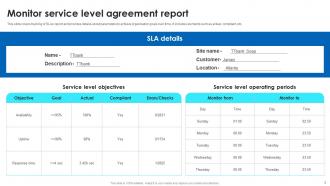
Monitor service level agreement report
-
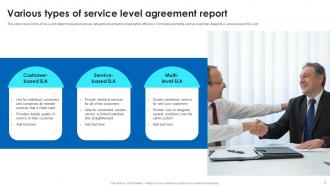
Various types of service level agreement report
-
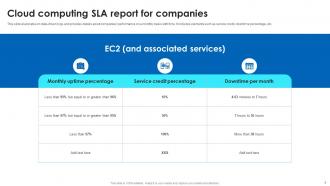
Cloud computing SLA report for companies
-
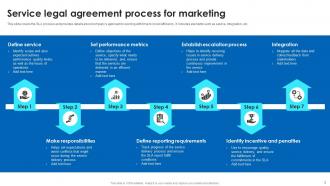
Service legal agreement process for marketing
-
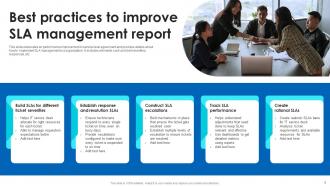
Best practices to improve SLA management report
-
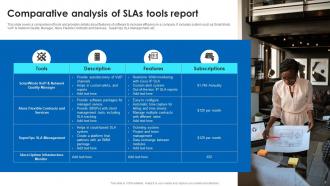
Comparative analysis of SLAs tools report
-
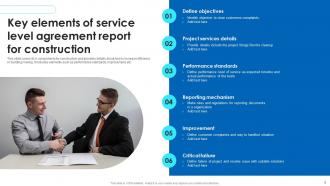
Key elements of service level agreement report for construction
-
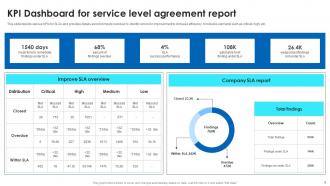
KPI Dashboard for service level agreement report
-
Monitor business and finance SLA report
-
Time and efficiency service level agreement report
-

Thanks for watching
-

-

-

-

-

-

-

-

FAQs for Sla Report Powerpoint
So basically you're looking at uptime percentages and how fast they respond to issues. Response times are huge - that's what actually matters when stuff breaks. Most reports show trends over time, which honestly can be pretty eye-opening for spotting weird patterns. They'll list any times they missed their targets with explanations (some are BS, some legit). Oh and upcoming maintenance windows too. The trick is making sure they track what actually impacts your business, not just random IT metrics that sound fancy but tell you nothing useful.
Honestly, start small - pick like 3-5 metrics that actually matter to your business and build automated alerts around those. Dashboards showing trends over time are gold (execs eat that stuff up). You'll want regular meetings where people actually talk through the data instead of just staring at numbers. Oh, and document every incident with root causes - sounds boring but you'll thank me later when patterns emerge. Don't fall into the trap of measuring everything just because you can. Real-time monitoring tools are your friend here.
So basically you're gonna see uptime percentage and response times in pretty much every SLA report. Resolution times too - that's a big one. Then there's availability metrics and incident tracking, which shows how many things went wrong and how bad it was. Performance stuff like page load speeds gets thrown in depending on what kind of service you're dealing with. Oh, and some places do customer satisfaction scores but honestly? Those first few I mentioned are what people actually care about. Just track everything consistently because your boss will 100% ask why numbers went up or down from last month.
Honestly, good SLA reports are like proof you're not just taking their money and running. Show them the actual numbers - response times, uptime stats, all that stuff. Clients hate getting BS updates that say "everything's fine!" when they want real data. I always make mine super visual because nobody wants to read paragraphs of metrics. Track everything month to month so you catch problems before they blow up in your face. It's basically showing your work, but for adults with budgets. The transparency thing really works - even when you miss targets, they'll respect you more for being upfront about it.
Honestly, it really depends on your industry. Telecom companies are obsessed with network uptime and call quality - nobody wants dropped calls. Healthcare? They're all about patient data availability and response times, which makes total sense when lives are at stake. Financial services get crazy detailed about transaction speeds and security response times. Money can't sit around waiting, you know? IT services track ticket resolution and system availability by severity levels. The trick is figuring out what your regulators and customers actually give a damn about, not just boring uptime numbers.
Honestly, visuals are a game-changer for SLA reports. Nobody wants to stare at endless spreadsheet rows trying to decode uptime patterns - trust me on that one. Charts and graphs let stakeholders spot trends instantly without the headache. I always go with traffic light colors (red/yellow/green) for performance stuff, plus trend lines for historical data. Bar charts work great for comparisons too. The result? Executives actually read your reports instead of glossing over them. You'll dodge those painful follow-up meetings where you're explaining what everything means. Color-coded dashboards are honestly your best friend here.
Honestly, transparency is what makes SLA reporting actually work. Clients trust you more when you're upfront about everything - the good stuff AND when things go sideways. Show clear metrics, explain any downtime that happened, and tell them what you're fixing. Don't hide the ugly numbers in tiny footnotes or use tech speak that makes their eyes glaze over. Your reports should be stupid easy to understand. Here's what I'd do: grab your last report and pretend you're the client reading it. Make sense? If not, fix it.
Monthly SLA reports are your sweet spot - generate them and review right away with the team. Weekly works if you're dealing with critical stuff or current performance headaches. Daily reports? I've watched teams drown in that much data unless they're literally putting out fires. Consistency beats frequency every time. Actually talk through what you find and spot trends instead of just filing everything away. Oh, and definitely set up a recurring meeting or it'll keep getting pushed to "next week" forever. Trust me on that one.
Ugh, data scattered everywhere is gonna be your biggest headache. Ticketing systems timestamp stuff totally different from monitoring tools, and legacy systems? Forget about it - they're a mess. Missing data points and duplicates will drive you crazy too. Plus you'll spend forever just figuring out what should actually count for your SLA math. Oh, and time zones - such a pain if you're dealing with global stuff. Honestly, map out where all your data lives first and get your definitions straight. Don't even think about aggregating until that's sorted.
SLA reports are seriously underrated - they show you exactly what's broken and what isn't. Look for patterns like response times crashing every Monday (spoiler: it's always Mondays). You can see which services constantly miss their marks and build a solid case for more resources when needed. The best part? You'll actually know if your fixes worked by comparing the numbers before and after. Oh, and don't just let these sit in some folder gathering digital dust. Use them to figure out your next move.
Depends what you're already using honestly. ServiceNow, Jira Service Management, Freshservice - they all have SLA tracking baked in. New Relic and Datadog are solid if you need infrastructure monitoring too. Excel works in a pinch but gets super messy once you have actual data flowing through. Power BI or Tableau make everything look way fancier than it needs to be, which management loves for some reason. I'd just check your current ticketing system first. Most have basic reporting already there, so you might not need anything new.
When you're presenting those SLA reports, hit them with three things: performance trends first - are we hitting targets or sliding downhill? Next, dig into the why behind any screw-ups. Volume spike? System crashed? Someone called in sick? That's way more valuable than just pointing at red numbers. Connect it to what actually matters - lost customers, revenue hits, whatever keeps executives up at night. Oh, and don't just dump data on them. Give them 2-3 concrete fixes with deadlines so they can't just nod and forget about it later.
Start with automated monitoring - that's what'll catch problems before they blow up. Track the right stuff consistently and build dashboards people actually use (we've all seen those fancy ones nobody checks). Always pad your timelines because everything takes longer than you think it will. Set up clear escalation paths so people know exactly who to bug when shit hits the fan. Oh, and do regular reviews with stakeholders to keep targets realistic. Nobody benefits from impossible SLAs that just stress everyone out.
SLA reports are basically your proof when contract talks come up. Hard numbers don't lie - they show exactly what you delivered vs what you promised. Hitting 99.9% uptime when you only committed to 99%? That's solid ground for better pricing. Missing your targets though? Well, at least you've got data to negotiate something more realistic next time. I've seen too many companies just wing it with SLAs that sound impressive but are total fantasy. Use that historical stuff to figure out what actually works for everyone instead of making promises you can't keep.
Look, your SLA report basically shows where you're screwed if things go wrong. Missing uptime targets or response times? Clients can demand money back or bail on contracts early. Some penalty structures are absolutely ruthless too. Your reputation takes a hit, which makes future deals harder to land. Check which metrics trigger penalties and what they'll actually cost you - that part's crucial. honestly, most teams don't realize how expensive these breaches can get until it's too late. Go through those thresholds with your team so everyone knows what's riding on hitting those numbers.
-
Great quality product.
-
Extremely professional slides with attractive designs. I especially appreciate how easily they can be modified and come in different colors, shapes, and sizes!
-
I want to thank SlideTeam for the work that they do, especially their customer service.
-
It's always a delight to see new templates from you! I am extremely pleased with the fact that they are easy to modify and fit any presentation layout in seconds!