


AI In Education Transforming Teaching And Learning AI CD




Try Before you Buy Download Free Sample Product
 Impress Your
 Audience
 100%
100% Editable
 Save Hours
 of Time


Check out our professionally designed AI in Education Transforming Teaching and Learning PPT. This AI for Educators presentation unveils the power of artificial intelligence in reshaping traditional educational practices. Moreover, our AI teacher PowerPoint presentation covers key AI technologies tailored for education, including machine learning, adaptive learning systems, and personalized education platforms. Lastly, the AI in the Classroom Template explores how AI revolutionizes classroom experiences, aids in curriculum design, and provides customized learning paths for students. Dive into the future of education technology with insights into AI-driven assessment tools, virtual classrooms, and intelligent tutoring systems. Access the knowledge to elevate teaching and learning strategies, embracing the full potential of AI in education.
People who downloaded this PowerPoint presentation also viewed the following :
Content of this Powerpoint Presentation
Slide 1: The slide introduces AI in EDUCATION: Transforming Teaching and Learning. State your company name.
Slide 2: This is an Agenda slide. State your agendas here.
Slide 3: The slide displays Table Contents for the presentation.
Slide 4: The slide continues Table of contents.
Slide 5: This slide showcases introduction of artificial intelligence in education, referable for educators and students gaining interest towards this technology.
Slide 6: This slide shows types of artificial intelligence in education, referable for educators and students gaining interest towards this technology.
Slide 7: This slide continues types of artificial intelligence in education, referable for educators and students gaining interest towards this technology.
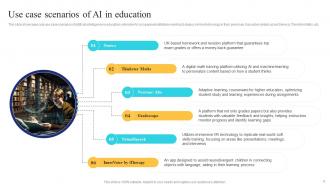
Slide 8: This slide highlights real use case scenarios of artificial intelligence in education.
Slide 9: The slide renders Title of Contents further.
Slide 10: This slide showcases top grossing facts of AI in education, helping tech practitioners refer practical data and make decisions accordingly.
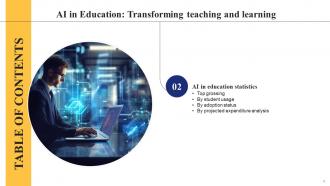
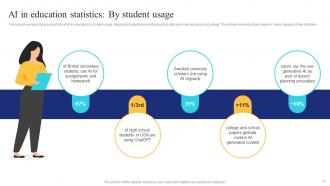
Slide 11: This slide continues top grossing facts of AI in education by student usage.
Slide 12: This slide depicts top grossing facts of AI in education by adoption status.
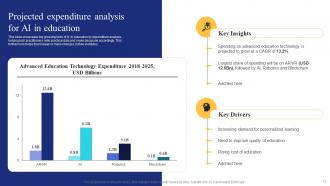
Slide 13: This slide renders top grossing facts of AI in education by expenditure analysis.
Slide 14: The slide demonstrates Title of contents further.
Slide 15: This slide shows market analysis snapshot of artificial intelligence in education market.
Slide 16: This slide showcases market share by application for artificial intelligence in education.
Slide 17: This slide highlights market growth drivers of artificial intelligence in education, referable for investors and businesses interested in this industry.
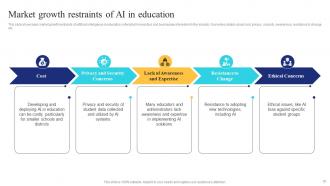
Slide 18: This slide shows market growth restraints of artificial intelligence in education, referable for investors and businesses interested in this industry.
Slide 19: The slide describes Title of contents further.
Slide 20: This slide shows multiple ways in which artificial intelligence is being used in education.
Slide 21: The slide displays Title of contents further.
Slide 22: This slide showcases basic introduction to artificial intelligence in classroom, referable for teachers and students wanting to leverage this technology.
Slide 23: This slide highlights key benefits of artificial intelligence in classroom technology.
Slide 24: This slide showcases best practices of artificial intelligence technology in classrooms.
Slide 25: The slide renders Title of contents further.
Slide 26: This slide showcases classroom AI technology i.e. quiz question generator, referable for teachers and students wanting to leverage this technology.
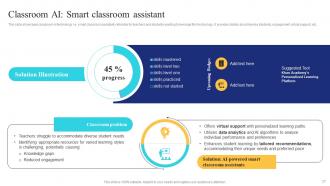
Slide 27: This slide shows classroom AI technology i.e. smart classroom assistant, referable for teachers and students wanting to leverage this technology.
Slide 28: This slide displays classroom AI technology i.e. grading assistance tool, referable for teachers and students wanting to leverage this technology.
Slide 29: This slide showcases classroom AI technology i.e. multilingual guide, referable for teachers and students wanting to leverage this technology.
Slide 30: This slide renders classroom AI technology i.e. 24/7 support bots for students, referable for teachers and students wanting to leverage this technology.
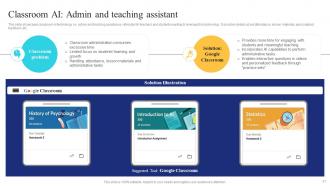
Slide 31: This slide depicts classroom AI technology i.e. admin and teaching assistance, referable for teachers and students wanting to leverage this technology.
Slide 32: This slide describes classroom AI technology i.e. lesson planning tool, referable for teachers and students wanting to leverage this technology.
Slide 33: This slide showcases classroom AI technology i.e. learning simulations tool, referable for teachers and students wanting to leverage this technology.
Slide 34: The slide displays Title of contents further.
Slide 35: This slide highlights overview of AI in higher education, referable for professors and students wanting to leverage this technology.
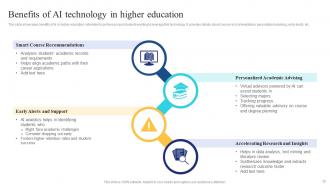
Slide 36: This slide shows benefits of AI in higher education, referable for professors and students wanting to leverage this technology.
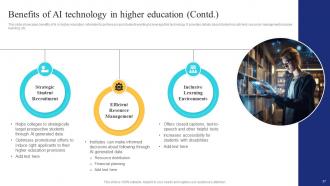
Slide 37: This slide highlights benefits of AI in higher education, referable for professors and students wanting to leverage this technology.
Slide 38: The slide renders Title of contents which is to be discussed further.
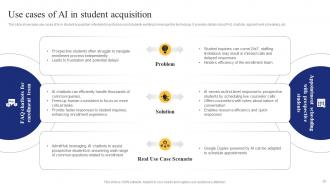
Slide 39: This slide showcases use cases of AI in student acquisition, referable for professors and students wanting to leverage this technology.
Slide 40: This slide shows use cases of AI in learning enhancement, referable for professors and students wanting to leverage this technology.
Slide 41: This slide highlights use cases of AI in managing student affairs, referable for professors and students wanting to leverage this technology.
Slide 42: The slide depicts Title of contents further.
Slide 43: This slide showcases basic overview to generative AI technology in educational sector.
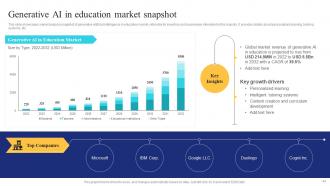
Slide 44: This slide shows market analysis snapshot of generative artificial intelligence in education market.
Slide 45: The slide represents Title of contents which is to be discussed further.
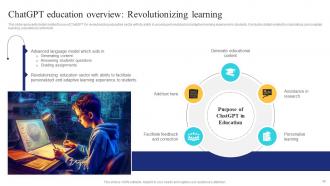
Slide 46: This slide presents details related to use of ChatGPT for revolutionizing education sector.
Slide 47: This slide highlights benefits of using ChatGPT, which is revolutionizing education sector.
Slide 48: This slide represents the benefits of ChatGPT for educators, which is revolutionizing education sector.
Slide 49: This slide renders the benefits of ChatGPT for educators, which is revolutionizing education sector.
Slide 50: This slide displays details related to use of AI technology designed to understand and generate human-like texts based on received inputs.
Slide 51: This slide represents details related to use of AI technology designed to understand and generate human-like texts based on received inputs.
Slide 52: This slide showcases main applications of ChatGPT generative model for higher education scholars, guiding them in their graduation success.
Slide 53: This slide continues main applications of ChatGPT generative model for higher education scholars, guiding them in their graduation success.
Slide 54: This slide shows main applications of ChatGPT generative model for advanced research, guiding them in their graduation success.
Slide 55: The slide describes Title of contents further.
Slide 56: This slide showcases top grossing AI tools which teachers can use to increase their productivity and overall teaching experience.
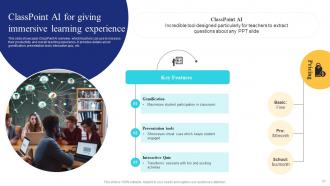
Slide 57: This slide renders ClassPoint AI overview, which teachers can use to increase their productivity and overall teaching experience.
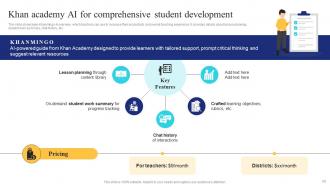
Slide 58: This slide showcases Khanmingo AI overview, which teachers can use to increase their productivity and overall teaching experience.
Slide 59: This slide shows Gradescope AI, which teachers can use to increase their productivity and overall teaching experience.
Slide 60: This slide renders comparative analysis of Khanmingo, Gradescope and Classpoint AI.
Slide 61: The slide depicts Title of contents further.
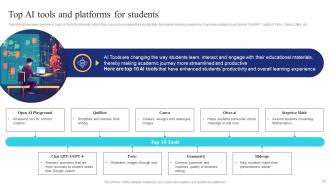
Slide 62: This slide showcases overview to basic AI tools for students, which they can use to increase their productivity and overall learning experience.
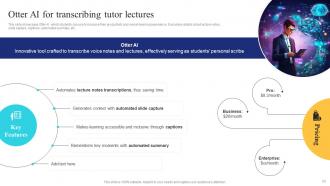
Slide 63: This slide renders Otter AI, which students can use to increase their productivity and overall learning experience.
Slide 64: This slide highlights Grammarly AI, which students can use to increase their productivity and overall learning experience.
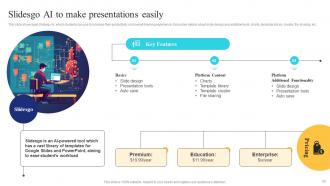
Slide 65: This slide showcases Slidesgo AI, which students can use to increase their productivity and overall learning experience.
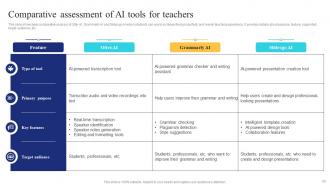
Slide 66: This slide shows comparative analysis of Otter AI, Grammarly AI and Slidesgo AI which students can use to increase their productivity.
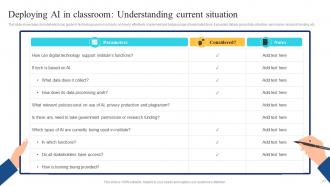
Slide 67: The slide displays Title of contents further.
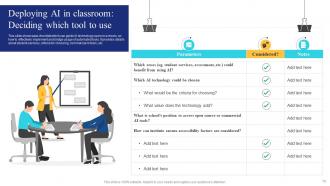
Slide 68: This slide showcases benefits of artificial intelligence in education to students.
Slide 69: This slide highlight benefits of artificial intelligence in education to teachers, which can help them excel in efficient management and audit.
Slide 70: The slide describes Title of contents further.
Slide 71: This slide showcases major challenges in deploying AI technology in schools, warning educators and students to use AI wisely.
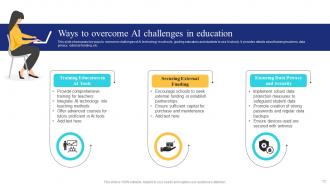
Slide 72: This slide render key ways to overcome challenges of AI technology in schools, guiding educators and students to use AI wisely.
Slide 73: This slide showcases major risks in deploying AI technology in schools, warning educators and students to use AI wisely.
Slide 74: This slide highlight tools which can overcome risks and misuse of AI technology in schools, guiding educators and students to use AI wisely.
Slide 75: This slide showcases flowchart which can guide AI technology users in in schools, to use it wisely and carefully.
Slide 76: The slide displays Title of contents further.
Slide 77: This slide showcases checklist which can guide AI technology users in schools, on how to effectively implement and bridge usage of automated tools.
Slide 78: This slide continues checklist which can guide AI technology users in schools, on how to effectively implement and bridge usage of automated tools.
Slide 79: This slide again shows checklist which can guide AI technology users in schools, on how to effectively implement and bridge usage of automated tools.
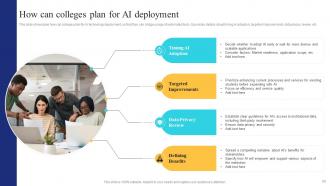
Slide 80: This slide showcases how can colleges plan for AI technology deployment, so that they can bridge usage of automated tools.
Slide 81: This slide highlights best practices for deploying AI in education, so that they can bridge usage of automated tools.
Slide 82: The slide continues Title of contents which is to be discussed further.
Slide 83: This slide showcases factors which will impact future of AI technology in educational sector, so that they can bridge usage of automated tools.
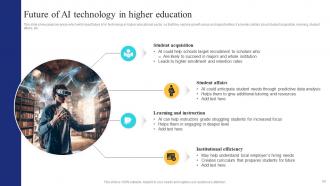
Slide 84: This slide render key areas which will impact future of AI technology in higher educational sector, so that they explore growth areas and opportunities.
Slide 85: This slide shows all the icons included in the presentation.
Slide 86: This slide is titled as Additional Slides for moving forward.
Slide 87: This is our Mission, Vision and Goal Slide. State your firm goals here.
Slide 88: This is a Financial slide. Show your finance related stuff here.
Slide 89: This slide shows Post It Notes. Post your important notes here.
Slide 90: This slide depicts Venn diagram with text boxes.
Slide 91: This is a Thank You slide with address, contact numbers and email address.
AI In Education Transforming Teaching And Learning AI CD with all 99 slides:
Use our AI In Education Transforming Teaching And Learning AI CD to effectively help you save your valuable time. They are readymade to fit into any presentation structure.







































FAQs for AI In Education Transforming Teaching And
So basically AI watches how each kid learns and adjusts on the fly. It spots when someone's stuck on fractions (or whatever) and tosses them easier problems, then ramps back up once they get it. Meanwhile, your quick learners zoom ahead instead of getting bored. Khan Academy does this really well - honestly it's kind of wild watching it work. DreamBox is another good one. The whole thing runs off performance data, constantly shifting based on what each student needs. I'd start with just one platform to test it out, see how your kids respond to the personalized pacing.
You should definitely try automated quiz grading first - saves SO much time. Real-time progress tracking is where it gets interesting though. Instead of waiting for test results to see who's lost, you'll catch struggling kids right away. I've been using dashboard features that show class trends, and honestly? Way better than digging through spreadsheets at 10pm. Essay scoring tools work pretty well too, though I still double-check the weird ones. The pattern analysis stuff helps you spot if everyone's missing the same concept. Start simple and build from there.
Honestly, there's some really cool stuff happening with AI for students with disabilities. Text-to-speech works great for dyslexic kids, and there are visual recognition tools that help students with vision problems. Plus you can get adaptive interfaces that adjust to different motor skills - which is honestly way more advanced than I expected when I first looked into this. Real-time captioning is huge too. Some tools even track behavioral patterns to catch when someone's struggling before they totally fall behind. The trick is matching specific tools to what your actual students need instead of just grabbing whatever's popular.
Honestly, there are three big things that would worry me. Privacy is huge - these systems hoover up so much student data it's kinda scary. Then there's bias, which is a real problem because algorithms can screw over certain groups depending on their training data. Black box decision-making is the third issue. Like, how do you explain to a parent why the AI flagged their kid? You'll want to be upfront about what tools you're using and definitely keep humans making the final calls on anything important.
Honestly, the data you get from AI analytics is pretty wild - it shows you exactly where kids are getting stuck or flying through stuff in real-time. Heat maps reveal those tricky spots everyone struggles with (way faster than trying to figure it out yourself). You'll see completion rates, learning patterns, all that good stuff. The system even predicts which topics need more support and suggests better ways to sequence everything. I'd probably start small with just one course section first. You might be shocked at what the engagement data tells you about how your curriculum actually flows - I know I was when I first tried it.
So I've been using AI tools with my kids and it's honestly a game changer. Students get personalized content that matches their pace, which keeps them from getting bored or totally lost. The instant feedback thing is huge too - they don't have to wait days to know if they're on track. Some of those gamified quiz platforms actually make kids compete with AI bots, which sounds weird but they love it. What really impressed me though is how the tech picks up when someone's struggling and adjusts automatically. Maybe try one of those adaptive learning apps for your next unit? My kids were way more engaged than usual.
Pick one AI tool and actually get good at it first - there's literally a million new ones every week and it gets overwhelming fast. I'd go with ChatGPT for lesson brainstorming or Grammarly for student feedback. Use it for boring stuff like rubrics and discussion questions initially. Then you can branch out to student activities. Honestly, being upfront with kids about when you're using AI is huge - they appreciate it way more than you'd think. Plus it teaches them how to use this stuff responsibly, which they'll need anyway.
Honestly, I'd start with just messing around with ChatGPT or some education AI tools for like 15 minutes a day. Get comfortable with how they actually work - prompt engineering sounds fancy but it's basically just learning how to ask better questions. The tricky part is figuring out how to weave these into your teaching without it feeling gimmicky. You definitely need to get good at spotting when AI spits out something totally wrong or biased though. Three main things: learn the tech itself, rethink how you teach with it, and develop a good BS detector for AI content. Pick one tool this week and just play around!
So there's this cool AI stuff happening where it groups kids based on their skills or how they learn best. Real-time feedback between students is huge now. Platforms like Flip and Padlet are doing interesting things with peer interaction - though honestly, I haven't tried Padlet myself yet. The AI can balance who talks more in discussions, which is pretty smart. It'll even translate conversations for multilingual classes. Some tools track contributions during group work and suggest tweaks. Digital workspaces get way more collaborative too. The writing assistance during projects is solid.
Biggest issue is bias - AI just repeats whatever unfair assumptions were in its training data about different student groups. Also, it totally misses the subtle stuff that teachers pick up on, like understanding WHY a kid gave a weird answer. Students are gonna figure out how to game it too, which honestly might happen faster than we think. The technology glitches sometimes and completely botches creative responses that don't match what it expects. I'd probably use it for basic grading grunt work, but definitely have real teachers double-check everything. Especially for anything that actually matters for the student's future.
So basically, AI can spot where your students are struggling way faster than you ever could going through everything manually. It catches weird patterns - like when kids keep dodging certain topics or making the same mistakes over and over. Then it suggests personalized study paths or gives you a heads up about who needs help before they totally crash and burn. Honestly, the real-time feedback is a game changer instead of waiting for the next test to figure out someone's completely lost. I'd start with something basic like an adaptive quiz tool - you'll see those knowledge gaps pop up immediately.
So NLP is what makes those AI language tutors actually work well. It does the speech recognition for pronunciation practice, catches grammar mistakes in writing, and runs those chatbot conversations where kids practice dialogue. The feedback happens instantly - accent help, sentence fixes, vocab suggestions. Way faster than grading everything yourself! Each student gets content matched to their level automatically. Honestly, if you're looking at AI language tools, the NLP quality makes or breaks whether it feels like talking to a person or just... weird robot responses.
Honestly, AI could save you so much headache with all that boring admin stuff. Automated enrollment, scheduling that actually works with room availability, transcript generation - the usual time-suckers. Chatbots can field basic student questions too (though some kids will probably try to break them for fun). What really gets me excited is attendance tracking and grade calculations becoming automatic. Your staff won't be buried under paperwork anymore and can actually help students. I'd start with just scheduling first - see how much time you get back before going crazy with everything else.
So there's some solid stuff happening already. MATHia from Carnegie Learning is pretty legit for math - adapts to each kid's speed and actually moves test scores. Duolingo for Schools changed language learning completely with their game-like AI setup (side note: that app is way too addictive). Georgia State did something smart with AI chatbots answering student questions 24/7 and bumped their retention up 5%. My advice? Don't go crazy right away. Pick one subject, try an AI tutoring tool, see what happens. You'll know pretty quick if it's worth expanding.
Honestly, AI is pretty game-changing for learning new stuff throughout your career. It tracks what skills you're missing and suggests courses that actually match how you learn best. Kind of like how Spotify knows your music taste, but for professional skills - which sounds nerdy but is actually super helpful. You can get AI tutors for coding or languages that work around your schedule, plus it spots trending skills in your field way before everyone else catches on. I'd start with platforms like Coursera or LinkedIn Learning since they're already using this tech to personalize everything for you.
-
Innovative and creative templates with high-quality designs. Helped me with my presentation as the slides were easy to edit.
-
The content is very helpful from business point of view.