

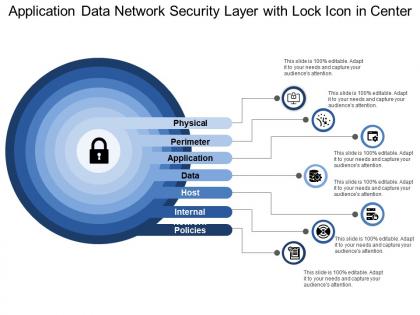
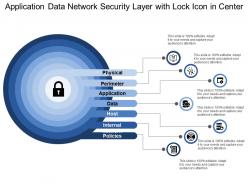
Application data network security layer with lock icon in center





Try Before you Buy Download Free Sample Product
 Impress Your
 Audience
 100%
100% Editable
 Save Hours
 of Time


Our Application Data Network Security Layer With Lock Icon In Center are an inspiring influence. Brilliant ideas get automatically generated.
People who downloaded this PowerPoint presentation also viewed the following :
Application data network security layer with lock icon in center with all 5 slides:
Our Application Data Network Security Layer With Lock Icon In Center allow you a high degree of freedom. Enjoy having great choices at hand.



FAQs for Application data network security layer with lock
Phishing emails are still the worst - even smart people click on convincing fake links sometimes. Ransomware will lock up all your files until you pay up. Then there's credential stuffing where hackers use old stolen passwords to break into new accounts. DDoS attacks happen too, plus you've got insider threats from your own employees (though nobody likes talking about that one). Multi-factor authentication is clutch for everything. Oh, and don't skip those boring security training sessions - they actually help people spot the sketchy stuff.
Honestly, first thing is figuring out what you actually have - map every device, user, and how data moves around. Can't secure stuff you don't know about, right? Multi-factor auth on everything, then chop your network into smaller chunks. The whole "trust no one" thing might feel extreme but it works - verify every access request no matter where it's coming from. Oh, and definitely get some endpoint monitoring going to catch weird user behavior. I'd tackle your most important stuff first though, don't try doing it all simultaneously or you'll burn out. Basically assume you're already hacked and build defenses around that mindset.
So encryption scrambles your data into gibberish that only the right people can decode. If someone grabs your info while it's traveling through the internet, they can't actually read it. Super important on sketchy public WiFi - like seriously, those coffee shop connections are the worst. Your passwords and bank stuff would just be sitting there in plain text otherwise, which is terrifying. HTTPS websites do this automatically, and VPNs add that protection layer when you're working remotely. It's basically like having a secret decoder ring, but for your digital life.
Honestly, pen testing is your best bet - gives you the real deal on where you're vulnerable. Track stuff like how fast you respond to incidents, failed logins, patch speeds. Also run phishing tests on your team (spoiler: they'll click more than you want them to). I'd dig through network logs pretty regularly too. Third-party auditors are solid for getting an outside perspective - sometimes you're too close to see the obvious gaps. Just don't make this a yearly thing and call it good. Security changes way too fast for that approach to actually work.
So IDS is basically like having security cameras - it watches everything and sends you alerts when sketchy stuff happens. IPS is more aggressive though, it'll actually jump in and block threats as they're happening. IDS runs alongside your network so it won't bog things down, but IPS sits right in the middle of your traffic flow. That means it can stop attacks but might slow things down a bit. Honestly, most people run both since they work pretty well together - IDS catches what IPS might miss and vice versa.
So there's basically three types of firewalls you should know about. The simplest ones just do packet filtering - they check where traffic's coming from and going to, then block or allow based on basic rules. Stateful firewalls are way better though because they actually remember your connections and track what's happening with each session. Then there's application-layer firewalls that dig into the actual content of your data packets. Think of it like a bouncer who reads your entire conversation instead of just checking your ID at the door. For most setups you'll want at least stateful, but if you're dealing with really sensitive stuff, go application-layer.
Okay so first thing - get a good VPN with strong encryption and multi-factor auth. Network segmentation is huge too, don't let remote users access your whole system (learned that one the hard way). Make sure all their devices have endpoint protection and stay patched up. Zero-trust is the way to go - verify every single connection no matter where it's coming from. Strong passwords are obvious but also look into privileged access management for admin stuff. Oh and definitely test everything regularly, plus train your users because they're honestly your biggest risk factor.
Honestly? Train your employees - it's the biggest bang for your buck. Most breaches happen because someone clicks a sketchy link or falls for a phishing email. You can have all the expensive security software you want, but if Bob from accounting gives away his password, you're screwed. I'd do monthly 15-minute sessions covering phishing, social engineering, basic internet safety stuff. People forget this stuff surprisingly fast. Once your team knows what to look for, they become another layer of defense instead of your biggest vulnerability.
Honestly, AI and machine learning are crushing it right now - way better at catching weird stuff that old-school security misses. Zero-trust is everywhere now too, basically don't trust anything until you verify it. SASE is another big one, though I swear these acronyms multiply daily. It mixes network security with cloud access. Quantum-resistant encryption is starting to pop up since quantum computing's getting scary good. You should definitely dive into AI security tools and zero-trust stuff - they'll probably be mandatory in like two years anyway.
Ugh, okay first thing - activate your incident response plan RIGHT NOW. Don't sit around trying to figure out how bad it is first. Contain everything, document what got hit, and honestly this is why you should've had that plan written down already (learned that one the hard way). You've got 72 hours to notify regulators and customers, so get your legal team involved immediately. Be transparent with communication but don't guess about what caused it - that'll bite you later. Oh and loop in PR from day one too. After the chaos dies down, do a proper post-mortem to fix whatever broke.
Honestly, just focus on the encryption first - switch to WPA3 if your router has it, WPA2 if not. Change that default admin password to something actually strong. WPS is pretty much garbage so disable that. I'd also hide your network name and maybe set up a guest network for when people come over. Router firmware updates are annoying but worth doing every few months. Oh, and turn off remote management unless you're some kind of tech wizard who needs it. The password and encryption stuff will give you the most protection and literally takes five minutes.
So basically, you want to catch security holes before the bad guys do - that's what vulnerability scans are for. They'll find stuff like outdated software, weird configurations, systems that haven't been patched in forever. Kind of like those health checkups nobody wants but actually needs, except this one's way more important for your business. Way better to find problems when they're just sitting there vs. when someone's already broken in and you're hemorrhaging money. I'd run these monthly, plus whenever you make big system changes. Trust me on the monthly thing - I've seen what happens when people skip it.
Yeah so basically all these IoT gadgets create tons of new ways hackers can get in. Most have garbage security - default passwords, no updates, the works. Your smart thermostat or doorbell camera could literally be someone's way into your whole network. It's actually crazy how many connected things we have now. Short sentences work. Network segmentation is your friend here - stick all that IoT stuff on its own VLAN so when (not if) something gets hacked, it can't touch your important systems. Trust me on this one.
Don't make the same mistake I see everywhere - cramming security in at the end. Build it right into your IT planning from the start. When you're mapping out new systems or cloud moves, security needs to be part of those early conversations, not some checkbox later. Get your security folks involved in strategy meetings, honestly they catch stuff nobody else thinks of. Oh, and definitely tie security metrics into your regular IT tracking. Do a quick gap analysis first though - compare where your security sits now against your IT roadmap. That'll show you the biggest holes to tackle.
Ugh, there's so many depending on what you do. GDPR's the big one if you touch any EU data - total nightmare but you can't ignore it. Healthcare? HIPAA's gonna bite you. Processing payments means PCI DSS compliance. Public companies deal with SOX, and financial stuff has GLBA on top of everything else. California's CCPA is spreading to other states now too, which is fun. Honestly, just start by figuring out what data you're actually collecting first. Then work backwards to see which rules apply - way easier than trying to tackle everything at once.
-
Great quality product.
-
I discovered this website through a google search, the services matched my needs perfectly and the pricing was very reasonable. I was thrilled with the product and the customer service. I will definitely use their slides again for my presentations and recommend them to other colleagues.