


Data center security and safety data center it ppt powerpoint presentation infographic template




Try Before you Buy Download Free Sample Product
 Impress Your
 Audience
 100%
100% Editable
 Save Hours
 of Time


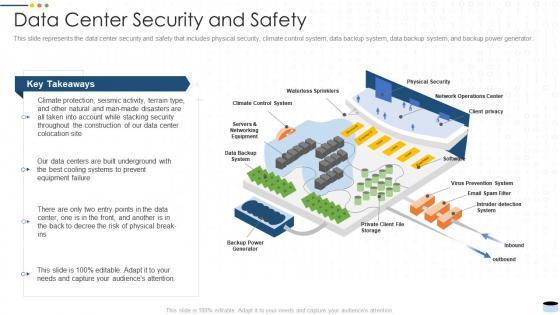
This slide represents the data center security and safety that includes physical security, climate control system, data backup system, data backup system, and backup power generator.
People who downloaded this PowerPoint presentation also viewed the following :
Data center security and safety data center it ppt powerpoint presentation infographic template with all 6 slides:
Use our Data Center Security And Safety Data Center It Ppt Powerpoint Presentation Infographic Template to effectively help you save your valuable time. They are readymade to fit into any presentation structure.





FAQs for Data center security and safety data center it ppt powerpoint
Honestly, start with the access control stuff - card readers, biometric scanners, those mantrap doors between zones. Physical barriers matter too: reinforced walls, locked server racks, cages around your critical gear. CCTV with 24/7 recording is basically mandatory now (learned that one the hard way). Environmental monitoring is huge - temperature, humidity, water detection alarms will save you from expensive meltdowns. Set up proper visitor protocols with escort requirements. Oh, and audit what you've got first to see where the biggest holes are. No point fixing small stuff when your main entrance is basically wide open.
Multi-factor authentication is where you want to start - combine key cards, biometric scanners, and those mantrap entries. Basically creates multiple checkpoints instead of relying on just one thing (which never ends well). The logging feature is clutch too since you'll have records of who accessed what areas and when. Honestly, I'd never trust just badges alone - way too easy to lose or steal. Layer everything together and you've got solid protection for sensitive areas. Oh, and the audit trail helps big time if something goes sideways later.
Dude, you absolutely need environmental monitoring - it's like having a smoke detector for your whole data center. Temperature, humidity, water leaks, smoke, power issues... any of these can wreck everything. Honestly, I've watched so many preventable outages happen because people skip this step. Your servers are super picky about their environment, so sensors with automated alerts will save your butt before small problems become disasters. Oh, and definitely use redundant sensors - redundancy is king. Test those alerts monthly or you'll forget they exist.
Insider threats are honestly terrifying because it's your own people. Give employees bare minimum access - seriously, people don't need to see everything. Regular permission reviews catch this stuff early. Set up monitoring for weird access patterns and unusual behavior, plus alerts that actually work. Background checks are obvious but people skip them. Here's something most companies ignore - if your employees hate their jobs, they're way more likely to screw you over. Build a culture where people don't feel disposable. Oh, and have a response plan ready because you'll need it eventually.
Start with the big three: data at rest, in transit, and in use. AES-256 works great for stored stuff, TLS 1.3 for anything moving around. HSMs are expensive but honestly worth every penny for key management - learned that one the hard way. Database encryption is huge too, especially those sensitive fields. Performance can take a hit though, so maybe start with your most critical data first? Oh, and don't be that person who forgets about key rotation. Have a recovery plan ready because you'll need it eventually. The whole thing's a balancing act between security and speed.
Look, redundancy and failover are just fancy ways of saying "have backups for your critical stuff." You want duplicate network connections, backup power, mirrored storage - the works. One thing goes down, another kicks in immediately. Think of it like having a spare tire, except way more important for your business. Honestly, most people don't realize how screwed they are until something actually fails. Map out what systems you absolutely can't lose, then figure out where you need those backup components. It'll save your ass when hardware craps out or someone tries to mess with your infrastructure.
Dude, both regulations will make your life way more complicated than you want. Encrypted storage everywhere. Access controls that actually work. Audit trails tracking literally every action - super fun, right? Healthcare data gets the worst treatment under HIPAA since it has to stay completely isolated. Honestly, the fines are what'll really mess you up though. We're talking millions if you screw this up. Your security team can't just wing it anymore. They need to know exactly what data you've got, where it lives, then build specific controls around those requirements instead of just generic security stuff.
Look, definitely go with clean agent systems - FM-200 or Novec 1230. Water and servers are basically enemies, plus you don't want residue everywhere after. Your detection needs both smoke AND heat sensors with backup coverage. Configure it for early warning though, don't wait until everything's on fire. Zoning is huge so you're not killing your whole facility over one incident. I'd test quarterly and honestly? Train everyone on manual activation because you never know. My buddy learned that the hard way when their system failed during an actual emergency.
Honestly, zero trust is where you want to start - treat everything like it's already hacked until it proves it isn't. Micro-segmentation helps a ton by keeping workloads separate, so when something breaks (and it will), the damage stays contained. The AI threat detection stuff is getting weirdly accurate at catching problems as they happen. Edge computing makes this all more complex since now your security boundary is basically everywhere. Don't sleep on container and serverless security either - that infrastructure disappears and reappears constantly. Trust me, build zero trust into your cloud move from day one.
So basically you want an incident response plan mapped out before everything hits the fan. When your systems get breached or go down, you'll know exactly who to call and what steps to take instead of running around like headless chickens. Contact lists, escalation steps, recovery procedures - all that stuff needs to be written down and practiced. Oh, and actually test the damn thing every few months because I've seen too many companies with "perfect" plans that nobody's touched in years. It's like having a fire extinguisher you've never checked - pretty useless when you actually need it.
Honestly, the trickiest part is that your regular firewalls can't see VMs chatting with each other on the same host - all that east-west traffic stays invisible. VMs spin up and vanish so fast you lose track of what's even running where. I swear, VM sprawl gets out of hand quick (saw one place with like 200+ random test VMs nobody remembered). Worst case? Someone hits the hypervisor and boom - they've got access to everything on that host. You'll want micro-segmentation and security tools that actually work with virtual networks, not against them.
Look, you've gotta get your physical and cyber security teams talking to each other instead of working in completely separate bubbles. Honestly, it's crazy how many companies still do this. Start with your access controls - use the same system for both badge entry and network logins. Your security ops center should watch everything from one place, not have two different dashrooms (is that even a word?). Don't forget incident response plans need to cover combo attacks since hackers love using physical access to get into networks. A joint risk assessment will show you where everything connects. It's way more effective than keeping teams isolated.
Honestly, most places I've seen get hit because of basic stuff - weak passwords that never change, systems running without updates for months. Access controls are usually a mess too. Physical security? Don't even get me started - I've walked into server rooms that were just sitting wide open. Badge sharing happens way more than you'd think. Firewalls and network configs often have holes nobody notices until it's too late. Legacy systems are the worst since you can't really patch them properly. My advice? Start with an access audit and get your patch management sorted first. Those two things will fix like 80% of your problems right there.
Training your people is literally the biggest thing you can do - most breaches happen because someone messed up, not because hackers are geniuses. Run phishing tests regularly (yeah, everyone complains but it works). Monthly security meetings are solid for keeping stuff fresh. Don't forget the physical side either - teaching people about tailgating, keeping desks clean, escorting visitors properly. Oh and make sure anyone with access gets recertified annually. Honestly the worst part is people think one training session covers them forever, but you've got to keep hammering this stuff home.
Honestly, third-party vendors are probably your biggest headache security-wise. They need access to your stuff, which is scary. You'll want to vet them hard upfront - check their certs, audit them regularly, and don't give them permanent access (learned that one the hard way). A vendor breach hits just as hard as someone breaking in directly. Start by making a list of who has access to what right now - you might be surprised how many people are in your systems. Time limits on access are clutch too.
-
Nice and innovative design.
-
Commendable slides with attractive designs. Extremely pleased with the fact that they are easy to modify. Great work!