


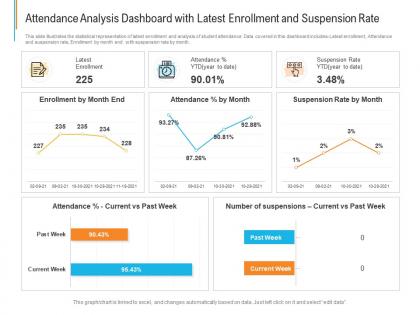
Attendance analysis dashboard with latest enrollment and suspension rate powerpoint template




Try Before you Buy Download Free Sample Product
 Impress Your
 Audience
 100%
100% Editable
 Save Hours
 of Time


Our Attendance Analysis Dashboard With Latest Enrollment And Suspension Rate Powerpoint Template are topically designed to provide an attractive backdrop to any subject. Use them to look like a presentation pro.
People who downloaded this PowerPoint presentation also viewed the following :
Attendance analysis dashboard with latest enrollment and suspension rate powerpoint template with all 2 slides:
Use our Attendance Analysis Dashboard With Latest Enrollment And Suspension Rate Powerpoint Template to effectively help you save your valuable time. They are readymade to fit into any presentation structure.

FAQs for Attendance analysis dashboard with latest enrollment and suspension
Track your overall attendance rates first, then dig into patterns like tardiness and early departures. Summer Fridays are brutal for this stuff, honestly. Break it down by department so you can see which teams are struggling most. Individual records help too when review season rolls around. Don't just count absences - figure out why people are out. Sick days vs personal time tells different stories. Pull last quarter's data and set up something simple you can update monthly. Raw numbers don't mean much without context, so focus on spotting trends rather than just tracking totals.
Track attendance for 3-6 months first—you'll spot actual trends vs random stuff. Low Fridays or slow seasons? Cut back on cleaning, catering, maybe even sublease some space temporarily. I was shocked how much we were wasting on ghost days. High-traffic periods mean ramping up IT support and making sure parking doesn't become a nightmare. The data really changes how you think about budgeting. You can actually predict what you'll need next quarter instead of just guessing and hoping for the best.
So I've been doing this for years - tracking attendance before performance reviews is a game changer. You get real data instead of just going off vibes or whatever drama happened last week. Like, you'll actually see if Sarah's always late to Monday meetings or if Mike takes sick days every time there's a big deadline (which, honestly, some people totally do). The numbers don't lie. Plus it works both ways - you can call out the people who never miss anything and actually deserve props. When you need to have those awkward conversations about attendance, having concrete patterns makes it way less personal. Start collecting data like 3-6 months out so you have enough to actually mean something.
Honestly, going digital for attendance is a game changer. Biometric scanners or RFID cards automatically track when people show up and leave - no more dealing with messy handwriting or people "forgetting" to sign in. Mobile apps with geofencing work great too, though some folks find them a bit invasive. Everything gets timestamped and synced instantly, so you'll have solid records without hunting down paper sheets. You can even set alerts for when someone's running late. I'd probably start with whatever plays nice with your HR system, but really any of these beats manual tracking by miles.
So attendance data is basically your early warning system - catch kids before they totally disappear, you know? Like when someone's always missing Tuesdays or their attendance tanks after certain stuff happens. Honestly feels like detective work half the time lol. You can figure out who needs help and what's actually blocking them from showing up. The whole point is using those patterns to jump in with real support instead of just... tracking stuff because you have to. Way more useful than I thought it'd be when I first started looking at this stuff.
First thing I'd do is throw your attendance data into a timeline - daily or weekly works best. Seasonal patterns jump out pretty quickly, plus you'll spot weird holiday spikes or those predictable Monday dips. Set up some basic alerts when numbers go crazy outside your normal range (maybe 2 standard deviations if you want to get nerdy about it). But honestly? Just making a line chart in Excel catches more issues than you'd think. Your brain's actually amazing at catching weird patterns that spreadsheet formulas miss. Compare this year to last year, break it down by location or groups. Visual stuff first, then dig into the math later.
First thing - dig into your attendance data and see what patterns pop up. Is it always Fridays? Certain departments? That'll tell you what's actually going on. Most of the time it's stuff like needing more flexible schedules or people just don't understand the expectations clearly. Sometimes workplace culture is toxic and people literally avoid showing up (been there). The key is catching problems early before they become habit. Oh, and skip the one-size-fits-all policies - they never work. Once you know why people aren't coming in, you can fix the real problem instead of guessing.
Honestly, attendance data is like having a cheat sheet for scheduling. Pull those reports monthly and you'll start seeing weird patterns - like how Mondays are always a disaster for call-outs. Once you know that, schedule extra people. I've noticed it also helps catch the chronic no-shows before they become a real headache. You can even spot seasonal stuff, like how everyone disappears during flu season or right before holidays. The trick is actually using what you find though. Don't just collect the data - build those patterns into your scheduling so you're not constantly scrambling.
First things first - get proper consent and loop in HR before you even start. Only grab the data you actually need, not everything you can get your hands on. Be super transparent about who's accessing this stuff and why. Honestly, this whole thing can feel pretty creepy to employees if you mess it up. Watch out for bias too - some people have kids or health issues that affect attendance, and that's totally valid. Set up clear policies around data handling. Trust me, doing this right from the start will save you major headaches later.
Don't call people out individually - that's just gonna tank morale. Instead, focus on the wins like "we're up 15% this quarter" or shout out departments doing well. When you share it in team meetings, give context about busy seasons or workload stuff so people get why it matters. I've watched managers turn this into a total blame fest and it backfires every time. Show how attendance connects to team goals, but keep it supportive. The whole point is making everyone feel like they're part of something bigger, not picking apart who missed what days.
So there's a bunch of ways to tackle this. BambooHR, Workday, ADP - they all have attendance reporting baked in. Pretty straightforward stuff. Kronos and Deputy are solid if you need deeper workforce analytics. Honestly? Excel still works great if you don't mind getting your hands dirty with formulas. I've seen people build crazy impressive tracking systems just in spreadsheets. Power BI or Tableau are clutch for real-time dashboards - they'll connect to whatever data you've already got. Oh, and definitely check what you're already paying for first. You might have this functionality sitting there unused.
Yeah, good attendance usually means better productivity, but it's not that black and white. Teams that show up consistently tend to hit their goals more often - no surprise there. But here's the thing: don't get hung up on just counting bodies. Some of your best people might miss more days but absolutely crush it when they're around. I'd track both metrics together honestly. When attendance starts dropping at the same time as performance? That's when you know something's up. Perfect time to check in before things get worse.
Okay so remote work basically throws the whole "butt in seat" thing out the window, right? You can't just peek around the office to see who's there. Now you gotta think about engagement instead - like are people actually participating in meetings? Meeting their deadlines? Responding to messages in a reasonable time? Time zones make everything complicated too (ugh don't even get me started on trying to find times that work for everyone). The whole point is shifting from "did they log in at 9am" to "are they getting stuff done and staying connected with the team?" It's more about results than just being online.
Ok so attendance tracking is actually pretty genius for figuring out what's really going on with your team. You'll start noticing weird patterns - like maybe marketing is always calling out Mondays or whatever. That's your cue to dig deeper before people bail entirely. Honestly, it's the best early warning system for burnout I've seen. Plus you can tell if your "flexible" policies are actually helping or if workloads are just insane. The trick though? Don't use it to play time police. Have real conversations about what the data's showing you.
Dude, you really need good attendance tracking - it's like your safety net when labor inspectors show up. Track overtime limits, break requirements, all that stuff so you can prove you're not overworking people. It also helps with FMLA leave and union scheduling rules. Without decent records? You're screwed when regulators come around. I'd run reports regularly to spot any sketchy patterns early. Trust me, catching issues before they blow up is way better than scrambling later. Plus sick day documentation becomes super easy when everything's already organized properly.
-
Innovative and attractive designs.
-
Informative design.