

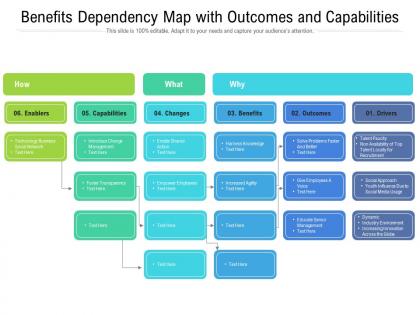
Benefits dependency map with outcomes and capabilities




Try Before you Buy Download Free Sample Product
 Impress Your
 Audience
 100%
100% Editable
 Save Hours
 of Time


Our Benefits Dependency Map With Outcomes And Capabilities are topically designed to provide an attractive backdrop to any subject. Use them to look like a presentation pro.
People who downloaded this PowerPoint presentation also viewed the following :
Benefits dependency map with outcomes and capabilities with all 2 slides:
Use our Benefits Dependency Map With Outcomes And Capabilities to effectively help you save your valuable time. They are readymade to fit into any presentation structure.
FAQs for Benefits dependency map with
Think of it like this - a benefits dependency map shows how your project stuff actually connects to real business results. You're tracing the whole chain from activities to changes to actual benefits. Most PM tools just focus on tasks and deadlines, but this one's different - it proves your project will deliver real value, not just check boxes. Traditional tools show you the "how," while benefits maps show the "why" and what winning looks like business-wise. Honestly, it's way more useful than I initially thought. Start with your end benefits first, then work backwards to map everything out.
Honestly, those dependency maps are game-changers for getting stakeholders actually engaged. Instead of boring status updates, you can point right at the map and show people exactly where they fit in. Makes them way more invested when they see their piece of the puzzle clearly laid out. The visual aspect is huge too - everyone's literally looking at the same thing, so conversations stay focused. I've seen people's eyes light up when they finally get how their work connects to the bigger outcomes. Worth trying in your next meeting, even if it feels a bit different at first.
Okay so you need five main pieces: end benefits (the actual business results you want), enabling changes (operational stuff that has to shift), business changes (new processes people will follow), enablers (tech, training, whatever), and all the dependencies between them. Honestly, those connections are everything - without clear arrows showing how it all links up, you're just staring at random boxes. Oh, and don't forget to assign owners so someone's actually responsible for each piece. I'd start with your end benefits first, then work backwards to figure out what makes them happen.
Honestly, I'd start backwards from your end goals and ask what needs to go right for success. Get your key stakeholders in a room - finance people see totally different benefits than ops, it's wild. Look at the obvious stuff like cost savings and efficiency, but also the fuzzy benefits like team morale or customer satisfaction. Those matter more than people think. Check what happened with similar projects before too, saves you from reinventing the wheel. Then map it all out visually so you can spot which benefits need others to happen first.
Think of it as your project's GPS - shows how changes actually lead to real benefits. Map the chain: activities → outcomes → business results. Makes those "what's the ROI?" conversations so much smoother, trust me. Figure out what happens first, dependencies, potential disasters waiting to happen. Keeps teams focused on actual wins instead of just checking boxes off lists. Oh, and start backwards from your end benefits - way less confusing that way. Honestly saved my butt on the last big project when leadership started getting antsy about results.
So basically, a benefits dependency map lets you trace backwards from your big goals to figure out which projects actually matter. You map out your top 3 strategic objectives first, then work backwards to see what really drives results. Honestly, it's kind of eye-opening how much stuff you realize is just busy work. The cool part is seeing how different projects connect - like you can't do Project B until Project A is done, that kind of thing. Saves you from throwing money at random initiatives that won't actually move the needle. Super helpful for cutting through all the noise.
Honestly, the hardest part is getting everyone to actually define what "improved efficiency" means instead of just saying it sounds good. Stakeholders will argue forever about which benefits matter most. Scope creep kills these projects too - people want to map their entire org at once, which turns into a nightmare pretty quickly. Teams rarely understand how their stuff affects other departments, so getting accurate dependency data is brutal. Oh, and don't let them convince you to boil the ocean right away. Pick one solid benefit and trace backwards to find the real connections first.
Honestly, just go digital with this stuff. Tools like Miro or Lucidchart let your whole team work on the same map at once - no more emailing versions back and forth. You can drag benefits around, connect dependencies, and everything updates automatically. The real game changer though? Integration with your other project tools means data syncs without you having to bug people constantly. I swear that's half the battle right there. Version control tracks changes over time too. Start simple with a basic template and expand from there.
A benefits dependency map basically shows how your projects connect to actual business results - super helpful for figuring out what's worth doing. You'll spot which initiatives actually move the needle versus the ones that just keep people busy (honestly, half our projects fall into that second bucket). Plus it reveals when different teams depend on each other, so you won't get blindsided when Team A can't deliver because Team B dropped the ball. Budget conversations become way easier too. You can literally point to the map and say "here's why this matters." Just start mapping what you're already working on and see what patterns jump out.
Honestly? Most teams mess this up by treating it like a one-time thing. Update your benefits dependency map every 2-3 months, or whenever scope/stakeholders shift dramatically. I've totally been guilty of making gorgeous maps then never touching them again lol. Your assumptions will change as you learn stuff, so don't let it collect dust. Short bursts work better than marathon sessions anyway. Set a recurring reminder during sprint planning or monthly reviews - whatever doesn't feel forced for your team. The whole point is catching changes before they derail you.
The UK's Cabinet Office has gotten really good results with these - they basically helped create the whole approach for their digital projects. Microsoft's used them for IT stuff internally too. Rolls-Royce did something similar when they were overhauling their supply chain a while back, which was probably a nightmare project honestly. These companies didn't just try it once either - it became standard practice for them. Best time to use them? Right at the start before you've convinced yourself you know exactly what you're trying to achieve. That's when they're most helpful.
So basically, these dependency maps get everyone aligned on what you're actually trying to accomplish. No more working in silos with different assumptions about the goal. You map out all the changes needed, who owns what, and how everything connects to your end benefits. The real value comes during those mapping workshops - suddenly people realize their work totally depends on what someone else delivers first. It's honestly kind of eye-opening sometimes. Think of it like a shared roadmap where everyone can see their piece of the puzzle. Definitely do it as a group workshop instead of trying to figure it out alone.
Honestly, three things will make the biggest difference: stakeholder mapping workshops, outcome measurement training, and getting better at facilitating collaboration. The stakeholder part trips up most teams - figuring out who actually has influence is way harder than people think. Get your team practicing with dependency mapping tools and running cross-functional sessions where everyone can talk openly about assumptions and risks. Templates are nice, but the real magic happens when you know what questions to ask. Oh, and definitely start with a smaller pilot project first. Save the big stuff for when you've got some reps under your belt.
Just build the benefits mapping right into your sprints - way easier than trying to bolt it on later. Map out your expected benefits when you start the project, then spend like 10 minutes each sprint review updating it to see what's actually working. Teams get so caught up in velocity numbers they forget if they're even building useful stuff (drives me nuts honestly). Your retros are perfect for checking if your assumptions were right or if you need to change direction. Don't overthink it though - keep the whole thing super lightweight or it'll just slow you down.
Honestly, those dependency maps are gold for tracking if your project actually worked. Go back to your original map and check - did the benefits show up when you thought they would? Which assumptions were totally off? I always tell people to treat it like a scorecard you made before everything kicked off. Short sentences work here. The cool thing is you can see exactly where reality diverged from your plan, and that's where the real learning happens. Just schedule those review sessions and be brutally honest about what didn't pan out.
-
Informative presentations that are easily editable.