


Best 10 Generative AI Tools For Everything Powerpoint Presentation Slides AI CD





Try Before you Buy Download Free Sample Product
 Impress Your
 Audience
 100%
100% Editable
 Save Hours
 of Time


Various powerful tools are emerging in the field of Generative AI, allowing users to generate new content actively, including text, images, music, code, and query solving. The best 10 Generative AI Tools for Everything template helps enhance how humans interact with the world around them. This Creative AIdeck allows users to explore the possibilities of generative AI such as ChatGPT, Midjourney, Synthesia AI, Soundraw, Replit, StarryTars, Writesonic, Pictory, Remini, and Wordtune. Moreover, the Generative AI tools template substantially impacts various fields, such as music, art, and literature. Furthermore, in the Data-driven creativity presentation, all of the tools are developed to save time while preparing a creative realm accessible to more humans. Lastly, the Artificial Imagination PPT tools are chosen based on several considerations, willingness to spend on the tool, technical expertise of the user, user-friendliness of the device, and agency competency. Download our 100 percent editable and customizable artificial intelligence ppt to know more in detail.
People who downloaded this PowerPoint presentation also viewed the following :
Content of this Powerpoint Presentation
Slide 1: This slide introduces Best 10 Generative AI Tools for Everything.
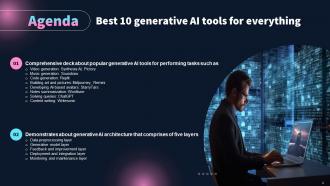
Slide 2: This is an Agenda slide. State your agendas here.
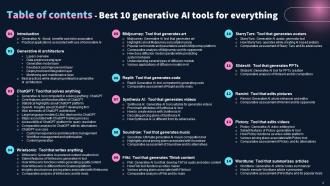
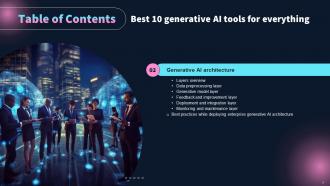
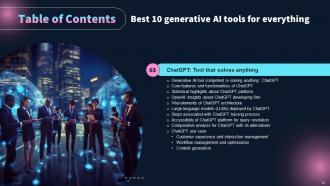
Slide 3: This slide displays table of contents.
Slide 4: The slide continues Table of Contents.
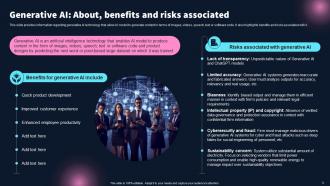
Slide 5: This slide provides information regarding generative AI technology that allow AI model to generate content.
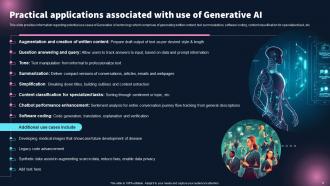
Slide 6: This slide renders information regarding potential use cases of Generative AI technology.
Slide 7: The slide highlights Title of Contents.
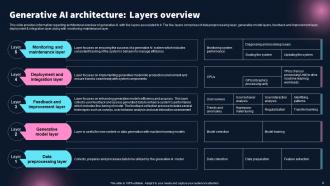
Slide 8: This slide shows information regarding architectural overview of generative AI with five layers.
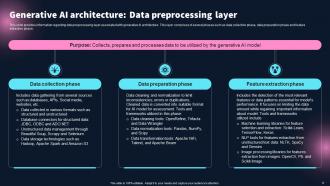
Slide 9: This slide provides information regarding data preprocessing layer associated with generative AI architecture.
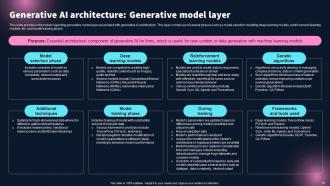
Slide 10: This slide provides information regarding generative model layer associated with generative AI architecture.
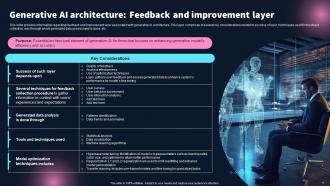
Slide 11: This slide gives information regarding feedback and improvement layer associated with generative AI architecture.
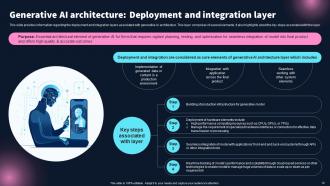
Slide 12: This slide provides information regarding the deployment and integration layers associated with generative AI architecture.
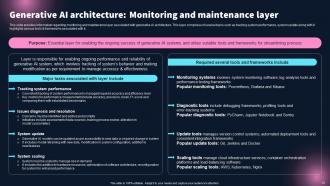
Slide 13: This slide provides information regarding monitoring and maintenance layer associated with generative AI architecture.
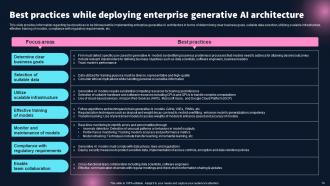
Slide 14: This slide provides information regarding best practices to be followed while implementing enterprise generative AI architecture.
Slide 15: The slide highlights Title of Contents further.
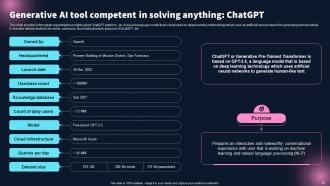
Slide 16: This slide provides information regarding the insights about ChatGPT platform.
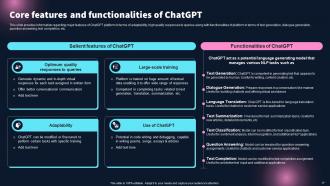
Slide 17: This slide continues information regarding major features of ChatGPT platform.
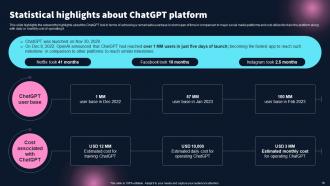
Slide 18: This slide highlights the noteworthy highlights about the ChatGPT tool in terms of achieving a remarkable userbase.
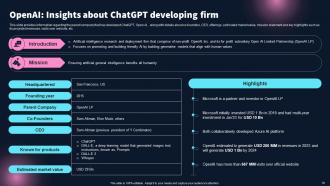
Slide 19: This slide provides information regarding the parent company.
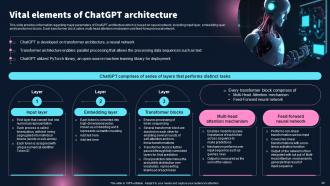
Slide 20: This slide provides information regarding major parameters of ChatGPT architecture.
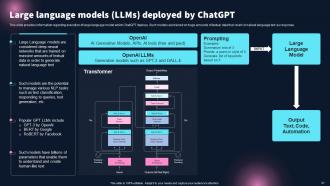
Slide 21: This slide provides information regarding execution of large language model which ChatGPT deploys.
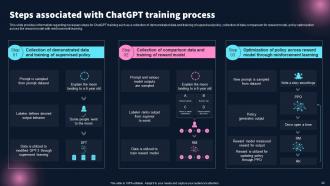
Slide 22: This slide provides information regarding necessary steps for ChatGPT training.
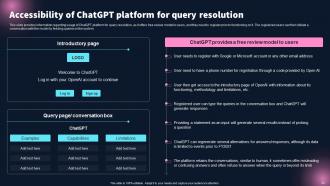
Slide 23: This slide provides information regarding usage of ChatGPT platform for query resolution.
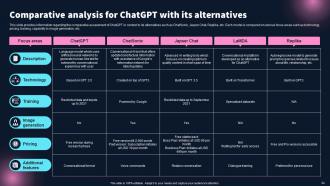
Slide 24: This slide provides information regarding the comparative assessment of ChatGPT in context to its alternatives.
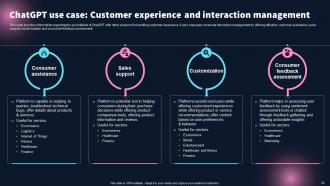
Slide 25: This slide provides information regarding the assimilation of ChatGPT with other systems for handling customer experience.
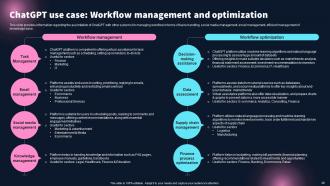
Slide 26: This slide provides information regarding the assimilation of ChatGPT with other systems for managing workflow.
Slide 27: This slide provides information regarding the assimilation of ChatGPT with other systems.
Slide 28: The slide renders title of contents which is to be discussed further.
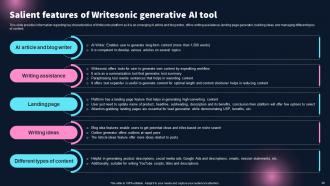
Slide 29: This slide provides information regarding Writesonic platform which is an AI-enabled content creation tool.
Slide 30: This slide provides information regarding key characteristics of Writesonic platform.
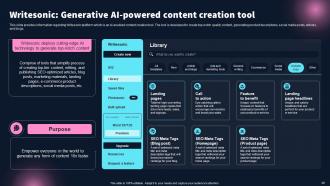
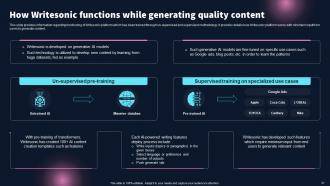
Slide 31: This slide contains information regarding functioning of Writesonic platform.
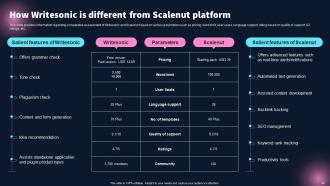
Slide 32: This slide provides information regarding comparative assessment of Writesonic and Scalenut based on various parameters.
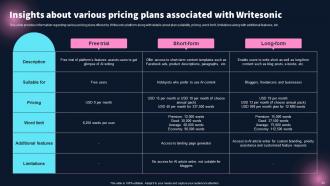
Slide 33: This slide provides information regarding various pricing plans offered by Writesonic platform.
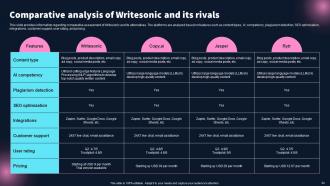
Slide 34: This slide provides information regarding comparative assessment of Writesonic and its alternatives.
Slide 35: The slide depicts another title of contents.
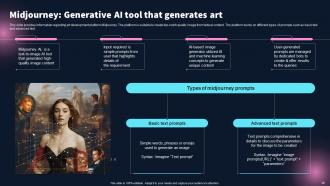
Slide 36: This slide presents information regarding art development platform Midjourney.
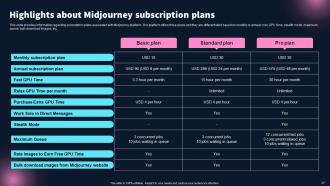
Slide 37: This slide shows information regarding subscription plans associated with Midjourney platform.
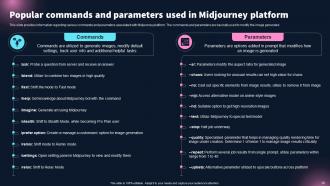
Slide 38: This slide showcases information regarding various commands and parameters.
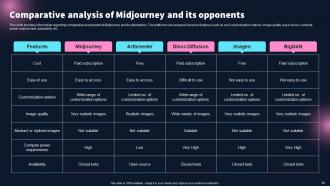
Slide 39: This slide highlights information regarding comparative assessment of Midjourney and its alternatives.
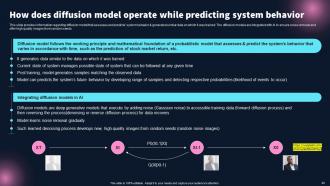
Slide 40: This slide shows information regarding diffusion model that assesses and predicts’ system behavior & generated similar data.
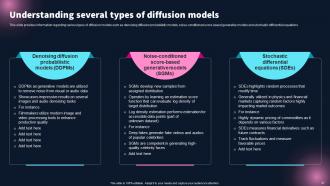
Slide 41: This slide provides information regarding various types of diffusion models.
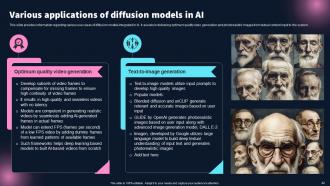
Slide 42: This slide displays information regarding various use cases of diffusion models integrated in AI.
Slide 43: The slide again contains title of contents.
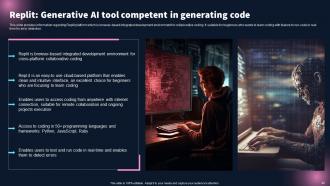
Slide 44: This slide presents information regarding Replit platform.
Slide 45: This slide provides information regarding comparative assessment of Replit and its alternatives.
Slide 46: The slide again displays title of contents.
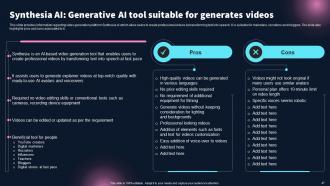
Slide 47: This slide provides information regarding video generation platform Synthesia AI.
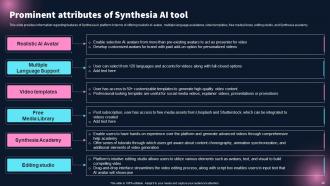
Slide 48: This slide represents information regarding features of Synthesia AI platform.
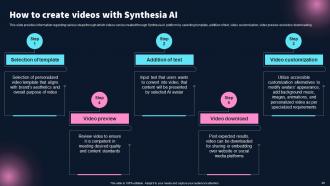
Slide 49: This slide shows information regarding various steps through which videos can be created through Synthesia AI platform.
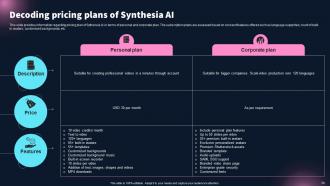
Slide 50: This slide displays information regarding pricing plan of Sythensia AI in terms of personal and corporate plan.
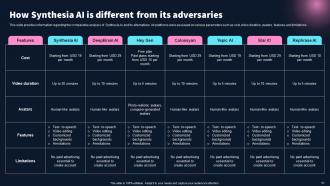
Slide 51: This slide exhibits information regarding the comparative analysis of Synthesia AI and its alternatives.
Slide 52: The slide displays title of contents further.
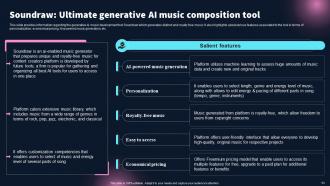
Slide 53: This slide shows information regarding the generative AI music development tool Soundraw.
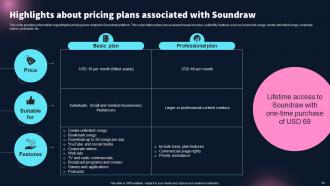
Slide 54: This slide presents information regarding the pricing plans related to Soundraw platform.
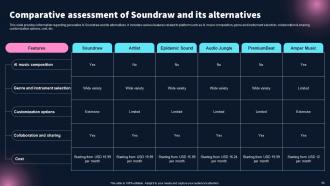
Slide 55: This slide provides information regarding generative AI Soundraw and its alternatives.
Slide 56: The slide again title of contents further.
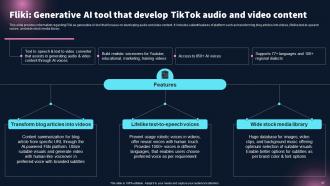
Slide 57: This slide renders information regarding Fliki as generative AI tool.
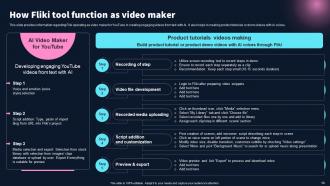
Slide 58: This slide contains information regarding Fliki operating as video maker.
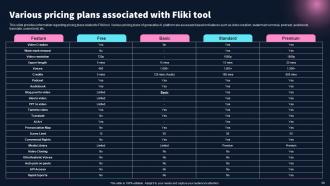
Slide 59: This slide provides information regarding pricing plans related to Fliki tool.
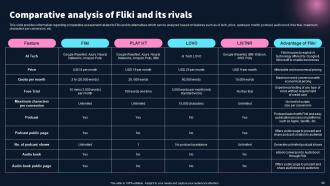
Slide 60: This slide highlights information regarding comparative assessment related to Fliki and its alternatives.
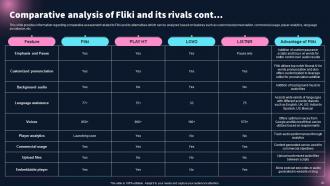
Slide 61: This slide continues information regarding comparative assessment related to Fliki and its alternatives.
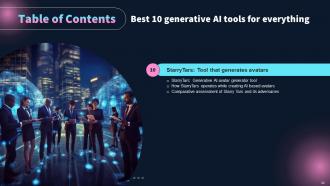
Slide 62: The slide again renders title of contents.
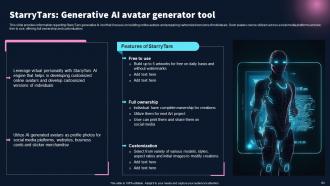
Slide 63: This slide provides information regarding StarryTars generative AI tool.
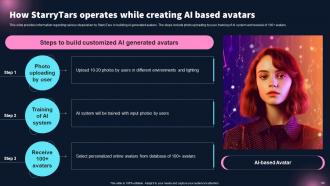
Slide 64: This slide showcases information regarding various steps taken by StarryTars in building AI generated avatars.
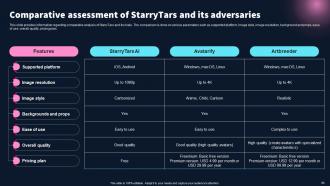
Slide 65: This slide exhibits information regarding comparative analysis of StarryTars and its rivals.
Slide 66: The slide exhibits another title of contents.
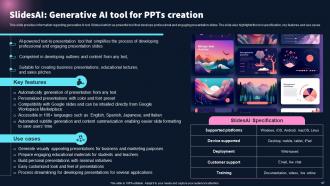
Slide 67: This slide provides information regarding generative AI tool SlidesAI which as powerful tool.
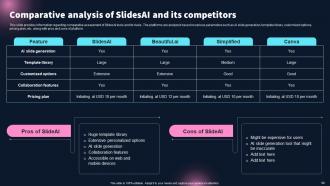
Slide 68: This slide shows information regarding comparative assessment of SlidesAI tools and its rivals.
Slide 69: The slide contains another title of contents.
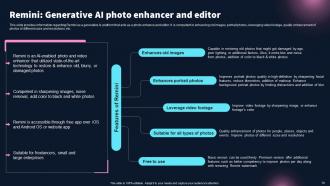
Slide 70: This slide displays information regarding Remini as a generative AI platform.
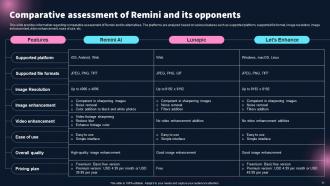
Slide 71: This slide provides information regarding comparative assessment of Remini and its alternatives.
Slide 72: The slide displays title of contents further.
Slide 73: This slide shows information regarding PictoryAI is video generation and editing platform.
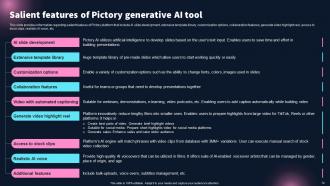
Slide 74: This slide presents information regarding salient features of Pictory platform.
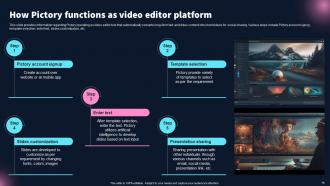
Slide 75: This slide renders information regarding Pictory operating as video editor tool.
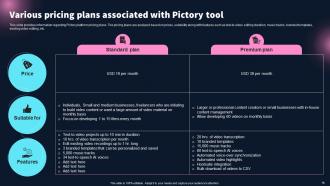
Slide 76: This slide displays information regarding Pictory platform pricing plans.
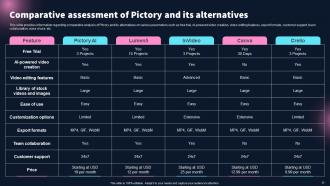
Slide 77: This slide provides information regarding comparative analysis of Pitcory and its alternatives.
Slide 78: The slide depicts title of contents further.
Slide 79: This slide showcases information regarding Wordtune which is generative AI article and notes summarizer.
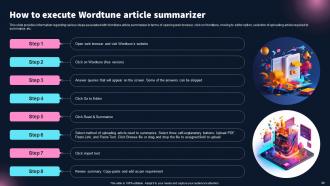
Slide 80: This slide depicts information regarding various steps associated with Wordtune article summarizer.
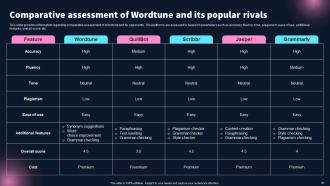
Slide 81: This slide provides information regarding comparative assessment of Wordtune and its opponents.
Slide 82: This slide shows all the icons included in the presentation.
Slide 83: This is a Thank You slide with address, contact numbers and email address.
Best 10 Generative AI Tools For Everything Powerpoint Presentation Slides AI CD with all 88 slides:
Use our Best 10 Generative AI Tools For Everything Powerpoint Presentation Slides AI CD to effectively help you save your valuable time. They are readymade to fit into any presentation structure.










FAQs for Best 10 Generative AI Tools For Everything Powerpoint Presentation
So ChatGPT is basically everywhere right now - people use it for emails, brainstorming, whatever. For images, Midjourney and DALL-E are solid choices. Claude's really good if you want something more conversational. There's also Jasper and Copy.ai for marketing stuff specifically. Video tools like RunwayML exist but they're still kinda niche tbh. My take? Just start with ChatGPT since it's free and does most things decently well. Then once you figure out what you're actually making most often, you can get more specific with other tools.
Honestly, these AI presentation tools are a total lifesaver. They'll knock out slide layouts and graphics in minutes - way faster than me fumbling around in PowerPoint for hours. The copy writing feature is clutch when you're staring at a blank slide with zero ideas. Beautiful.AI and Gamma are solid options to try first. Your color schemes stay consistent too, which is nice since I'm terrible at matching colors. Oh, and the custom icons actually look professional instead of like clipart from 2003. Definitely worth testing out for your next deck - you'll probably save yourself a few hours of headache.
Honestly, there's some sketchy stuff to watch out for. Copyright's a big one - these AI tools train on millions of images without asking artists first, so you might accidentally rip off someone's style. Creating fake images of real people is where things get really messy (deepfake territory, yikes). You've gotta be transparent about using AI too, especially for work stuff where people expect human creativity. Look, I'd say use it for inspiration or rough drafts, but always mention it's AI-generated. Just don't make anything that'll hurt people or steal from artists - that's pretty basic decency, right?
Honestly, just pick one AI tool and mess around with it first - don't try to do everything at once. I use ChatGPT all the time for making quiz questions (seriously saves me so much time). It's also solid for brainstorming discussion topics or practice exercises when you're stuck. With students, I let them use AI for research and first drafts, then we spend class time actually analyzing what the AI spit out. The trick is being upfront about it - tell them when you're using AI and set clear rules for how they can use it. Way less stressful than pretending it doesn't exist.
Honestly, your input is like 90% of getting good AI results. Be super specific with your prompts - vague requests get you garbage outputs. Give examples of what you want, set the tone, tell it the format you need. The AI basically learns your style as you go back and forth with it. Short sentences work. But you can also give longer, more detailed instructions when you need something complex. Use feedback too - if it's not quite right, tell it what to fix. Oh and don't be afraid to iterate a bunch of times until it clicks.
So I've been playing around with generative AI for marketing stuff lately - it's actually insane how quickly you can pump out ad copy and social posts now. Takes minutes instead of hours. You can create tons of versions for A/B testing, personalize campaigns at scale, even generate visuals from text prompts. Honestly, the best part is it handles all the boring stuff like product descriptions (ugh, those used to take forever). Frees you up for the actual strategy work. My advice? Start small - just use it for brainstorming headlines or email subject lines first and see how it feels.
Yeah, so these AI design tools are pretty hit-or-miss with actual measurements and technical stuff. Like, you'll get something that looks cool but then realize the proportions are completely off or it's just not buildable in real life. Brand consistency? Forget about it - I've tried getting the same style twice and it's basically impossible. They're honestly better for just throwing ideas around and getting your creative juices flowing. Once you have a rough concept you like, you'll definitely want to hop back into your normal design software to make it actually work. Think of them more like a brainstorming buddy than a replacement for proper CAD tools.
Honestly, AI is a total game-changer for small businesses. I'd start with content creation - ChatGPT or Claude can bang out social media posts, product descriptions, even customer emails in minutes instead of hours. Customer service bots are pretty solid now too. Market research used to take forever, but AI can analyze competitors and trends super fast. Oh, and creating decent marketing materials without paying an agency? Huge money saver. Don't go crazy trying every tool though - that's where people mess up. Pick 2-3 things that'll actually solve your biggest time drains first, then expand from there.
Honestly, generative AI is like having a tireless brainstorming buddy who can pump out concept variations super fast. You're not starting with that terrifying blank page anymore - instead you get to play creative director. Guide the AI, pick the good stuff, polish what works. It handles the grunt work while you focus on the strategic thinking that actually moves the needle. I mean, it's basically a really efficient intern who doesn't need coffee breaks! The whole dynamic shifts from doing everything yourself to curating and refining. Don't replace your creative instincts though - just let it do the heavy lifting upfront.
Honestly, it's a mess right now. Copyright law hasn't caught up with AI yet - these tools train on huge datasets that probably include copyrighted stuff, but fair use makes it complicated. You can't actually copyright what the AI spits out, though you might own rights to your edits. Getty has this generator that only uses licensed content, which seems way smarter. I'd definitely read the terms for whatever tool you're using. And if it's for business? Maybe run it by a lawyer first - better safe than sorry.
Honestly, AI tools are gonna get way more niche and industry-specific in the next couple years. Right now the hallucinations are pretty annoying, but accuracy should improve a lot. The coolest part will be multimodal stuff - like working with text, images, and video all in one tool instead of juggling different apps. Oh and they'll actually understand your specific field better rather than giving you generic responses. My take? Start messing around with what's available now. You'll have a huge head start when the really good specialized versions come out. Trust me on this one.
Honestly, AI design tools are a game changer for team projects. Try Canva's Magic Design or Gamma - just throw your main ideas at them and boom, you've got multiple design options instead of staring at a blank slide deck forever. Figma's AI plugins are pretty solid too since everyone can jump in and suggest changes at once. Oh, and here's what really works: have someone make an AI template first, then share those exact prompts with your whole team. That way you're not dealing with completely different visual styles. Saves so much back-and-forth later.
So McKinsey's already using AI to auto-generate slides and data viz for client stuff - saves them like 40% prep time which is insane. Salesforce does personalized pitch decks for different prospects with AI too. Oh, and Accenture's people use Gamma and Beautiful.AI for quick mockups before they dive into the real design work. Nobody's replacing the creative stuff, just automating the boring parts honestly. I'd say start small though - maybe have it write your slide outlines first? Or come up with better headlines since mine always suck.
Honestly, generative AI is a game-changer for all that writing stuff that usually drains your soul. Blog posts, social media captions, emails, marketing copy - you name it. No coding required, just tell it what you want in plain English. I know people who've literally cut their content time in half. Sure, you'll still need to edit and double-check everything because AI can be weird sometimes, but beats staring at a blank screen for hours. Oh, and start small - like Instagram captions or something. Way less intimidating than jumping into full blog posts right away.
Start with super specific prompts - give it tons of context upfront. AI hallucinates like crazy, so fact-check everything (especially numbers and quotes). I learned this the hard way when a client caught fake stats I didn't verify. Use the output as your rough draft, then rewrite it in your voice. Don't just copy-paste that generic AI tone - it's so obvious. Short sentences work great. Longer ones should actually flow naturally instead of sounding robotic. Get a coworker to glance at important stuff if you can. Honestly, treating AI like a research assistant rather than a ghostwriter works way better.
-
Loved the fact that SlideTeam provides clean, high-definition, and professional PowerPoint products.
-
“There is so much choice. At first, it seems like there isn't but you have to just keep looking, there are endless amounts to explore.”