

Generative AI Tools Usage In Different Industries Powerpoint Presentation Slides AI CD




Try Before you Buy Download Free Sample Product
 Impress Your
 Audience
 100%
100% Editable
 Save Hours
 of Time


Generative AI technology helps formulate content such as text, images, audio, video, and code based on user prompts. Grab our professionally designed Generative AI tools usage in different industries template. It uses neural networks to recognize patterns and structures within existing data to formulate new and original content. Our AI tools deck contains slides that can assist organizations in getting familiar with generative AI by referring to aspects such as global market overview, key statistics, the latest trends, challenges, and solutions. It also highlights various technologies used by Generative AI tools such as neural style transfer, pixel CNN, generative adversarial model, autoregressive model etc. Additionally, our Generative AI industry PPT showcases the application of generative AI in different sectors such as supply chain, E commerce, fintech, healthcare, and banking. It also highlights use cases in various business functions such as marketing, sales, and human resources. Further, our Natural language processing module exhibits details about various generative AI tools like Bard, Jasper, ChatGPT, and Synthesia. Lastly, it shows the future impact of Generative AI on jobs and different areas, including marketing, finance, healthcare, education, etc. Get instant access.
People who downloaded this PowerPoint presentation also viewed the following :
Content of this Powerpoint Presentation
Slide 1: This slide introduces Generative AI Tools Usage in Different Industries. Commence by stating Your Company Name.
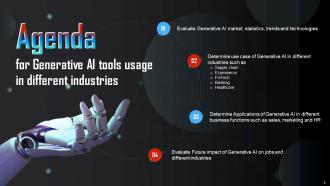
Slide 2: This slide depicts the Agenda of the presentation.
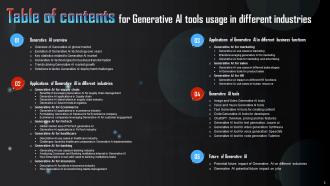
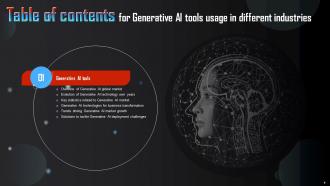
Slide 3: This slide includes the Table of contents.
Slide 4: This slide highlights the Title for the Topics to be covered further.
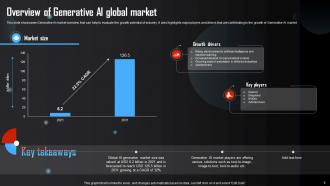
Slide 5: This slide showcases Generative AI market overview that can help to evaluate the growth potential of industry.
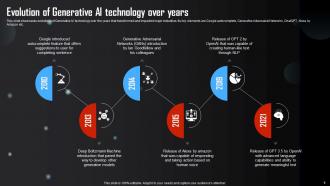
Slide 6: This slide reveals the evolutions of Generative AI technology over the years that transformed and impacted major industries.
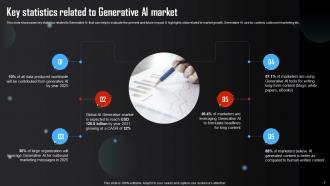
Slide 7: This slide highlights the key statistics related to Generative AI that can help to evaluate the present and future impact.
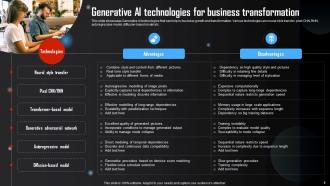
Slide 8: This slide presents Generative AI technologies that can help in business growth and transformation.
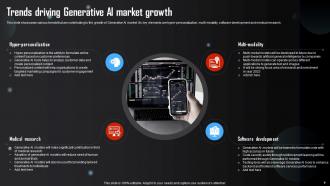
Slide 9: This slide showcases various trends that are contributing to the growth of Generative AI market.
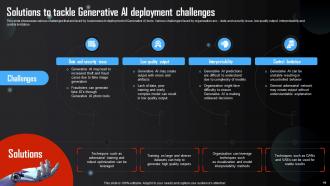
Slide 10: This slide states the various challenges that are faced by businesses in deployment of Generative AI tools.
Slide 11: This slide includes the Heading for the Contents to be discussed next.
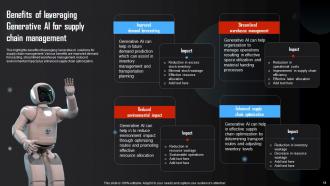
Slide 12: This slide exhibits the Benefits of leveraging Generative AI for supply chain management.
Slide 13: This slide showcases various applications of Generative AI that can help to enhance supply chain management and optimize logistics.
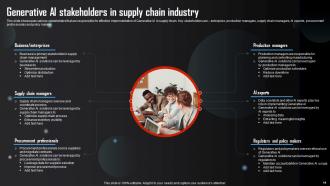
Slide 14: This slide portrays various stakeholders that are responsible for effective implementation of Generative AI in supply chain.
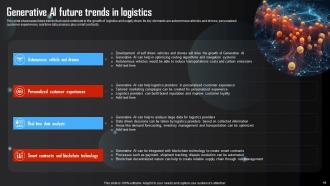
Slide 15: This slide showcases highlights the future trends that could contribute to the growth of logistics and supply chain.
Slide 16: This slide indicates the Title for the Ideas to be covered in the upcoming template.
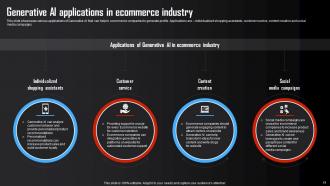
Slide 17: This slide presents the various applications of Generative AI that can help to ecommerce companies to generate profits.
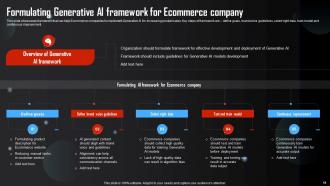
Slide 18: This slide reveals framework that can help Ecommerce companies to implement Generative AI for increasing product sales.
Slide 19: This slide showcases various companies that are leveraging Generative AI for enhancing the customer experience.
Slide 20: This slide displays the Heading for the Ideas to be discussed next.
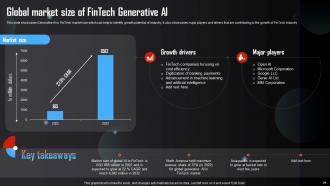
Slide 21: This slide presents the Generative AI in FinTech market size which can help to identify growth potential of industry.
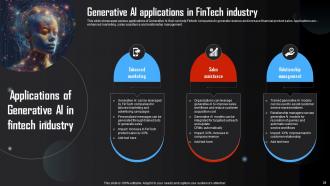
Slide 22: This slide showcases various applications of Generative AI that can help Fintech companies to generate revenue and increase financial product sales.
Slide 23: This slide outlines the Title for the Contents to be covered in the following template.
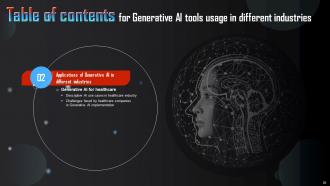
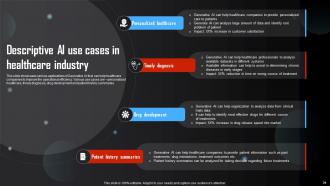
Slide 24: This slide showcases various applications of Generative AI that can help healthcare companies to improve the operational efficiency.
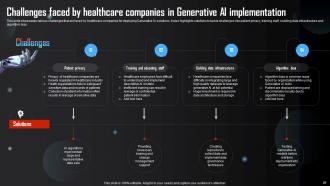
Slide 25: This slide exhibits the challenges faced by healthcare companies in generative AI implementation.
Slide 26: This slide indicates the Heading for the Topics to be discussed next.
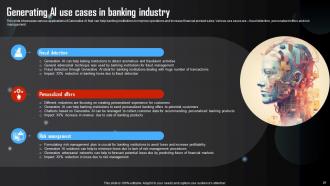
Slide 27: This slide showcases various applications of Generative AI that can help banking institutions to improve operations and increase financial product sales.
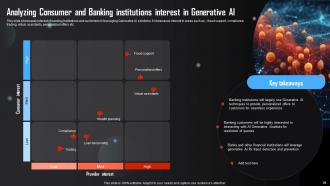
Slide 28: This slide highlights interest of banking institutions and customers in leveraging Generative AI solutions.
Slide 29: This slide showcases benefits of leveraging Generative AI for different activities in banking institutions.
Slide 30: This slide reveals the Title for the Topics to be covered in the following template.
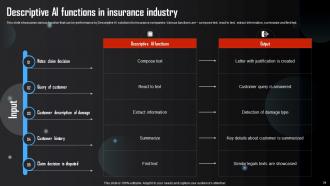
Slide 31: This slide presents various function that can be performance by Descriptive AI solutions for insurance companies.
Slide 32: This slide displays usage of Generative in transforming and managing the insurance claims.
Slide 33: This slide portrays the Heading for the Contents to be discussed further.
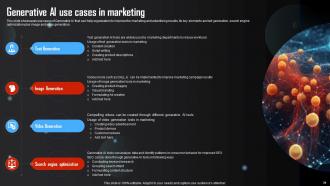
Slide 34: This slide showcases use cases of Generative AI that can help organization to improve the marketing and advertising results.
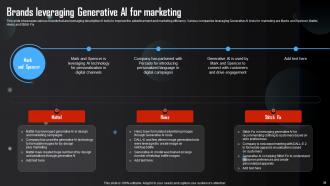
Slide 35: This slide highlights various brands that are leveraging descriptive AI tools to improve the advertisement and marketing efficiency.
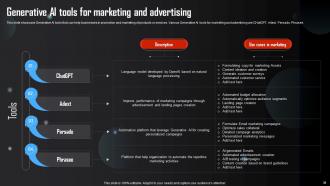
Slide 36: This slide presents Generative AI tools that can help businesses in promotion and marketing of products or services.
Slide 37: This slide outlines the Title for the Ideas to be covered next.
Slide 38: This slide showcases usage of Generative AI in different stages of business sales lifecycle.
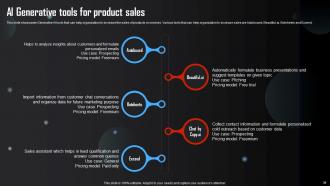
Slide 39: This slide portrays Generative AI tools that can help organization to increase the sales of products or services.
Slide 40: This slide exhibits the Heading for the Ideas to be discussed further.
Slide 41: This slide showcases level of impact on different functions of human resource.
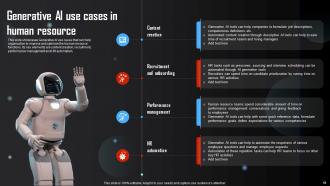
Slide 42: This slide highlights the Generative AI use cases that can help organization to improve and optimize the human resource functions.
Slide 43: This slide includes the Title for the Contents to be covered in the upocming template.
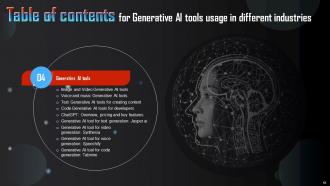
Slide 44: This slide showcases various AI generative tools that can assist businesses in text to image plus video conversions.
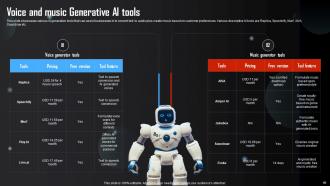
Slide 45: This slide reveals various AI generative tools that can assist businesses in to convert text to audio plus create music based on customer preferences.
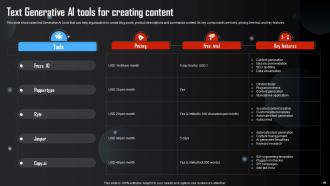
Slide 46: This slide presents text Generative AI tools to create blog posts, product descriptions and summarize content.
Slide 47: This slide showcases code Generative AI tools that can help organization to improve coding accuracy and custom model suggestions for developers.
Slide 48: This slide represents ChatGPT that can help businesses to stimulate human like conversations through natural language processing.
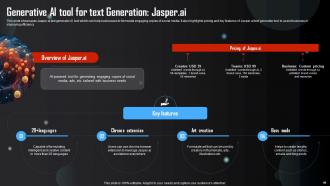
Slide 49: This slide reveals Jasper.ai text generator AI tool which can help businesses to formulate engaging copies of social media.
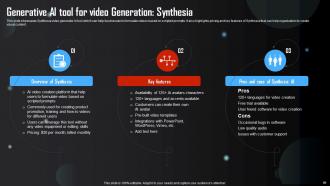
Slide 50: This slide highlights Synthesia video generator AI tool which can help businesses to formulate videos based on scripted prompts.
Slide 51: This slide showcases Speechify voice generator AI tool that leverage optical character recognition to convert text into audio.
Slide 52: This slide portrays Tabnine code generator AI tool that can help programmers and developers to improve coding accuracy.
Slide 53: This slide depicts the Heading for the Topics to be discussed next.
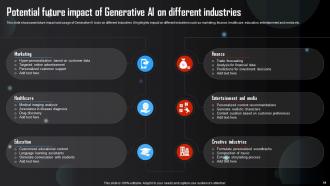
Slide 54: This slide showcases future impact and usage of Generative AI tools on different industries.
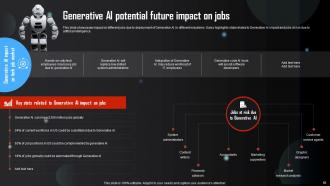
Slide 55: This slide states the impact on different jobs due to deployment of Generative AI in different industries.
Slide 56: This is the Icons slide containing all the Icons used in the plan.
Slide 57: This slide is used for displaying some Addtional information.
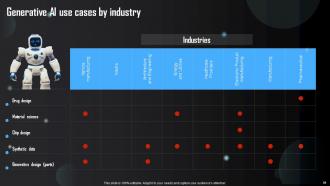
Slide 58: This slide talks about Generative AI use cases by industry.
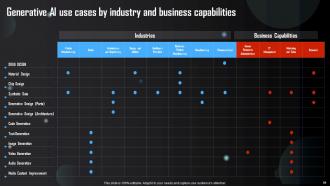
Slide 59: This slide contains Generative AI use cases by industry and business capabilities.
Slide 60: This slide exhibits Generative AI market size with key players.
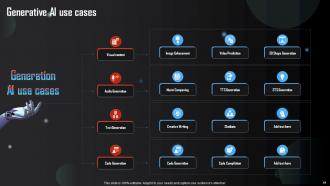
Slide 61: This slide shows the Generative AI use cases.
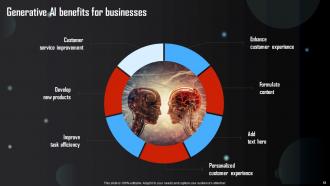
Slide 62: This slide focuses on the Generative AI benefits for businesses.
Slide 63: This slide presents the organization's Timeline.
Slide 64: This is the Venn Diagram slide.
Slide 65: This is Our team slide. State your team-related information here.
Slide 66: This slide contains the Post it Notes for reminders and deadlines.
Slide 67: This is the Idea generation slide for encouraging fresh ideas.
Slide 68: This is the Thank you slide for acknowledgement.
Generative AI Tools Usage In Different Industries Powerpoint Presentation Slides AI CD with all 73 slides:
Use our Generative AI Tools Usage In Different Industries Powerpoint Presentation Slides AI CD to effectively help you save your valuable time. They are readymade to fit into any presentation structure.























FAQs for Generative AI Tools Usage In Different Industries Powerpoint Presentation
Gamma's what I'd try first - it actually writes decent content instead of just making things pretty. Beautiful.AI is more about auto-polishing your slides so they don't look like garbage. Tome plays nice with other apps you're probably using already. There's Slidebean and Presentations.AI too, but honestly this whole space changes every five minutes so who knows what'll be hot next month lol. Gamma has a solid free plan though, so I'd mess around with that and see if it gives you what you need before paying for anything.
Honestly, AI is pretty solid for this stuff. DALL-E or Midjourney can create custom graphics when stock photos look like garbage (which is most of the time). You can generate color palettes that don't clash horribly together. Some tools will analyze your content and suggest better chart types for your data. Writing slide titles gets easier too - AI helps you avoid that awful corporate buzzword nonsense. Oh, and it's great for designing layouts from scratch instead of using those terrible default templates everyone recognizes. Just try it on one slide first and compare it to your usual work. The difference is pretty obvious once you see it side by side.
Honestly, focus on template libraries and content suggestions first - those are game changers. You'll want something that actually integrates with PowerPoint or Google Slides because switching between platforms is annoying as hell. Smart visual suggestions help too, plus anything that can keep your branding consistent without you having to think about it. The content variation features are clutch when you're totally stuck on how to say something. But here's the thing - some of these tools create more headaches than they solve. Definitely test the free trials first and see what actually speeds up your workflow.
Dude, AI tools are crazy fast for getting initial ideas out - like minutes instead of hours. You can pump out tons of variations super quickly. Pretty wild honestly. But here's the thing - you'll end up spending that saved time polishing everything because AI stuff usually looks... off somehow? Traditional methods take forever upfront but you get way more control. My take? Use AI when you're brainstorming or need rough drafts, then switch back to regular tools for the final version. It's kinda like having a really fast intern who needs lots of supervision.
Yeah, definitely! You'll want to be super specific in your prompts though. Like tell it "formal corporate deck for executives" or "edgy startup pitch with bold visuals." ChatGPT and Claude are pretty solid at this - honestly Claude might be slightly better for creative stuff, but that's just my take. The key is throwing in examples of what you want or describing the vibe you're going for. Oh, and don't forget to mention your audience and any brand rules upfront. Makes a huge difference in what you'll get back.
Honestly, AI has been a game-changer for my presentations. I'll throw my topic at it and get back solid outlines, talking points, even ideas for visuals. The trick is being super specific about your audience and what you're trying to achieve. Like, don't just say "help me with my sales pitch" - tell it who you're pitching to and what outcome you want. I've gotten weirdly good transitions between slides this way. Just double-check the facts it spits out because sometimes it gets creative with data. Oh, and make sure you rewrite stuff in your own voice afterward - nobody wants to sit through a presentation that sounds like a robot gave it.
Dude, I cannot stress this enough - be super specific with your prompts or you'll get the most boring generic slides ever. Tell the AI exactly who you're presenting to, what tone you want, your main points, everything. Like "presenting to skeptical executives who hate change" vs just "business presentation" - totally different outputs. I made this mistake so many times and kept getting corporate robot speak that would put my own mother to sleep lol. The AI basically just copies your energy, so if you're vague, it'll be vague right back. Oh and mention the format too - that actually matters more than I thought it would.
Yeah, for sure there are some things to watch out for. The biggest issue is they'll straight-up make stuff up sometimes or give you old info, so double-check anything that matters. Also, the content usually comes out pretty bland - like it was written by a robot (which, fair enough). They don't really get your specific audience either. Oh and the design suggestions? Super basic. I'd say use them to get past that awful blank page moment, but then you gotta make it actually sound like you before sending it anywhere.
Honestly, generative AI is perfect for this. Just feed it your main presentation and ask for different versions - like a technical deep-dive for engineers, then flip it to high-level bullet points for executives. Creative teams? Make it super visual-heavy. The cool part is how it automatically shifts the tone and complexity. I've been having it generate different examples and analogies that actually make sense for each group. Oh, and you can create those interactive Q&A sections based on what each audience typically asks about. Next time, try making 2-3 versions of your most important slides and test which one hits better.
Honestly, AI cuts my presentation prep time in half now. I'll throw my topic into ChatGPT or Claude and get them to brainstorm content ideas and write slide copy. There are these newer tools like Gamma that literally build entire decks from just a prompt - kind of insane how good they've gotten. You can also get AI to tweak your speaking notes for different audiences, which is clutch. Oh, and it's great for suggesting visuals too. The trick is giving it solid context about what you're trying to accomplish, then just treat whatever it spits out as your rough draft. Works way better than staring at a blank slide.
Definitely be upfront about using AI - don't try to pass it off as your own work. I learned this the hard way, but you've gotta fact-check everything because AI will confidently tell you completely wrong stuff sometimes. Watch out for any weird biases or stereotypes it might've picked up too. Your company probably has rules about this stuff, so check on that. Oh, and think about whether your audience even wants AI-generated content. Honestly, just treat it like any other tool - super helpful, but you're still responsible for what you put out there.
So there's a bunch of ways to do this. Tools like Gamma and Beautiful.ai have add-ins that plug right into PowerPoint and Google Slides - they're pretty slick for generating slides automatically. Microsoft Copilot works great too if you've got a business account (though honestly it should be free by now). ChatGPT and Claude are super helpful but they don't connect directly, so you'll be doing some copy-pasting. I'd try the free add-ins first - Tome is another good one. Just see what clicks with how you actually work since everyone's different with this stuff.
Oh totally! I've been messing with ChatGPT and Claude for this - they're actually pretty solid at turning boring bullet points into actual stories. Feed them your main presentation ideas and ask for narrative frameworks or opening hooks. They're weirdly good at creating customer scenarios too, which beats the hell out of dry statistics. You can get them to suggest metaphors that make complex stuff click for your audience. Honestly didn't expect AI to be this helpful with creative stuff, but here we are. Just don't use everything they spit out - pick the gems.
AI's gonna be wild for presentations soon. Picture this - you give it a rough outline and boom, full slide deck ready. It'll write speaker notes that actually match how you talk, not some generic script. Real-time coaching while you practice? Yep, that's coming too. Some tools might even read the room and suggest tweaks mid-presentation based on audience vibes. Honestly feels like sci-fi but it's happening fast. My advice? Start messing around with current AI presentation tools now. You don't want to be scrambling to catch up later when everyone else is already using this stuff.
Honestly, AI's pretty solid for this stuff. ChatGPT can help you brainstorm ways to explain tricky concepts without boring everyone to death. Those AI image tools are clutch when you need custom graphics - way better than generic stock photos. Your students can use it for research and organizing ideas too. The trick is teaching them it's more like a study buddy than doing the work for them. Critical thinking still matters, obviously. Maybe start small - have them try one AI-assisted presentation this semester? Oh, and the outline generation feature is surprisingly helpful for structure.
-
The presentations are very helpful. I am always able to get appropriate templates for the different topics related to my profession.
-
Loved the collection. Editing the presentation was seamless with their templates.