


 0 Comment
 Customer Reviews

Among the most valuable yet scarce resources available in business is time. The question is always the same: What should we do first? Whether your role is team leader aiming for strategic focus, project manager balancing deadlines, or company founder negotiating anarchy. Now enter the Action Priority Matrix, a potent tool for making decisions that helps teams and individuals maximize efficiency by organizing chores according to impact and effort. Your shortcut to faster, smarter, and more strategic execution is our carefully chosen Top 10 Action Priority Matrix Templates, which feature actual samples and examples.
Access our “Top 5 Prioritization Matrix Templates with Examples and Samples” by clicking on the link provided.
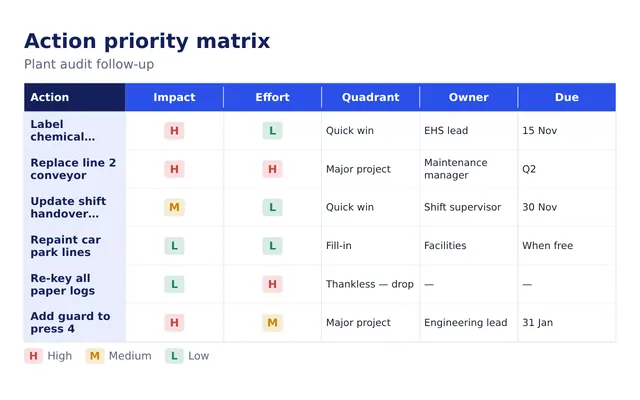
Based on a straightforward but transforming idea, the Action Priority Matrix—also known as the Impact-Effort Matrix—helps one focus on high-impact, low-effort activities (Quick Wins) and eliminate or assign low-impact, high-effort ones (Thankless Tasks.). Grounded in Eisenhower's Urgent-Important Principle, this visual approach to prioritizing fits productivity techniques like the 80/20 Rule (Pareto Principle), hence it is a favorite among corporate strategists, Agile teams, and productivity consultants.
Our selection moves beyond mere theory to provide you actual traction. Whether you’re running a marketing campaign, refining a product roadmap, planning a quarterly strategy, or handling daily to-dos, each of our 10 templates is not only professionally created but also 100% configurable, allowing you to fit them to your specific demand.
Get your hands on our “Top 7 Priority List Templates with Samples and Examples” by clicking on the link provided.
Every template comes with a real-world use case and is loaded with customizable information, drag-and-drop task blocks, and advice to enable you to start running. We have you covered for Excel, Google Sheets, PowerPoint, Notion, or Canva.
All set to bring your anarchy into order? Let us now delve in.
Template 1: Action Priority Matrix PowerPoint Template Bundles
Slides in this PPT Preset classify jobs according to effort and impact. Labeled as Quick Wins, Major Projects, Fill-Ins, and Thankless Tasks, it employs four-quadrant matrix configurations Circular and square matrices are among the several forms offered. While some slides show editable text fields for task descriptions, others show icons for visual clarity. Slides with timelines, workflow diagrams, and detailed instructions on implementing the matrix in decision-making make up the package. It is appropriate for project planning, prioritizing, and strategic presentations as well since it provides templates with arrows and legends to show job flow between quadrants.
[product_image id=519413]
Template 2: Action Priority Matrix showing Impact and Effort Required with Dotted Circle
This Slide maps tasks depending on two main criteria: impact and effort required using a dotted circular pattern. Four named quadrants—Quick Wins, Major Projects, Fill-Ins, and Thankless Tasks—separate the matrix. Every quadrant is color-coded and positioned along high/low impact and high/low effort axes. Within every part of the slide, editable text placeholders for listing chores or activities abound. Whereas the circular design stresses task distribution, axis labels precisely describe the evaluation criteria. The structure is meant to facilitate in corporate, project, or team planning sessions decision-making, task sorting, and resource allocation.

Template 3: Action Priority Matrix Worksheet with Impact and Effort
This PPT Template uses a disciplined table arrangement to classify jobs according to their importance and effort. It comprises columns for numerical scale computation of activity impact and effort, as well as for priority grading. The slide shows a matrix with four quadrants—Quick Wins, Major Projects, Fill-Ins, and Thankless Tasks—ordered by impact and effort level. Users are guided in ranking every activity by a scoring legend. Customizing task entries and notes is accomplished using Editable Text Fields. In project or team planning this worksheet assists task appraisal, prioritizing, and informed decision-making.

Template 4: Action Priority Matrix with Issue and Criteria
Here is a PPT Layout that has a tabular style used to evaluate and rank problems depending on particular evaluation standards. Columns for identifying pertinent criteria, outlining problems, and rating each criterion abound in the design. There is a last column to figure every issue's overall score. Additionally included on the slide is a four-quadrant matrix covering Quick Wins, Major Projects, Fill-Ins, and Thankless Tasks whereby problems can be arranged based on their total influence and necessary work. Editable fields let one change issue descriptions, criteria, and scores. In strategic and operational planning, this framework helps to drive data-driven prioritizing and methodically solve problems.

Template 5: Action Priority Matrix with Important and Urgent Work
Based on their significance and urgency, this Slide arranges tasks in four-quadrants. Important and Urgent, Important but Not Urgent, Not Important but Urgent, Not Important and Not Urgent are the four quadrants' labels. Editable placeholders for listing chores abound in every area. The presentation has clearly designated axes for visual task placement—urgency and importance. Section color-coded aid distinguishes priorities. Through alignment with the Eisenhower Decision Matrix, the layout is intended to promote time management, daily task planning, and strategic concentration. Customizable fields let users fit the matrix to either team-based or individual projects.

Template 6: Action Priority Matrix with Impact and Urgency
This Slide ranks chores depending on impact and urgency using a four-quadrant layout. High Impact–High Urgent, High Impact–Low Urgent, Low Impact–High Urgent, Low Impact–Low Urgent are the four named areas of the matrix. Axes clearly identify effect and urgency degrees. Editable text boxes for task organization and listing abound in every quadrant. Color-coded sections improve task category visual distinction. Notes or extra directions have room on the slide as well. Designed for task appraisal and workflow efficiency, this arrangement helps with decision-making in team meetings, project planning, and personal prioritizing activities.

Template 7: Action Priority Matrix Tasks Template
Task categories in this presentation are based on impact and effort levels using a square grid style. Four quadrants—Quick Wins, Major Projects, Fill-Ins, and Thankless Tasks—are named as such below. Editable placeholders for inserting particular jobs or activities abound in every quadrant. Clearly indicated as "Impact" and "Effort," the axes let users quickly evaluate job priority. The slide also has a legend outlining the meaning of every quadrant. Designed for work management and prioritizing, the arrangement facilitates use in presentations, planning meetings, and strategy conversations. For customizing particular project requirements, all elements are totally customizable.

Template 8: Action Priority Matrix Prioritization Framework
Based on effort and impact, this Action Priority Matrix presentation offers a four-quadrant design prioritizing structure. With editable text boxes for task entry, the quadrants—Quick Wins, Major Projects, Fill-Ins, and Thankless Tasks—have titles. The labels on the axes indicate rising degrees of work and influence, therefore offering a visual guide for job classification. At the bottom of the presentation is a little instructive note on applying the framework for making decisions. Designed for organizing and prioritizing work, this arrangement lets teams and individuals efficiently review projects and distribute resources. Every component is adjustable.

Template 9: Action Priority Matrix for Blogging with Different Projects
Designed for blogging and content planning, this Action Priority Matrix presentation uses a four-quadrant arrangement to evaluate initiatives depending on influence and effort. Labeling the quadrants as Quick Wins, Major Projects, Fill-Ins, and Thankless Tasks is Editable placeholders for including various blog topics or content efforts abound in every area. Clear marking of the axes indicates impact and effort, thereby directing users in content development activity priority. Project icons and detailed labels on the slide help you visually arrange blog-related chores. Originally intended for editorial planning and content strategy, the template lets complete adaptation fit certain blogging objectives and processes.

Template 10: Action Matrix of Priority or Work Plan
Task organization depending on priority and expected timescales is achieved on this Action Matrix of Priority or Work Plan slide via a grid arrangement. Task names, allocated team members, timeframes, and priority levels all find places in the matrix. Different priority groups for tasks help to clearly see critical and urgent actions. Editable fields for notes, task information, and status updates abound on the presentation. It is meant to assist in projects or operational processes' task planning, resource allocation, and progress monitoring. The design helps teams to methodically control their workload and guarantee timely completion of high-priority projects.

Wrapping it Up!
Comprising a thorough, flexible toolkit meant to provide clarity and emphasis to task management and decision-making, the Top 10 Action Priority Matrix Templates with Samples and Examples give These templates enable people and teams to find Quick Wins, prioritize Major Projects, and properly distribute resources by grouping activities according on impact and effort—that is, urgency and priority. Every template is completely flexible, allowing easy integration into many processes—from content planning and operational work plans to marketing campaigns and product development. Using these disciplined systems turns daunting to-do lists into strategic action plans, therefore enabling you to maximize output and confidently and precisely reach your objectives.
PS: Access our “Top 5 Priority Ranking Templates with Samples and Examples” by clicking on the link provided.
FAQs on Action Priority Matrix
1. How to use an Action Priority Matrix?
Map your chores on a grid with effort on one axis and effect on the other. This clarifies which chores are Quick Wins (high impact, low effort), Major Projects (high impact, high effort), Fill-Ins (low impact, low effort), and Thankless Tasks (low impact, high effort), therefore enabling you to prioritize wisely.
2. What is the 3-priority matrix?
Based on factors like urgency or importance, the 3-priority matrix classifies tasks into three degrees of priority: high, medium, and low, therefore facilitating the emphasis on the most important activities first.
3. What is a rank 3 matrix?
Usually signifying a medium or moderate degree of priority or relevance in the context of a ranking or scoring system, a rank 3 matrix is one in which each element or job is awarded a rating of three.