

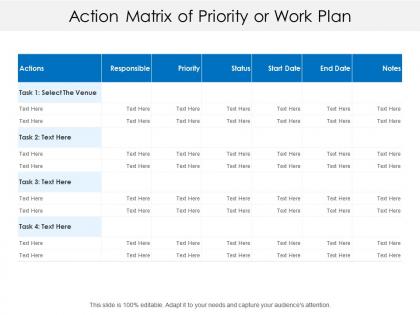
Action matrix of priority or work plan




Try Before you Buy Download Free Sample Product
 Impress Your
 Audience
 100%
100% Editable
 Save Hours
 of Time


Develop faith among your employees with our Action Matrix Of Priority Or Work Plan. Come across as a caring employer.
People who downloaded this PowerPoint presentation also viewed the following :
Action matrix of priority or work plan with all 5 slides:
Use our Action Matrix Of Priority Or Work Plan get your audience in sync. Grab their eyeballs they wont even blink.

FAQs for Action matrix of priority
So basically you draw a 2x2 grid and sort your tasks by two things - like how important they are vs how urgent. Each quadrant shows you different stuff: what needs doing now, what you can delegate, what to plan for later. I use this all the time when I'm totally overwhelmed. Teams love it too because everyone can actually see the same priorities instead of arguing about what matters most. Honestly beats making endless to-do lists that go nowhere. Just plot everything out visually and you'll spot the tasks that actually make a difference pretty quick.
So basically you plot your tasks on a grid - urgency vs importance. Makes four boxes. Start with the urgent AND important stuff (crisis mode), then hit the important-but-not-urgent tasks. That's where the real progress happens honestly. Most of us get stuck putting out random fires in the urgent-not-important zone though... it's exhausting. I actually color-code my project board with these quadrants now. Game changer during standups. Oh and be ruthless about ditching the neither-urgent-nor-important crap. Review it regularly or you'll just slide back into chaos.
Look, you need four main things: clear tasks, one person assigned to each (not a whole team - that's where things die), realistic deadlines, and ways to measure if it actually worked. Track status and note which tasks depend on others. Priority levels are clutch too. I've watched so many of these turn into fancy to-do lists that nobody follows up on. Schedule regular check-ins or it'll collect digital dust. Start basic with these pieces, then get fancier once everyone's used to updating it. The single owner thing is huge - can't stress that enough.
So basically it's like having a cheat sheet for who's supposed to do what. Everyone gets assigned specific tasks with actual deadlines, which is clutch because then nobody can pretend they "forgot" or didn't know it was theirs. You can see right away when someone's drowning in work or when things are getting stuck. Honestly, the best part is avoiding those super awkward moments where two people show up having done the same thing (or worse, nobody did it). We update ours every week in our team meeting - sounds boring but it actually works pretty well for keeping track of stuff.
So the Action Matrix is all about impact vs effort - basically "what gives me the biggest bang for my buck?" Meanwhile, Eisenhower sorts by urgency vs importance. Honestly? I think Eisenhower can make you super reactive since literally everything feels urgent nowadays. With the Action Matrix, you're thinking more strategically about where your time actually pays off. You'll naturally go for those quick wins first, then move on to the harder stuff that's still worth doing. I'd say try both with your current to-do list and see what clicks better for you.
Honestly, pretty much any industry with messy projects benefits from these things. Hospitals use them for patient care stuff, manufacturers track quality control between departments. Tech teams are obsessed with them - makes sense since they're always dealing with unclear ownership. Financial services and consulting love them too. Even retail chains jump on board when they can't figure out who's responsible for what. I mean, if your team constantly goes "wait, whose job is this actually?" then you probably need one. Manufacturing might be where they work best though - so many moving parts.
Honestly, deadlines are what save the Action Matrix from becoming just another pretty chart that sits there doing nothing. Without them? Everything just lives in those boxes forever - trust me, I had a "someday" matrix collecting digital dust for months. You've got to get specific too. Not "sometime next week" but like "Thursday at 2pm." That forces you to actually think about what's realistic. Buffer time is clutch because random urgent stuff always comes out of nowhere. The timeline basically turns your matrix from wishful thinking into something that'll actually move the needle.
There are tons of good options for this stuff. Asana, Monday, and ClickUp all let you build matrices that update automatically and ping you when deadlines are coming up. Google Sheets or Airtable work fine too if you don't want anything fancy. The automation is where it gets interesting though - you can set triggers to move tasks between quadrants when priorities shift or dates change. Most teams I know connect theirs to Slack for quick updates. Honestly, just pick whatever your team will actually stick with, because the fanciest tool is useless if nobody uses it.
Honestly, the worst thing you can do is overcomplicate it. People just won't use a matrix that's too complex or has like 15 different action items. I'd start with maybe 5-7 things max. Be super specific too - "improve communication" is basically useless, but "send weekly updates to the team" actually means something. Each action needs one person who owns it (not a committee, one person) and a real deadline. The other trap? Creating it and then never looking at it again. You've gotta schedule regular check-ins or it'll just collect digital dust.
Yeah, just take that urgency vs importance grid and throw your personal stuff on it. Daily tasks, goals, whatever - urgent/important goes in quadrant 1, important but not urgent (like working out or that Spanish app you downloaded) hits quadrant 2. Honestly, quadrant 2 is where the good stuff happens for personal growth. I always end up shocked at how much time I waste in the "urgent but not important" zone - like responding to every random text immediately. Weekly check-ins help a ton. You'll start seeing patterns in what actually pushes you forward versus busy work.
Track how fast you're finishing stuff in each quadrant, especially those high-priority items. Also check if tasks are actually shifting from urgent to important over time - that's the whole point, right? Resource allocation is key though. Are you spending most of your energy on important/not urgent work? Honestly, most people totally fail at this part. Monitor stakeholder happiness and how quickly you're making decisions. The real win is when your team stops being in constant crisis mode and gets ahead of things. Monthly reviews work great - look at your metrics and tweak the matrix criteria as needed.
Honestly, just bake the feedback stuff right into your matrix from the start. Add review dates and feedback columns for each action item. Monthly check-ins are clutch - actually look at what's bombing vs what's crushing it. Most people create these docs then totally forget about them (guilty as charged). Based on what stakeholders tell you and how things are actually performing, keep tweaking the matrix. Maybe you need to shuffle priorities or dump actions that aren't moving the needle. The whole point is making it something that actually grows with your project instead of just sitting there gathering digital cobwebs.
Put that Action Matrix somewhere everyone can see it - Miro's good, or honestly just a Google Sheet works fine. During your next meeting, have people actually plot their current tasks on it together. Trust me, half your team doesn't really get the urgent vs important thing yet. Review it weekly since stuff changes constantly. The real win here is getting everyone to speak the same language about priorities. No more of that "everything's on fire" nonsense. Once people see their tasks laid out visually, they'll stop treating every email like it's life or death.
Honestly, the format you pick makes a huge difference for actually using your Action Matrix. Color-coded charts are clutch - you'll spot urgent stuff right away. Tables work well if you need to sort by deadlines. I'm weirdly into Kanban boards for this because seeing things move through columns just hits different, you know? Heat maps are solid too when you're plotting urgency against impact. Oh, and don't overthink it - just try a couple layouts with your team. Whatever makes them actually want to use the thing is the winner.
Let people define their own "urgent" vs "important" instead of telling them what matters. The visual stuff works like magic - moving tasks between boxes or checking things off gives you that little rush. Don't overthink it either. Start rough and messy, then let everyone tweak the categories together. Honestly, that collaborative mess-around builds way more buy-in than handing them some perfect system. Weekly check-ins work great too - people love celebrating when something finally moves from "urgent nightmare" to "done." Oh, and the progress visibility thing? Total game-changer for keeping momentum going.
No Reviews