

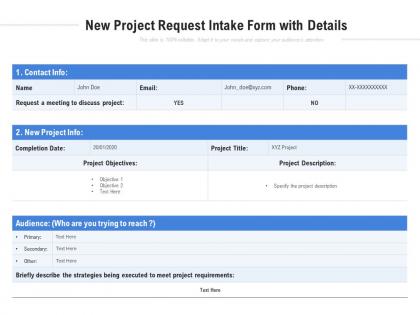
New project request intake form with details




Try Before you Buy Download Free Sample Product
 Impress Your
Audience
 100%
Editable
 Save Hours
of Time


Our New Project Request Intake Form With Details create a bunch of happy customers. They will conform to their every demand.
People who downloaded this PowerPoint presentation also viewed the following :
New project request intake form with details with all 2 slides:
Clients get enamored by our New Project Request Intake Form With Details. They engineer the ' feel good ' factor.


FAQs for New project request intake
Definitely grab the basics first - project overview, timeline, budget, who's asking for it and their contact info. Scope and objectives are huge too. I always throw in a priority level section because everything's "urgent" until it's not, you know? Technical requirements save you from those annoying back-and-forth emails later. Success metrics help everyone stay on the same page about what "done" looks like. Oh, and add constraint fields - stuff like dependencies or resource limitations always pop up anyway. Don't skip the approval workflow part either. Trust me, you'll want to know upfront who needs to sign off before your team starts working.
Honestly, project intake forms are a total game-changer. They stop all that messy email ping-pong where people forget to mention half the important stuff. Everyone fills out one form with scope, budget, timeline - you know, the basics. Your team gets everything organized upfront instead of hunting through random messages from weeks ago. Short story: I used to waste so much time in meetings just trying to figure out what people actually wanted. Now you can compare requests easily and decide what's worth doing. Good template = meetings that don't suck.
Honestly, go digital - it's so much faster than paper forms. No more hunting through desk drawers for stuff that got buried (ugh, the worst). The validation catches errors automatically, which saves you from trying to decode terrible handwriting later. Everything stays in one system instead of random filing cabinets everywhere. You can set up workflows that route things to the right people without you having to babysit every request. I mean, the time you'll save is huge, but the real game-changer? Actually being able to search for project info instead of digging through piles of paper like some kind of archaeological dig.
Honestly, project intake forms are like having a fair scoring system when everything feels chaotic. You're collecting the same info from everyone - ROI projections, how many people they need, does it actually fit your strategy, timelines, all that stuff. Makes it way easier to compare projects objectively instead of just picking whoever emails you ten times a day (we all know that person). The forms also make people actually think through what they're asking for, which is hilarious because half the "urgent" requests suddenly aren't so urgent anymore. Consistent criteria = better decisions. Way better than the squeaky wheel approach.
So basically, just think about what info you actually need before projects kick off. Marketing teams usually want stuff like campaign goals and target audience details. Construction folks care more about permits and site specs - makes sense, right? Software teams always ask about technical requirements. Here's what I'd do: write down the 5 questions you're constantly asking clients anyway. Build your form around those first. You can always grab other details later, but nail the essentials upfront. Each industry's different, so don't overthink it - just focus on what'll save you the most back-and-forth emails.
Oh man, the worst thing you can do is make those forms crazy long. Like, if I see 20 fields I'm out - stick to maybe 8 max. Super vague questions are annoying too, instead of "describe your needs" ask something specific. Budget ranges and timelines should definitely be in there since you'll end up asking anyway. Here's what I learned the hard way though - test it with actual people first! What seemed obvious to me was confusing as hell to everyone else. Short sentences work better than rambling ones. Focus on stuff you'll actually use, not just info that sounds nice to have.
Honestly, intake forms are a game-changer for this stuff. You'll get consistent data on scope, timeline, skills needed - all that good stuff that helps you spot resource conflicts before they blow up. Having real numbers makes budget conversations way less awkward too (no more "trust me, we need this" conversations). The best part? You can actually compare projects fairly when you're figuring out priorities. I'd start with maybe 5 key fields and keep it simple - you don't need to go crazy with it. Once you have a few projects in there, patterns start jumping out at you pretty fast.
Honestly, intake forms are like doing a quick health check on your project before it even starts. You're catching all the messy stuff upfront - tight budgets, crazy deadlines, whether you've got enough people, technical nightmares, stakeholders who hate each other. Way better than discovering these issues halfway through when everything's on fire. The form makes you actually think about what might go sideways early on. I always tell people to include real risk questions, not just the boring basic details. You want to spot those red flags now so you can figure out how to deal with them later.
Honestly, the biggest thing is just making your forms stupid simple. Ditch the jargon - write like you're talking to your neighbor. I always test mine with people who don't work here because they'll spot confusing stuff immediately. Mobile optimization is huge since everyone's filling these out on their phones now. For longer forms, throw in a progress bar so people don't bail halfway through. Oh, and definitely check your data regularly to see where people are dropping off. Those spots usually mean something's broken or too complicated. Adding little examples next to tricky fields helps too.
Honestly, start with completion rates and timeline accuracy - those tell you if you're actually hitting your targets. Budget variance is clutch too. I'd definitely track how often scope creeps after intake because that usually means your requirements gathering sucks (been there). The thing that's helped me most? Comparing those initial complexity ratings to what actually happened. Resource allocation tracking is solid - shows if you're constantly over or underestimating effort. Don't go crazy though. Pick maybe 2-3 metrics that match your biggest headaches and stick with them for a few months. You'll start seeing patterns pretty quick.
Honestly, I'd check them every 6 months or so - I totally used to ignore this until we kept getting the same confusing questions! Watch for when your team changes or new project types pop up. Those fields nobody fills out? Just delete them, they're useless anyway. If you're constantly chasing people for missing info after they submit, that's your cue to fix something. Oh, and definitely test tweaks with a small group first - learned that one the hard way. Set a quarterly reminder or you'll forget like I did!
So here's what I do - go through your intake feedback and look for stuff that keeps coming up. Like when people always say "wait, what exactly do you need from me?" or "this timeline is insane." That's your process telling you where it's broken. Track which questions trip people up or which parts they just skip completely (honestly, if they're skipping it, it's probably not clear anyway). Then actually fix those spots - don't just collect feedback and let it sit there. I swear, even tiny changes based on what people tell you will save you so much drama down the road. Makes the whole thing way smoother.
So there's Typeform, JotForm, Google Forms - pretty standard stuff for building forms. But here's what actually makes a difference: hook it straight into whatever project management thing your team already uses. Like Asana or Monday.com or whatever. That way when someone fills out the form, boom - it's automatically a ticket with all their info. Oh and conditional logic is clutch - questions change based on what people answered before. Way less annoying than seeing a million irrelevant fields. I'd honestly just pick one tool and test it with a couple people first before unleashing it on everyone.
Honestly, intake forms are like your safety net for the whole project. They grab all the crucial stuff upfront - scope, timeline, budget, who's involved - so you're not frantically trying to figure things out later. You know how projects can totally derail when nobody's clear on what they're actually doing? That's exactly what these forms prevent. Plus they feed right into your planning phase and give you something solid to track against when things inevitably change. The trick is making sure you're actually collecting useful info for decisions, not just random fields that nobody cares about.
Do hands-on training sessions where everyone fills out the actual forms together. Way better than just reading about it. Walk through each field and explain WHY you need that info - people always forget the reasoning behind stuff. Use real examples from your own projects so it actually makes sense to them. Make a quick reference sheet with common screw-ups and what each field means. Oh, and pick someone from each team to be the "form person" who can answer questions when you're busy. Trust me, this peer thing works so much better than having everyone bug you with emails all the time. The designated champions thing has saved my sanity honestly.
No Reviews