

Authority matrix with task or decision and person or function




Try Before you Buy Download Free Sample Product
 Impress Your
 Audience
 100%
100% Editable
 Save Hours
 of Time


Let us handle the design aspects of your next presentation for you. Thousands of ready made Authority Matrix With Task Or Decision And Person Or Function are on hand to make your projects look their best.
People who downloaded this PowerPoint presentation also viewed the following :
Content of this Powerpoint Presentation
Description:
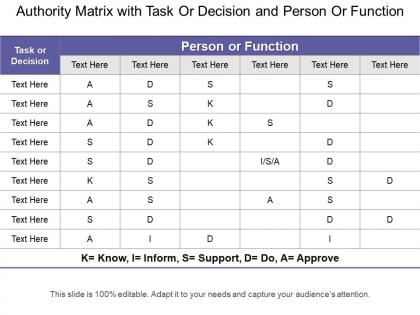
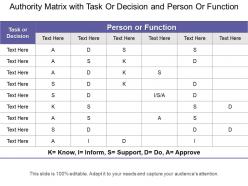
The image displays a PowerPoint slide titled "Authority Matrix with Task Or Decision and Person Or Function." This slide is a template of an authority matrix, also known as a Responsibility Assignment Matrix (RAM), which is used to define roles and responsibilities in decision-making within a project or organization.
The matrix is organized into columns and rows. The first column, labeled "Task or Decision," is where specific tasks or decisions are listed. The subsequent columns represent different people or functions within the organization, though their specific titles or names are not provided and are instead represented by "Text Here" placeholders.
Within the matrix, there are various abbreviations used to define the level of responsibility:
K: Know. This person or function needs to be informed about the task or decision.
I: Inform. This person or function should be informed after a decision is made or a task is completed.
S: Support. This role supports the task or decision-making process.
D: Do. The person or function is responsible for carrying out the task.
A: Approve. This person has the authority to approve the task or decision.
The presence of these letters in the matrix cells indicates the type of responsibility assigned to each role for a particular task or decision.
Use Cases:
This type of authority matrix is applicable across various industries:
1. Construction:
Use: Clarifying roles in project management phases.
Presenter: Project Manager
Audience: Construction team, engineers, contractors
2. Healthcare:
Use: Assigning responsibilities in patient care protocols.
Presenter: Healthcare Administrator
Audience: Medical staff, department leads
3. Education:
Use: Defining duties in school administration and curriculum development.
Presenter: School Principal
Audience: Teachers, administrative staff
4. Manufacturing:
Use: Outlining accountability in production processes.
Presenter: Operations Manager
Audience: Production supervisors, quality control staff
5. Finance:
Use: Specifying roles in financial operations and compliance.
Presenter: CFO or Compliance Officer
Audience: Finance department, auditors
6. Technology:
Use: Delegating responsibilities in software development projects.
Presenter: CTO or Development Team Lead
Audience: Developers, product managers
7. Hospitality:
Use: Distributing tasks for hotel operations and services.
Presenter: Hotel General Manager
Audience: Department heads, service staff
Authority matrix with task or decision and person or function with all 5 slides:
Our Authority Matrix With Task Or Decision And Person Or Function are a catalyst for happiness. It induces a lot of joy.


FAQs for Authority matrix with task or decision and
So an Authority Matrix is just a chart showing who can approve what spending and make which decisions in your company. Maps out the decision-making power so people know their limits. Honestly, you need this or things get messy fast. People either freeze up because they don't know if they can decide something, or they overstep and create drama. Projects get stuck for weeks over this kind of stuff - I've watched it happen. The matrix cuts through all that confusion and keeps work moving. Just make sure it's updated and people can actually find it when they need it.
So an Authority Matrix basically tells everyone who can approve what and how much they can spend. No more "wait, who do I ask about this?" moments that kill momentum. Your team just knows where to go for different decisions instead of playing approval hot potato. Projects move way faster when people aren't second-guessing if they have the authority or waiting around for sign-offs they don't actually need. Honestly, it's one of those simple things that makes a huge difference. I'd start by looking at where things currently get stuck - probably you'll spot the authority confusion pretty quickly.
So for your Authority Matrix, start with clear role titles and what dollar amounts each person can approve - like $500 for team leads, $5K for managers, $25K for directors. Include different decision types: hiring, budget stuff, vendor contracts, all that. Oh and definitely add escalation paths for when people are on vacation (learned that one the hard way). Build in review dates since teams change constantly. Honestly, the most important thing is being super specific so there's zero confusion about who approves what. Nothing worse than deals sitting in limbo because nobody knows whose signature you need.
So an org chart just shows who reports to who, right? But an Authority Matrix is way more useful - it tells you who can actually make decisions about what. Like Sarah might report to Tom on the org chart, but the matrix shows Sarah can approve up to $50K while Tom handles bigger stuff. Way more specific. Honestly, I use the matrix way more because it cuts through all the corporate hierarchy BS. When you need approval for something, you don't want to guess - you just want to know exactly who has the power to say yes.
So basically an Authority Matrix is just a chart showing who gets to decide what on your project. You map out different decision levels - like who approves, who recommends, who you gotta consult, whatever. Then assign those to people based on the type of decision or how much money's involved. Honestly, it's a lifesaver when you've got stakeholders who don't play nice together. No more awkward "wait, I thought you were handling that" conversations mid-project. Set it up early though - like right after kickoff. Share it with everyone so there's zero confusion about who has final say. Trust me, future you will thank you for this.
Honestly, an Authority Matrix just clears up who makes what decisions so nobody's pointing fingers later. No more "wait, I thought you were doing that" confusion. Everyone knows exactly who owns each decision and what approvals they need. It's basically a roadmap for decision-making – sounds boring but it actually works. People step up more when they know what they're accountable for. Just map out your main decisions and assign clear owners for each one. Trust me, things will run way smoother once you get this sorted.
Honestly, the biggest trap is overcomplicating it. You'll just confuse everyone and nobody will know who's actually in charge of what. I've seen teams create these massive matrices where literally everyone has to weigh in on everything - total nightmare. Keep authority levels super clear, no overlap. And here's what I'd do differently: figure out who needs to give input vs who actually makes the call. Those are totally different things. Oh, and before you launch this thing company-wide? Run through some real examples first. Trust me, you'll catch weird gaps that looked fine on paper but make zero sense in practice.
Okay so basically an Authority Matrix just shows who's actually in charge of what decisions. No more of that weird thing where marketing, ops, and finance all think they're running the same project. It maps out who gets consulted vs who actually makes the final call. Honestly, it's a lifesaver for avoiding those endless email chains where everyone's like "well I thought Sarah was handling this?" Plus it forces teams to hash out their boundaries beforehand - way better than the usual blame game when stuff hits the fan later.
Oh, that's actually pretty straightforward! When your org changes, just update the Authority Matrix document - no special software or anything. Move decision rights around to match new roles. Update who approves what when reporting lines shift. Add people when teams merge, remove them when they split. Honestly, the trickiest part is remembering to actually do the updates instead of letting it sit there getting outdated. You'll need to adjust spending limits for promoted people and redistribute responsibilities after department reshuffles. Just shoot everyone an email when you make changes so they're not confused about who decides what.
Honestly, just start with Excel or Google Sheets - they're super easy and everyone knows how to use them. Lucidchart and Visio are worth it if you need something that looks more professional for presentations. The big enterprise tools like MetricStream have RACI templates built in, but they're probably way too much unless you're at a huge company. I made that mistake once and spent forever just learning the software. Map everything out in a simple spreadsheet first. You can always get fancy later once you know it's actually working for your team.
So basically it gives you a paper trail of who approved what and when - auditors love that stuff. You'll be able to show that the right people signed off on spending and big decisions. Think of it like keeping receipts but for corporate stuff. It also helps catch gaps where someone's making calls without proper approval (happens more than you'd think). Short sentences work. When audit time comes around, you can just pull up docs showing your processes are solid and consistent. Honestly, set it up now because scrambling later sucks.
Authority Matrices are actually pretty empowering once you get the hang of them. They show you exactly what decisions you can make without running upstairs for approval every time. Think of it as your decision-making cheat sheet - way better than constantly guessing whether something's in your wheelhouse or not. You'll move faster on routine stuff and feel more confident about your calls. Honestly, most people don't even realize they have more authority than they think. Before you automatically escalate next time, just double-check your matrix first. You might be surprised what you can handle yourself.
Honestly, just do quarterly check-ins with your team about the Authority Matrix - more than that and people get annoyed. Ask them straight up where decisions are getting stuck or when they weren't sure who was supposed to make the call. Those grey areas always pop up, trust me. Take what they tell you and actually fix the unclear ownership stuff or shift authority around where it makes sense. The biggest thing? You've gotta act on their feedback or they'll stop being real with you next time. Regular feedback sessions work, but only if you're not just collecting opinions for the sake of it.
Quarterly at minimum, but monthly's way better - especially if you're growing fast. I always set calendar reminders because this stuff gets buried under "urgent" tasks every damn time. New roles, spending limits, process changes - capture all that since your last check. Oh, and definitely pull in people from finance, HR, ops when you update it. They spot things you totally miss. Honestly, the biggest mistake is treating it like a set-it-and-forget-it thing. It's gotta be living and breathing with your business.
Honestly, Authority Matrix sounds fancy but it's basically just mapping out who decides what on your team. Super helpful when everyone's remote and you can't just pop over to ask questions. Set up one shared doc that shows who's responsible for decisions, who needs to approve stuff, and who just gets a heads up. Trust me, it saves so much back-and-forth messaging. Your teammates will know when they can just go ahead with something vs. when they need buy-in first. Way better than those endless "should I ask Sarah or Mike?" moments that eat up half your day.
-
Perfect template with attractive color combination.
-
Appreciate the research and its presentable format.