





 0 Comment
 Customer Reviews

Could constant digitization and speedy data ingestion lead to data dumping, causing inconsistencies in the data warehouse?
Yes, of course! We are constantly digitized and surrounded by the world called ‘data.’ The higher the data quality, the higher the chances of forging better connections, leading to better experience, more automation, better reporting, and new insights.
Data Architecture is the art and science behind connecting, democratizing, and managing data to enable automation, self-service reporting, and data-based decision-making. It is based on a structured diagram that outlines instructions for managing it.
Now, this may get complex with some challenges down the road, such as conflicting priorities, improper data governance, blurred expectations, siloed workflows, or technical issues. As a data architect, you may be responsible for mentoring a team of data professionals who look up to you for constant guidance, feedback, and support.
Let’s talk about data! Explore how different databases can transform your business with our Top 7 Database Diagram Templates!
Here’s what you can do!
Data architecture requires constant learning, collaboration, and innovation. You need something that can match the speed of such a change. This is where our templates barge in! These are the foundations of your data storage, redefining the way of storing, assessing, and using data.
Our 100% customizable and content-ready templates act as a starting point that helps you clean, organize, understand, and transform your data more easily. They further help you to analyze the processed data to generate insights and reports and redefine KPIs.
Let’s explore!
Don’t let software architecture design be an afterthought for your business. Craft your digital blueprint with our Top 10 Software Architecture Templates!
Template 1: Data Architecture Diagram
This PPT Deck does the trick when focusing on improving communication and efficiency. It is a common language among employees and stakeholders to discuss and understand the data flow. Its eye-catching symbols, such as servers, databases, cloud storage, documents, etc., make highlighting potential issues easier, pinpointing errors, and fostering collaboration. The template also helps identify data redundancies and security risks, optimizing data management processes. Download it right away!
[product_image id=687750]
Template 2: Architecture Diagram
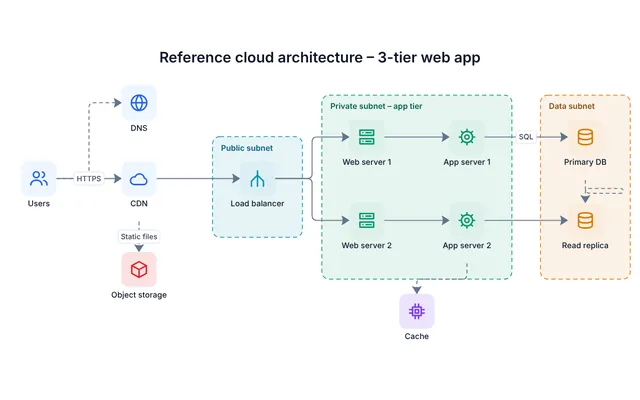
This PPT Slide discusses business software systems, workflows, database management systems, constrained and standard devices for app development, and more. The included front-end and back-end database architecture diagram allows you to present views and ideas on complex concepts like load balancing, web service, and social networking services and how they are interlinked. Download it right away!
[product_image id=520972]
Template 3: Data Architecture Diagram
Do you need help managing your business data and preventing you from making real-time decisions? Try this template! It breaks down data sources like owned, third-party, unorganized, and lost data. It also tackles data management, covering the solutions for analytics such as cloud data lake, cloud data warehouse, segmentation, content algorithms, and more, focusing on quality management, data governance, and scalability. It further discusses tools like insight generation (artificial intelligence), BI, AI, deployment devOps, and self-service reporting under the analytics section. Grab it now!

Template 4: Warehouse Data Storage Architecture Diagram
This PPT shows how a system stores, segregates and analyzes a ton of data load. It depicts how architecture diagrams help handle and compute the data once it is in the data warehouse. The slide goes beyond just boring boxes and classifies different data sources in different sections, outlining the following data warehouse architecture functions:
- Establishes consistency between various data kinds from multiple sources
- Ensures data stability
- Analyzes functional areas
- Ensures data cleansing and transformation

Template 5: Data Warehouse Reference Architecture Diagram
You don’t have to struggle with your data management needs anymore! This PowerPoint Presentation organizes your traditional data warehouse setup and highlights the importance of adopting technology to accommodate new requirements. Its data acquisition layer talks show the data sources gathered from human resources, billing, and products. The data integration layer facilitates data flow from the sources to data repositories like staging. Use its analytics layer to undertake what-if analysis efficiently. Lastly, the presentation layer combines it all using web pages and portlets to show data for different departments like consumers, marketing, and agents. Get it now!

Template 6: Bank Website Data Architecture Diagram
This roadmap takes you behind the scenes of your bank’s website. Sections like users, delivery channels, business processes, data and information, and technology enablers help you sort data for different banking functions. The templates give you a 360-degree view of your banking data and how it is organized and connected. Keep track of the data flow of everyday activities with its ‘users’ section, such as account openings, fund transfers, deposits & withdrawals, account closures, etc. Its ‘data and information’ covers critical elements such as product information, transactions, investments, order details, account maintenance, etc. The ‘technology enablers’ section helps you run things smoothly by showcasing the role of tools like ERP adaptors, payment gateways, real-time transfers, message routing, etc. Grab it now!

Template 7: Corporate Modern Data Environment Architecture Diagram
This PPT Template emphasizes using analytics and BI tools to turn complex data into actionable insights. Its ‘operational applications’ section includes tools like web services, mobile, and customer relationship management, ensuring data is accessible through easy formats like reports, one-pagers, and dashboards. Such a flexible setup makes it a breeze to explain how data flows in a corporate environment and how it is curated, transformed, and used by different users and applications. This template allows businesses to efficiently visualize, organize, mine, and manage the data for better decision-making. Get access to it now!

Template 8: Architecture Diagram including Automated Development Infrastructure
Here is a PPT Template that maps out an entire journey from content creation to coding and deployment. Sections like staging enhance clarity and communication and help synchronize and verify everything from production to development. Use this template to promote collaboration among developers, content creators, and the operations team, allowing them to discuss how their tasks align and work for the benefit of the business. Get access to it now!

Template 9: Architecture Diagram Including Client and Database
This PPT Preset decodes a business system’s structure and explains how clients, web apps, and databases are connected. The template includes essential components like clients, app service web apps, content distribution network channels, data stores, SQL databases, etc. Such a classification helps demonstrate how a client interface interacts with an underlined database management system. This template works best when explaining technical concepts to non-tech staff members. Get access to it now!

Template 10: Architecture Diagram with Constrained Devices and Standard Devices
This PPT Template displays various cloud-based components, their breakdown, and their interactions. It allows the stakeholders to see how different parts interact, enabling them to make decisions regarding resource allocation and system upgrades. Further, it helps understand the overall business processes and technology infrastructure. Use this template to depict different elements of an architecture diagram, such as data ingest, pipelines, storage, analytics, and application & presentation. This helps bridge the communication and information gap between technical and non-technical teams while addressing the potential risks and enhancing communication and efficiency. Grab it now!

Templates that Make Sense!
Did you know that approximately 70% of software projects fail to meet their goals? One of the biggest reasons is incidental architecture, which means no deliberate architecture. A company’s data architecture is like the plumbing and electrical wiring. It is invisible but essential. Thus, you must ensure it doesn’t go faulty after a while.
Our templates are equipped with an efficient database design. This allows you to map out entities and their relationships and help developers foresee potential issues in the design phase. It also helps prevent costly changes or heavy documentation and maintenance.
So, download one of these today to better understand the complexity of your system and maintain data consistency.
Structure and manage your data landscape with the help of our Data Lake Architecture PPT Templates. Click here to learn more!



![Top 10 Templates to Build a Strategic Enterprise Architecture Roadmap [Free PDF Attached]](https://www.slideteam.net/wp/wp-content/uploads/2022/05/1013x441no-button-2.jpg)


