



 0 Comment
 Customer Reviews

Do you ever wonder how car brands like BMW always offer groundbreaking innovations and still remain on their track? The secret sauce behind all this success is a powerful combination of various attributes. For these companies, having clear milestones, collaboration, and project management strategies come in handy while launching a new BMW vehicle or expanding into other segments.
You will be thinking that achieving this kind of success requires a massive budget or unlimited resources. But the story is different. You require a platform that brings transparency, accountability, and progress tracking within your teams, and all this is offered by SlideTeam's Milestone Tracking Templates.
These presentation templates help businesses set milestones, assign responsibilities, and track progress so that you can progress forward.
We have professional presentation layouts for everything, including agile planning, project timelines, and milestone tracking.
Key Features of Milestone Tracking Templates
- Professional Layouts: All these presentation slides are filled with clean and professional designs to improve readability.
- 100% Customizable Elements: You can easily edit text, colors, and visuals all at once according to the business requirements.
- Detailed Project Phases: You can break projects into various phases, including start and finish dates, duration, responsible team members, and status.
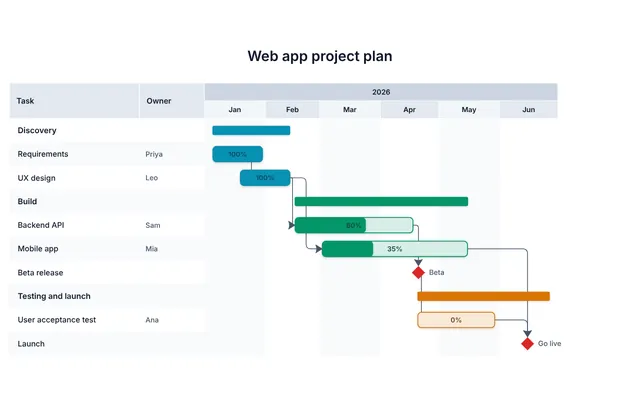
- Proper Progress Tracking: These presentation layouts highlight your data with professional charts, Gantt timelines, and percentage completion trackers.
Key Advantages of Milestone Tracking Templates
- Project Visibility: You can easily communicate project timelines and statuses to stakeholders.
- Increased Productivity: You can feel more push to your productivity by tracking milestones, durations, and progress.
Template 1: Milestone Tracking PowerPoint Deck
Our PowerPoint Deck is a powerful tool to streamline project management activities. This tool will allow your teams to monitor progress across different project phases, such as initiation and completion. Furthermore, this presentation deck can sort project milestone monitoring by breaking down complex projects into manageable stages.
There are also other presentation slides, which belong to various phases, prerequisites, and wrap-ups so that you can communicate tasks, deadlines, and achievements.
As a matter of fact, it will help stakeholders by tracking the goal progress of short-term projects or multi-year operations without any obstacles.
Download this PowerPoint Deck from the link below.
[product_image id=513596]
Template 2: Milestone Tracking with Different Phases PowerPoint Preset
Our PowerPoint Slides help you with project planning and progress visualization. It will help you organize complex projects into clear phases so that you can identify milestones, tasks, and timelines.
Furthermore, you can showcase multiple years in a structured Gantt chart format, and its intuitive layout helps to track phases, tasks, and project progress across various timelines.
Moreover, you can enhance goal progress tracking by helping teams monitor achievements and convey the same to your stakeholders.
As a matter of fact, this presentation slide is a perfect platform to manage several projects all at once. It also sorts timeline milestone management; download it from the link below.

Template 3: Milestone Tracking with Prerequisites PowerPoint Theme
Our PowerPoint Theme is a highly effective visual tool for organizing complex project phases and dependencies. You can highlight critical phases, timelines, and key deliverables across multiple years.
Furthermore, prerequisites are included so that your tasks are completed in sequence. Additionally, this presentation slide sorts task completion milestones, which means your team will always remain on top of every phase.
Moreover, it has an intuitive design, making it easy for you to plan, execute, and deliver on time to your stakeholders. There is a feature to support deliverable tracking, and your teams can quickly identify gaps and milestones.
Download this PowerPoint Template from the link below.

Template 4: Milestone Tracking with Project Initiation and Closure PowerPoint Preset
Our PowerPoint Framework offers a streamlined platform to perform several activities, such as plan, monitor, and complete project phases on a unified platform. With this presentation layout, you can track project progression and see if the deliverables are met or not.
Furthermore, each milestone is marked with clear checkpoints to help teams review progress and maintain focus on the important tasks.
This presentation slide will behave as a milestone achievement log, where you can provide stakeholders with complete clarity on project timelines.
Moreover, it becomes easy to identify progress points, evaluate checkpoints, and align resources.
Download this PowerPoint Preset from the link below.

Click here to learn more about milestone templates from SlideTeam.
Template 5: Tracking of Key Milestones by Firm PowerPoint Preset
Our PowerPoint Layout is a versatile tool that helps you professionally construct project phases and timelines. There is a detailed breakdown of phases, key milestones, and progress percentages so that your teams can track their achievements.
The clear format helps your stakeholders analyze performance, and they can also keep an eye on deliverables and timelines. Therefore, by developing project timeline checkpoints, your teams can monitor progress across multiple years with precision.
Additionally, you can portray key performance milestones with an intuitive design so that everything remains transparent.
Take control of your project milestones and timelines by downloading this PowerPoint Slide from the link below.

Template 6: Monthly Multiphase Project Milestone Tracker PowerPoint Layout
Our PowerPoint Preset slide helps you keep a close watch on project phases for multiple timelines. It provides space to break projects into distinct phases in the form of key milestones and their completion timelines.
As a matter of fact, each phase is displayed with specific durations so that your teams can work towards the deadline tracking system.
There are sections for date ranges and milestones so that you can track tasks and take projects forward. Additionally, the design promotes objective progress tracking to keep your team focused.
Streamline your project tracking by downloading this PowerPoint Template from the link below.

Template 7: Tracking Key Milestones to Ensure Project Progress PowerPoint Preset
Our PowerPoint Framework helps you map key tasks across phases, such as Project Initiation, Planning, Execution, Control, and Closure. You can depict task durations, efforts, and completion dates with a powerful visual representation. Furthermore, your teams can track task dependencies, identify timelines, and maintain focus on deliverables, hence, a step towards project milestone monitoring.
There are various color-coded bars and timeline grids present in this presentation layout so that it becomes easy to measure ongoing and completed tasks. Now, all your stakeholders will remain updated on the progress of the tasks.
Download this PowerPoint Preset from the link below to meet deadlines!

Do you want to apply milestone chart templates to your company? Click here to know more.
Template 8: Comparative Analysis of Agile Milestone Progress Tracking Tools PowerPoint Theme
Our PowerPoint Slide helps you build a comparison of popular project management tools, where you can concentrate on their key attributes. You can show various sections for features, pricing, and ratings.
Furthermore, you can throw light on project tracking, team scheduling, and workflow management, which your audience can understand.
Moreover, you can put the deliverable tracking attribute in the highest category to ensure that milestones are completed on time via these tools.
Undoubtedly, visual clarity on this presentation layout makes it easy to compare performance metrics for managing tasks, issues, and progress.
Choose the best tool for your project needs by making a comparison on this PowerPoint Theme, so download it from the link below.

Template 9: Weekly Time Tracking In Agile Chart Milestone PowerPoint Slide
Our PowerPoint Preset is here for you to track project progress and task completion without any challenges. This presentation slide has a powerful platform to show weekly timelines, tasks, and percentage completion rates.
Your teams can identify task completion milestones and allocate adequate resources to stay on track with others.
Additionally, there is a professional design that highlights ongoing and completed tasks for a quick overview of project status.
Now, you can manage multiple features or track weekly progress with this powerful tool.
Stay on top of your project progress by downloading this PowerPoint Preset from the link below.

Are you looking for a platform to build a robust project milestone plan? Click here to learn more.
Template 10: Agile Environment Milestone Achievement Tracking Plan PowerPoint Preset
Monitor project tasks, responsibilities, and statuses on a single platform, i.e., our PowerPoint Template. There are various columns for tasks, assigned team members, start and finish dates, duration, and current status. Now, your teams can track task completion, identify key milestones, and manage timelines.
Additionally, the inclusion of comments and risk indicators shows the collaboration between agile teams.
Furthermore, your teams can quickly identify bottlenecks and maintain focus on task execution.
Keep your team on track by downloading this PowerPoint Template from the link below.

Achieve More with Our Templates
In conclusion, success is achieved by performing meticulous planning, collaboration, and clear progress tracking, which seems a tiresome job. But SlideTeam’s Milestone Tracking Templates are here to help teams with 100% customizable tools to streamline your tasks and take your projects one step forward.
All of our above-mentioned presentation templates will help you improve project visibility and achieve higher productivity within your working environment.
Furthermore, you can build timelines, agile charts, and progress trackers to remove any obstacles and hit every milestone with confidence.
So, what are you waiting for? Start delivering results to your stakeholders by downloading these PowerPoint Decks and Templates and taking your business to new heights.