

Booking Process Powerpoint Ppt Template Bundles




Try Before you Buy Download Free Sample Product
 Impress Your
 Audience
 100%
100% Editable
 Save Hours
 of Time


Introducing our comprehensive Booking Process PowerPoint PPT presentation, designed to provide a thorough understanding of efficient booking processes for various industries. This informative slide deck covers essential keywords such as Hotel Room Reservation, Airline Reservation, Ticket Booking, Order Placement, and Online Booking System. With visually appealing slides and concise content, our PPT offers a deep dive into the intricacies of streamlined booking processes. Whether youre in the hospitality, travel, or e commerce sector, this resource will enhance your understanding of the steps involved in seamless bookings. From customer inquiries to order placement and confirmation, our PPT provides valuable insights into optimizing the booking experience for both businesses and customers. Enhance your operational efficiency and maximize customer satisfaction with our user friendly Booking Process PPT.
People who downloaded this PowerPoint presentation also viewed the following :
Booking Process Powerpoint Ppt Template Bundles with all 22 slides:
Use our Booking Process Powerpoint Ppt Template Bundles to effectively help you save your valuable time. They are readymade to fit into any presentation structure.
-
Booking Process
-
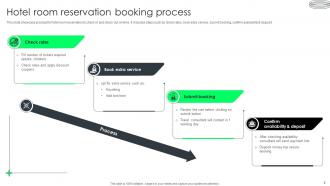
Hotel room reservation booking process
-
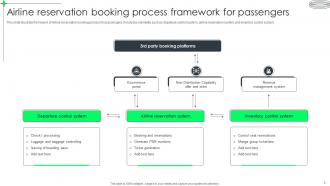
Airline reservation booking process framework for passengers
-

Airline ticket booking process for travelling
-
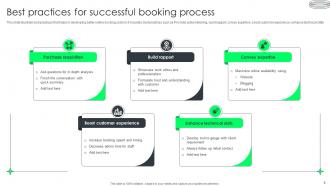
Best practices for successful booking process
-
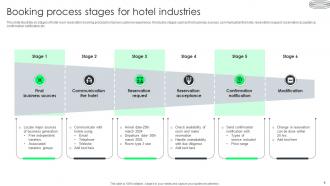
Booking process stages for hotel industries
-
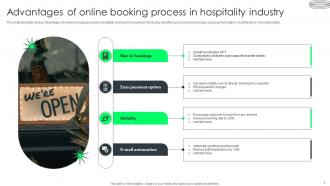
Advantages of online booking process in hospitality industry
-
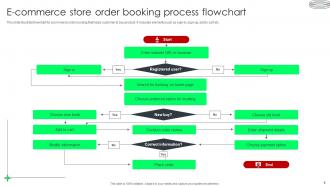
E commerce store order booking process flowchart
-
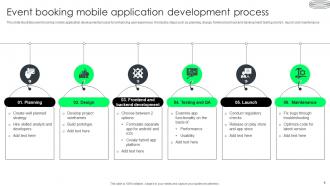
Event booking mobile application development process
-
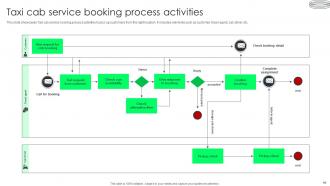
Taxi cab service booking process activities
-
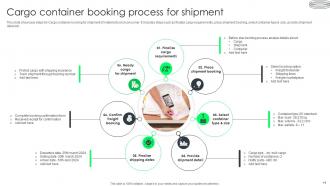
Cargo container booking process for shipment
-
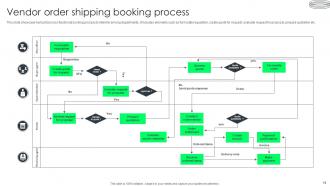
Vendor order shipping booking process
-
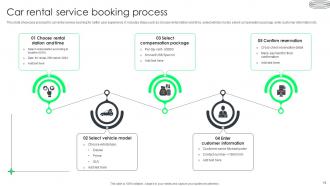
Car rental service booking process
-
Cab service booking process icon
-
Online movie ticket booking process icon
-
Air ticket reservation booking process icon
-
Thanks for watching
-

-

-

-

-

FAQs for Booking Process Powerpoint
Before you buy that template, definitely check if the colors and fonts work with your brand. I learned this the hard way lol. Look at the actual slide layouts too - sometimes they only show fancy cover slides in the preview but the inner slides are trash. Oh and make sure it's the right aspect ratio (16:9 vs 4:3) or you'll hate yourself later. Always scroll through like 5-6 slides deep to see what you're actually getting. The flashy first slide means nothing if slide 4 looks terrible.
Look through the template options when you're booking and find something that actually fits your content. Preview them first - trust me on this one. I always get sucked into scrolling through way too many options but whatever. Make sure it has the slide types you need, like charts or timeline layouts or whatever. Can't find something perfect? Just grab the closest match since you can tweak individual slides anyway. Pick something that won't make you start over from zero. Short sentences work. Don't overthink it too much - you can always fix things later if needed.
Yeah totally! After you pick your template, there's a whole customization panel that pops up. Colors, fonts, layouts - you can tweak pretty much everything to match your vibe. The logo upload thing is clutch, honestly makes it look way more professional. Oh and you can throw in your own background images too which is nice. There's this real-time preview so you don't have to guess what it'll look like. I'd mess around with the preview first - saves you from redoing stuff later if it looks weird.
You should get it pretty much right away - usually 5-10 minutes tops once your payment goes through. They'll email you a download link, plus you can grab it from your account dashboard if you made one. Email can be weird sometimes though. Don't see it after 15 minutes? Check your spam folder first - those things always end up there for some reason. Still nothing? Just message their support team and they'll hook you up. Honestly their customer service is pretty solid from what I've heard.
Yeah definitely! There's a "Preview Templates" button on the booking page - just click through to see all the layouts and color schemes. I'd honestly browse through them first since it's super awkward when you book something and then hate how it looks. Each one shows the actual slide structure you'll get, plus transitions and formatting stuff. Take your time looking through them all (there's quite a few options). Then pick whichever one you like best when you're ready to book. Way better than going in blind!
You can pay with the usual stuff - Visa, Mastercard, Amex, PayPal, or bank transfers. Cards and PayPal are instant so you'll get your templates right away. Bank transfers work but they're kind of annoying since they take 2-3 days to process. No cash, checks, or crypto though - we're not that fancy yet lol. Honestly I'd just use your card or PayPal if you need the templates soon. Way easier than waiting around for a bank transfer to go through.
Yeah, you're covered with a 30-day refund policy if the template sucks. Pretty standard stuff - just contact support with your order info and tell them why it's not working. They'll get your money back in 3-5 business days once they approve it. Honestly, I'd test everything right away instead of waiting around. You don't want to hit that deadline and be stuck with something useless. The whole process is actually painless from what I've heard.
Oh for sure! You'll get editing guides right after booking - they're way simpler than you'd expect. Most people are like "wait, that's it?" when they see how easy swapping text and images actually is. There are video walkthroughs too for the step-by-step stuff. Honestly, the hardest part is usually just picking which color scheme you want lol. But if you get stuck on formatting or whatever, just message support and they'll fix it. I've never met anyone who couldn't figure it out with a little help.
Yeah, so once you buy those templates you can basically do whatever with them for your business. Change colors, throw your logo on there, edit the text - all that stuff is fair game. You can even pull elements from different templates if you want. The main thing is you just can't turn around and sell them to other people or share the original files (which honestly makes total sense). Also can't pretend you designed them from scratch, but who would do that anyway? For actual work stuff though - pitches, meetings, presentations - you're good to go. Just grab them and start tweaking!
They usually drop new templates every 2-3 weeks, but honestly the design team moves faster when everyone's requesting the same thing or there's seasonal stuff happening. You'll get emailed when new ones come out. Plus they stick a "New" badge on them for like a month, which is actually helpful since I always forget to check. Templates show up at the top of your library too. Oh, and if you're missing something specific? Just tell them what you need - they're pretty good about using that feedback to decide what to build next. Way better than just guessing what people want.
Business strategy and quarterly review templates are killing it right now. Startup pitch decks too, obviously. Everyone's going crazy for AI/tech stuff - like every other request is some variation of that theme. Data viz templates are massive since people want their numbers to actually look good (totally get it). Remote work presentations are still big, plus sustainability content and social media marketing templates. Oh, and definitely book the business strategy ones first when you're scheduling. Those fill up super fast because clients always need them yesterday. The other stuff has more flexible timelines usually.
Yeah definitely! They've got monthly and annual subscriptions for unlimited templates. Monthly's good if you just wanna test it out first. But honestly? Go annual if you're gonna use it a lot - it's like 30% cheaper which is pretty solid savings. You can upgrade straight from your dashboard, or there's usually some upgrade banner thing that shows up if you're on the pay-per-template plan. Just click through and pick whatever fits your budget. I always forget how much I actually end up using these things until I'm already deep into a project.
Yeah, so the license is pretty straightforward - you can use them for client work, internal stuff, whatever business thing you need. Customize away, rebrand them, present to clients. No stress there. Just don't try selling the actual templates or redistributing them as your own products, which honestly makes sense. Beyond that you're good to go. I mean, it covers all the normal business uses you'd want anyway. Oh and you can modify them however you need - that part's totally fine.
Yeah totally! Most templates have reviews right on their detail pages. Scroll past the preview pics and you'll hit the "Customer Reviews" section with ratings and comments. Popular ones like the wedding packages are loaded with feedback, but newer templates might only have a handful. Honestly, the reviews are clutch because people get into the nitty-gritty about booking stuff, customization, how their guests reacted. Some get pretty detailed about what worked and what didn't. Worth checking out before you pick one - you'll get the real deal on what actually works.
Just hit the filter dropdown and pick your software - saves you from scrolling through a million templates. We've got PowerPoint, Keynote, Google Slides, and Canva covered. Each one's actually customized for that platform, so like the Keynote version might have cooler animations than PowerPoint (honestly PowerPoint animations are pretty basic anyway). The aspect ratios are different too depending on what you're using. Once you filter it down, you can preview exactly how it'll look before you commit to anything. Way easier than guessing.
-
I took a chance with SlideTeam. I never looked back. Great products and great service.
-
“Superb. What a great finding. Thankful for SlideTeam. We were paying people to make slides which went all in vain. We are so happy to have found you.”