


Business Model Canvas With Customer Painpoints





Try Before you Buy Download Free Sample Product
 Impress Your
 Audience
 100%
100% Editable
 Save Hours
 of Time


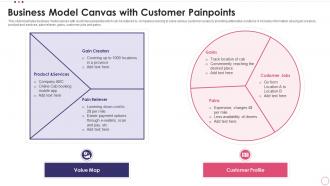
This slide illustrates business model canvas with customer painpoints which can be referred by companies looking to solve various customer issues by providing alternative solutions. It includes information about gain creators, product and services, pain reliever, gains, customer jobs and pains.
People who downloaded this PowerPoint presentation also viewed the following :
Business Model Canvas With Customer Painpoints with all 6 slides:
Use our Business Model Canvas With Customer Painpoints to effectively help you save your valuable time. They are readymade to fit into any presentation structure.





FAQs for Business Model Canvas
So the Business Model Canvas has nine blocks that fit together. Start with your Value Proposition - basically what you're selling and why people care. Customer Segments are who you're targeting, Channels show how you reach them, and Customer Relationships cover how you interact. On the operations side, you've got Key Activities, Resources, and Partnerships. Revenue Streams and Cost Structure handle the money stuff (obviously super important). The cool thing is when you map your value prop first, then work outward - you can see how everything connects. It's honestly pretty satisfying when it all clicks together.
Honestly, treat it like a sketch that never stops changing. Map out your best guesses for all nine blocks first, then test everything through customer interviews and small experiments. I'd focus hard on value prop and customer segments - mess those up and you're basically building a house on quicksand. Update it weekly when you're starting out (I know, sounds like a lot but trust me). Oh and get your team involved so when you pivot, everyone's on the same page. The whole thing's just an organized way to track what you think you know vs. what's actually true.
So first map out what you're doing now with the canvas, then start messing around with different versions. Try new revenue streams or target different customers - you don't have to blow everything up at once. The visual layout is honestly pretty clutch because you'll catch weird dependencies you'd totally miss otherwise. Run some workshops where you question each piece - like what happens if we partner with completely different people? Those "we've always done it this way" moments are innovation killers. Oh and definitely start small when you test stuff out. Way less risky that way.
Dude, you need to get everyone around one big visual map of your business. Print out a Business Model Canvas and stick it on the wall - seriously, this thing works. All those scattered ideas people have? They go right into specific boxes showing how everything connects. Your value prop, revenue streams, partnerships - it's all there in one place. When someone disagrees (and they will), you can literally point to the canvas and work through it together. I used one last month and honestly felt like we solved three months of confusion in two hours. Game changer for getting teams aligned quickly.
Honestly, customer segmentation is where everything starts with the Business Model Canvas. Get super specific here - way more than you think you need to. Who exactly are your different customer groups? Each one's got different needs and spending habits, so this shapes literally everything else you'll do. Your value props, how you reach people, pricing - it all flows from nailing down these segments first. I learned this the hard way actually. Don't try to be everything to everyone. Pick your segments, then let that guide the rest of your decisions.
Oh totally! The Business Model Canvas works great for finding new revenue streams. Start with your current canvas, then get creative with the Revenue Streams box - literally brainstorm every wild way you could make money. But here's what's cool: the other sections give you hints too. Your Value Propositions might show premium opportunities you're missing. Customer Segments could reveal markets you haven't touched. Even your Key Activities - maybe you're doing stuff for free that people would actually pay for? I always tell people to think "what if" scenarios. Some ideas will be terrible, but that's fine.
Track the stuff that actually matters - customer acquisition costs, lifetime value, retention rates. Revenue streams and partnership performance too. Most people get totally obsessed with vanity metrics though, which is pretty useless honestly. What you really want to know is: are people paying for what you think they value? That's the real test. Set up quarterly check-ins to see if your assumptions are still holding up. Don't overthink it - focus on metrics that directly connect to your value props and adjust when reality doesn't match your canvas.
Dude, the biggest mistake is treating it like homework you do once and never touch again. It's supposed to change constantly! People also think it replaces a real business plan - nah, it's more like a brainstorming whiteboard. Don't waste time making yours look Instagram-perfect either. The magic happens when you keep scribbling on it after talking to customers. I've seen too many founders print theirs out and frame it or whatever. Keep it messy, keep updating it based on what you learn. That's literally the whole point.
Honestly, the Business Model Canvas beats traditional business plans by a mile. It's all visual - just one page with nine blocks instead of some massive document that'll sit in a drawer forever. You can sketch out your value prop first, then build around it. Makes way more sense than those linear plans that take ages to write and even longer to change. The canvas shows how everything connects instantly, which is clutch when you're bouncing ideas around or testing stuff out. I mean, who has time for 50-page documents anyway? This approach actually gets used.
Miro's probably your best bet to start - free and super easy to pick up. For team stuff, Mural and Figma are solid too since everyone can jump in and edit at once. Honestly been loving Conceptboard lately, their sticky notes just hit different. If you need it to look fancy for a presentation, Canva's great for that polished look. Adobe Creative Suite works too but might be overkill? Oh, and if you're feeling ambitious later, PowerBI or Tableau can add actual data visualizations right onto your canvas sections. But yeah, just start with Miro - you'll have something decent looking in like 10 minutes.
Honestly, don't get married to your first canvas - I learned that the hard way! Your Business Model Canvas should change as you get feedback from customers. Pick the sections that aren't working. Maybe your value prop is off or revenue streams need tweaking. Test small changes first before going all-in. We used to do monthly reviews with the team instead of just panicking every time someone gave us feedback. The companies that pivot fast usually win. Run quick experiments, see what works, then update those blocks. It's way better than being stubborn about your original idea.
Look, the canvas totally falls apart when you're dealing with messy stuff like healthcare systems or companies juggling multiple business models at once. Those nine boxes? Pretty limiting for complex situations. Multi-sided platforms are a nightmare to map out, and don't even get me started on heavily regulated industries. When your revenue streams depend on each other or you've got customer segments that want completely different things, it gets chaotic real quick. I'd honestly just break it into separate canvases for each part. Or use it as your starting point, then pile on other frameworks to handle the complexity.
So basically just swap a few terms and you're golden. Instead of "revenue streams" think funding - grants, donations, those fancy gala dinners. Your "customers" become beneficiaries since they're not the ones cutting checks. The value prop? That's your mission impact now, not just fixing problems. For partnerships, you're looking at other nonprofits, maybe government agencies, corporate sponsors - way different crowd than typical business stuff. Oh and definitely map out your current funding first. I always forget that step but it shows you exactly where the gaps are. The whole canvas framework actually translates pretty smoothly once you make those switches!
Get them involved right away - don't just show up with a finished canvas. Set up workshops where everyone's moving sticky notes around and actually arguing about the assumptions. Way more fun that way. Back everything up with real customer quotes and actual data, because people zone out fast when you're just theorizing. I always throw in "what if" scenarios too, like what happens when that key partnership implodes? Makes it feel less academic. Oh, and treat it like it's their document that changes based on what they say. Nobody wants to just nod politely at your "brilliant" work.
Make each of the nine blocks a different color - it sounds basic but seriously helps. Bigger fonts for your main value props, and throw in some icons for customer segments if you can. Don't cram everything together though, white space actually makes it readable. I'd group related stuff visually and maybe add arrows between blocks that connect. The whole point is making it scannable at a glance instead of this dense wall of text. Oh, and if you're presenting in person, print that thing huge. For virtual meetings, use something where you can zoom into sections.
-
Innovative and attractive designs.
-
Innovative and Colorful designs.