


Business Model Of Johnson And Johnson Powerpoint Ppt Template Bundles BMC





Try Before you Buy Download Free Sample Product
 Impress Your
 Audience
 100%
100% Editable
 Save Hours
 of Time


Our Business Model Of Johnson And Johnson Powerpoint Ppt Template Bundles BMC are topically designed to provide an attractive backdrop to any subject. Use them to look like a presentation pro.
People who downloaded this PowerPoint presentation also viewed the following :
Business Model Of Johnson And Johnson Powerpoint Ppt Template Bundles BMC with all 32 slides:
Use our Business Model Of Johnson And Johnson Powerpoint Ppt Template Bundles BMC to effectively help you save your valuable time. They are readymade to fit into any presentation structure.

















FAQs for Business Model Of Johnson And Johnson Powerpoint Ppt
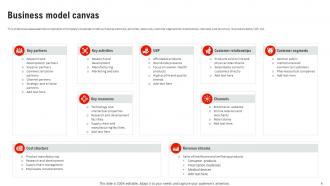
So the Business Model Canvas breaks down into 9 boxes that show how your business actually works. Value Propositions sit in the middle - basically what problem you're solving. Customer Segments, Channels, and Customer Relationships are all about who you're targeting and how you reach them. Then you've got the operational stuff: Key Partners, Activities, and Resources (this part honestly gets messy because everything connects to everything). Revenue Streams and Cost Structure handle the money flow. The cool thing? Change one box and it affects others. Add new customers, you'll probably need different channels. Just start filling out what you already know and see where the holes are.
Honestly, the Business Model Canvas is perfect for this - it's just one page that maps out nine key areas like your customers, value prop, channels, all that stuff. Way better than writing some 50-page business plan that'll just collect dust. Here's what I'd do: fill one out showing where you are right now, then make another for where you want to be in maybe 12-18 months. The differences between them? Those become your priorities. Update it every quarter and bring it to team meetings. Keeps everyone on the same page about what actually moves the needle. Trust me, it's a game-changer for staying focused.
Honestly, the Business Model Canvas is so much better than those brutal 50-page business plans nobody actually reads. You just map everything on one page with sticky notes - way more visual and you can actually collaborate with people. Nine key building blocks instead of getting buried in endless financial projections. Those traditional plans feel like they're carved in stone once you write them, but the canvas lets you iterate fast and test your assumptions. I mean, those massive Word docs are honestly soul-crushing. Just sketch your business on a canvas first - you'll catch gaps and see connections way faster than grinding through some template.
Okay so the Business Model Canvas is like your startup's entire story but on just one page - investors actually love this because they can get it fast. Instead of boring them with some massive 50-slide deck, you're showing exactly how you'll make money, who's buying from you, what resources you need, all that good stuff. Honestly, the visual format is clutch because you'll catch problems before investors do. Then you can fix them ahead of time. My take? Start with the canvas first, then build your pitch deck around it. Way more effective for investor convos.
Customer feedback is your reality check for the Business Model Canvas - shows you what's actually working vs what you thought would work. Teams fall in love with their original canvas all the time (guilty as charged). Big mistake though. You'll want to constantly update based on what customers say about your value props and pain points. Map their insights directly to different canvas sections. The feedback helps you pivot specific parts without trashing everything. Oh, and schedule regular reviews to actually incorporate the changes - otherwise you're just collecting feedback for no reason. It's basically how you avoid building something nobody wants.
Yeah totally! The Business Model Canvas works great for nonprofits, just swap out a few sections. Instead of revenue streams, map your funding - grants, donations, that kind of stuff. Your "customers" become both the people you help AND your donors, which is actually pretty smart. The value proposition shifts from profit to social impact goals. I'd just grab the regular canvas template and tweak the wording to fit what you're doing. Makes it way easier to see how everything connects - my friend Sarah used it for her food bank and loved how clear it made everything.
So basically, you'll want to rethink each section of your Business Model Canvas through a green lens. Your value props should scream eco-friendly benefits. Partner with suppliers who actually care about the environment - not just the ones saying they do. Revenue streams? Think circular economy stuff. The partnerships section is honestly where it gets fun because you're mapping out your whole sustainability network. Don't forget you'll probably have new costs too - renewable energy, sustainable materials, that kind of thing. Oh, and you might make money from waste reduction or carbon credits. Just start with one section and see how sustainability could flip it on its head.
Honestly, I'd go with Miro or Mural - both have BMC templates already built in and your team can jump in and edit together. Real lifesaver for remote work. Canva's solid too if you need something that looks super clean for presenting to clients, but it's not as collaborative. PowerPoint works in a pinch (I've definitely been there), though moving virtual sticky notes around gets annoying fast. Google Slides is similar. But seriously, if you can do it in person with a giant printed poster and actual sticky notes? That's still the gold standard. Try Miro's free version first - see if your team actually uses the collaboration stuff before paying for it.
Honestly, Miro and Mural are total lifesavers for this stuff. Everyone can jump on the same canvas at once and you'll see cursors flying around as people drop sticky notes everywhere - it's weirdly satisfying to watch. Set up actual workshop sessions with cameras on, not just some boring screen share situation. Give different people ownership of specific blocks so nobody's just sitting there zoned out. Oh and definitely have someone facilitate or it turns into chaos real quick. The whole point is getting everyone involved instead of watching one person do all the work while you pretend to pay attention.
Honestly, the biggest mistake is treating it like homework you do once and forget about. Most teams fill it out, feel accomplished, then it just sits there collecting dust. That's totally missing the point! Also don't be super vague with your descriptions - actually talk to real customers instead of just guessing what they want. Oh, and here's something I see a lot: people try to jam their existing business into the canvas instead of using it to explore new ideas. Set up monthly review sessions with your team and test those assumptions early. Trust me, you don't want to fall in love with an idea that customers hate.
Honestly, the Business Model Canvas is a game-changer for testing new ideas without blowing up what's already working. Map out different customer segments on separate canvases. Try new revenue streams. See what partnerships might make sense. Way better than writing some massive strategy doc that'll just collect dust anyway. The visual layout makes it super obvious where you've got gaps or missed opportunities. Plus you can prototype changes fast and get everyone on board before spending real money. Oh, and definitely run a workshop with your team - those sessions always surface stuff you hadn't thought of.
Honestly, make your canvas readable first - bigger fonts, good colors. Can't tell you how many times I've squinted at tiny text from the back of a room. Highlight your best 2-3 blocks, especially value prop and revenue. Sticky notes work great for visual appeal. Don't dump everything on screen at once though - walk through it piece by piece so people actually follow your logic. Oh, and definitely practice beforehand! You'll sound way more confident when you're not just reading off the canvas word for word.
Map out your current Business Model Canvas first. Then go crazy with "what if" scenarios on each section - different customers, new channels, tweaked value props. The partnerships and revenue blocks are where I always find the best stuff honestly. One trick that works really well: run workshops where you make like 3-4 totally different canvas versions. Forces your brain out of its usual patterns. I've watched teams stumble onto whole new markets just by shifting their value prop slightly to the left or right.
Honestly, just pick metrics that match your business model blocks. Customer acquisition cost for your segments, conversion rates for value props - that kind of stuff. Don't overthink it though! Start with maybe 3-5 key ones that test your biggest assumptions. Monthly recurring revenue is gold if you have subscriptions, plus churn rate and cost per acquisition. Those three alone will tell you if you're actually onto something or just burning cash. The whole point is using real data instead of just hoping things work out, you know?
Dude, the Business Model Canvas is honestly genius for getting teams aligned. Picture this: one visual framework showing all nine pieces of your business on a single page. Marketing finally sees how their campaigns connect to revenue streams. Product gets why their features matter for the value prop. Sales understands the bigger picture beyond just closing deals. I swear, departments usually operate like they're in different companies or something. But when you stick that canvas on the conference room wall during meetings? Magic happens. People start connecting dots they never saw before. It's basically a shared roadmap so everyone stops wandering around confused about how their work fits together.
-
Extremely professional slides with attractive designs. I especially appreciate how easily they can be modified and come in different colors, shapes, and sizes!
-
I am not the best at presentations but using SlideTeam’s PPT template made it easier for me. Thank you SlideTeam!